
1. Uvod
This manual provides detailed instructions for the installation, operation, and maintenance of your ESLYYDS Double Din Car Stereo. This advanced multimedia system offers a wide range of features including Apple CarPlay, Android Auto, Bluetooth connectivity, a high-definition touchscreen, and support for a backup camera, enhancing your in-car entertainment and navigation experience.

Figure 1.1: ESLYYDS Double Din Car Stereo Overview
2. Vsebina paketa
Prosimo, preverite, ali so v vašem paketu priloženi vsi spodaj navedeni artikli:
- ESLYYDS Double Din Car Stereo Unit
- Komplet montažnih nosilcev
- Camera Wire A
- Camera Wire B
- Steering Wheel Control Unit
- Žični snop A
- Žični snop B
- Zadaj-view Kamera
- Daljinski upravljalnik
- Uporabniški priročnik (ta dokument)

Figure 2.1: Stereo Dimensions and Included Accessories
3. Značilnosti izdelka
The ESLYYDS Double Din Car Stereo is equipped with a variety of features designed for convenience and enhanced driving experience:
- Združljivost z Apple CarPlay in Android Auto: Seamlessly integrate your smartphone for navigation, music, calls, and messages using voice control.
- 7-inch HD Capacitive Touch Screen: A responsive and accurate display supporting 1080P video playback.
- Bluetooth 5.2: For stable and clear hands-free calling and audio streaming.
- Zrcalna povezava telefona: Display your smartphone's screen directly on the stereo.
- Dvojni USB vmesnik: One port for media playback and another with 2.1A fast charging capability.
- Zadaj View Vnos kamere: Supports the included 12 HD LED light, night vision, 170° viewing angle waterproof backup camera for safer reversing.
- Upravljanje na volanu (SWC): Compatible with existing steering wheel controls for convenient operation.
- AM/FM Audio Receiver: Access to radio stations with user-friendly digital control.
- AUX IN Connectivity: Za zunanje avdio naprave.
- 7 Color LED Buttons: Customizable button illumination.
3.1 Apple CarPlay in Android Auto
Connect your smartphone via USB to access navigation, phone contacts, email, notifications, and music directly on the stereo display. This feature utilizes voice control technology for safe operation while driving.
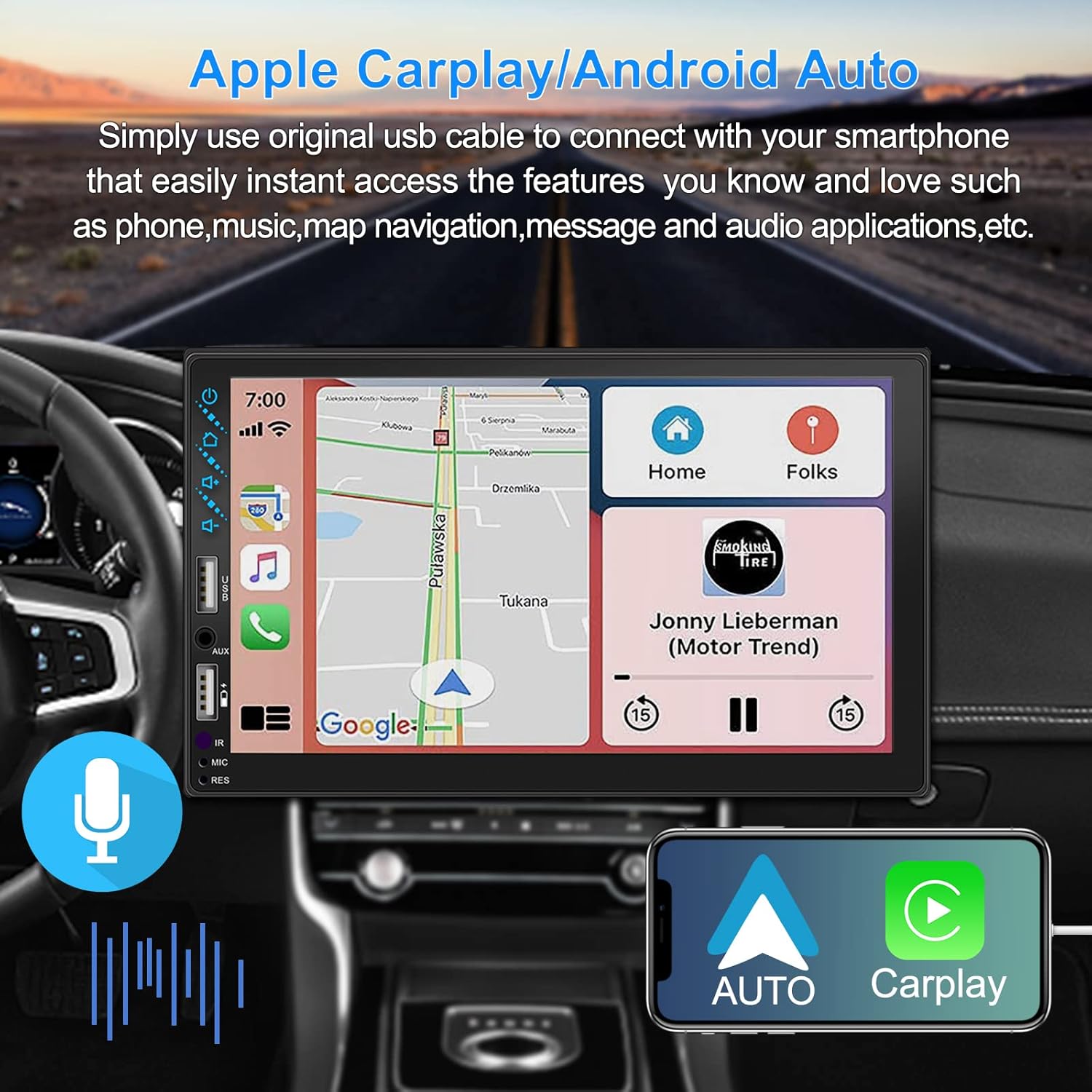
Figure 3.1: Apple CarPlay and Android Auto Interface
3.2 Glasovni nadzor
Utilize voice commands to control various functions such as making calls, playing music, and navigating, allowing you to keep your hands on the wheel and eyes on the road.

Slika 3.2: Funkcionalnost glasovnega upravljanja
3.3 Zrcalna povezava telefona
The Mirror Link function allows you to display your smartphone's screen directly onto the stereo's touchscreen. This supports Android devices (version 10.1 and below) and iPhone devices (version 14.5 and below, including iPhone 12, 11, XR, and 8 series and below) with resolutions up to 1920x1080 pixels.
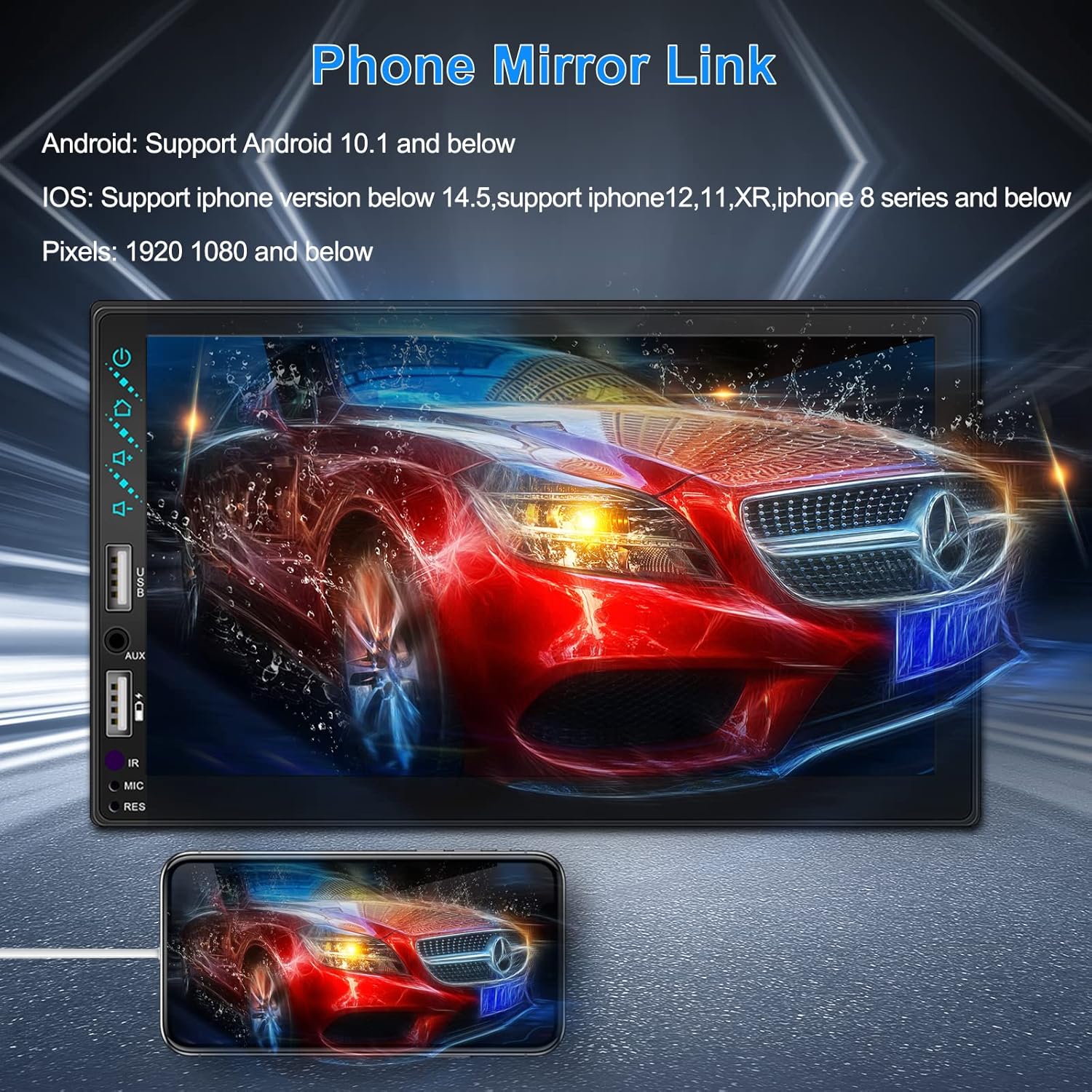
Figure 3.3: Phone Mirror Link
3.4 zadaj View Kamera
The included waterproof backup camera features 12 HD LED lights for night vision and a 170° viewing angle. When you shift into reverse, the system automatically displays the camera feed on the screen, providing optimal visibility in various weather conditions.
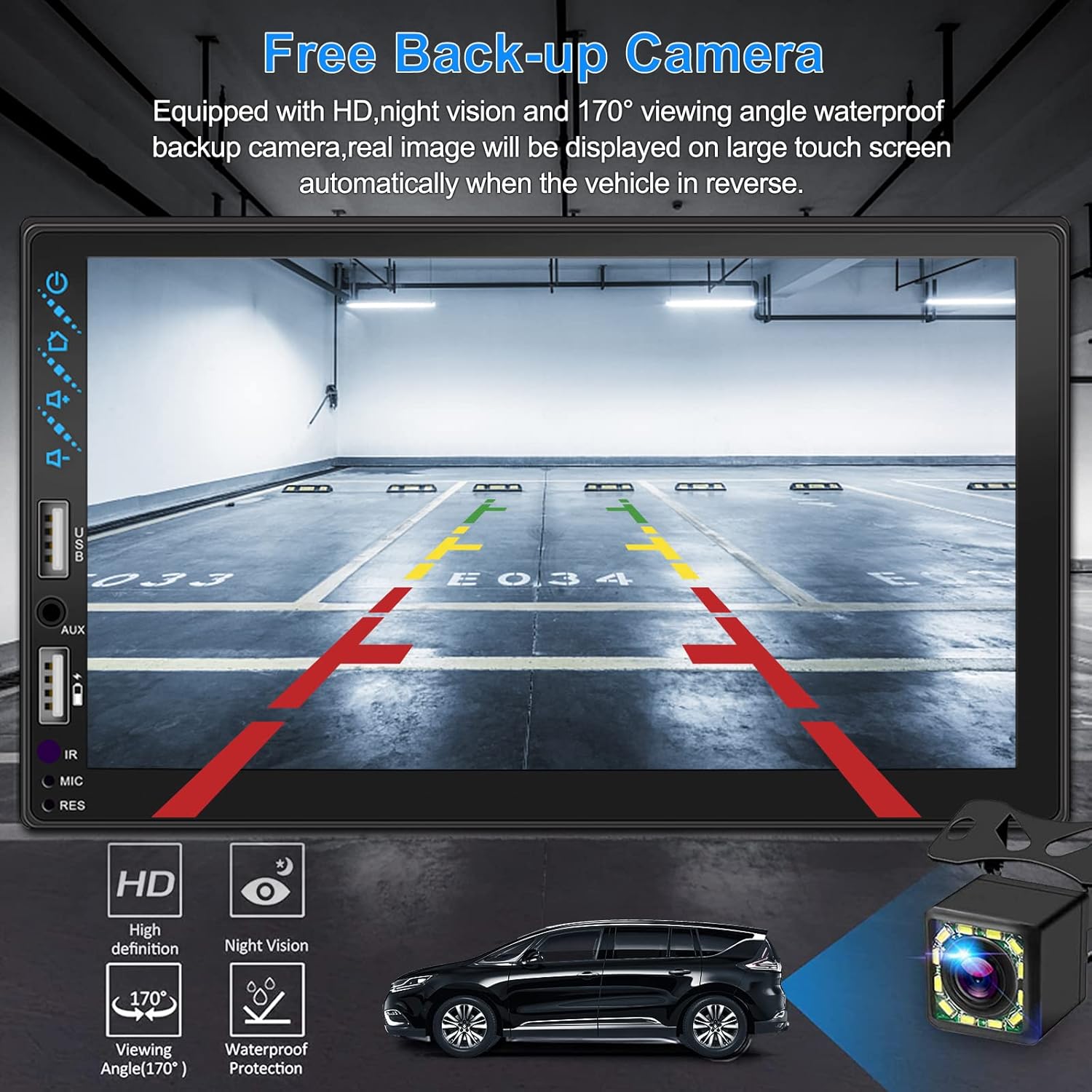
Slika 3.4: Zadaj View Zaslon kamere
4. Vodič za namestitev
Proper installation is crucial for optimal performance. It is recommended to have the unit installed by a professional if you are unfamiliar with car audio wiring.
4.1 Mere
The stereo unit has a standard double din size. Refer to Figure 2.1 for detailed dimensions.
- Širina: 178 mm (7 palca)
- Višina: 102 mm (4 palcev)
- Globina: 60 mm (2.6 palcev)
4.2 Shema ožičenja
Carefully follow the wiring diagram below to connect the stereo to your vehicle's electrical system. Ensure all connections are secure to prevent malfunctions.
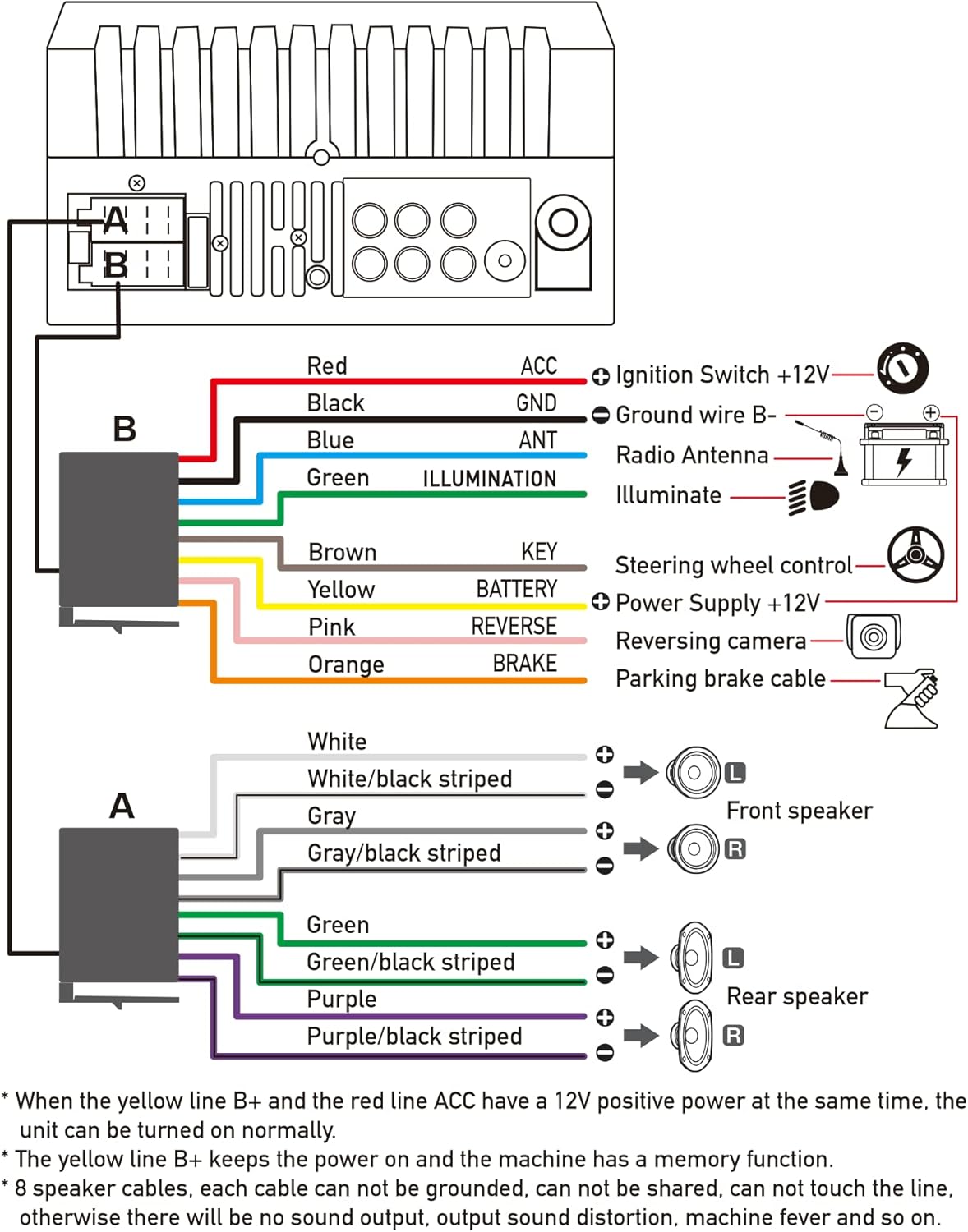
Slika 4.1: Diagram glavne ožičenja
- Rdeča (ACC): Connect to Ignition Switch +12V.
- Črna (GND): Connect to Ground wire B-.
- Modra (ANT): Connect to Radio Antenna (if applicable).
- Zelena (OSVETLITEV): Connect to Illuminate wire.
- Rjava (KLJUČ): Connect to Steering wheel control.
- Rumena (BATERIJA): Connect to Power Supply +12V.
- Roza (HRBTNA STRAN): Connect to Reversing camera input.
- Oranžna (ZAVORA): Connect to Parking brake cable.
Speaker Connections (8 speakers supported):
- White / White/black striped: Sprednji levi zvočnik
- Gray / Gray/black striped: Sprednji desni zvočnik
- Green / Green/black striped: Zadnji levi zvočnik
- Purple / Purple/black striped: Zadnji desni zvočnik
Pomembne opombe:
- The unit requires both the Yellow (BATTERY) and Red (ACC) wires to have a 12V positive power supply simultaneously for normal operation.
- The Yellow (BATTERY) wire keeps the power on and maintains memory functions.
- For speaker connections, each cable must not be grounded or shared with other cables. Incorrect wiring can lead to no sound output, sound distortion, or damage to the machine.
5. Navodila za uporabo
5.1 Osnovne operacije
- Vklop/izklop: Pritisnite gumb za vklop na sprednji plošči ali daljinskem upravljalniku.
- Nadzor glasnosti: Use the volume buttons on the front panel, steering wheel controls, or remote control.
- Izbira vira: Tap the 'Source' or 'Mode' icon on the touchscreen to switch between Radio, Bluetooth, USB, AUX, CarPlay, and Android Auto.
5.2 Apple CarPlay / Android Auto Usage
- Connect your compatible iPhone or Android smartphone to the stereo's USB port using a certified USB cable.
- The stereo will automatically detect the connection and prompt you to launch CarPlay or Android Auto.
- Za dokončanje nastavitve sledite navodilom na zaslonu.
- Once connected, you can access supported apps like Maps, Phone, Messages, and Music directly from the stereo's touchscreen or via voice commands.
5.3 Bluetooth seznanjanje
- Vklopite Bluetooth na pametnem telefonu.
- On the stereo, navigate to the Bluetooth menu.
- Iskanje available devices on your smartphone. The stereo's Bluetooth name will typically be 'ESLYYDS' or similar.
- Select the stereo from your smartphone's list and confirm the pairing code if prompted.
- Ko sta seznanjena, lahko brezžično kličete/sprejemate klice in pretakate zvok.
5.4 Phone Mirror Link Usage
- Connect your smartphone to the stereo's USB port.
- Select the 'Mirror Link' option on the stereo's screen.
- Follow the specific instructions displayed on the stereo for your phone's operating system (Android or iOS) to enable screen mirroring. This may involve enabling USB debugging for Android or trusting the device for iOS.
5.5 Radijsko delovanje
- Izberite vir »Radio«.
- Use the 'Scan' function to automatically search and save stations, or manually tune using the frequency controls.
- Shranite svoje najljubše postaje na prednastavljene gumbe za hiter dostop.
5.6 Predvajanje prek USB-ja
- Insert a USB drive containing audio or video files into the designated USB playback port.
- The stereo will automatically switch to USB mode or prompt you to select it.
- Browse and play your media files using the touchscreen controls.
6. Vzdrževanje
Za zagotovitev dolge življenjske dobe in optimalnega delovanja vašega avtomobilskega stereo sistema upoštevajte ta navodila za vzdrževanje:
- Čiščenje: Use a soft, dry cloth to clean the screen and exterior. For stubborn smudges on the screen, use a screen cleaner specifically designed for electronic displays. Avoid abrasive cleaners or solvents.
- Temperatura: Izogibajte se dolgotrajnemu izpostavljanju enote ekstremnim temperaturam, tako vročim kot mrzlim.
- Vlaga: Napravo hranite suho. Ne izpostavljajte je vodi ali prekomerni vlagi.
- Posodobitve vdelane programske opreme: Preverite pri proizvajalcu webobčasno preverite morebitne posodobitve vdelane programske opreme za izboljšanje delovanja in dodajanje novih funkcij.
7. Odpravljanje težav
If you encounter issues with your ESLYYDS car stereo, please refer to the following common problems and solutions. If the problem persists, contact customer support.
| Težava | Možen vzrok | rešitev |
|---|---|---|
| Brez moči | Nepravilno ožičenje; Pregorela varovalka; Težava z akumulatorjem vozila. | Check power (Yellow and Red) and ground (Black) wire connections. Inspect vehicle fuses. Ensure vehicle battery is charged. |
| Brez zvoka | Žice zvočnikov so nepravilno priključene; Glasnost je prenizka; Funkcija za utišanje zvoka je aktivna. | Verify all speaker wire connections (ensure no shorts or grounds). Increase volume. Check if mute is enabled. |
| Bluetooth se ne povezuje | Bluetooth not enabled on phone/stereo; Incorrect pairing process. | Ensure Bluetooth is active on both devices. Delete previous pairings and re-attempt pairing process. |
| CarPlay/Android Auto se ne zažene | Faulty USB cable; Phone not compatible; Software issue. | Use a high-quality, certified USB cable. Ensure your phone's OS version is compatible. Restart both phone and stereo. |
| Zadnja kamera ne prikazuje slike | Camera wire disconnected; Reverse trigger wire not connected. | Check the camera's video input and power connections. Ensure the Pink (REVERSE) wire is correctly connected to the vehicle's reverse light trigger. |
| USB not reading media | Nepodprto file format; Corrupted USB drive; USB port issue. | Zagotovite medije files are in supported formats (e.g., MP3, MP4, MKV). Try a different USB drive. |
8. Specifikacije
| Funkcija | Specifikacija |
|---|---|
| Dimenzije izdelka | 7 x 2.6 x 3.94 palcev |
| Teža predmeta | 2.33 funtov |
| Številka modela | L3 |
| Velikost zaslona | 7 palcev (18 cm) |
| Vrsta zaslona | HD Capacitive Touchscreen |
| Tehnologija povezljivosti | Carplay, Android Auto, Mirror-Link, Bluetooth 5.2, USB, AUX |
| Vrsta krmilnika | Google Assistant, iOS, Android |
| Posebne lastnosti | Touchscreen, RDS, Steering Wheel Control (SWC), Fast Charging USB (2.1A) |
| Združljive naprave | Pametni telefon |
| Vrsta priključka | USB |
| Način avdio izhoda | Surround |
| Konfiguracija kanala za prostorski zvok | 5.1 |
| Podpora za kodiranje videa | MKV |
| barva | Črna |
| Prvič na voljo | 25. september 2021 |
9. Garancija in podpora
ESLYYDS is committed to providing excellent customer service and technical support. For any inquiries or assistance, please contact our professional technical team.
- Garancija vračila denarja: 30-day period from purchase.
- Garancija za zamenjavo: 12-month period for product replacement.
- Tehnična podpora: Life-time technical support is provided.
Please refer to your purchase documentation for specific contact details or visit the official ESLYYDS webspletno mesto za informacije o podpori.