
HTC HTC TWS3
Uporabniški priročnik za brezžične slušalke HTC True Wireless Earbuds 2
Model: HTC TWS3
Uvod
The HTC True Wireless Earbuds 2 offer a seamless audio experience with advanced features designed for comfort and convenience. These earbuds utilize the latest Bluetooth 5.1 technology for instant pairing and stable connections across various devices. Enjoy extended listening times, intuitive touch controls, and a comfortable, ergonomic fit for all-day use.

Image: HTC True Wireless Earbuds 2 in their pink charging case, showcasing kompaktna zasnova.

Image: A display of HTC True Wireless Earbuds 2 in three available colors: white, black, and pink.
Video: Uradnik nadview of the HTC True Wireless Bluetooth Earbuds, highlighting key features and design.
Kaj je v škatli
Your HTC True Wireless Earbuds 2 package includes the following items:
- HTC True Wireless Earbuds 2 (Left and Right)
- Polnilni kabel USB-C
- Rubber Eartips (Two pairs: Large and Small sizes, in addition to the pre-installed medium size)
- etui za polnjenje
Video: An unboxing video for the HTC True Wireless Earbuds 2, showing the contents of the package.
Nastavitev
1. Polnjenje slušalk in etuija
Before first use, ensure both the earbuds and the charging case are fully charged. Connect the provided USB-C cable to the charging port on the case and plug the other end into a compatible USB power source. The indicator light on the case will show charging status. A full charge provides up to 8 hours of listening time for the earbuds and up to 32 hours total with the charging case.

Image: Pink HTC True Wireless Earbuds 2 and their charging case, illustrating the 30-hour combined battery life.
2. Seznanjanje z vašo napravo
- Odprite polnilno ohišje. Slušalke bodo samodejno prešle v način seznanjanja.
- V napravi (pametnem telefonu, tablici, prenosniku) pojdite v nastavitve Bluetooth.
- Select "HTC True Wireless Earbuds 2" from the list of available devices.
- Ko je povezava vzpostavljena, boste zaslišali zvočni poziv in indikatorska lučka na slušalkah se bo spremenila.
The earbuds utilize Bluetooth 5.1 for quick and stable connections. They are compatible with iOS, Android, and Windows devices.

Image: A diagram illustrating the quick pairing process and wide compatibility of the HTC True Wireless Earbuds 2 with various devices.
3. Achieving Optimal Comfort
The earbuds are ergonomically crafted for a secure and comfortable in-ear fit. Experiment with the included rubber eartips (small, medium, large) to find the size that provides the best seal and comfort for your ears. A proper fit enhances sound quality and noise isolation.

Image: A woman wearing pink HTC True Wireless Earbuds 2 while working on a laptop, emphasizing the ultra-lightweight comfort and ergonomic design.
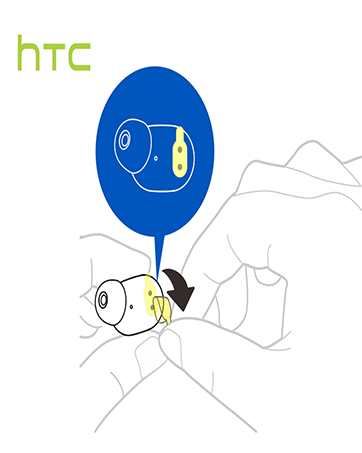
Image: A diagram illustrating the correct method for inserting an earbud to ensure a secure and comfortable fit.
Navodila za uporabo
Dotaknite se kontrolnikov
The HTC True Wireless Earbuds 2 feature intuitive touch controls on each earbud for easy management of your audio and calls:
- Predvajanje/pavza: Tap left/right earbud once.
- Sprejmi klic: Tap left earbud once.
- Prekinitev klica: Tap right earbud once.
- Zavrni klic: Tap and hold left/right earbud for 2 seconds.
- Prejšnja skladba: Tap and hold left earbud for 2 seconds.
- Naslednja skladba: Tap and hold right earbud for 2 seconds.
- Povečaj glasnost: Tap left earbud twice.
- Znižaj glasnost: Tap right earbud twice.
- Aktiviranje glasovnega pomočnika: Tap left/right earbud three times.

Image: A visual guide detailing the simple touch controls for the pink HTC True Wireless Earbuds 2.

Image: A visual guide detailing the simple touch controls for the black HTC True Wireless Earbuds 2.
Uporaba ene ušesne slušalke
You can use either earbud independently for mono audio or calls. Simply take one earbud out of the case, and it will automatically connect to your device. This feature allows for versatility depending on your listening needs.

Image: Two smartphones connected to individual pink HTC True Wireless Earbuds 2, showcasing the versatility of using one or both earbuds.

Image: A diagram illustrating the versatility of using one or both black HTC True Wireless Earbuds 2 with different devices.
Vzdrževanje
Čiščenje in nega
- Slušalke in polnilno ohišje redno čistite z mehko, suho krpo.
- Odstranite ušesne nastavke in jih po potrebi očistite z blagim milom in vodo, pri čemer se pred ponovno namestitvijo prepričajte, da so popolnoma suhi.
- Izogibajte se uporabi abrazivnih materialov ali močnih kemikalij.
Vodoodpornost
The HTC True Wireless Earbuds 2 are IPX5 waterproof, meaning they are protected against low-pressure water jets from any direction. This makes them suitable for workouts and light rain. However, they are not designed for submersion in water.
Odpravljanje težav
Če imate kakršne koli težave z brezžičnimi slušalkami HTC True Wireless Earbuds 2, si oglejte naslednje pogoste rešitve:
| Težava | rešitev |
|---|---|
| Slušalke se ne seznanijo | Ensure earbuds are charged. Place them back in the case, close, then reopen to re-enter pairing mode. Check your device's Bluetooth settings and forget/remove previous connections if necessary. |
| Brez zvoka iz ene slušalke | Prepričajte se, da sta obe slušalki napolnjeni. Poskusite obe vstaviti nazaj v etui in ju nato ponovno vzeti ven. Ponovno ju seznanite z napravo. |
| Kontrole na dotik se ne odzivajo | Ensure earbuds are clean and dry. Restart your device and re-pair the earbuds. |
| Slaba kakovost zvoka | Adjust the eartips for a better seal. Ensure your device is within the 10m Bluetooth range. Check for interference from other wireless devices. |
Specifikacije
| Funkcija | Podrobnost |
|---|---|
| Ime modela | HTC True Wireless Earbuds 2 |
| Številka modela artikla | HTC TWS3 |
| Tehnologija povezljivosti | Brezžično (Bluetooth 5.1) |
| Življenjska doba baterije (slušalke) | Do 8 ur z enim polnjenjem |
| Življenjska doba baterije (s polnilnim ohišjem) | Do 32 ur |
| Zmogljivost baterije polnilnega ohišja | 500 mAh |
| Stopnja vodoodpornosti | IPX5 (odporen na vodo) |
| Vrsta nadzora | Touch Control (Volume, Play/Pause, Call Management, Voice Assistant) |
| Namestitev ušesa | V ušesu |
| Frekvenčno območje | 20-20,000 Hz |
| Teža predmeta | 2.82 unč |
| Dimenzije izdelka | 1.71 x 1.71 x 1.36 palcev |
Garancija in podpora
HTC provides a 12-month warranty for the True Wireless Earbuds 2. For any support inquiries or warranty claims, please contact HTC customer service through their official webspletno mesto ali prodajalec, kjer je bil izdelek kupljen.
Za več informacij obiščite uradno Trgovina HTC na Amazonu.
Ask a question about this manual
Ask about setup, troubleshooting, compatibility, parts, safety, or missing instructions. Manuals+ will review the question and use this page’s manual context to help answer it.