
Earbay headset
Earbay Headset Instruction Manual
Model: headset
1. Uvod
Thank you for choosing the Earbay Headset. This manual provides essential information for the proper setup, operation, and maintenance of your new headset. Please read it thoroughly before use to ensure optimal performance and longevity of the product.
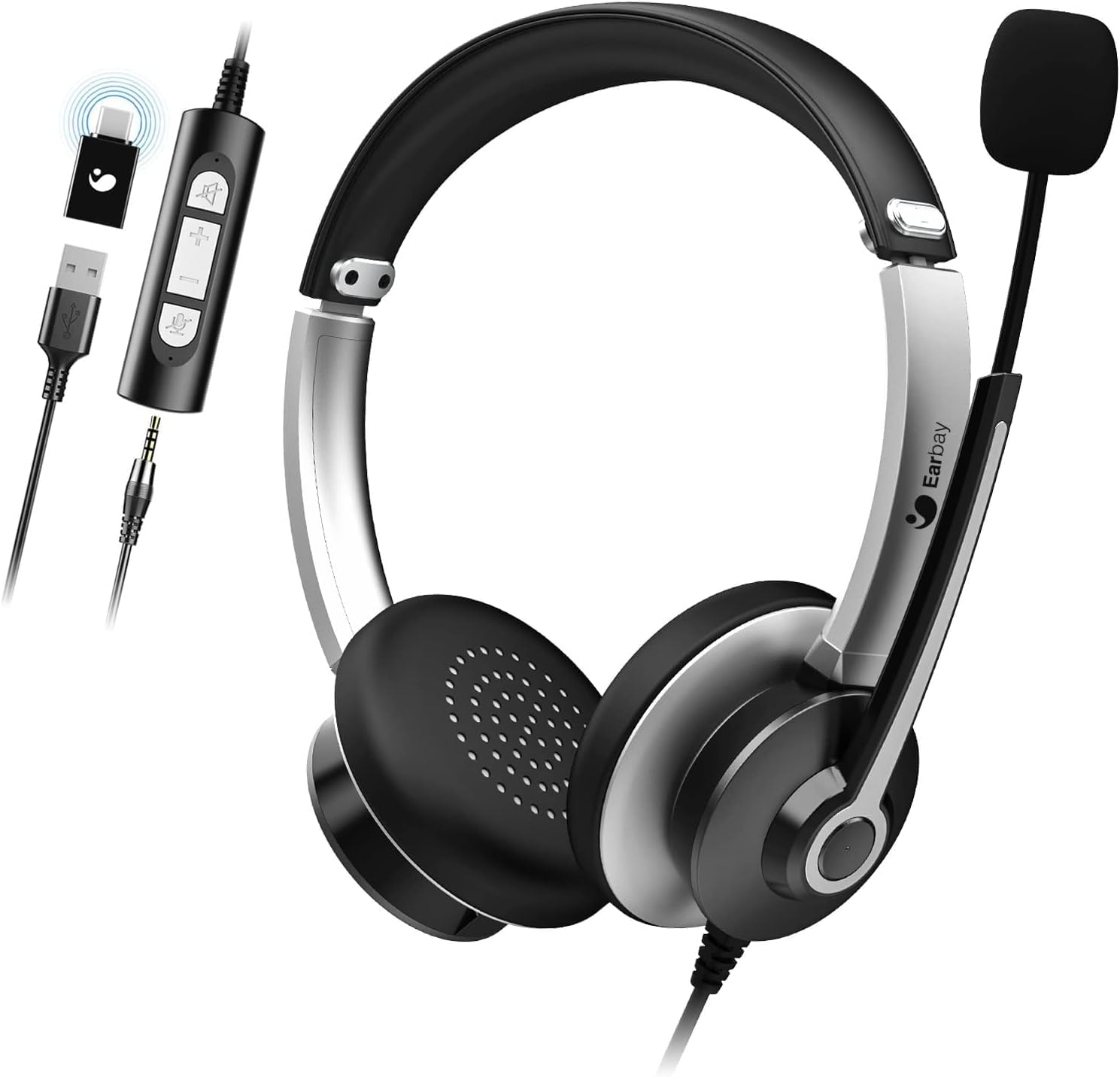
Image 1.1: The Earbay Headset, showcasing its design, adjustable microphone, and inline control unit with USB, 3.5mm, and Type-C adapters.
2. Vsebina paketa
Preverite, ali so v paketu vsi elementi:
- Earbay Headset with integrated microphone
- Inline control unit
- USB adapter
- 3.5 mm avdio priključek
- Adapter tipa C
3. Izdelek je končanview
The Earbay Headset is designed for clear audio communication and comfortable wear. It features multiple connectivity options for broad compatibility.

Slika 3.1: Bližnji posnetek view of the Earbay Stereo Computer Headset, highlighting its compatibility with USB, 3.5mm, and Type-C connections.
Ključne značilnosti:
- Nastavljiv naglavni trak: Za udobno in varno prileganje.
- Breathable Ear Cushions: Zasnovano za dolgotrajno udobje nošenja.
- Noise Reduction Microphone: Izboljša jasnost glasu z zmanjšanjem hrupa v ozadju.
- Vgrajeni kontrolniki: Easy access to volume adjustment and mute functions for both microphone and speaker.
- Večkratna povezljivost: Supports USB, 3.5mm, and Type-C connections for versatile use.

Image 3.2: Detail of the breathable ear cushions, designed for comfort during prolonged use.

Image 3.3: Illustration of the microphone's noise reduction technology, showing improved sound clarity.
4. Nastavitev in povezava
The Earbay Headset offers flexible connection options for various devices.

Image 4.1: The headset is compatible with various platforms including laptops, PCs, and tablets.
4.1 Povezovanje z napravo
- Določite pravilen konektor: The headset comes with a 3.5mm jack, a USB adapter, and a Type-C adapter. Choose the one compatible with your device.
- Za 3.5 mm povezavo: Plug the 3.5mm jack directly into your device's audio port. This is typically used for smartphones, tablets, and some laptops/PCs.
- Za povezavo USB: Connect the 3.5mm jack to the USB adapter, then plug the USB adapter into an available USB port on your computer (Laptop, PC).
- For Type-C connection: Connect the 3.5mm jack to the Type-C adapter, then plug the Type-C adapter into an available Type-C port on your device.
- Namestitev gonilnika: For most operating systems (Windows, macOS), the headset is plug-and-play and does not require additional drivers. The system should automatically detect and configure the device.

Image 4.2: The inline control unit, demonstrating its three connection options (USB, 3.5mm, Type-C) and dedicated buttons for microphone and speaker mute.
5. Navodila za uporabo
5.1 Prilagajanje slušalk
- Naglavni trak: Adjust the headband by sliding the earcups up or down until they rest comfortably over your ears.
- Mikrofon: Position the flexible microphone boom approximately 1-2 inches from your mouth for optimal voice pickup.
5.2 Using Inline Controls
The inline control unit provides convenient access to audio functions:
- Povečanje glasnosti (+): Pritisnite za povečanje glasnosti zvočnika.
- Znižaj glasnost (-): Pritisnite za zmanjšanje glasnosti zvočnika.
- Izklop mikrofona: Press the microphone icon button to mute or unmute the microphone. An indicator light (if present) may show mute status.
- Izklop zvočnika: Press the speaker icon button to mute or unmute the headset speakers.
5.3 Klicne funkcije
When connected to a communication application (e.g., Zoom, Skype, Microsoft Teams), the headset is ready for use.
- Ensure the headset is selected as the default audio input and output device in your application's settings.
- Use the inline controls for quick adjustments during calls.

Image 5.1: The Earbay Headset in use for business communication, emphasizing its design for clear calls and webinars.
6. Vzdrževanje in nega
- Čiščenje: Za čiščenje slušalk uporabite mehko, suho krpo. Za ušesne blazinice rahloamp Krpe se lahko uporabljajo, vendar se pred uporabo prepričajte, da so popolnoma suhe. Ne uporabljajte agresivnih kemikalij ali abrazivnih čistil.
- Shranjevanje: Slušalke shranjujte na hladnem in suhem mestu, stran od neposredne sončne svetlobe in ekstremnih temperatur. Pazite, da se kabel ne zaplete.
- Ravnanje: Za izklop slušalk ne vlecite za kabel. Vedno trdno primite vtič. Pazite, da vam slušalke ne padejo ali da jih ne izpostavljate močnim udarcem.
7. Odpravljanje težav
| Težava | Možen vzrok | rešitev |
|---|---|---|
| Ni zvoka iz slušalk |
|
|
| Mikrofon ne deluje |
|
|
| Kakovost zvoka je slaba ali popačena |
|
|
8. Specifikacije
- Ime modela: slušalke
- Znamka: Earbay
- Tehnologija povezljivosti: Žično
- Brezžična komunikacijska tehnologija: Bluetooth (Note: Product is primarily wired, Bluetooth may refer to a variant or general capability not active in this model)
- Vključene komponente: Kabel
- Material: Akrilonitril butadien stiren (ABS)
- Teža artikla: 104 gramov (3.67 unč)
- Dimenzije izdelka: 7.28 x 6.1 x 1.97 palcev
- Posebna lastnost: Nastavljiv naglavni trak
- Strojna platforma: Prenosni računalnik, osebni računalnik, tablični računalnik
- Vtičnica za slušalke: 3.5 mm Jack
- Nadzor hrupa: Active Noise Cancellation (for headphones)
9. Garancija in podpora
Earbay products are manufactured to high-quality standards. For information regarding warranty coverage, technical support, or service inquiries, please refer to the warranty card included with your purchase or visit the official Earbay webspletnega mesta. Prosimo, shranite dokazilo o nakupu za uveljavljanje garancije.
Ask a question about this manual
Ask about setup, troubleshooting, compatibility, parts, safety, or missing instructions. Manuals+ will review the question and use this page’s manual context to help answer it.