
Uvod
This manual provides detailed instructions for the installation, operation, and maintenance of your Hama 00118498 Monitor Desk Mount. Designed to enhance your ergonomic workspace, this monitor arm allows for flexible positioning of your display, promoting a comfortable and productive environment. Please read these instructions carefully before beginning installation.
Navodila za namestitev
Follow these steps to correctly install your Hama 00118498 Monitor Desk Mount.
1. Pritrditev mize Clamp
- Postavite mizo klamp assembly onto the edge of your desk. Ensure the desk surface is sturdy and can support the weight of the mount and your monitor.
- Zategnite clamp screw firmly until the mount is securely fastened to the desk. Do not overtighten.
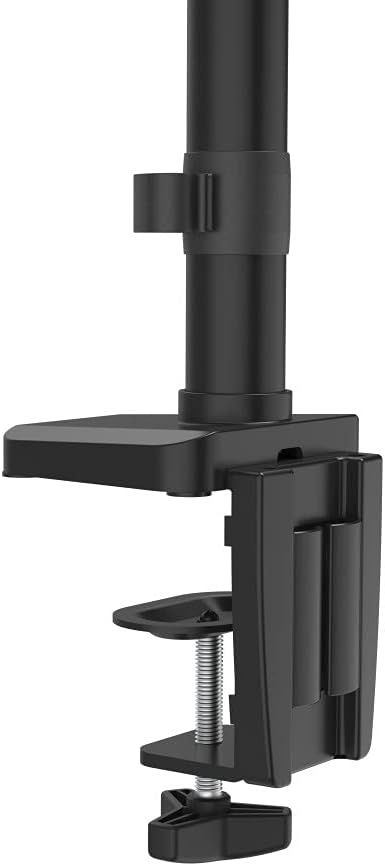
Image: The desk clamp mechanism, showing how it attaches to the desk edge for secure mounting.
2. Pritrditev monitorja
- Prepričajte se, da je vaš monitor združljiv s standardom VESA (100 x 100 mm ali 75 x 75 mm).
- Carefully attach the VESA plate from the monitor arm to the back of your monitor using the provided screws. Make sure the screws are tightened securely.
- Slide the monitor (with the attached VESA plate) onto the arm's mounting head. Ensure it clicks into place or is secured with any locking mechanism provided.

Image: The monitor arm's VESA plate and adjustable joint, ready for monitor attachment.

Slika: Stran view of the assembled monitor arm, highlighting the VESA mount and integrated cable management channels.
3. Upravljanje kablov
Utilize the integrated cable management system to route your monitor cables neatly along the arm. This helps maintain a tidy workspace and prevents cable clutter.
Navodila za uporabo
The Hama 00118498 Monitor Desk Mount offers various adjustment options for optimal viewudobje.
- Nastavitev višine: The integrated pneumatic spring allows for smooth and effortless vertical height adjustment. Gently push or pull the monitor to your desired height.
- Vrtljiva: The arm can swivel horizontally, allowing you to rotate your monitor to share your screen or change your viewvhodni kot.
- Nagib: Adjust the monitor's tilt angle (up or down) to reduce glare and find the most comfortable viewpoložaj.
- Vrtenje: Rotate your monitor from landscape to portrait orientation as needed for different tasks.
Adjustments should be smooth. If the monitor does not hold its position, refer to the troubleshooting section for tension adjustments.
Vzdrževanje
Regular maintenance ensures the longevity and optimal performance of your monitor arm.
- Čiščenje: Površino ročaja monitorja obrišite z mehko,amp krpo. Izogibajte se uporabi abrazivnih čistil ali topil.
- Preverite povezave: Občasno preverite vse vijake in povezave, da se prepričate, da so trdno priviti. Po potrebi jih ponovno privijte.
- Mazanje: The pneumatic spring is maintenance-free. Do not attempt to lubricate internal components.
Odpravljanje težav
If you encounter issues with your Hama 00118498 Monitor Desk Mount, refer to the following common problems and solutions:
- Monitor Sags or Does Not Hold Position: The tension of the pneumatic spring may need adjustment. Locate the tension adjustment screw (usually found on the arm joint) and turn it clockwise to increase tension for heavier monitors, or counter-clockwise for lighter monitors. Adjust gradually until the monitor holds its position.
- Monitor is Difficult to Move: If the arm is too stiff, the tension may be too high. Turn the tension adjustment screw counter-clockwise to decrease tension.
- Arm Feels Loose on Desk: Poskrbite, da bo miza klamp is fully tightened. If the desk surface is too thin or fragile, consider adding a protective pad between the clamp and the desk.
- Monitor Wobbles: Check all mounting screws on the VESA plate and the arm joints to ensure they are securely fastened.
Specifikacije
| Funkcija | Podrobnost |
|---|---|
| Številka modela | 00118498 |
| Vrsta namestitve | Pisalna miza Clamp |
| Vrsta gibanja | Rotating, Swivel, Tilt, Height Adjustable (Pneumatic Spring) |
| Znamka | Hama |
| Material | Aluminij |
| barva | Črna |
| Združljive naprave | Monitor |
| Najmanjša združljiva velikost | 10 palcev |
| Največja združljiva velikost | 32 palcev |
| Teža predmeta | 2.2 kilogramov |
| Država izvora | Kitajska |
Garancija in podpora
For warranty information or technical support, please refer to the documentation included with your purchase or visit the official Hama webspletno mesto. Tam običajno najdete kontaktne podatke za podporo, pogosta vprašanja in dodatne vire.
Uradna Hama Webspletno mesto: www.hama.com