
1. Varnostne informacije
Pred uporabo te naprave natančno preberite vsa navodila in jih shranite za poznejšo uporabo. Neupoštevanje teh navodil lahko povzroči električni udar, požar ali resne poškodbe.
- Pred čiščenjem, servisiranjem ali premikanjem ventilator vedno izključite iz električne vtičnice.
- Do not operate the fan with a damaged cord or plug. If the cord or plug is damaged, contact customer service for repair or replacement.
- Ta ventilator je namenjen samo za uporabo v zaprtih prostorih. Ne uporabljajte ga na prostem ali v vlažnih prostorih.
- Ventilator hranite stran od vode in drugih tekočin. Ventilatorja ne potapljajte v vodo.
- Ventilator postavite na stabilno, ravno površino, da preprečite prevrnitev.
- Med delovanjem ventilatorja naj otroci in hišni ljubljenčki ne bodo v bližini.
- Med delovanjem ventilatorja ne vstavljajte prstov ali kakršnih koli predmetov v rešetko.
- Do not block air openings or operate near curtains, drapes, or other objects that could block airflow.
- Do not use the fan in areas where flammable liquids or gases are stored.
2. Izdelek je končanview
The Amazon Basics 40" 70-Degree Oscillating Digital Tower Fan is designed to provide efficient and customizable cooling for various indoor spaces. It features a sleek, compact design and user-friendly controls.
Komponente
- Stolpni ventilator
- Base (requires assembly)
- Daljinski upravljalnik
Ključne značilnosti
- Učinkovito hlajenje: Delivers powerful airflow for effective cooling in enclosed spaces.
- Prilagodljive hitrosti: Four intuitive speed settings to adjust airflow.
- Več načinov: Includes Standard, Breeze, and Nature modes for varied airflow patterns.
- Nihanje: 70-degree oscillation for wide-range air flow coverage.
- Funkcija časovnika: Programabilni časovnik do 15 ur za varčevanje z energijo in udobje.
- Daljinski upravljalnik: Convenient remote for adjusting settings from a distance.
- Digitalne kontrole: Easy-to-use digital control panel located on the top of the fan.
- Kompaktna zasnova: Slim tower design (11.4"D x 11.4"W x 39.3"H) fits easily into any room.

Slika 2.1: The Amazon Basics 40-inch Digital Tower Fan shown with its remote control. The fan is black with a sleek, tall design, and the remote is compact with clearly labeled buttons for power, speed, mode, oscillation, and timer.

Slika 2.2: A diagram illustrating the key features of the tower fan, including its 40-inch height, 4 customizable airflow speed settings, timer with auto shutoff (1h, 2h, 4h, 8h options), and convenient remote control for adjusting speed, oscillation, and timer. The diagram highlights the digital display and control panel on top of the fan.
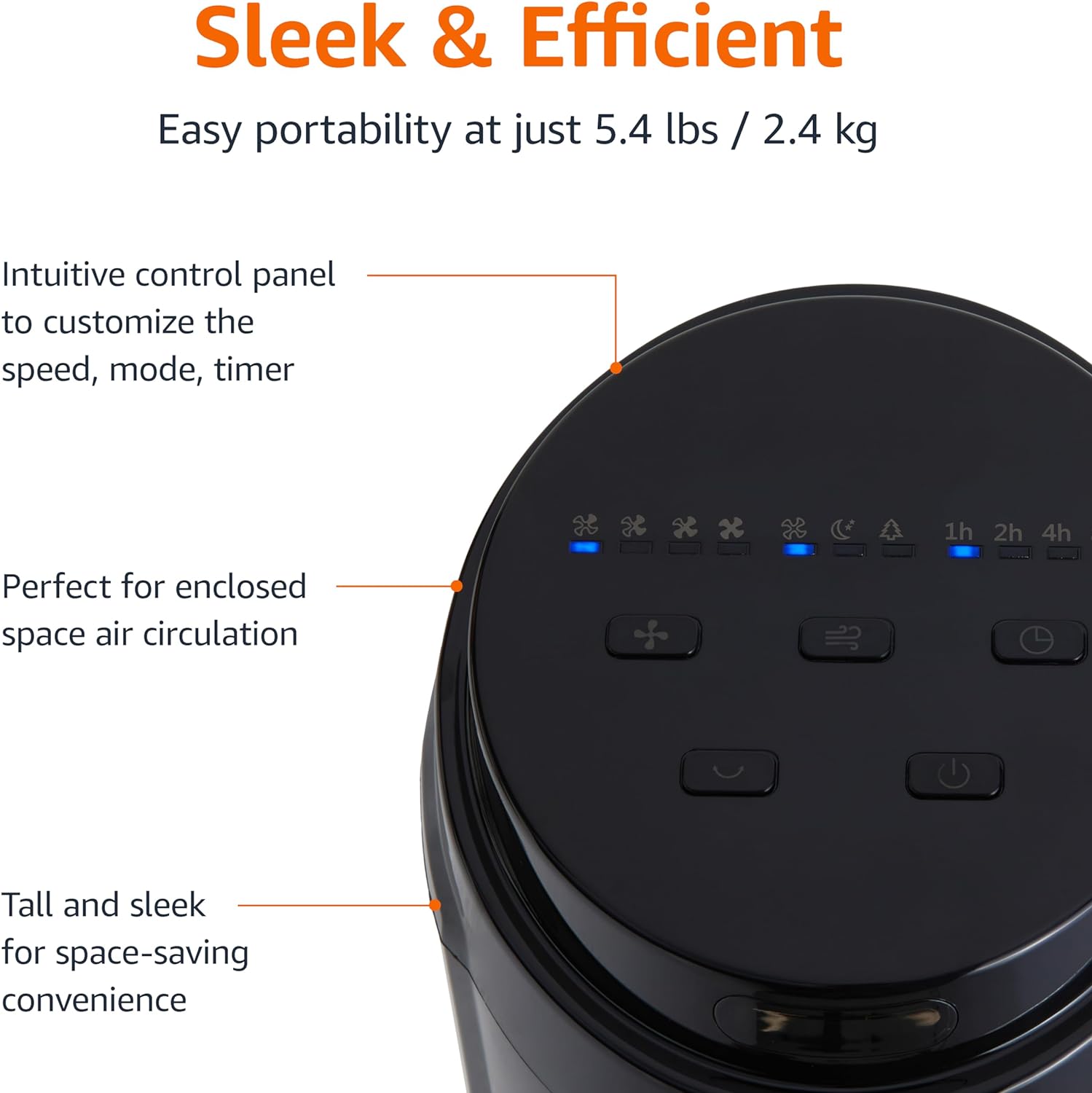
Slika 2.3: Bližnji posnetek view of the intuitive control panel located on the top of the Amazon Basics Tower Fan. The panel features buttons for speed, mode, power, oscillation, and timer, along with LED indicators for selected settings. This design allows for easy customization of fan operation.
3. Nastavitev
3.1 Montaža
- Previdno odstranite vse komponente iz embalaže.
- Attach the fan base to the main tower unit. Align the slots on the base with the corresponding tabs on the bottom of the fan.
- Secure the base using the provided screws, if any, ensuring it is firmly attached.
3.2 Namestitev
- Ventilator postavite na trdno, ravno površino.
- Ensure there is adequate space around the fan for proper air circulation, especially for the oscillation feature.
- Keep the fan at least 1 foot (30 cm) away from walls, furniture, and other objects.
- Plug the power cord into a standard NEMA 5-15 (US Standard Wall Outlet) electrical outlet.
4. Navodila za uporabo
The fan can be operated using either the control panel on top of the unit or the included remote control.
4.1 Funkcije nadzorne plošče in daljinskega upravljalnika
| Gumb/funkcija | Opis |
|---|---|
| Napajanje (vklop/izklop) | Vklopi ali izklopi ventilator. |
| Hitrost | Cycles through 4 fan speed settings (Low, Medium, High, Max). |
| Način | Selects between 3 operating modes:
|
| Nihanje | Activates or deactivates the 70-degree oscillation feature, allowing the fan to sweep air across a wider area. |
| Časovnik | Sets the fan to automatically turn off after a specified period (up to 15 hours in 1-hour increments). |
4.2 Uporaba daljinskega upravljalnika
The remote control allows for convenient operation of all fan functions from a distance. Ensure the remote is pointed towards the fan's control panel for optimal response.
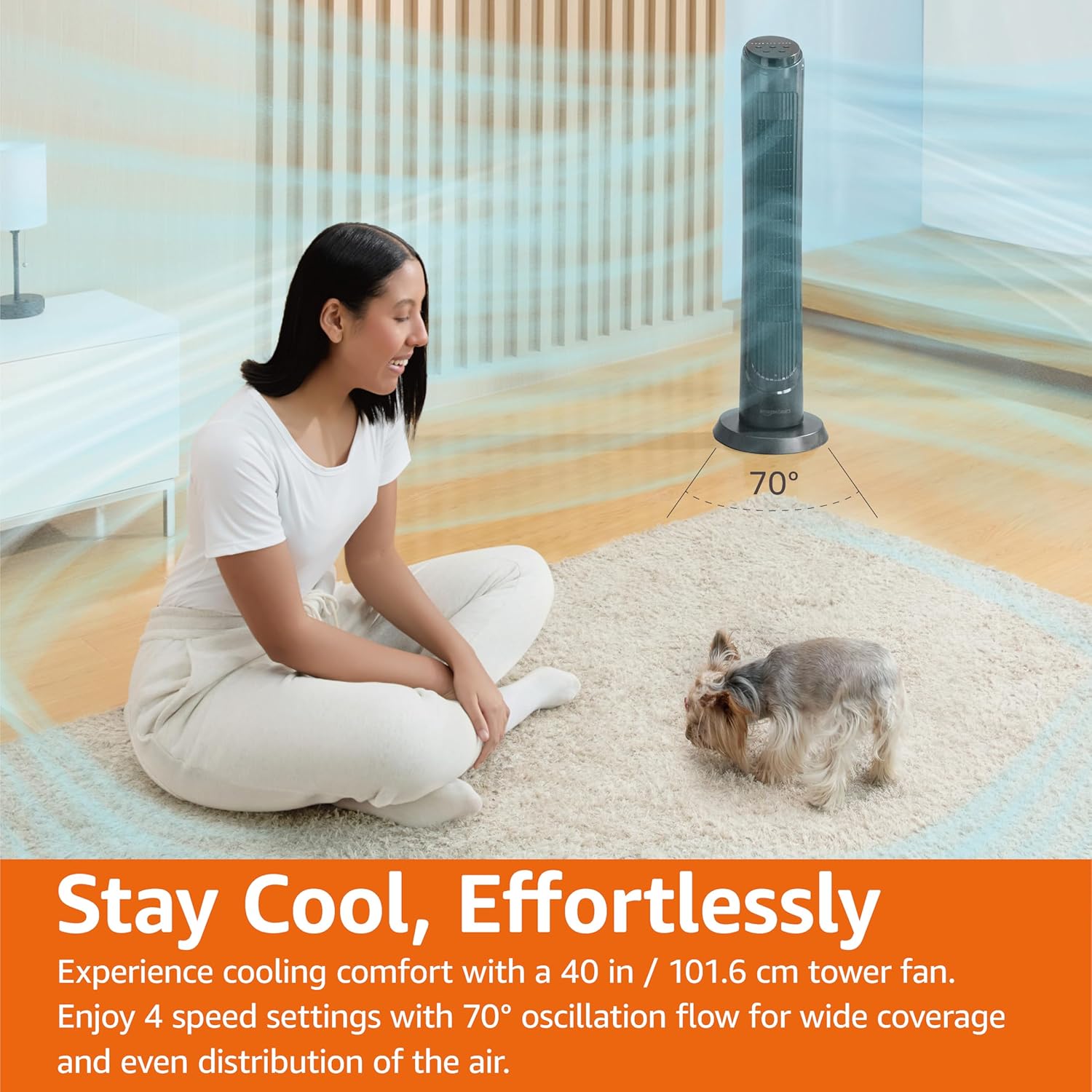
Slika 4.1: The Amazon Basics Tower Fan oscillating 70 degrees, providing wide coverage and even air distribution in a room. A person and a small dog are comfortably seated on a rug, benefiting from the airflow.

Slika 4.2: The Amazon Basics Tower Fan positioned in a modern living space, demonstrating its effective airflow. The image visually represents the air movement from the fan, highlighting its ability to circulate air throughout the room.
5. Vzdrževanje
5.1 Čiščenje
- Pred čiščenjem vedno odklopite ventilator.
- Uporabite mehko, damp krpo za brisanje zunanjih površin ventilatorja.
- Do not use abrasive cleaners or harsh chemicals, as these may damage the fan's finish.
- For dust accumulation on the air intake or output grilles, use a vacuum cleaner with a brush attachment to gently remove dust.
- Preden ventilator ponovno priključite, se prepričajte, da je popolnoma suh.
5.2 Shranjevanje
- If storing the fan for an extended period, clean it thoroughly as described above.
- Ventilator shranjujte v originalni embalaži ali primerni škatli, da ga zaščitite pred prahom in poškodbami.
- Hraniti na hladnem in suhem mestu.
6. Odpravljanje težav
Če imate težave z ventilatorjem, si oglejte naslednje pogoste težave in rešitve:
| Težava | Možen vzrok | rešitev |
|---|---|---|
| Ventilator se ne vklopi. | Ni napajanja; gumb za vklop ni pritisnjen. | Ensure the power cord is securely plugged into a working outlet. Press the Power button on the control panel or remote. |
| Šibek ali brez pretoka zraka. | Air intake/output blocked; Fan speed too low. | Check for any obstructions around the fan grilles. Increase the fan speed setting. |
| Oscilacija ne deluje. | Funkcija oscilacije ni aktivirana. | Press the Oscillation button on the control panel or remote. Ensure the fan is on a flat surface. |
| Daljinski upravljalnik ne deluje. | Batteries are dead; Remote not pointed correctly. | Replace the remote control batteries. Ensure the remote is pointed directly at the fan's control panel. |
| Nenavaden hrup. | Ventilator ni na ravni površini; Notranja ovira. | Place the fan on a stable, level surface. Unplug the fan and check for any foreign objects inside the grilles (do not attempt to disassemble). |
Če težava po poskusu teh rešitev še vedno obstaja, se obrnite na podporo strankam.
7. Specifikacije
| Atribut | Podrobnost |
|---|---|
| Znamka | Osnove Amazona |
| Ime modela | DC2021 |
| barva | Črna |
| Dizajn električnega ventilatorja | Talni ventilator |
| Vir napajanja | AC napajanje |
| Slog | 40" - Digital |
| Dimenzije izdelka | 11.4"D x 11.4"Š x 39.3"V |
| Vrsta sobe | Spalnica, dnevna soba, pisarna |
| Posebna funkcija | Oscillating, 4 Speeds, 3 Modes, Timer, Remote Control |
| Priporočene uporabe | Cooling and Air Circulation for Indoor Spaces |
| Nivo hrupa | 60 dB |
| Wattage | 50 vatov |
| Teža predmeta | 7.5 funta (približno 3.4 kg) |
| Vključene komponente | Daljinsko |
| Notranja/zunanja uporaba | Notranja |
| Nadzorna metoda | Daljinsko |
| Material rezila | Plastika |
| Število ravni moči | 4 |
| Tip glavnega napajalnega priključka | NEMA 5-15 (US Standard Wall Outlet) |
| Proizvajalec | Amazon |
| UPC | 840095880428 |
| Država izvora | Kitajska |
8. Garancija in podpora
For detailed warranty information, please refer to the official Warranty PDF document provided by Amazon Basics. This document outlines the terms and conditions of your product's warranty.
For further assistance, troubleshooting not covered in this manual, or to inquire about replacement parts, please contact Amazon Basics customer support.
- Uradni uporabniški priročnik (PDF): Prenesi PDF
- Uradna garancija (PDF): Prenesi PDF
- Amazon Basics Store: Obišči trgovino