
1. Uvod
Hvala za nakupasing the AIYIMA TUBE T9 Bluetooth 5.0 6K4 Tube Amplifier. This device combines a tube preamplifier with a digital power amplifier, offering multiple audio inputs including Bluetooth 5.0, USB, Coaxial, Optical, and RCA. It features a classic VU meter and tone controls for a personalized audio experience. This manual provides detailed instructions for setup, operation, and maintenance to ensure optimal performance and longevity of your amplifier.
2. Varnostne informacije
- Napajanje: Use only the provided DC24V power adapter. Ensure the voltage is within the specified range (DC18V-30V).
- Prezračevanje: Postavite amplifier in a well-ventilated area. Do not block ventilation openings.
- Vlaga: Napravo hranite stran od vode, vlage in visoke vlažnosti.
- Toplota: Izogibajte se postavljanju ampv bližini virov toplote ali na neposredni sončni svetlobi.
- Handling Tubes: Vacuum tubes can become hot during operation. Exercise caution when handling or replacing them. Allow the unit to cool down before touching the tubes.
- Čiščenje: Pred čiščenjem izklopite napajanje. Uporabite mehko, suho krpo. Ne uporabljajte tekočih čistil ali aerosolov.
- Servisiranje: Tega izdelka ne poskušajte servisirati sami. Vsa servisna dela prepustite usposobljenemu osebju.
3. Vsebina paketa
Prosimo, preverite paket za naslednje artikle:
- AIYIMA TUBE T9 Ampojačevalec x 1
- 6K4 Vacuum Tube x 2
- Bluetooth antena x 1
- DC24V Power Adapter x 1
- Kabel PC-USB x 1
- Remote Control x 1 (AA batteries not included)
- Uporabniški priročnik x 1
- Garancijska kartica x 1

Image: Contents included in the AIYIMA TUBE T9 amprešilni paket, ki prikazuje amplifier unit, two 6K4 tubes, a Bluetooth antenna, power adapter, USB cable, remote control, user manual, and warranty card.
4. Izdelek je končanview
4.1 Sprednja plošča
The front panel features controls for power, input selection, volume, and tone, along with a classic VU meter and input indicators.
- VU meter: Displays audio signal level in real-time.
- Indikator vnosa: LEDs indicate the currently selected input (Bluetooth, PC-USB, RCA, Coaxial, Optical).
- Gumb za glasnost/vhod: Rotate to adjust volume. Press to cycle through input sources. Press and hold to power on/off.
- Nadzor nizkih tonov: Prilagodi nizkofrekvenčni izhod.
- Nadzor visokih tonov: Prilagodi visokofrekvenčni izhod.
- IR sprejemnik: For remote control commands.

Slika: Podrobna view of the AIYIMA TUBE T9 amplifier's front panel, showing the VU meter, input indicators, volume knob, bass and treble controls, and the two visible 6K4 vacuum tubes.
4.2 Zadnja plošča
The rear panel provides all necessary audio input and output connections.
- Priključek za anteno Bluetooth: Priključite priloženo Bluetooth anteno.
- RCA Input (L/R): Za analogne avdio vire.
- Koaksialni vhod: Za digitalne avdio vire.
- Optični vhod: Za digitalne avdio vire.
- Vhod za računalnik-USB: Za povezavo z računalnikom kot USB DAC.
- AUX Out (3.5mm): For connecting to an active subwoofer or another amplifier.
- Speaker Output (L/R): Connect passive speakers (3-8Ω).
- DC18-30V Power Input: Priključite napajalnik.
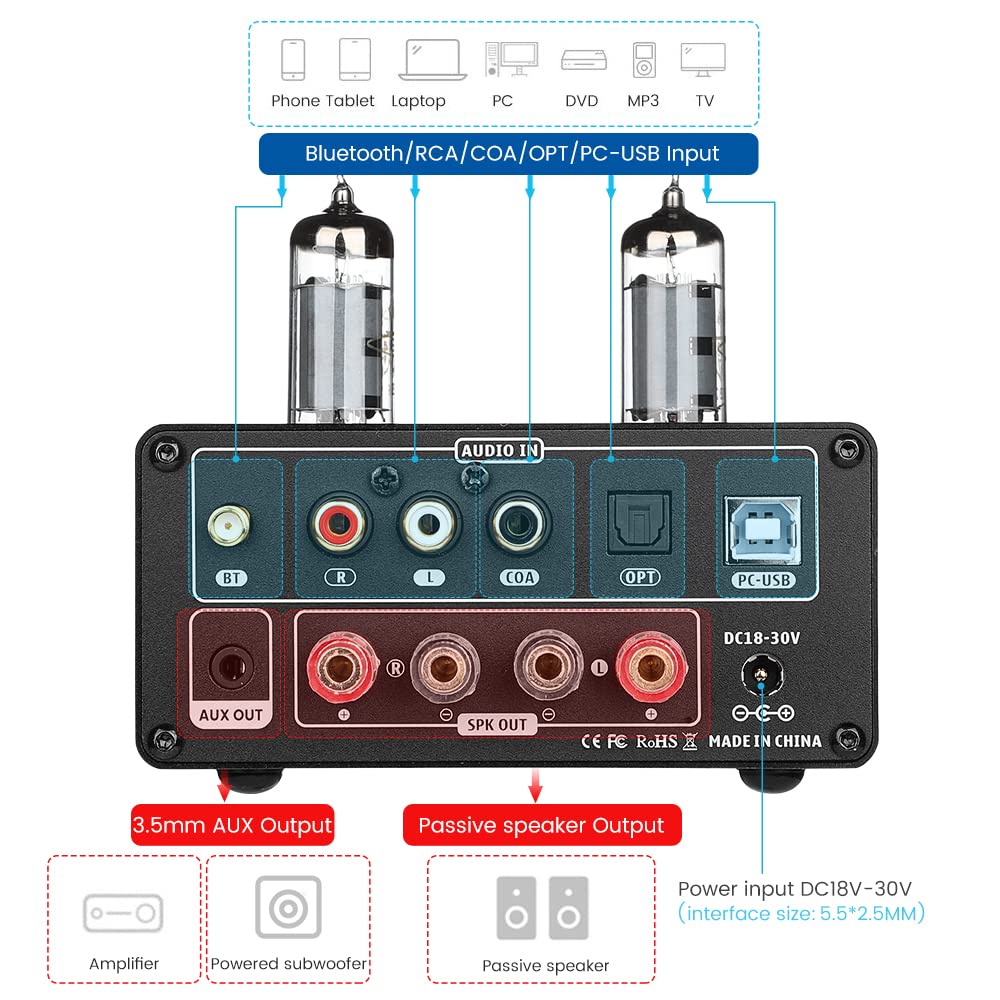
Slika: Zadaj view of the AIYIMA TUBE T9 amplifier, highlighting the various input and output ports including Bluetooth, RCA, Coaxial, Optical, PC-USB, AUX Out, speaker terminals, and power input.
5. Nastavitev
5.1 Namestitev cevi
- Carefully unpack the two 6K4 vacuum tubes.
- Align the pins of each tube with the corresponding holes on the amplifier's tube sockets.
- Gently push the tubes straight down into the sockets until they are firmly seated. Do not force them.
5.2 Priključitev zvočnikov
The TUBE T9 is designed for passive speakers with an impedance of 3-8Ω.
- Priključite svoje pasivne zvočnike na Speaker Output (SPK OUT) terminals on the rear panel. Ensure correct polarity (+ to + and - to -).
- For a 2.1 channel system, connect an active subwoofer to the AUX Out (3.5mm) pristanišče.
5.3 Priklop avdio virov
Connect your desired audio sources to the corresponding input ports:
- Bluetooth: Screw the included Bluetooth antenna into the BT pristanišče.
- PC-USB: Use the provided USB cable to connect your computer to the PC-USB pristanišče.
- RCA: Connect analog audio devices (e.g., CD player, streamer) using RCA cables to the RCA (L/D) vnos.
- Koaksialni/optični: Connect digital audio devices (e.g., TV, game console) using Coaxial or Optical cables to the respective inputs.
Pomembna opomba: to amplifier does not have a built-in phono preamplifier. Do not connect a vinyl record player directly to the RCA input without an external phono preamp, as this may result in very low volume or distorted sound.

Image: Diagrams illustrating various connection scenarios for the AIYIMA TUBE T9 amplifier, including connecting to passive speakers, an amplifier, and different audio sources like phones, tablets, laptops, PCs, DVDs, and TVs.

Image: A visual warning indicating that the AIYIMA TUBE T9 amplifier cannot be directly connected to a vinyl record player without an external phono preamplifier.
5.4 Napajalni priključek
- Zagotovite, da so vse zvočne povezave varne.
- Connect the DC24V power adapter to the DC18-30V vhodna vrata na zadnji plošči.
- Priključite napajalnik v stensko vtičnico.
6. Navodila za uporabo
6.1 Vklop/izklop
Press and hold the main Volume/Input Knob on the front panel for approximately 1 second to power the amplifier on or off. The VU meter and tubes will illuminate upon power-on.
6.2 Izbira vnosa
Short press the main Volume/Input Knob to cycle through the available input sources: Bluetooth, PC-USB, RCA, Coaxial, Optical. The corresponding LED indicator on the front panel will light up.
6.3 Nadzor glasnosti
Rotate the main Volume/Input Knob v smeri urinega kazalca za povečanje glasnosti in v nasprotni smeri urinega kazalca za zmanjšanje glasnosti.
6.4 Tonski nadzor
Uporabite Bas in Visoki toni knobs on the front panel to adjust the low and high frequencies according to your preference. This allows for fine-tuning the sound profile.
6.5 Bluetooth seznanjanje
- Select the Bluetooth input using the Volume/Input Knob. The Bluetooth indicator will flash.
- On your mobile device (phone, tablet, etc.), enable Bluetooth and search for available devices.
- Select "AIYIMA TUBE T9" from the list of devices to pair.
- Ko je naprava združena, indikator Bluetooth preneha utripati in sveti neprekinjeno. Zdaj lahko predvajate zvok iz naprave.

Image: A smartphone connected via Bluetooth 5.0 to the AIYIMA TUBE T9 amplifier, demonstrating wireless audio streaming.
6.6 VU meter
The integrated VU meter provides a visual representation of the audio output level. Its warm light and dynamic movement add a retro aesthetic to your listening experience. The meter is designed to respond to various volume levels.

Slika: Bližnji posnetek view of the illuminated VU meter on the AIYIMA TUBE T9 amplifier, showing its needle indicating audio levels.
7. Vzdrževanje
7.1 Zamenjava cevi
The 6K4 vacuum tubes can be replaced to customize the sound or if they wear out. Compatible tube models include:
- 6J1
- 6J2
- GE5654
- 6J3
- 6J4
- 6J5
- 6Ж1п (6Zh1p)
- 6AK5
To replace tubes:
- Izklopite amplifier and disconnect it from the power outlet.
- Allow the tubes to cool completely (this may take several minutes).
- Gently pull the existing tubes straight up from their sockets.
- Insert the new compatible tubes, aligning the pins carefully, and push them straight down until seated firmly.
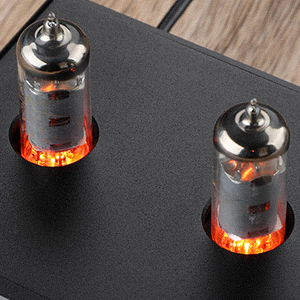
Slika: Bližnji posnetek view of the two 6K4 vacuum tubes installed on the AIYIMA TUBE T9 amplifier, showing their glowing filaments during operation.
7.2 Čiščenje
Obrišite amplifier's exterior with a soft, dry cloth. Do not use abrasive cleaners or solvents.
7.3 Prezračevanje
Zagotovite zadosten pretok zraka okoli amplifier to prevent overheating. Do not place objects on top of the unit that could obstruct ventilation.
8. Odpravljanje težav
| Težava | Možen vzrok | rešitev |
|---|---|---|
| Ni zvoka |
|
|
| Popačen zvok |
|
|
| Težave s povezavo Bluetooth |
|
|
| Clicking sound after silence | Automatic hibernation mode engaging | The amplifier may enter a hibernation state after a period of no audio signal, producing a soft click. This feature can be disabled using the remote control: press the M1 button on the remote to toggle the hibernation prompt on/off. |
| VU Meter not moving | Very low volume or specific audio characteristics | The VU meter is designed to respond to audio levels. Ensure the volume is sufficiently high for the meter to register movement. This issue has been addressed in updated models to work at various levels. |
9. Specifikacije

Image: The AIYIMA TUBE T9 amplifier shown with its physical dimensions and a table summarizing its key specifications.
| Funkcija | Specifikacija |
|---|---|
| Številka modela | TUBE T9 |
| Znamka | AIYIMA |
| Vhodni vmesniki | Bluetooth 5.0, PC-USB, RCA, Coaxial, Optical |
| Izhodni vmesniki | Passive Speaker Output, 3.5mm AUX Out (for active subwoofer/ampLifier) |
| Izhodna moč | 100W x 2 (at 4Ω load) |
| Impedanca zvočnika | 3-8Ω |
| Frekvenčni odziv | 20-20 kHz (±1 dB) |
| Razmerje med signalom in šumom (S/N) | ≥98dB |
| Delovni letniktage | DC18V-30V |
| Dimenzije (D x Š x V) | 22 x 22 x 10 cm (približno 8.66 x 8.66 x 3.94 palca) |
| Teža predmeta | 1 kg (pribl. 2.2 lbs) |
| Certifikati | CE |
| Država izvora | Kitajska |
10. Garancija in podpora
10.1 Informacije o garanciji
According to the product specifications, there is no explicit warranty provided for this product. Please refer to your retailer's return policy for any issues within the initial purchase period.
10.2 Podpora strankam
For technical assistance or inquiries, please contact the seller or AIYIMA customer support through their official channels. Keep your purchase receipt or order details handy for any support requests.