1. Uvod
This user manual provides detailed instructions for the operation and maintenance of your Sunbuck AS-60BU Home Audio Amplifier Stereo Receiver. This 2-channel amplifier is designed to enhance your home audio experience, offering versatile input options including Bluetooth 5.0, USB, SD card, AUX, CD, Line-in, and microphone inputs. Please read this manual thoroughly before using the product to ensure proper function and safety.

Figure 1: Sunbuck AS-60BU Amplifier and Remote Control
2. Varnostna navodila
- Te naprave ne izpostavljajte dežju ali vlagi.
- Ne odstranjujte pokrova. V notranjosti ni delov, ki bi jih lahko uporabnik sam servisiral. Servisiranje prepustite usposobljenemu osebju.
- Zagotovite ustrezno prezračevanje okoli enote. Ne blokirajte prezračevalnih odprtin.
- Connect only to a grounded AC power outlet.
- Ne preobremenjujte električnih vtičnic ali podaljškov.
- Izogibajte se postavljanju enote v bližino virov toplote ali na neposredno sončno svetlobo.
- Med nevihtami ali če naprave dalj časa ne uporabljate, izklopite napajanje.
- Hraniti izven dosega otrok.
3. Vsebina paketa
Preverite, ali so v paketu vsi elementi:
- Ležalnik za sončenje AS-60BU Ampsprejemnik lifierja
- AC napajalni kabel
- Uporabniški priročnik (ta dokument)
- Daljinski upravljalnik

Slika 2: Kaj je v škatli
4. Izdelek je končanview
4.1 Sprednja plošča

Slika 3: Postavitev sprednje in zadnje plošče
| Funkcija | Opis |
|---|---|
| NAPAJANJE (VKLOP/IZKLOP) | Glavno stikalo za napajanje enote. |
| AUX VHOD | 3.5 mm priključek za priključitev zunanjih avdio naprav. |
| Izbirnik vhoda | Rotary knob to select audio input source: LINE, CD, AUX, MEDIA PLAYER. |
| Nadzor nizkih tonov | Prilagodi nizkofrekvenčni zvočni izhod. |
| Kontrola TREBLE | Prilagodi visokofrekvenčni zvočni izhod. |
| Nadzor ECHO | Prilagodi odmevni učinek za mikrofonske vhode. |
| M.TONE Control | Adjusts the microphone tone. |
| Nadzor glasnosti mikrofona | Adjusts the volume of the microphone inputs. |
| GLAVNA GLASNOST | Main volume control for all audio output. |
| USB/SD/MMC Port | Input for USB flash drives and SD/MMC cards for media playback. |
| MEDIA PLAYER Display & Buttons | Digital display and controls (MODE, Play/Pause, Previous, Next) for USB/SD/Bluetooth playback. |
| MIC 1 / MIC 2 | 6.35 mm vhodni priključki za mikrofon. |
4.2 Zadnja plošča
| Funkcija | Opis |
|---|---|
| CD L/R IN | RCA stereo input for CD players. |
| LINE L/R IN | RCA stereo input for general line-level audio sources. |
| FM antena | Connection point for the FM radio antenna. |
| Vhodna moč enosmernega toka | Power input for the amplifier. |
| Speaker Output (L/R) | Binding posts for connecting passive speakers (4-16 ohms). |
5. Nastavitev
Follow these steps to set up your Sunbuck AS-60BU ampdvigalo:
- Povezava zvočnikov: Connect your passive speakers to the "Speaker Output (L/R)" binding posts on the rear panel. Ensure correct polarity (+ to + and - to -) for optimal sound. This amplifier supports speakers with an impedance range of 4 to 16 ohms.
- Povezava avdio vira:
- For CD players, connect RCA cables from the CD player's output to the "CD L/R IN" on the amplifier.
- For other line-level devices (e.g., tape drive, tuner), connect RCA cables to the "LINE L/R IN".
- For devices with a 3.5mm output (e.g., smartphones, tablets), use a 3.5mm audio cable to connect to the "AUX INPUT" on the front panel.
- For PC connection, use appropriate cables to connect your PC's audio output to either the LINE IN or AUX IN.

Slika 4: Diagram povezave
- Priključek FM antene: If you plan to use the FM radio function, connect an FM antenna to the "FM Antenna" terminal on the rear panel.
- Napajalni priključek: Zagotovite amplifier's POWER switch is in the OFF position. Connect the supplied AC power cord to the "DC Power Input" on the rear panel and then to a suitable wall outlet.
6. Navodila za uporabo
6.1 Vklop/izklop
Če želite vklopiti amplifier, press the MOČ switch to the ON position. The LED display will illuminate. To turn off, press the MOČ preklopite v položaj OFF.
6.2 Izbira vnosa
Zavrtite Izbirnik vhoda knob on the front panel to choose your desired audio source (LINE, CD, AUX, MEDIA PLAYER). When selecting MEDIA PLAYER, you can then use the MODE button on the front panel or remote to switch between USB, SD, and Bluetooth modes.
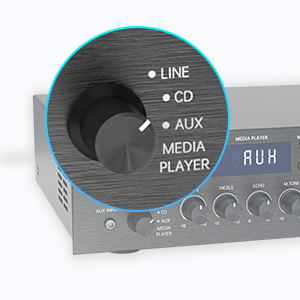
Figure 5: Input Selector
6.3 Povezljivost Bluetooth
Za povezavo prek Bluetooth:
- Nastavite Izbirnik vhoda to MEDIA PLAYER.
- Pritisnite NAČIN button until "BLUETOOTH" or "BT" appears on the display.
- Na mobilni napravi (pametnem telefonu, tablici, prenosniku) omogočite Bluetooth in poiščite razpoložljive naprave.
- Select "SUNBUCK" or "AS-60BU" from the list to pair.
- Once paired, you can stream audio wirelessly from your device to the amplifier.
The Bluetooth range is approximately 40+ feet, but can be affected by obstacles and interference.

Slika 6: Povezljivost Bluetooth
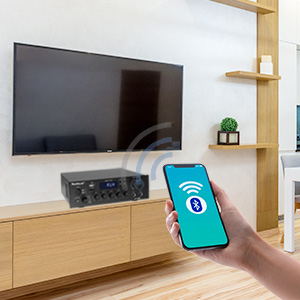
Figure 7: Bluetooth Connection Indicator
6.4 Predvajanje z USB-ja/SD-kartic
To play media from a USB drive or SD/MMC card:
- Insert your USB flash drive or SD/MMC card into the corresponding port on the front panel.
- Nastavite Izbirnik vhoda to MEDIA PLAYER.
- The amplifier will automatically detect and begin playing supported audio files (MP3, WAV, WMA, APE, FLAC).
- Use the Play/Pause, Previous, and Next buttons on the front panel or remote to control playback.
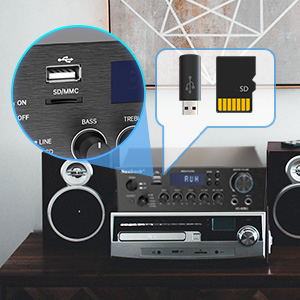
Figure 8: USB/SD Card Slots
6.5 Uporaba mikrofona
Connect up to two microphones to the MIC 1 and MIC 2 jacks on the front panel. Adjust the GLASNOST MIK, ODMEV, in M.TONE controls to achieve your desired sound for karaoke or public address.

Figure 9: Ideal for Karaoke and Home Entertainment
6.6 FM radio
Za uporabo FM radia:
- Ensure an FM antenna is connected to the rear panel.
- Nastavite Izbirnik vhoda to MEDIA PLAYER.
- Pritisnite NAČIN gumb, dokler se na zaslonu ne prikaže "FM".
- Use the Previous/Next buttons to scan for stations. Note that this model cannot fix and save FM stations.

Figure 10: FM Mode Display
6.7 Zvočne nastavitve
Uporabite BASS, TREPLE, in GLAVNA GLASNOST knobs on the front panel to fine-tune your audio output. The GLAVNA GLASNOST controls the overall sound level.
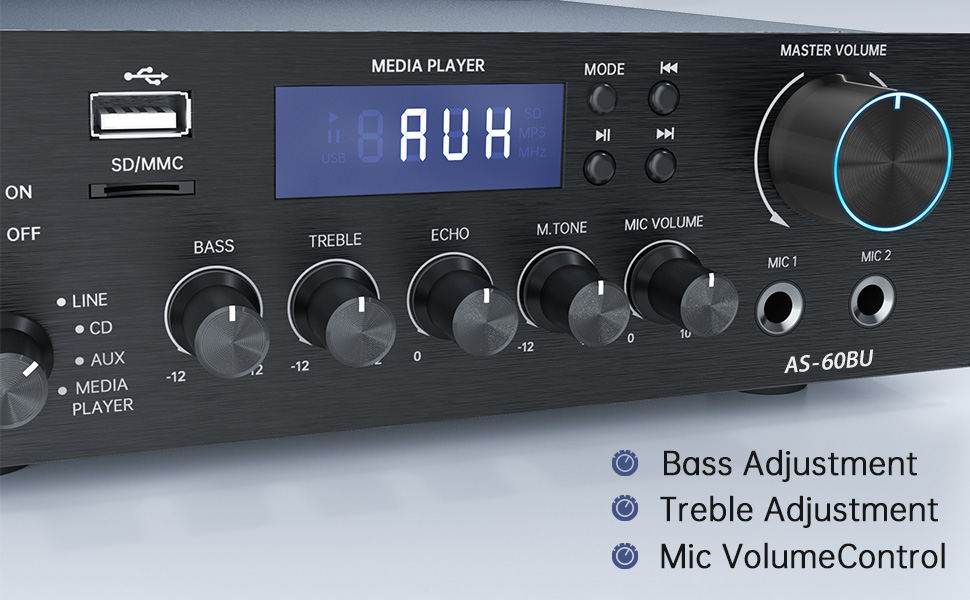
Figure 11: Audio Adjustment Controls
Video 1: Demonstration of Sunbuck AS-60BU amplifier features and sound quality.
7. Vzdrževanje
- Čiščenje: Zunanjost očistite z mehko, suho krpo ampNe uporabljajte tekočih čistil ali aerosolov.
- Shranjevanje: Ko naprave dalj časa ne uporabljate, jo shranite ampShranjujte na hladnem in suhem mestu, stran od neposredne sončne svetlobe in ekstremnih temperatur.
- Prezračevanje: Prepričajte se, da so prezračevalne odprtine čiste od prahu in umazanije, da preprečite pregrevanje.
8. Odpravljanje težav
| Težava | Možen vzrok | rešitev |
|---|---|---|
| Ni zvoka. | Incorrect input selected, loose speaker connections, low volume. | Verify input selection, check speaker wiring polarity and tightness, increase MASTER VOLUME. |
| Bluetooth connection unstable or short range. | Obstacles between device and amplifier, interference, device too far. | Reduce distance between devices, remove obstacles, avoid other wireless devices. |
| Daljinski upravljalnik ne deluje. | Dead batteries, line of sight blocked. | Replace batteries, ensure clear path to ampIR sprejemnik naprave Liferier. |
| Settings not saved after power off. | This is normal behavior for some settings (e.g., input mode). | Re-select desired input mode after powering on. |
| Popačen zvok. | Input signal too high, speaker impedance mismatch, faulty cables. | Reduce source volume, ensure speakers are within 4-16 ohm range, check/replace cables. |
9. Specifikacije
- Model: AS-60BU
- Izhodna moč: MAX 400W x 2 (RMS 70W x 2)
- Kanali: 2-kanalni
- Impedanca zvočnika: 4-16 ohmov
- Izhodna impedanca: 0.1 ohme
- Vhodi: 2 x RCA Audio (CD, Line), 2 x Microphone (6.35mm), USB 2.0, SD Card, Bluetooth 5.0, AUX In (3.5mm), FM Radio
- Supported Audio Formats (USB/SD): MP3, WAV, WMA, APE, FLAC
- Dimenzije izdelka: 8.27 x 7.68 x 2.44 palcev
- Teža: 3.24 funta
- Proizvajalec: JS Electronics Limited
- Prvi na voljo: 9. september 2021
10. Garancija in podpora
Sunbuck products are designed for reliability and performance. For warranty information or technical support, please refer to the contact details provided with your purchase documentation or visit the official Sunbuck webspletnega mesta. Račun shranite kot dokazilo o nakupu za uveljavljanje garancije.
For further assistance, you may contact the manufacturer, JS Electronics Limited.