
1. Uvod
Hvala za nakupasing the KEPLUG Sunrise Alarm Clock. This device is designed to enhance your waking and sleeping experience with its unique features, including sunrise and sunset simulations, dual alarms, FM radio, and various natural sounds. Please read this manual carefully to ensure proper use and optimal performance.
Vsebina paketa:
- 1 x KEPLUG Sunrise Alarm Clock
- 1 x mikro USB kabel
- 1 x stenski adapter
- 1 x uporabniški priročnik
2. Izdelek je končanview
Familiarize yourself with the main components and controls of your KEPLUG Sunrise Alarm Clock.

Slika 2.1: Spredaj view of the KEPLUG Sunrise Alarm Clock, showing the digital time display and the illuminated light panel. The clock face is round with a white base.
Kontrolni gumbi in vrata:
Refer to the diagram below for button identification (exact button layout may vary slightly by model, but functions are consistent).
- Gumb za nastavitev časa: Uporablja se za vstop v način nastavitve časa.
- Gumb za alarm 1: Used to set and activate Alarm 1.
- Gumb za alarm 2: Used to set and activate Alarm 2.
- Gumb za FM radio: Activates and controls FM radio functions.
- Svetlobni gumb: Controls the light brightness and color modes.
- Gumbi za glasnost +/-: Prilagodi glasnost zvoka.
- Gumbi gor/dol: Navigacija po menijih in prilagajanje vrednosti.
- Snooze/Sleep Aid Button: Activates snooze during an alarm or sleep aid function.
- Vrata za polnjenje USB: Za polnjenje zunanjih naprav.
- Micro USB Power Input: Povezuje se z napajalnikom.
3. Nastavitev
3.1 Napajalni priključek
- Connect the micro USB cable to the power input port on the back of the alarm clock.
- Priključite stenski adapter v standardno električno vtičnico.
- Zaslon se bo prižgal, kar pomeni, da je naprava vklopljena.
The clock includes a built-in backup battery to retain settings during power outagali prekinitve povezav.
3.2 Nastavitev časa
- Pritisnite Gumb za nastavitev časa (often represented by a clock icon). The hour display will start flashing.
- Uporabite Gumbi gor / dol za prilagoditev ure.
- Pritisnite Gumb za nastavitev časa again to confirm the hour and move to minute setting. The minute display will flash.
- Uporabite Gumbi gor / dol za prilagoditev minut.
- Pritisnite Gumb za nastavitev časa a third time to confirm the minutes.
- Za preklop med 12-urnim in 24-urnim formatom časa pritisnite Gumbi gor / dol while the time is flashing during setup, or refer to the specific instructions in your manual for a dedicated time format button.
3.3 Time Display Brightness
The time display offers three brightness settings: High, Low, and Off. This can typically be adjusted by repeatedly pressing a dedicated display brightness button or by holding the Time Setting button. Refer to your specific model's instructions for exact control.
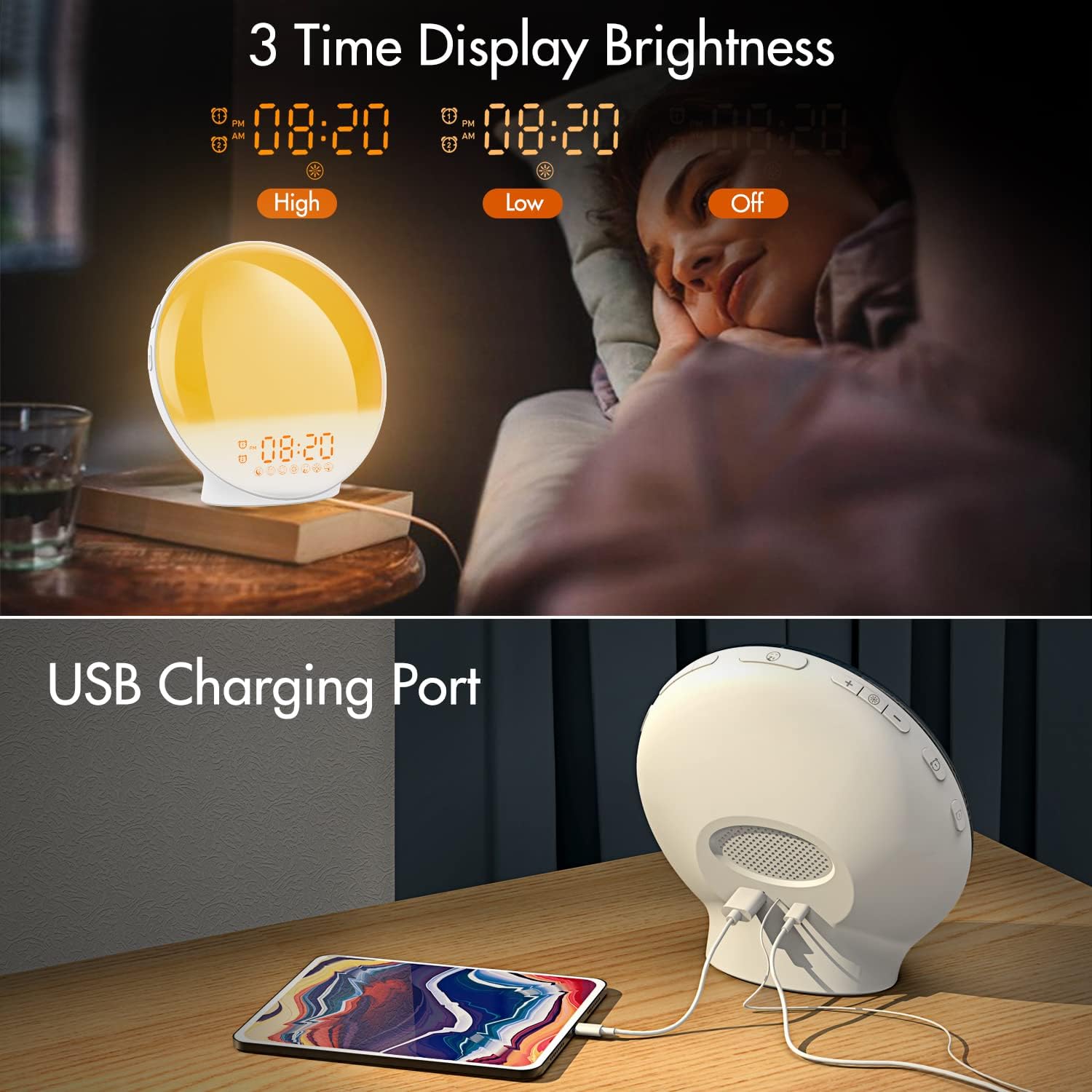
Slika 3.1: Illustration of the three time display brightness options: High, Low, and Off, allowing users to customize visibility for different times of day or night.
4. Navodila za uporabo
4.1 Nastavitev alarmov (Alarm 1 in Alarm 2)
The clock features two independent alarms, allowing for separate wake-up times (e.g., weekday and weekend).

Slika 4.1: Depiction of the dual alarm functionality, allowing users to set different alarms for weekdays and weekends, along with the snooze feature.
- Pritisnite Gumb za alarm 1 (oz Gumb za alarm 2) to activate and enter alarm setting mode. The alarm time will flash.
- Uporabite Gumbi gor / dol da nastavite želeno uro budilke.
- Pritisnite Gumb za alarm again to confirm the hour and set the minutes.
- Uporabite Gumbi gor / dol za nastavitev želenih minut alarma.
- Pritisnite Gumb za alarm again to select the wake-up sound. Use Gumbi gor / dol to cycle through 7 nature sounds or FM radio.
- Pritisnite Gumb za alarm again to set the volume level (1-16) for the alarm sound. Use Gumbi gor / dol prilagoditi.
- Pritisnite Gumb za alarm one last time to confirm all settings and activate the alarm. An alarm icon will appear on the display.
4.2 Funkcija dremeža
Ko se oglasi alarm, tapnite Gumb za dremež (often the large button on top or front) to pause the alarm for 9 minutes. This can be repeated up to 5 times.
4.3 Simulacija sončnega vzhoda
The sunrise simulation gradually brightens the light before your alarm time, mimicking a natural sunrise.

Slika 4.2: Visual representation of the sunrise simulation feature, where the light intensifies gradually over a set period before the alarm, designed for a gentle wake-up.
- When setting an alarm, after selecting the sound and volume, you will typically be prompted to set the sunrise duration.
- Uporabite Gumbi gor / dol to choose a duration between 10 to 60 minutes. The light will gradually increase from 0% to the set brightness level (0-20) during this period.
- The light color will transition from deep red to bright yellow, simulating a natural sunrise.
4.4 Sunset Simulation / Sleep Aid
The sunset simulation gradually dims the light and can play soothing sounds to help you fall asleep.

Slika 4.3: Illustration of the sunset simulation, where the light gradually dims over a period of 10 to 120 minutes, accompanied by optional sleep sounds like rain, forest, river, or FM radio.
- Pritisnite Snooze/Sleep Aid Button (or a dedicated Sleep Aid button) to activate the sleep aid function.
- Uporabite Gumbi gor / dol to select a duration for the dimming process (10-120 minutes).
- You can also select a natural sound (Rain, Forest, River) or FM radio to play during this period.
- The light will gradually dim from 100% to 0% over the selected duration, and the sound will fade out.
4.5 FM radio
The built-in FM radio allows you to listen to your favorite stations or use them as an alarm sound.

Slika 4.4: konecview of the 7 available alarm sounds and the FM radio option, providing diverse choices for waking up.
- Pritisnite FM radijski gumb za vklop/izklop radia.
- Drži FM radijski gumb za samodejno iskanje in shranjevanje razpoložljivih postaj.
- Uporabite Gumbi gor / dol to manually tune to a specific frequency or cycle through saved stations.
- Glasnost prilagodite s tipko Gumbi za glasnost +/-.
4.6 Night Light / Color Light
The clock can function as a night light with various color options and adjustable brightness.

Slika 4.5: Display of the 7 color atmosphere light options and 20 brightness levels, highlighting the clock's versatility as a mood light or reading lamp.
- Pritisnite Svetlobni gumb prižgati luč.
- Pritisnite Svetlobni gumb repeatedly to cycle through 7 static colors (e.g., Red, Green, Blue, Yellow, Indigo, Purple, White) or an automatic color-changing mode.
- Uporabite Gumbi gor / dol to adjust the brightness level (0-20) of the selected color or white light.
- Drži Svetlobni gumb da ugasnem luč.
4.7 vrata za polnjenje USB
A 5V/2.4A USB port is located on the back of the device, allowing you to charge your smartphone or other small electronic devices.
Slika 4.6: Zadaj view of the alarm clock showing the USB charging port in use, connected to a tablet for charging.
5. Vzdrževanje
- Čiščenje: Napravo obrišite z mehko, suho krpo. Ne uporabljajte abrazivnih čistil ali topil.
- Shranjevanje: Napravo shranjujte na hladnem in suhem mestu, ko je dalj časa ne uporabljate.
- moč: Always use the provided power adapter to prevent damage.
6. Odpravljanje težav
| Težava | Možen vzrok | rešitev |
|---|---|---|
| Ura se ne vklopi. | Napajalnik ni priključen ali je pokvarjen. | Ensure the power adapter is securely connected to both the clock and a working power outlet. Try a different outlet. |
| Alarm se ne oglasi. | Alarm ni aktiviran ali pa je glasnost prenizka. | Check if the alarm icon is displayed. Re-set the alarm and ensure the volume is set to an audible level. |
| Simulacija sončnega vzhoda ne deluje. | Sunrise duration not set during alarm setup. | Ensure you have set a sunrise duration (10-60 minutes) when configuring the alarm. |
| Statični zvoki ali slab sprejem FM radia. | Šibek signal ali položaj antene. | Extend the antenna wire fully. Reposition the clock to improve reception. Perform an auto-scan for stations. |
| Polnjenje prek USB-ja ne deluje. | Naprava ni združljiva ali pa je kabel pokvarjen. | Ensure the device you are charging is compatible with 5V/2.4A USB charging. Try a different USB cable. |
7. Specifikacije
- Znamka: KEPLUG
- Model: B09FRY71NH
- Dimenzije izdelka: 16 x 16 x 6.1 cm
- Teža artikla: 481 g
- voltage: 5 volta
- vir energije: Napajanje z baterijo (z napajalnikom AC)
- Vrsta zaslona: Digitalno
- Posebne lastnosti: Charging Port, Dimmable Light, Sunrise/Sunset Simulation, Dual Alarm, FM Radio, Nature Sounds
- Prvič na voljo: 12. november 2021
8. Garancija in podpora
For warranty information or technical support, please refer to the contact details provided with your purchase documentation or visit the official KEPLUG webspletno mesto. Shranite račun kot dokazilo o nakupu.