
1. Uvod
This manual provides detailed instructions for the TECLAST P33 10.1-inch Android Tablet. Please read this manual thoroughly before using your device to ensure proper operation and to maximize its lifespan.
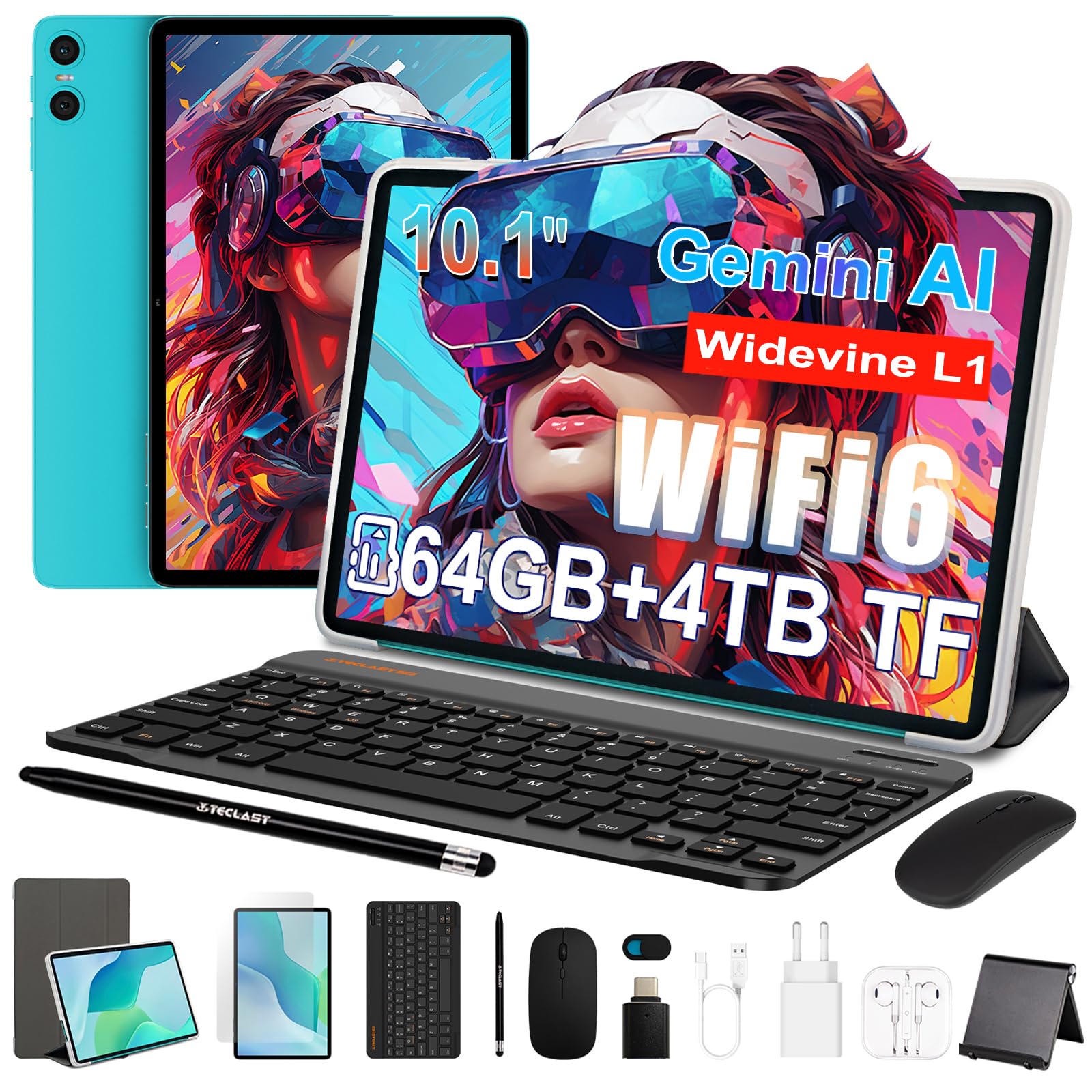
Figure 1: TECLAST P33 10.1-inch Android Tablet
Vsebina paketa
The TECLAST P33 tablet comes with a comprehensive accessory bundle to enhance your user experience. Please verify that all items listed below are included in your package:
- TECLAST P33 Tablet
- Ovitek za tablični računalnik
- Zaščitna folija
- Miška
- Camera Protection Caps
- Bluetooth tipkovnica
- 3.5mm Wired Earphones
- Pisalo
- Stojalo za tablične računalnike
- OTG adapter
- Kabel Type-C
- Polnilec
- Uporabniški priročnik

Figure 2: TECLAST P33 Package Contents
2. Nastavitev
2.1 Začetno polnjenje
Before first use, it is recommended to charge the tablet for at least 30 minutes. Use the provided Type-C cable and charger.
- Connect the Type-C cable to the tablet's charging port.
- Connect the other end of the cable to the charger.
- Polnilnik priključite v električno vtičnico.
- Indikator polnjenja bo zasvetil.

Figure 3: Charging the TECLAST P33 Tablet
2.2 Vklop/izklop
- Za vklop: Pritisnite in držite gumb za vklop, dokler se na zaslonu ne prikaže logotip TECLAST.
- Za izklop: Pritisnite in držite gumb za vklop, dokler se ne prikaže meni za izklop. Izberite »Izklop« in potrdite.
- Za ponovni zagon: V meniju za izklop izberite »Ponovni zagon« in potrdite.
2.3 Vstavljanje kartice MicroSD
The TECLAST P33 supports MicroSD card expansion up to 4TB.
- Poiščite režo za kartico MicroSD na strani tabličnega računalnika.
- Use the provided ejector pin to open the card tray.
- Vstavite kartico MicroSD v reži z zlatimi kontakti obrnjenimi navzdol.
- Pladenj nežno potisnite nazaj v režo, dokler se ne zaskoči.
2.4 Priključitev dodatne opreme
The TECLAST P33 comes with several accessories that can be connected via Bluetooth or physical ports.
- Tipkovnica/miška Bluetooth:
- Vklopite tipkovnico ali miško Bluetooth.
- On the tablet, go to Settings > Connected devices > Bluetooth.
- Enable Bluetooth and scan for available devices.
- Select the keyboard or mouse from the list and follow on-screen pairing instructions.
- 3.5mm Wired Earphones: Plug the earphones into the 3.5mm audio jack on the tablet.
- OTG adapter: The OTG adapter allows you to connect USB devices (like flash drives) to your tablet. Plug the OTG adapter into the Type-C port, then connect your USB device to the adapter.
3. Navodila za uporabo
3.1 Zaslon in uporabniški vmesnik
The TECLAST P33 features a 10.1-inch IPS display with a resolution of 1280x800 pixels. It utilizes T-color 3.0 technology for enhanced color and image detail. The tablet runs on Android 15, offering an intuitive user interface.

Figure 4: TECLAST P33 Display Features
3.2 Zmogljivost in shranjevanje
Powered by an Allwinner A333 Octa-Core processor (up to 2GHz) and an ARM Mali-G57 GPU, the P33 delivers smooth performance for multitasking, video playback, and light gaming. It includes 9GB RAM (3GB LPDDR4 + 6GB expandable memory) and 64GB of internal storage, expandable up to 4TB via MicroSD card.

Slika 5: Podrobnosti o procesorju in grafični kartici

Figure 6: Storage Expansion Capabilities
3.3 Povezljivost
The tablet supports dual-band Wi-Fi 6 (2.4G+5G) for faster connection speeds and lower latency. Bluetooth 5.4 is included for connecting wireless peripherals and supports AAC and LDAC codecs for high-fidelity audio.

Slika 7: Brezžična povezljivost
3.4 Kamera in zvok
The P33 is equipped with a 5MP front camera and a 5MP rear camera, suitable for video calls and capturing everyday moments. It features dual PureSound stereo speakers and an intelligent amplification chip for immersive audio. A 3.5mm audio jack is also available for headphones.

Slika 8: Zvočne funkcije
3.5 Življenjska doba baterije
The 6000mAh battery provides approximately 10-12 hours of online video playback at standard brightness, ensuring extended usage for reading and browsing.
4. Vzdrževanje
4.1 Čiščenje tabličnega računalnika
- Za čiščenje zaslona in ohišja tabličnega računalnika uporabite mehko krpo, ki ne pušča vlaken.
- Za trdovratne madeže rahlo dampkrpo sperite z vodo ali čistilom za zaslone, posebej zasnovanim za elektroniko.
- Izogibajte se uporabi agresivnih kemikalij, abrazivnih materialov ali prekomerne vlage, saj lahko te poškodujejo napravo.
4.2 Posodobitve programske opreme
Redno preverjajte in nameščajte posodobitve programske opreme, da zagotovite optimalno delovanje, varnost in dostop do novih funkcij.
- Pojdite v Nastavitve > Sistem > Posodobitev sistema.
- Sledite navodilom na zaslonu, da preverite in namestite morebitne razpoložljive posodobitve.
4.3 Skrb za baterije
- Izogibajte se pogostemu popolnemu praznjenju baterije.
- Tablete ne izpostavljajte ekstremnim temperaturam (vročini ali mrazu).
- Uporabljajte samo originalni polnilnik ali certificiran združljiv polnilnik.
5. Odpravljanje težav
If you encounter issues with your TECLAST P33 tablet, refer to the following common solutions.
| Težava | rešitev |
|---|---|
| Tablični računalnik se ne vklopi | Prepričajte se, da je baterija napolnjena. Priključite polnilnik in poskusite znova. Če se naprava ne odziva, pritisnite in držite gumb za vklop 10–15 sekund, da se naprava prisili k ponovnemu zagonu. |
| Počasno delovanje | Close unnecessary background applications. Clear cache regularly. Consider performing a factory reset if the issue persists (back up data first). |
| Težave s povezavo Wi-Fi | Znova zaženite tablični računalnik in usmerjevalnik Wi-Fi. Pozabite na omrežje in se znova povežite. Prepričajte se, da ste v dosegu signala Wi-Fi. |
| Naprava Bluetooth se ne seznani | Ensure the Bluetooth device is in pairing mode. Turn Bluetooth off and on again on the tablet. Check if the device is already paired with another device. |
| Zaslon se ne odziva | Znova zaženite tablični računalnik. Če težava ne izgine, se prepričajte, da je zaslon čist in brez umazanije. |
For further assistance, please contact TECLAST customer support.
6. Specifikacije
| Funkcija | Podrobnost |
|---|---|
| Ime modela | TECLAST P33 |
| Velikost zaslona | 10.1 palcev |
| Ločljivost zaslona | 1280x800 Pixels (IPS LCD) |
| Procesor | Allwinner A333 Octa-Core (up to 2 GHz) |
| Grafični koprocesor | Mali-G57 |
| RAM | 9 GB (3GB LPDDR4 + 6GB expandable) |
| Notranji pomnilnik | 64 GB |
| Razširljiv prostor za shranjevanje | Do 4 TB prek MicroSD kartice |
| Operacijski sistem | Android 15 |
| Kapaciteta baterije | 6000 mAh (litijeva polimerna) |
| Življenjska doba baterije (povprečna) | 10 ur |
| Zadnja kamera | 5 MP |
| Sprednja kamera | 5 MP |
| Wi-Fi | 802.11a/b/g/n/ac (Wi-Fi 6, Dual-band 2.4G/5G) |
| Bluetooth | Bluetooth 5.4 |
| Celična tehnologija | 5G (SIM card support not explicitly detailed) |
| Pristanišča | 1x USB-C, 1x 3.5mm Audio Jack, MicroSD Slot |
| Dimenzije (DxŠxT) | Približno 24 x 16 x 0.8 cm |
| Teža | 535 gramov |
| Posebne lastnosti | Gemini AI, Stereo Speakers, USB OTG Support, Stylus Support |
7. Garancija in podpora
7.1 Garancija izdelka
The TECLAST P33 tablet is covered by a limited three-year warranty from the date of purchase. This warranty covers manufacturing defects and ensures product quality. Please retain your proof of purchase for warranty claims.
For the first use, it is recommended to charge the tablet for more than 30 minutes before powering it on.
7.2 Podpora strankam
If you encounter any issues or have questions regarding your TECLAST P33 tablet that are not covered in this manual, please contact TECLAST customer support. Our team is available to assist you and will respond to inquiries within 24 hours.
Kontaktne podatke običajno najdete na uradni spletni strani TECLAST. webspletnem mestu ali prek prodajalca, kjer ste izdelek kupili.