
FULODE Computer Control Adjust The Parameters
FULODE FX-888 Digital Equalizer User Manual
Model: Computer Control Adjust The Parameters
1. Uvod
The FULODE FX-888 is a dual-channel, 31-band digital graphic equalizer designed for precise audio signal processing. It allows users to boost or attenuate specific frequency bands to compensate for room acoustics, modify sound characteristics, and enhance overall audio quality. Featuring a large LED liquid crystal screen and computer control capabilities, the FX-888 offers intuitive operation and versatile compatibility for various audio setups, including home studios, live performances, and professional audio environments.
2. Ključne značilnosti
- Dual-Channel Synchronized Control: Independent control over two audio channels for balanced sound adjustment.
- 31-Band DSP-Processed Equalizer: Fine-tune audio frequencies with 31 individual bands for precise sound shaping.
- LED Spectrum Indication: Real-time visual feedback of frequency levels for accurate monitoring.
- Large LED Liquid Crystal Screen: User-friendly interface displaying operation content and parameters clearly.
- Noise Gate Noise Reduction: Advanced feature to minimize unwanted background noise.
- Vsestranska povezljivost: Supports TRS6.35, RCA Lotus, and XLR CANNON balanced interfaces for broad compatibility.
- Računalniško upravljanje: Adjust parameters and debug the unit via a connected computer for enhanced precision.
- Save and Recall Functions: Store and retrieve multiple custom audio settings (up to 16 modes).
- One-Click Sound Quality Incentive (BBE): Improves clarity, boosts loudness, and reduces listening fatigue.

Figure 2.1: Key features of the FULODE FX-888, highlighting the 31-segment LED spectrum display, noise reduction, DSP processing, and preset memory slots.

Figure 2.2: The FX-888 features a large LED liquid crystal screen for clear display of operation content, offering a significant improvement over older models.
3. Vsebina paketa
Po odprtju paketa preverite, ali so vsi predmeti prisotni in v dobrem stanju:
- FULODE FX-888 Digital Equalizer Unit
- Napajalni kabel
- USB Cable for Computer Connection
- Programski pogon USB
- Uporabniški priročnik (ta dokument)
- Garancijska kartica

Slika 3.1: Spredaj in zadaj views of the FX-888 unit, illustrating its compact design and comprehensive connectivity options.
4. Setup & Connections
Follow these steps to properly connect your FULODE FX-888 Digital Equalizer to your audio system.
4.1 Napajalni priključek
- Prepričajte se, da je stikalo za vklop na zadnji plošči v položaju IZKLOP.
- Connect the provided power cable to the AC input on the rear panel of the equalizer.
- Plug the other end of the power cable into a suitable AC power outlet (110V/60Hz).
4.2 Zvočne povezave
The FX-888 supports multiple input and output interfaces: TRS6.35, RCA Lotus, and XLR CANNON balanced interfaces. Choose the appropriate cables for your setup.

Figure 4.1: Rear panel interfaces, illustrating the diverse input and output options for seamless integration with audio equipment.
- Vhodna povezava: Connect the audio source (e.g., mixer, pre-amplifier) to the INPUT ports (CH-R, CH-L) on the rear panel of the equalizer.
- Izhodna povezava: Connect the OUTPUT ports (OUTPUT R, OUTPUT L) of the equalizer to your power amplifier ali aktivni zvočniki.
4.3 Computer Control Connection
For advanced control and parameter adjustment, connect the equalizer to a computer.
- Insert the provided software USB drive into your computer's USB port. Install the dedicated control software.
- Connect the equalizer to your computer using the supplied USB cable. The USB port is located on the rear panel.

Figure 4.2: Computer connection for software control, enabling precise adjustments and debugging.
4.4 Visual Guide: Sound System Connection
Watch this video for a visual demonstration of connecting the FULODE FX-888 to a sound system.
Video 4.1: Demonstrates the physical connections of the FULODE FX-888 equalizer within an audio setup, including inputs, outputs, and power.
5. Delovanje
The FULODE FX-888 offers both manual and computer-controlled operation. This section covers manual operation using the front panel controls.
5.1 Kontrolniki na sprednji ploščiview

Figure 5.1: Front panel layout and control functions.
- SAVE Key: Click to enter SAVZ storage status. 1-16 memory slots are displayed. Use the function key to switch between slots. Long press to enter RELOAD MODE, and long press again to confirm reset operation.
- RECALL Key: Press briefly to enter RECALL FROM call mode. Select the function key to call out 1-16 memory storage modes. Press and hold the RECALL key for mixed adjustment of EQ parameter status, then press again to exit.
- EQ/BYPASS Button: Click to enter EQ parameter value adjustment content status selection. The content includes EQ FREQ (frequency 20Hz-20KHz) for 31 segment value confirmation adjustment, GAIN for each segment, DELAY for output channel time delay, VOL OUT for output channel volume, HIGH PASS (20Hz-50Hz), and LOW PASS (5KHz-20KHz). Long press to bypass the EQ effect.
- Display Level: Displays and adjusts the dynamic LED input level value for music. Adjusts output 10Hz-20KHz gain by adding or subtracting 31 segments.
- Operation Content Display Screen: Large screen displaying all working parameters in real-time.
- Function Switch Knob (CONTROL/VOL): Turn the knob to adjust input volume. Press to select function.
5.2 Adjusting Equalization
Use the EQ/BYPASS button and the Function Switch Knob to navigate and adjust individual frequency bands. The LED spectrum display will provide visual feedback.

Figure 5.2: Independent adjustment of frequency bands (Bass, Midrange, Soprano) and status indicators.
5.3 Shranjevanje in priklic prednastavitev
Once you have achieved your desired sound, you can save the settings to one of the 16 memory slots using the SAVE key. To load a previously saved setting, use the RECALL key.
5.4 Visual Guide: Basic Operation
This video demonstrates the basic operational functions of the FULODE FX-888, including EQ adjustment, saving, and recalling settings.
Video 5.1: Konecview of the FULODE FX-888's features and operational controls, including EQ adjustments and preset management.
6. Računalniški nadzor
The FULODE FX-888 can be controlled via dedicated software on your computer, offering a more detailed and precise interface for adjustments.
6.1 Namestitev programske opreme
- Insert the provided USB drive labeled "SOFTWARE" into your computer.
- Poiščite in zaženite namestitveni program file na pogonu USB.
- Sledite navodilom na zaslonu, da dokončate namestitev programske opreme.
6.2 Connecting and Debugging
- Ensure the FX-888 is powered on and connected to your computer via the USB cable.
- Launch the installed FULODE control software.
- The software should automatically detect the connected equalizer. If not, refer to the software's help menu for device detection options.
- Use the graphical interface within the software to adjust frequency bands, save presets, and access other advanced settings.
7. Vzdrževanje
To ensure the longevity and optimal performance of your FULODE FX-888, follow these maintenance guidelines:
- Čiščenje: Use a soft, dry cloth to clean the exterior of the unit. Avoid abrasive cleaners or solvents that could damage the finish or screen.
- Prezračevanje: Zagotovite ustrezen pretok zraka okoli enote. Ne blokirajte prezračevalnih odprtin.
- Shranjevanje: When not in use for extended periods, store the equalizer in a cool, dry place, away from direct sunlight and extreme temperatures.
- Ravnanje: Z enoto ravnajte previdno. Pazite, da vam ne pade ali da je ne izpostavljate močnim udarcem.
8. Odpravljanje težav
If you encounter issues with your FULODE FX-888, refer to the following common problems and their solutions:
| Težava | Možen vzrok | rešitev |
|---|---|---|
| Brez moči | Power cable not connected securely; Power switch off; Power outlet malfunction. | Preverite povezave napajalnih kablov; Prepričajte se, da je stikalo za vklop vklopljeno; Preizkusite vtičnico z drugo napravo. |
| Brez izhoda zvoka | Incorrect audio connections; Input/Output volume too low; EQ Bypass active; Mute engaged. | Verify all audio cables are correctly connected to input/output ports; Increase volume levels; Deactivate EQ Bypass; Check for mute status on screen. |
| Izkrivljen zvok | Input signal too high (clipping); Incorrect EQ settings; Faulty cables. | Reduce input signal level; Adjust EQ settings to avoid excessive boosting; Replace audio cables. |
| Computer Software Not Connecting | USB cable not connected; Software not installed correctly; Driver issues; USB drive corrupted. | Ensure USB cable is securely connected to both equalizer and computer; Reinstall software and drivers; Try a different USB port or cable. If the software USB drive is corrupted, contact FULODE support for a digital copy. |
| Display Screen Issues | Loose internal connection; Software glitch. | Power cycle the unit (turn off, wait 10 seconds, turn on). If the issue persists, contact customer support. |
9. Specifikacije
| Parameter | Vrednost |
|---|---|
| Znamka | FULODE |
| Številka modela | Computer Control Adjust The Parameters (FX-888) |
| Teža predmeta | 4.84 funtov (2.2 kilograma) |
| Dimenzije izdelka | 19 x 6.96 x 1.96 palcev |
| Število kanalov | 2 (Dvokanalni) |
| Frekvenčni pasovi | 31-pasovni |
| Razmerje med signalom in hrupom | 92 dB |
| Vhodna impedanca linije | 15KΩ |
| Linijska izhodna impedanca | 300Ω |
| Način napajanja | 110 V (žična elektrika) |
| Frekvenčni odziv | 20Hz-20KHz |
| Tehnologija povezljivosti | Žično |
| barva | Črna |
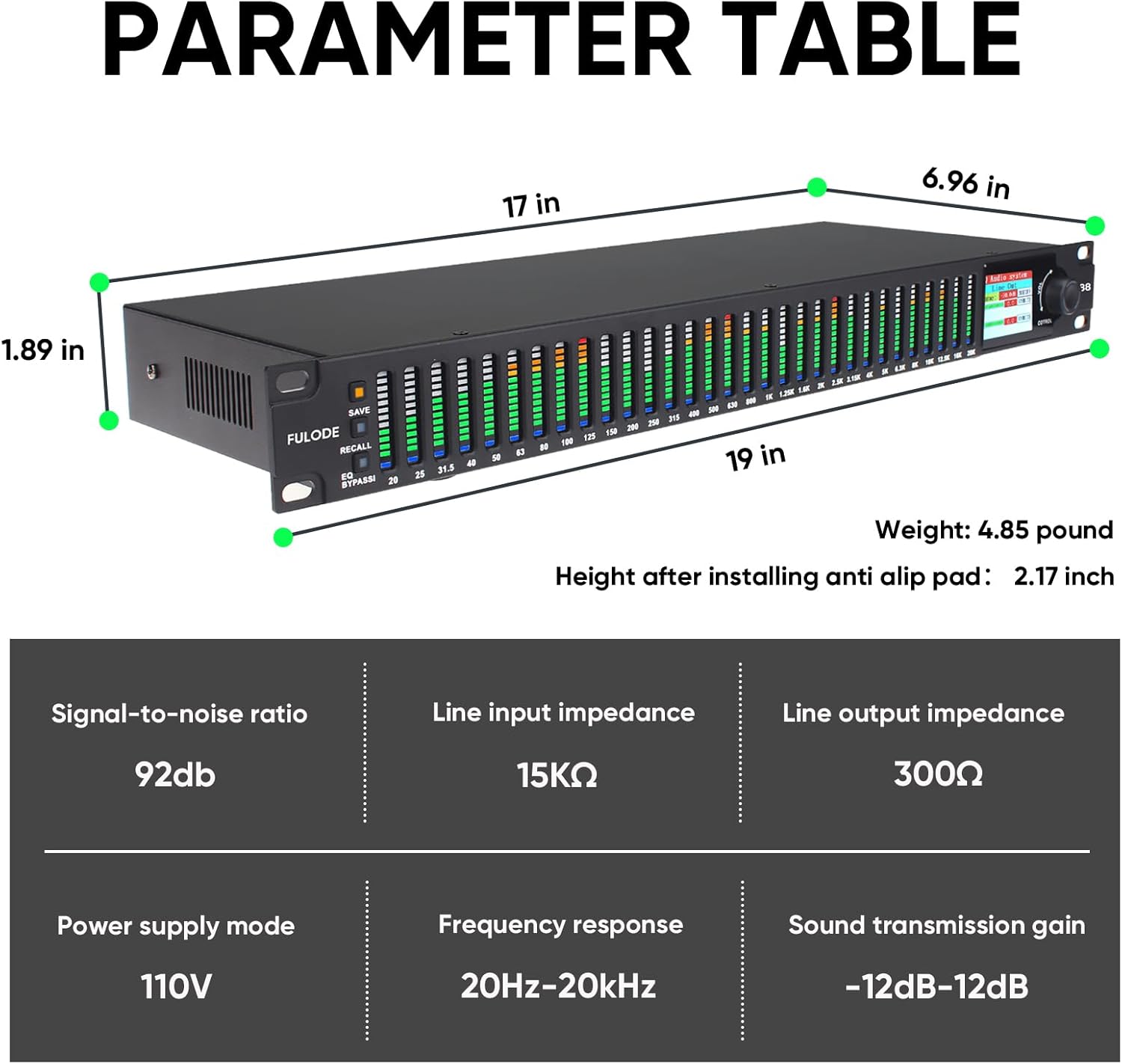
Figure 9.1: Detailed dimensions and technical parameters of the FX-888.
10. Garancija in podpora
FULODE products are manufactured to high-quality standards. For warranty information, technical support, or service inquiries, please refer to the warranty card included in your package or visit the official FULODE webspletnega mesta. Račun shranite kot dokazilo o nakupu za uveljavljanje garancije.
Za dodatno podporo lahko obiščete FULODE Store on Amazon.
Ask a question about this manual
Ask about setup, troubleshooting, compatibility, parts, safety, or missing instructions. Manuals+ will review the question and use this page’s manual context to help answer it.