
Uvod
Thank you for choosing the SOMIC MS300 Over-Ear Wireless Bluetooth Headphones. This manual provides essential information for setting up, operating, and maintaining your headphones to ensure optimal performance and longevity. Please read this manual thoroughly before using the product.
Vsebina paketa
- SOMIC MS300 Over-Ear Wireless Bluetooth Headphones
- USB polnilni kabel
- 3.5 mm avdio kabel
- Uporabniški priročnik (ta dokument)
Konec izdelkaview
Familiarize yourself with the various components and controls of your SOMIC MS300 headphones.
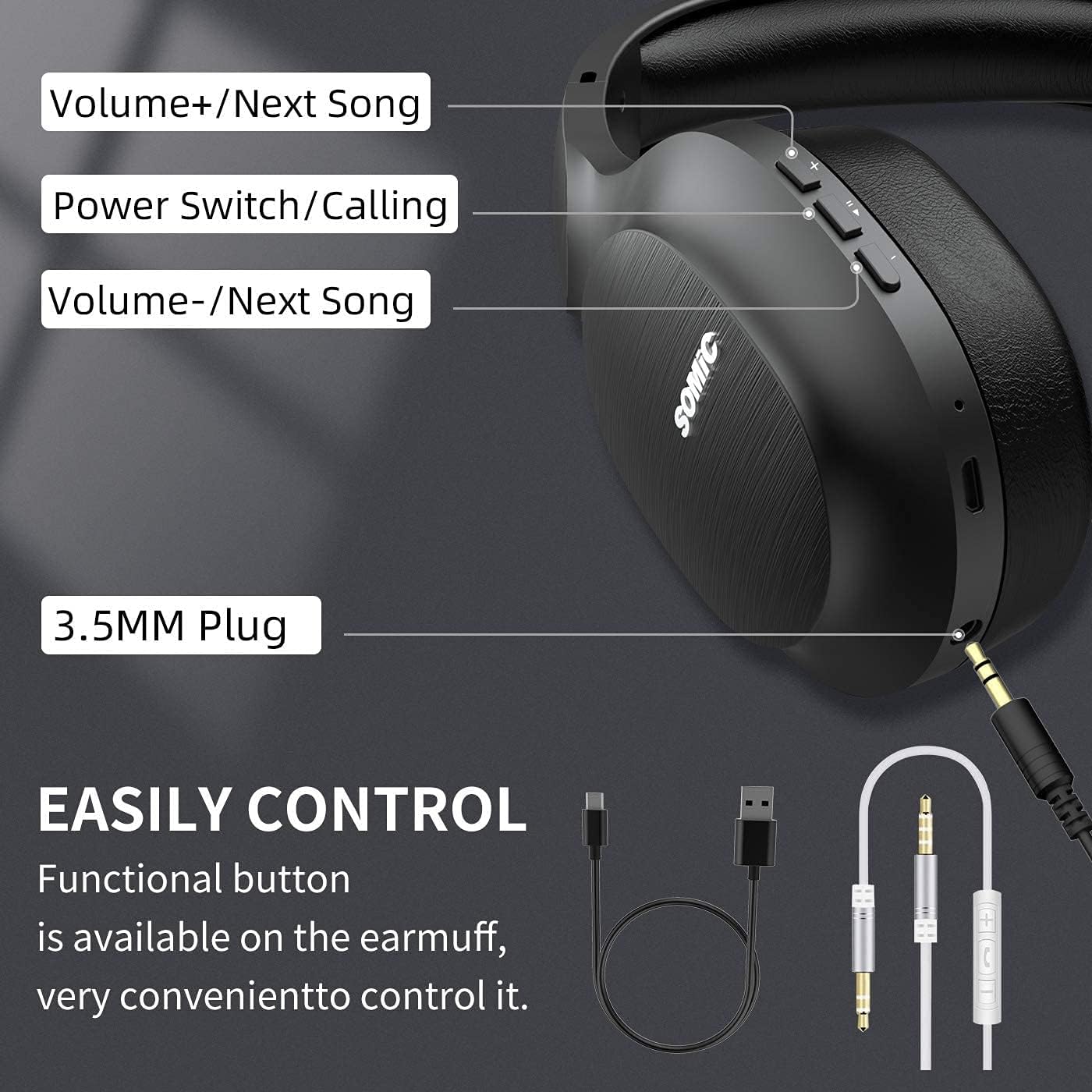
Slika: konecview of the SOMIC MS300 headphone controls, including volume buttons, power switch, and 3.5mm audio jack.
Kontrole in vrata
- Glasnost + / Naslednja pesem: Press briefly to increase volume, press and hold to skip to the next song.
- Power Switch / Calling: Press and hold to power on/off. Briefly press to play/pause music. During a call, press to answer/end a call.
- Glasnost - / Prejšnja pesem: Press briefly to decrease volume, press and hold to go to the previous song.
- 3.5 mm avdio priključek: Za žično povezavo z uporabo priloženega 3.5 mm avdio kabla.
- Vrata za polnjenje USB: For charging the headphones using the included USB cable.
- Mikrofon: Vgrajeno za prostoročno klicanje.
Nastavitev
Polnjenje slušalk

Slika: The SOMIC MS300 headphones illustrating the fast charging capability: 5 minutes of charge provides 2 hours of playback.
- Manjši konec polnilnega kabla USB priključite na polnilni priključek USB na slušalkah.
- Večji konec polnilnega kabla USB priključite na napajalnik USB (ni priložen) ali na vrata USB računalnika.
- LED indikator bo prikazoval stanje polnjenja (npr. rdeča za polnjenje, modra za polno napolnjenost).
- A full charge takes approximately 2-3 hours. For quick use, a 5-minute charge provides up to 2 hours of playtime.

Slika: The SOMIC MS300 headphones highlighting their strong endurance with up to 72 hours of playtime on a single charge.
Vklop/izklop
- Za vklop: Press and hold the Power Switch button for approximately 3 seconds until the LED indicator flashes blue.
- Za izklop: Press and hold the Power Switch button for approximately 3 seconds until the LED indicator turns off.
Bluetooth združitev
- Prepričajte se, da so slušalke izklopljene.
- Press and hold the Power Switch button for about 5-7 seconds until the LED indicator flashes red and blue alternately, indicating pairing mode.
- V napravi (pametnem telefonu, tablici, računalniku) omogočite Bluetooth in poiščite razpoložljive naprave.
- Select "SOMIC MS300" from the list of devices.
- Ko je priključen, LED indikator počasi utripa modro.
Wired Connection (3.5mm Audio Cable)

Slika: The SOMIC MS300 headphones demonstrating their versatility with both wireless Bluetooth connectivity and a wired option via a 3.5mm audio cable.
The SOMIC MS300 headphones can also be used with a wired connection, even if the battery is depleted.
- En konec 3.5 mm avdio kabla priključite na 3.5 mm avdio priključek na slušalkah.
- Drugi konec 3.5 mm avdio kabla priključite na avdio izhod na vaši napravi.
- The headphones will automatically switch to wired mode. Bluetooth functionality will be disabled.
Navodila za uporabo
Predvajanje glasbe
- Predvajanje/pavza: Na kratko pritisnite gumb za vklop/izklop.
- Povečaj glasnost: Briefly press the Volume + button.
- Znižaj glasnost: Briefly press the Volume - button.
- Naslednja skladba: Pritisnite in držite gumb za povečanje glasnosti.
- Prejšnja skladba: Pritisnite in držite gumb za glasnost -.
Telefonski klici
- Sprejmi/končaj klic: Na kratko pritisnite gumb za vklop/izklop.
- Zavrni klic: Press and hold the Power Switch button for 2 seconds.
- Ponovno klicanje zadnje številke: Double-press the Power Switch button.
Povezava dvojne naprave
The SOMIC MS300 headphones support connecting to two Bluetooth devices simultaneously.
- Slušalke priključite na prvo napravo, kot je opisano v razdelku »Združevanje prek Bluetootha«.
- Onemogočite Bluetooth na prvi napravi. Slušalke bodo znova prešle v način seznanjanja.
- Slušalke priključite na drugo napravo.
- Ponovno omogočite Bluetooth na prvi napravi. Slušalke bi se morale samodejno ponovno povezati z obema napravama.
- Zvok se bo predvajal iz naprave, ki aktivno predvaja medije ali sprejema klic.
Noise Cancellation (CVC 8.0)

Slika: A person wearing SOMIC MS300 headphones in a public setting, demonstrating the effectiveness of CVC Noise Cancelling Technology in reducing ambient noise.
The SOMIC MS300 headphones feature CVC 8.0 noise cancelling technology, which helps reduce ambient noise during calls for clearer communication. This feature is automatically active when using the built-in microphone.
Vzdrževanje
Čiščenje
- Slušalke obrišite z mehko, suho krpo, ki ne pušča vlaken.
- Ne uporabljajte abrazivnih čistil, topil ali čistil v spreju.
- Izogibajte se vdoru vlage v morebitne odprtine.
Shranjevanje
- Slušalke shranjujte na hladnem in suhem mestu, stran od ekstremnih temperatur in neposredne sončne svetlobe.
- Ko slušalk dlje časa ne uporabljate, jih napolnite vsaj enkrat na tri mesece, da podaljšate življenjsko dobo baterije.
Skrb za baterijo
- Ne poskušajte sami zamenjati baterije. Za težave, povezane z baterijo, se obrnite na podporo strankam.
- Izogibajte se pogostemu popolnemu praznjenju baterije, saj lahko to skrajša njeno celotno življenjsko dobo.
Odpravljanje težav
| Težava | Možna rešitev |
|---|---|
| Slušalke se ne vklopijo. | Prepričajte se, da so slušalke napolnjene. Priključite jih na vir napajanja s kablom USB. |
| Seznanitev z napravo ni mogoča. | Ensure headphones are in pairing mode (LED flashing red and blue). Turn off and on Bluetooth on your device. Move headphones closer to the device. |
| Ni zvoka ali nizka glasnost. | Check volume levels on both headphones and the connected device. Ensure headphones are properly paired or the 3.5mm cable is fully inserted. |
| Kakovost zvoka je slaba. | Move closer to the connected device to avoid interference. Ensure there are no obstacles between the headphones and the device. |
| Mikrofon ne deluje. | Ensure the headphones are connected via Bluetooth. Check microphone settings on your device. |
Specifikacije

Slika: Eksplodiral je view of the 40mm dynamic driver and the Qualcomm QCC Bluetooth 5.0 chip, highlighting the audio technology within the SOMIC MS300 headphones.
| Funkcija | Podrobnost |
|---|---|
| Model | MS300 |
| Znamka | SOMIC |
| Povezljivost | Wireless (Bluetooth 5.0), Wired (3.5mm Audio Jack) |
| Bluetooth čip | Qualcomm QCC Bluetooth 5.0 |
| Velikost gonilnika | 40 mm dinamični gonilniki |
| Nadzor hrupa | CVC 8.0 Odpravljanje hrupa |
| Kapaciteta baterije | 1000 mAh |
| Igralni čas | Do 72 ur |
| Hitro polnjenje | 5 minut polnjenja za 2 uri predvajanja |
| Material ušesnih blazinic | Memory Foam Protein |
| Teža | 208 g |
| barva | Črna |
| Vodoodpornost | Ni vodoodporen |
Garancija in podpora
Informacije o garanciji
SOMIC products are designed and manufactured to the highest quality standards. This product is covered by a limited warranty from the date of purchase. Please refer to the warranty card included in your package for specific terms and conditions. Keep your proof of purchase for warranty claims.
Podpora uporabnikom
If you encounter any issues or have questions regarding your SOMIC MS300 headphones, please contact our customer support team. Contact details can typically be found on the warranty card or the official SOMIC website. Please have your model number (MS300) and purchase information ready when contacting support.