
1. Uvod
Hvala za nakupasing the MONODEAL Portable CD Player. This device is designed for personal and portable audio playback, featuring built-in speakers, anti-skip protection, and dual headphone jacks. This manual provides detailed instructions for setup, operation, maintenance, and troubleshooting to ensure optimal performance and longevity of your CD player.

Image: The MONODEAL Portable CD Player, a compact black device with a clear top cover and control buttons on the front.
2. Kaj je v škatli
Prosimo, preverite vsebino paketa in se prepričajte, da so prisotni vsi elementi:
- CD predvajalnik
- Slušalke
- USB polnilni kabel
- Aux kabel
- Uporabniški priročnik

Image: The MONODEAL CD Player, its packaging, and all included accessories: earphones, USB charging cable, and aux cable.
3. Izdelek je končanview
Familiarize yourself with the various parts and controls of your CD player:
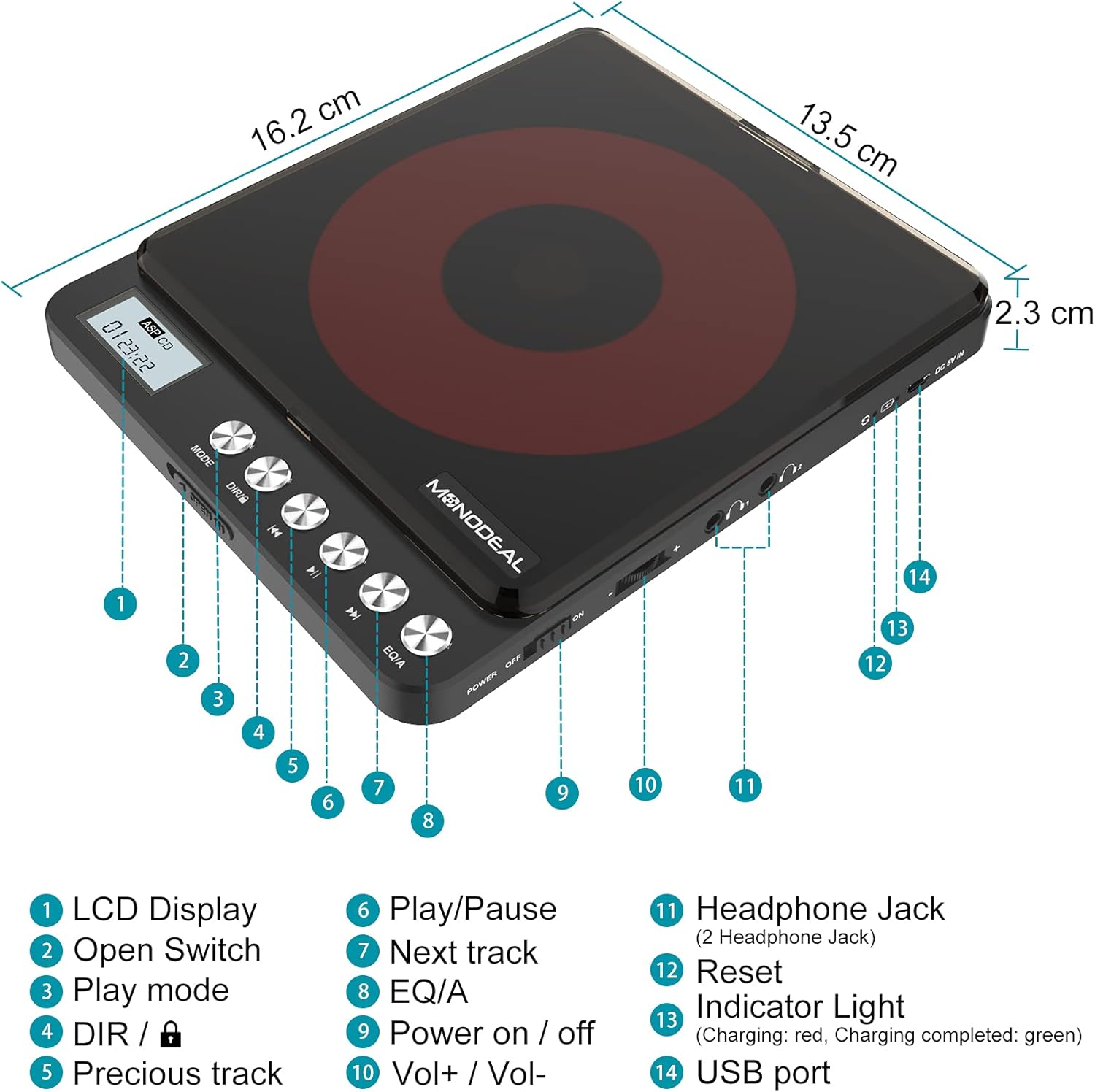
Image: A detailed diagram of the MONODEAL Portable CD Player, highlighting its various components with numbered labels.
- LCD zaslon: Prikazuje številko skladbe, čas in stanje predvajanja.
- Open Switch: Used to open the CD compartment.
- Način predvajanja: Cycles through playback modes (e.g., repeat, random).
- DIR / Lock: Directory navigation for MP3 CDs / Key lock function.
- Prejšnja skladba: Preskoči na začetek trenutne ali prejšnje skladbe.
- Predvajanje/pavza: Zažene ali zaustavi predvajanje.
- Naslednja skladba: Preskoči na naslednjo skladbo.
- EQ/A: Equalizer settings / Anti-skip function indicator.
- Vklop/izklop: Glavno stikalo za napajanje.
- Glasnost+ / Glasnost-: Nadzor glasnosti.
- Headphone Jack (2 Headphone Jacks): Audio output for headphones.
- Ponastaviti: Recessed button to reset the device (requires a thin object like a needle).
- Indikatorska lučka: Shows charging status (red for charging, green for fully charged).
- Vrata USB: Za polnjenje naprave.
4. Nastavitev
4.1 Polnjenje naprave
The CD player has a built-in rechargeable battery. Before first use, fully charge the device. A full charge provides up to 15 hours of playback.
- Connect the supplied USB charging cable to the USB port (14) on the CD player.
- Connect the other end of the USB cable to a power adapter, car charger, laptop, or power bank.
- The indicator light (13) will show red during charging and turn green when fully charged.
- Polnjenje običajno traja približno 4 uri.

Image: The MONODEAL CD Player being charged via various methods including a power bank, power adapter, laptop, and car charger.
4.2 Connecting to External Audio Systems
You can connect the CD player to external speakers, car audio systems, or home stereos using the provided 3.5mm AUX cable.
- Insert one end of the 3.5mm AUX cable into one of the headphone jacks (11) on the CD player.
- Insert the other end of the AUX cable into the 3.5mm auxiliary input port of your car stereo or external sound system.
- Opomba: The CD player is not compatible with car's USB ports or Bluetooth connections for audio output. An AUX port is required.
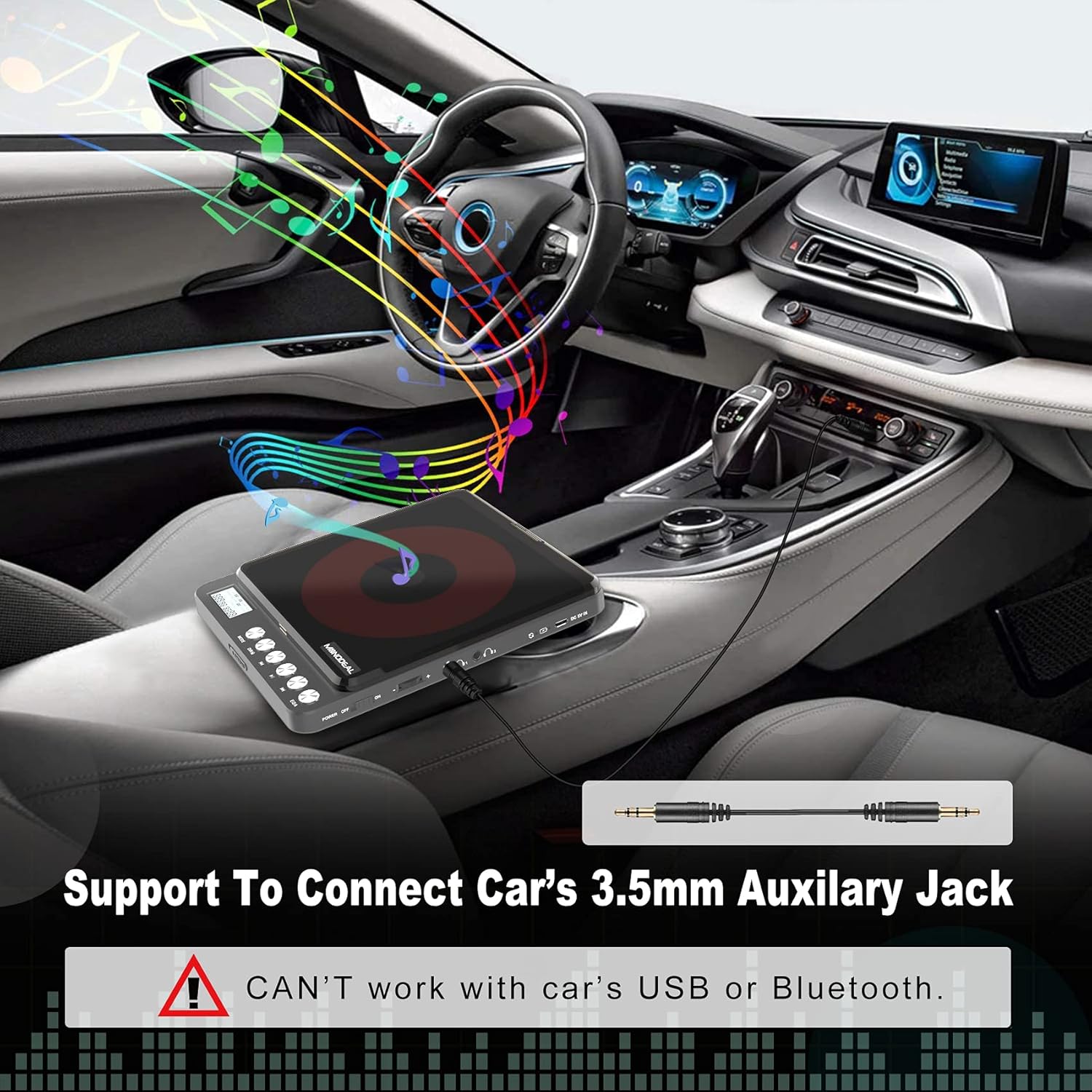
Image: The MONODEAL CD Player connected to a car's dashboard via a 3.5mm auxiliary cable, illustrating its use in a vehicle.
5. Navodila za uporabo
5.1 Osnovno predvajanje
- Slide the Power On/Off switch (9) to the "ON" position.
- Press the Open Switch (2) to open the CD compartment.
- Carefully place a compatible CD (CD, MP3, CD-R, CD-RW, HDCD) onto the spindle, ensuring it is seated correctly.
- Zaprite predal za CD.
- The LCD display (1) will show "READ" and then the total number of tracks and total playback time.
- Press the Play/Pause button (6) to start playback.
- Adjust the volume using the Vol+ / Vol- controls (10).
- To pause, press the Play/Pause button (6) again. Press again to resume.
- To skip to the next track, press the Next Track button (7).
- To go back to the previous track or the beginning of the current track, press the Previous Track button (5).
- To turn off the player, slide the Power On/Off switch (9) to the "OFF" position. The player will remember the last played position if a disc remains inside.
5.2 Načini predvajanja
Press the Play Mode button (3) repeatedly to cycle through different playback modes:
- Igrajte po vrsti: Plays tracks sequentially.
- Repeat a track: Ponavlja trenutno skladbo.
- Ponovi vse: Ponavlja vse skladbe na disku.
- Uvod: Predvaja prvih 10 sekund vsake skladbe.
- Shuf (Shuffle): Predvaja skladbe v naključnem vrstnem redu.

Image: A visual representation of the five play modes available on the MONODEAL CD Player, including play in order, repeat track, repeat all, intro, and shuffle.
5.3 Dual Headphone Jacks
The MONODEAL CD Player is equipped with two headphone jacks (11), allowing two users to listen simultaneously. Simply plug two sets of headphones into the available jacks.

Image: Two individuals sharing the MONODEAL CD Player using both headphone jacks, emphasizing the dual listening feature.
5.4-palčni vgrajeni zvočniki
For listening without headphones, the CD player features built-in stereo speakers. The sound quality is suitable for personal listening in quiet environments. The maximum volume of the internal speakers is designed for portability and may not be as loud as larger audio systems.

Image: The MONODEAL CD Player with an overlay indicating the location of its built-in dual speakers, shown in a setting with people dancing to music.
6. Vzdrževanje
- Keep the CD player clean by wiping it with a soft, dry cloth.
- Ne uporabljajte abrazivnih čistil ali topil.
- Regularly clean the disc and the optical pickup lens of the CD player with a dry, lint-free cloth.
- Naprave ne izpostavljajte ekstremnim temperaturam, vlagi ali neposredni sončni svetlobi.
- Store the player in a cool, dry place when not in use.
7. Odpravljanje težav
| Težava | Možen vzrok | rešitev |
|---|---|---|
| CD preskakuje ali se ne predvaja. | Disc is dirty, scratched, or incompatible format. Low battery. |
|
| No sound from internal speakers. | Volume too low. Headphones plugged in. |
|
| No sound when connected to car/external speakers. | Incorrect connection. Car/external system not set to AUX input. |
|
| Predvajalnik se ne vklopi. | Low battery. Power switch off. |
|
8. Specifikacije
| Funkcija | Podrobnost |
|---|---|
| Ime modela | CW705 |
| Dimenzije izdelka | 6.1 x 5.1 x 1.1 palcev |
| Teža predmeta | 1.3 funtov |
| barva | Črna |
| Tehnologija povezljivosti | Pomožni |
| Posebna funkcija | Portable, Built-in Speakers, Anti-Skip, Dual Headphone Jacks, Rechargeable |
| Podprti formati diskov | CD, MP3, CD-R, CD-RW, HDCD |
| Podprti glasbeni formati | CD-DA, MP3, WMA |
| Življenjska doba baterije | Up to 15 hours playback (after full charge) |

Image: The MONODEAL CD Player highlighting its 2000mAh built-in rechargeable battery for up to 15 hours of playback, and listing supported disc and music formats.
9. Garancija in podpora
For warranty information or further assistance, please refer to the official MONODEAL website or contact customer support through your purchase platform. A digital version of this user manual is also available for download at: MONODEAL User Manual PDF.