
plustek 8200i SE
Uporabniški priročnik za skener filmov in diapozitivov Plustek OpticFilm 8200i SE
Model: 8200i SE | Brand: Plustek
Uvod
This manual provides comprehensive instructions for the setup, operation, and maintenance of your Plustek OpticFilm 8200i SE Film & Slide Scanner. The OpticFilm 8200i SE is designed for high-resolution scanning of 35mm negative film and mounted slides, featuring a built-in infrared channel for dust and scratch detection and removal.

Image: The Plustek OpticFilm 8200i SE scanner shown with included 35mm negative film stripe holders and a mounted slide holder.
Vsebina paketa
Preverite, ali so v vašem paketu priloženi vsi spodaj navedeni elementi:
- Plustek OpticFilm 8200i SE Scanner
- Napajalni adapter
- USB kabel
- 35mm Negative Film Stripe Holder (x2 kits, total 4 holders)
- Montirano držalo za diapozitive
- Kratek vodnik
- Software DVD (SilverFast SE Plus 8)
- Torba za prenašanje
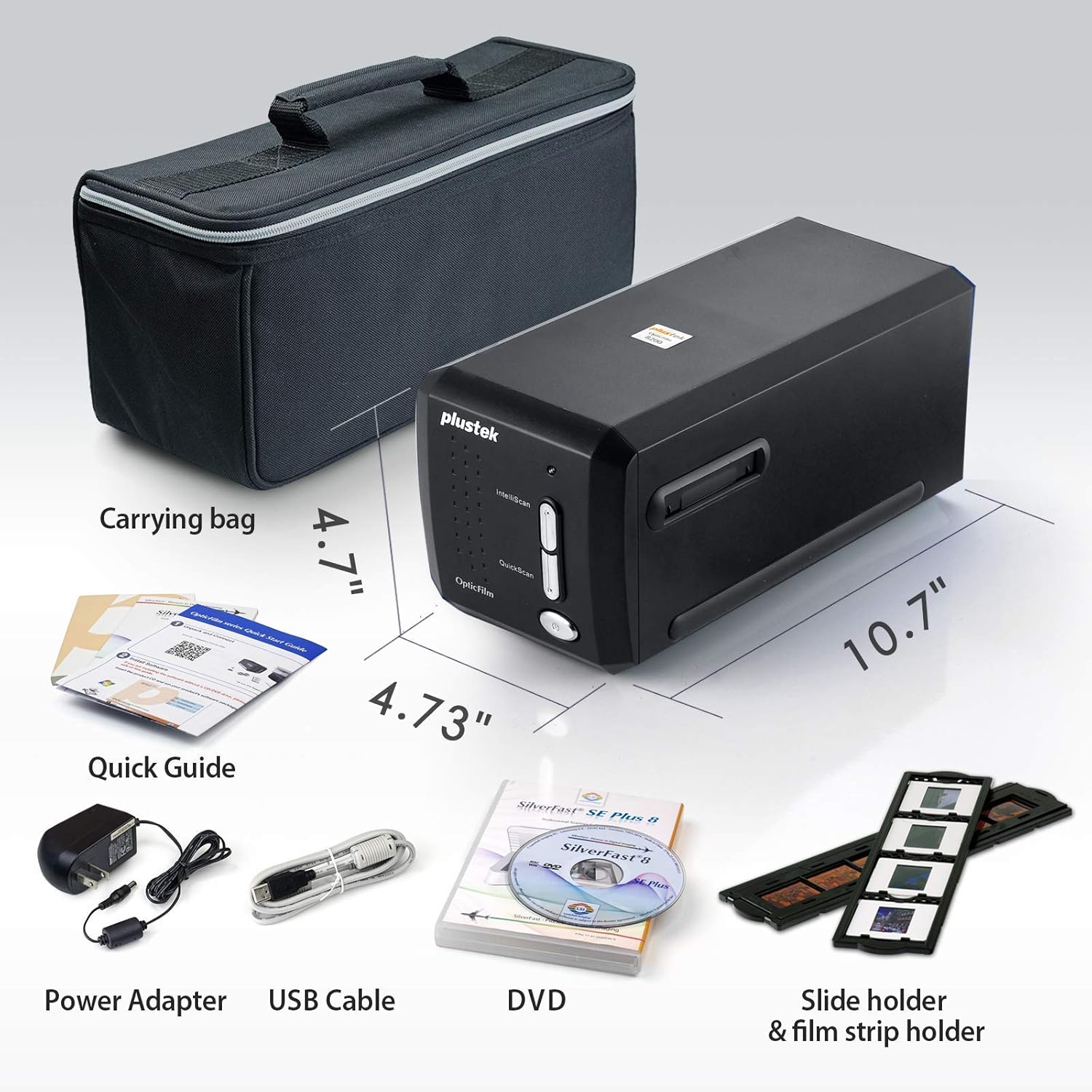
Image: All components included in the Plustek OpticFilm 8200i SE package, including the scanner, power adapter, USB cable, software DVD, quick guide, carrying bag, and film/slide holders.
Nastavitev
- Povezava strojne opreme:
- Priključite napajalnik na skener in nato v električno vtičnico.
- Priključite kabel USB iz optičnega bralnika v prosta vrata USB na računalniku.
- Namestitev programske opreme:
- Insert the provided SilverFast SE Plus 8 software DVD into your computer's optical drive.
- Follow the on-screen instructions to install the software and necessary drivers.
- If your computer does not have an optical drive, or for the latest drivers, download them from the official Plustek website. The scanner supports Windows 7/8/10/11 and Mac OS 10.12 ~ 11.x.
- SilverFast License Registration:
- After installation, launch the SilverFast software.
- You will be prompted to register your free SilverFast license. Follow the steps provided, which typically involve entering your scanner's hardware serial number.

Image: A visual guide demonstrating the steps for registering the SilverFast software license, including locating the serial number and inputting registration details.
Navodila za uporabo
Loading Film/Slides:
- For 35mm negative film strips, carefully insert the film into the 35mm Negative Film Stripe Holder. Ensure the film is flat and correctly aligned.
- For mounted slides, place the slide into the Mounted Slide Holder.
- Vstavite napolnjeno držalo v režo za film v optičnem bralniku.

Image: Two 35mm negative film holders, designed to securely hold film strips for scanning with the OpticFilm 8200i SE.
Scanning Process with SilverFast:
- Launch the SilverFast SE Plus 8 software.
- Select the appropriate film type (negative or slide) and film profile znotraj programske opreme.
- Uporabite predview function to adjust scanning area and settings.
- iSRD (infrardeče pametno odstranjevanje napak): The scanner features a built-in infrared channel to detect and remove dust and scratches. Enable this function in the SilverFast software for optimal results.
- Multi-Exposure Function: For improved image quality and dynamic range, enable the Multi-Exposure feature in the software. This captures multiple exposures to enhance detail in highlights and shadows.
- Adjust other settings such as resolution (up to 7200 dpi), color depth (48-bit input), and image enhancements as needed.
- Initiate the scan. The scanned image will appear in the software interface.
- Save your scanned image in your desired format (e.g., TIFF, JPEG).

Image: A diagram illustrating how the infrared channel detects dust and scratches on film, showing the original source image, infrared scan, marker for defects, and the final corrected result.

Image: Screenshot of the SilverFast SE Plus 8 software interface, highlighting the iSRD (Infrared Dust and Scratch Removal) feature and its controls.

Slika: npramples demonstrating the effects of SilverFast NegaFix for film profiles, iSRD for defect removal, and Multi-Exposure for increased dynamic range, showing before and after comparisons.
Vzdrževanje
- Čiščenje optičnega bralnika: Use a soft, lint-free cloth to gently wipe the exterior of the scanner. Do not use liquid cleaners or abrasive materials.
- Cleaning Film/Slides: Before scanning, ensure your film and slides are free of dust and fingerprints. Use a soft brush or compressed air designed for photographic materials. Avoid touching the film surface directly.
- Shranjevanje: When not in use, store the scanner in a clean, dry, and dust-free environment, preferably in its original packaging or the provided carrying bag.
Odpravljanje težav
Pogoste težave in rešitve:
- Optični bralnik ni zaznan:
- Prepričajte se, da je kabel USB varno priključen tako na optični bralnik kot na računalnik.
- Verify the power adapter is connected and the scanner is powered on.
- Reinstall the scanner drivers from the Plustek webmesto.
- Poskusite druga vrata USB na vašem računalniku.
- Dust/Scratches on Scans:
- Ensure the film/slides are clean before scanning.
- Activate and properly configure the iSRD (Infrared Smart Removal of Defects) function in the SilverFast software. This feature is specifically designed to address dust and scratches.
- Poor Image Quality (Low Dynamic Range, Lack of Detail):
- Ensure the film/slide is correctly loaded and flat in the holder.
- Utilize the Multi-Exposure function in SilverFast to capture more detail in highlights and shadows.
- Check and adjust exposure, contrast, and color settings in the SilverFast software.
- Ensure you are scanning at an appropriate resolution for your needs (e.g., 7200 dpi for maximum detail).
- Zrušitve ali zamrznitve programske opreme:
- Ensure your operating system meets the minimum system requirements (Windows 7 or later, Mac OS 10.12 or later).
- Update your SilverFast software and scanner drivers to the latest versions from the Plustek webmesto.
- Close other demanding applications while scanning.
Specifikacije
| Funkcija | Opis |
|---|---|
| Ime modela | OpticFilm 8200i SE |
| Vrsta optičnega bralnika | Film (35mm Negative & Mounted Slides) |
| Optična ločljivost | 7200 dpi |
| Dinamični razpon | Up to 3.6 Dmax |
| Barvna globina | 48-bit input, 24/48-bit output |
| Vir svetlobe | LED |
| Vrsta senzorja | CCD |
| Povezljivost | USB |
| Infrared Channel | Yes (for dust and scratch removal) |
| Podprt OS | Windows 7/8/10/11, Mac OS 10.12 ~ 11.x |
Garancija in podpora
Za podrobne informacije o garanciji glejte garancijski list, ki je priložen izdelku, ali obiščite uradno spletno stran Plustek. website. Plustek provides technical support and driver updates through their webmesto.
Official Plustek Webspletno mesto: www.plustek.com
It is recommended to regularly check the Plustek website for the latest software updates and support resources to ensure optimal performance of your scanner.
Povezani dokumenti - 8200i SE
 |
Uporabniški priročnik za skener Plustek OpticFilm 8100/8200i Comprehensive user guide for the Plustek OpticFilm 8100, 8200i SE, and 8200i Ai film and slide scanners. Includes setup, installation, software configuration, and troubleshooting. |
 |
Plustek OpticFilm Series Hitri vodnik za začetek: Nastavitev in namestitev programske opreme Kratek vodnik za nastavitev in namestitev programske opreme za filmske skenerje serije Plustek OpticFilm, vključno z navodili za odklepanje programa SilverFast in pogostimi nasveti za odpravljanje težav. |
 |
Plustek OpticFilm 135 Series Quick Start Guide Quick start guide for the Plustek OpticFilm 135 series film scanner, covering installation, preference settings, film holder insertion, scanning, editing, and troubleshooting. |
 |
Uporabniški priročnik za skener Plustek OpticFilm 135/135i Ta uporabniški priročnik vsebuje obsežna navodila za skener Plustek OpticFilm 135/135i, ki zajemajo nastavitev, namestitev, delovanje, funkcije skeniranja, odpravljanje težav in specifikacije za pretvorbo 35-milimetrskega filma in diapozitivov v digitalno obliko. |
 |
Plustek OpticFilm 120 Quick Guide Obsežen hitri vodnik za filmski skener Plustek OpticFilm 120, ki zajema nastavitev, namestitev, uporabo programske opreme s SilverFast in nasvete za odpravljanje težav. |
 |
Uporabniški priročnik za skener Plustek OpticFilm 120 Pro Obsežen uporabniški priročnik za skener Plustek OpticFilm 120 Pro, ki zajema namestitev, nastavitev programske opreme (SilverFast), delovanje, vzdrževanje, odpravljanje težav in specifikacije. |
Ask a question about this manual
Ask about setup, troubleshooting, compatibility, parts, safety, or missing instructions. Manuals+ will review the question and use this page’s manual context to help answer it.