
1. Uvod
This manual provides essential information for the safe and efficient use of your OnePlus Nord N100 LTE smartphone. Please read this guide thoroughly before operating your device to ensure optimal performance and longevity. Keep this manual for future reference.
2. Izdelek je končanview
The OnePlus Nord N100 LTE (Model BE2012) is a feature-rich smartphone designed for daily communication and entertainment. Key features include a 13MP Triple Camera System, an 8MP Front Camera, a large 90Hz display for immersive viewing, 4GB RAM, and 64GB of internal storage. It operates on Android 10 and is factory unlocked for major GSM carriers like T-Mobile, Sprint, and AT&T.

Image 2.1: Front and Rear View of the OnePlus Nord N100 LTE Smartphone. The device features a punch-hole display on the front and a triple camera setup with a fingerprint sensor on the back.

Image 2.2: Diagram highlighting key features of the OnePlus Nord N100, including the 6.52" HD+ LCD Display, Triple Camera System, 64 GB built-in storage, 18W Fast Charging, and Large 5000mAh battery.
3. Nastavitev
3.1 Vstavljanje SIM in SD kartice
- Poiščite pladenj za kartico SIM na strani naprave.
- Use the SIM ejector tool (not included in renewed package) to open the tray.
- Vstavite kartico(-e) Nano-SIM in/ali kartico microSD v reži in pazite na pravilno usmerjenost.
- Pladenj nežno potisnite nazaj v napravo, dokler se ne zaskoči.
3.2 Začetni vklop
- Press and hold the Power button (located on the side) until the OnePlus logo appears.
- Sledite navodilom na zaslonu, da dokončate začetno nastavitev, vključno z izbiro jezika, povezavo Wi-Fi in nastavitvijo Google Računa.
4. Upravljanje vaše naprave
4.1 Osnovna navigacija
- Zaslon na dotik: Dotaknite se za izbiro, podrsnite za pomikanje, ščipnite za povečavo.
- Gumb za vklop: Press to lock/unlock the screen. Press and hold for power options.
- Gumbi za glasnost: Prilagodite glasnost medijev, glasnost melodije zvonjenja in glasnost alarma.
- Senzor prstnih odtisov: Located on the rear of the device for secure unlocking.
4.2 Funkcije zaslona
The OnePlus Nord N100 features a 6.52-inch HD+ LCD display with a 90Hz refresh rate, providing a smooth visual experience for scrolling and gaming. The display resolution is 1920 x 1080 pixels.
5. Funkcije kamere
Capture your moments with the versatile camera system.
5.1 Sistem zadnje kamere
- Glavna kamera: 13MP sensor for clear and detailed photos.
- Makro objektiv: 2MP dedicated lens for close-up shots.
- Senzor globine: 2MP sensor for enhanced portrait mode with background blur.
5.2 sprednja kamera
Sprednja kamera s 8 MP je idealna za selfije in video klice.

Image 5.1: Diagram illustrating the triple camera system of the OnePlus Nord N100, detailing the 13MP Main Camera, Macro Lens, and Specialized Camera (Depth Sensor).
6. Upravljanje baterije
Naprava je opremljena s 5000 Milliamp Hours (mAh) Lithium Polymer battery, providing long-lasting power for extended use. Charging is facilitated via the USB-C port.
6.1 Polnjenje
- Connect the provided USB Cable and Adapter to your device and a power outlet.
- Ensure you use the original or certified compatible charging accessories for optimal performance and safety.
7. Povezljivost
- Brezžični operater: Unlocked for all major GSM carriers (T-Mobile, Sprint, AT&T). Not compatible with Cricket, Xfinity, Visible, or other CDMA networks. Verify carrier frequency compatibility.
- Tehnologije povezljivosti: USB (Type-C).
- Brezžične komunikacijske tehnologije: Cellular, Wi-Fi, Bluetooth.
- GPS: Integrated GPS functionality for location services.
- Zvočni priključek: No traditional headphone jack. Audio output is via USB-C or Bluetooth.
8. Specifikacije
| Funkcija | Podrobnost |
|---|---|
| Ime modela | BE2012 |
| Znamka | OnePlus |
| Operacijski sistem | Android 10.0 |
| RAM | 4 GB |
| Zmogljivost pomnilnika | 64 GB |
| Velikost zaslona | 6.52 palcev |
| Resolucija | 1920 x 1080 |
| Hitrost osveževanja | 90 hercev |
| Model procesorja | Snapdragon |
| Kapaciteta baterije | 5000 milliamp ure |
| Teža predmeta | 11.3 unč |
| barva | Midnight Frost |
9. Vzdrževanje
9.1 Posodobitve programske opreme
Your device runs on Android 10.0. Periodically check for software updates in the device settings to ensure optimal performance, security, and access to new features. Available storage may be less due to device software updates and app usage.
9.2 Čiščenje in nega
- Zaslon in ohišje naprave očistite z mehko krpo, ki ne pušča vlaken.
- Izogibajte se uporabi močnih kemikalij ali abrazivnih materialov, ki bi lahko poškodovali zaključek.
- Zaščitite svojo napravo pred ekstremnimi temperaturami in neposredno sončno svetlobo.
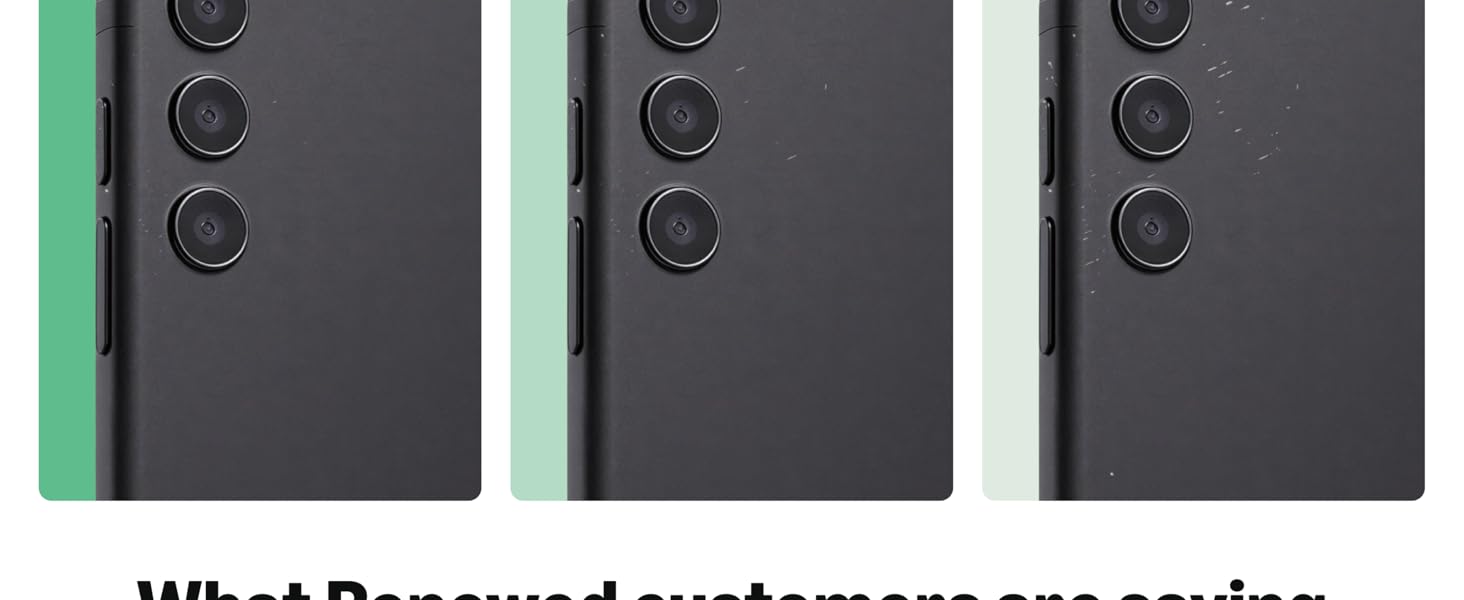
Image 9.1: Guidelines for Amazon Renewed product conditions, detailing criteria for 'Excellent', 'Good', and 'Acceptable' states regarding cosmetic damage, screen condition, and battery life.
10. Odpravljanje težav
10.1 Pogoste težave
- Naprava se ne odziva: Press and hold the Power button for 10-15 seconds to force restart.
- Težave z omrežno povezljivostjo: Check SIM card insertion, toggle Airplane Mode, or restart the device.
- Baterija se hitro prazni: Close unused apps, reduce screen brightness, or check for rogue apps in battery settings.
10.2 Ponastavitev na tovarniške nastavitve
Če imate vztrajne težave, jih lahko odpravite s ponastavitvijo na tovarniške nastavitve. Opozorilo: S tem boste izbrisali vse podatke v vaši napravi. Pred nadaljevanjem varnostno kopirajte pomembne podatke.
- Pojdite v Nastavitve > Sistem > Možnosti ponastavitve.
- Izberite »Izbriši vse podatke (ponastavitev na tovarniške nastavitve)«.
- Potrdite svojo izbiro in sledite navodilom na zaslonu.
11. Garancija in podpora
This Amazon Renewed device comes with a 90-day store limited warranty. For support or warranty claims, please contact the seller directly.
11.1 Kaj je v škatli
- OnePlus Nord N100 LTE Smartphone (Renewed)
- Premium aftermarket charger
- USB kabel
Please note that renewed products may have minor scuffs or scratches and ship in non-retail packaging.