
1. Uvod
Thank you for choosing the Greadio MD-T26 Portable AM/FM/SW Radio. This manual provides detailed instructions for the proper setup, operation, and maintenance of your radio. Please read this manual thoroughly before use to ensure optimal performance and longevity of your device.
The Greadio MD-T26 is a versatile portable radio featuring AM, FM, and Shortwave (SW) bands, an LCD display for clear frequency and time viewing, and dual power options for both indoor and outdoor use. It is designed for ease of use with large, accessible controls and a built-in speaker for clear audio.

Slika 1: Spredaj view of the Greadio MD-T26 Portable AM/FM/SW Radio.
2. Značilnosti izdelka
- Večpasovni sprejem: Receives AM, FM, and Shortwave (SW) frequencies.
- LCD zaslon: Clear digital display for frequency and time settings.
- Dvojne možnosti napajanja: Operates via AC power or 4 x D cell batteries (not included).
- Visokokakovosten zvočnik: Integrated 2W speaker for clear sound output.
- Nadzor tonov: Adjustable tone settings (Low/High) for personalized audio.
- Priključek za slušalke: 3.5mm stereo earphone jack for private listening.
- Prenosna zasnova: Equipped with a sturdy handle for easy transport.
3. Nastavitev
3.1 Vklop radia
The Greadio MD-T26 radio offers two methods for power supply:
- Napajalnik: For indoor use, connect the included AC power cable to the radio's AC input jack and then plug it into a standard wall outlet.
- Baterijski napajalnik: For portable use, insert four (4) D cell batteries (not included) into the battery compartment located on the back of the radio. Ensure correct polarity (+/-) as indicated inside the compartment.
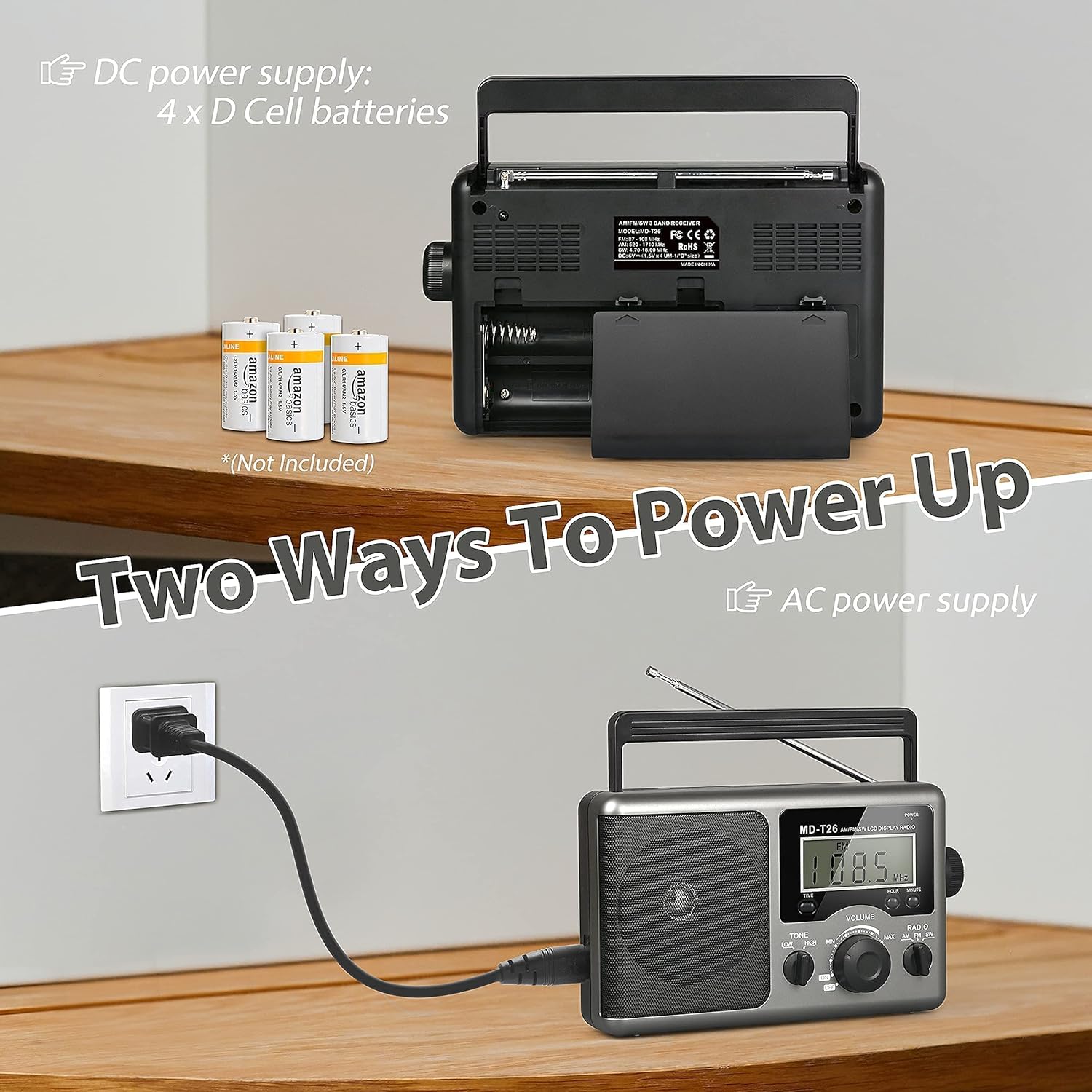
Figure 2: Illustration of AC power connection and battery compartment for D cell batteries.
3.2 Nastavitev antene
For optimal reception, adjust the antenna as follows:
- FM/SW Reception: Extend the telescopic antenna fully and adjust its angle for the clearest signal.
- Dopoldanska recepcija: The radio uses a built-in ferrite rod antenna for AM. Rotate the entire radio unit to find the strongest signal.
4. Navodila za uporabo
4.1 Nadzor nadview

Slika 3: Podrobno view of the radio's control panel.
- Gumb za prižig: Located on the top right, press to turn the radio ON/OFF.
- Gumb za uglaševanje: Located on the right side, rotate to select radio stations.
- Gumb VOLUME: Located on the front panel, rotate to adjust the sound level.
- RADIO Band Selector: Preklapljanje med pasovi AM, FM in SW.
- Stikalo TON: Select between LOW and HIGH tone settings.
- TIME/HOUR/MINUTE Buttons: Used for setting the time on the LCD display.
4.2 Turning On and Selecting a Band
- Pritisnite MOČ button to turn on the radio. The LCD display will illuminate.
- Uporabite RADIO band selector switch to choose your desired band: AM, FM, or SW.
4.3 Uglaševanje postaje
Once a band is selected, slowly rotate the UGLAŠEVANJE knob on the right side of the radio. Observe the frequency displayed on the LCD screen. Stop rotating when you hear your desired station clearly.
4.4 Prilagajanje glasnosti in tona
- obseg: Zavrtite GLASNOST Gumb na sprednji plošči v smeri urinega kazalca povečate glasnost, v nasprotni smeri urinega kazalca pa jo zmanjšate.
- Ton: Uporabite TON switch to select between 'LOW' for a warmer sound or 'HIGH' for a brighter sound, according to your preference.
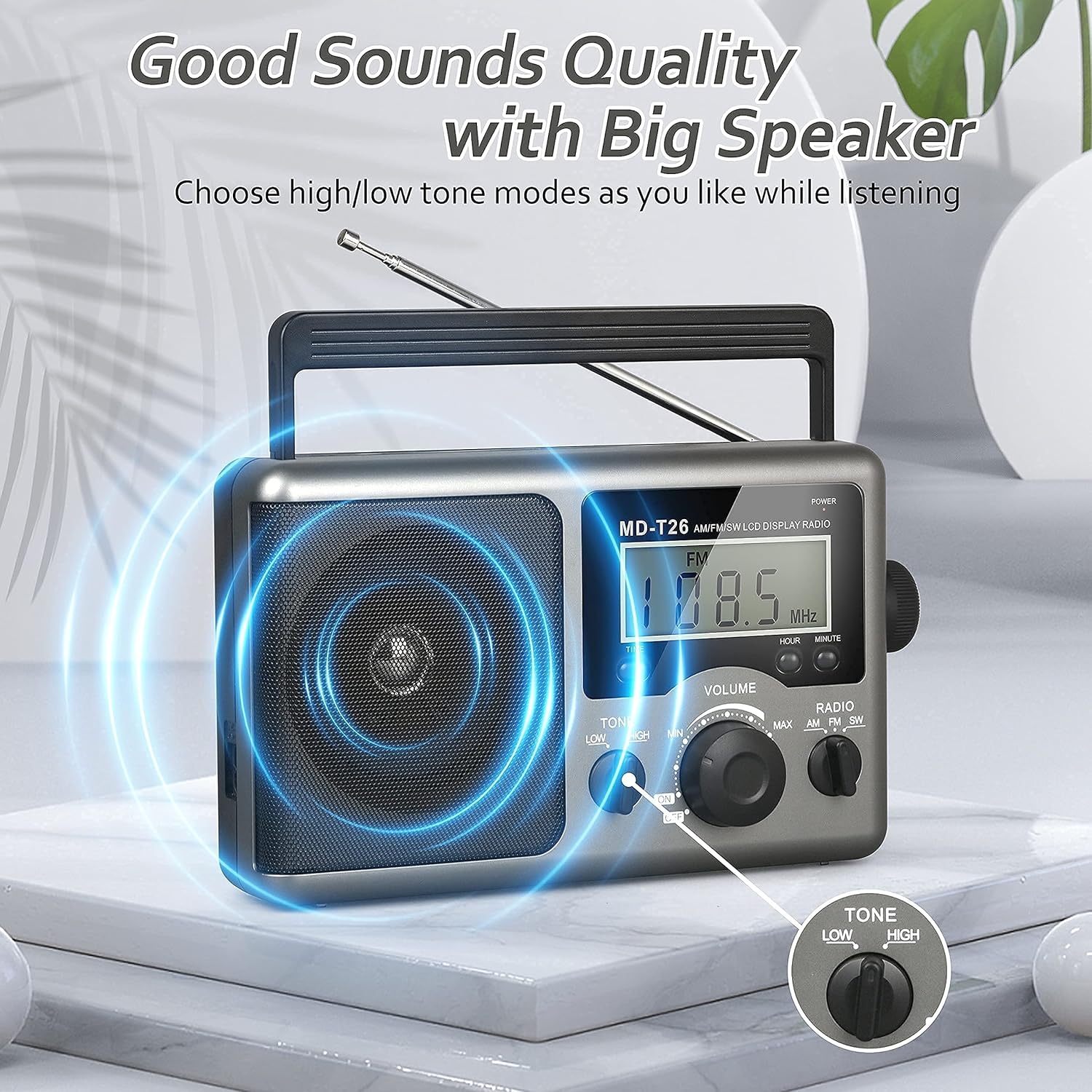
Figure 4: Speaker and Tone control detail.
4.5 Nastavitev časa
The LCD display can also show the current time. To set the time:
- Pritisnite ČAS button once to enter time setting mode.
- Uporabite URA gumb za nastavitev ure.
- Uporabite MINUTA gumb za nastavitev minute.
- The time system is 24-hour format.
4.6 Uporaba priključka za slušalke
For private listening, plug any standard 3.5mm stereo earphones (not included) into the PRIKLJUČEK ZA UŠILEC located on the side of the radio. The internal speaker will automatically mute when earphones are connected.
5. Vzdrževanje
- Čiščenje: Zunanjost radia obrišite z mehko, suho krpo. Ne uporabljajte abrazivnih čistil ali topil.
- Vzdrževanje baterije: If the radio will not be used for an extended period, remove the D cell batteries to prevent leakage and damage.
- Shranjevanje: Radio shranjujte na hladnem in suhem mestu, stran od neposredne sončne svetlobe in ekstremnih temperatur.
- Vodoodpornost: Ta radio je ni vodoodporen. Avoid exposure to rain, moisture, or splashing water.
6. Odpravljanje težav
| Težava | Možen vzrok | rešitev |
|---|---|---|
| Brez moči | AC cable not connected, batteries depleted or incorrectly inserted. | Preverite priključek napajalnega kabla. Zamenjajte baterije ali pazite na pravilno polarnost. |
| Slab sprejem / Statična frekvenca | Antenna not extended/adjusted, weak signal area, interference. | Extend and adjust telescopic antenna (FM/SW). Rotate radio for AM. Move to an area with better signal. Avoid sources of electronic interference. |
| Ni zvoka iz zvočnika | Glasnost je prenizka, slušalke so priključene. | Increase volume. Disconnect earphones if not intended for private listening. |
| LCD zaslon ne deluje | Težava z napajanjem, notranja napaka. | Preverite napajanje. Če težava ne izgine, se obrnite na podporo strankam. |
7. Specifikacije
| Funkcija | Podrobnost |
|---|---|
| Znamka | Greadio |
| Številka modela | MD-T26 |
| Tehnologija povezljivosti | Pomožni (za slušalke) |
| Tehnologija sprejemnika | AM, FM, JZ |
| Vir napajanja | AC Power, 4 x D Cell Batteries |
| Združljive naprave | Slušalka |
| Vrsta zaslona | LCD |
| Strojni vmesnik | 3.5mm avdio Jack |
| Stopnja vodoodpornosti | Ni vodoodporen |
8. Garancija in podpora
8.1 Informacije o garanciji
Greadio provides a 12-mesečna garancija for this product, covering manufacturing defects from the date of purchase. Additionally, a 30-dnevna garancija vračila denarja je ponujeno.
Ta garancija ne krije škode, ki jo povzroči nepravilna uporaba, nesreča, nepooblaščena sprememba ali običajna obraba.
8.2 Podpora strankam
For any questions, technical assistance, or warranty claims, please contact Greadio customer service. We offer 24/7 služba za stranke da vam pomagam.
Prosimo, glejte embalažo izdelka ali navodila prodajalca webspletno mesto za najnovejše kontaktne podatke.