
FLINQ Motion Lights 4-pack
Uporabniški priročnik za gibljive luči FLINQ
Model: Motion Lights 4-pack (ASIN: B09CDRQ3VW)
Uvod
Thank you for choosing the FLINQ Motion Lights. This 4-pack of LED motion sensor lights is designed to provide convenient and efficient lighting for various indoor spaces such as cabinets, wardrobes, bookshelves, and drawers. With their rechargeable battery and versatile installation options, these lights offer a practical solution for illuminating dark areas.
Please read this manual carefully before using the product to ensure proper operation and longevity.
Konec izdelkaview
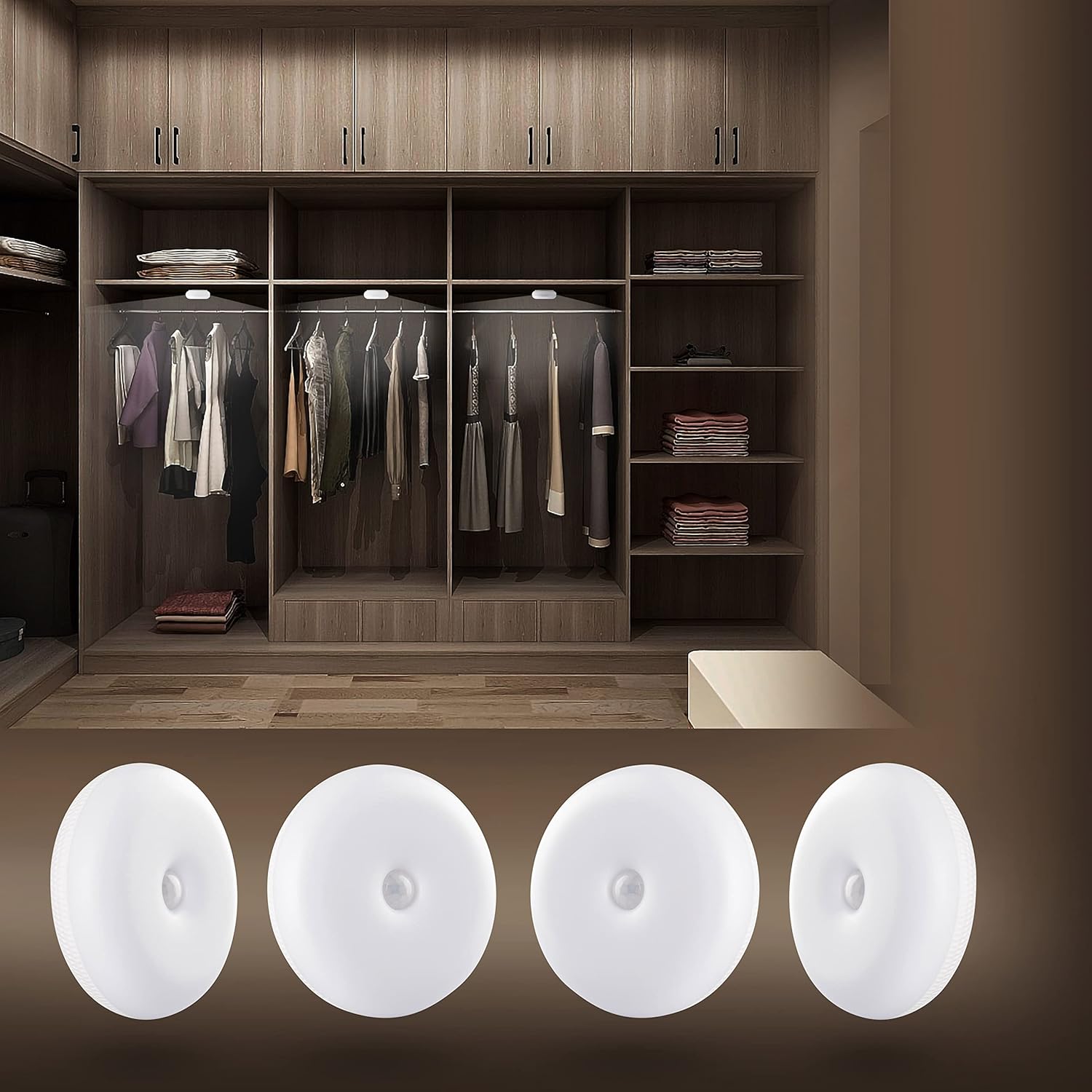
The FLINQ Motion Lights provide bright, warm white illumination, perfect for enhancing visibility inside closets and other dark spaces. This image shows the lights discreetly installed within a wardrobe, highlighting their practical application.

This image displays the complete contents of the FLINQ Motion Lights 4-pack, including the four motion sensor lights, four USB charging cables, and adhesive mounting options. Everything needed for setup is provided.
Nastavitev in namestitev
Polnjenje luči
Before first use, ensure the lights are fully charged. Each light is equipped with a rechargeable battery.
- Locate the micro-USB charging port on the side of the light.
- Connect the provided USB charging cable to the light and a compatible USB power source (e.g., computer USB port, USB wall adapter).
- The indicator light will show charging status (e.g., red for charging, green/off for fully charged).
- Popolno polnjenje običajno traja nekaj ur.

Podrobno view of the back of a FLINQ Motion Light, highlighting the micro-USB charging port and the ON/OFF/AUTO switch for mode selection.
Možnosti namestitve
The FLINQ Motion Lights offer three versatile installation methods:
- Lepilni trak:
Peel off the protective film from the 3M adhesive tape located on the back of the light. Press the light firmly onto a clean, dry, and smooth surface where you wish to install it. This method is ideal for permanent placement.
- Magnetna plošča:
Attach the provided magnetic plate to the desired surface using its adhesive backing. The light can then be magnetically attached to this plate, allowing for easy removal for charging or repositioning.

The back of the FLINQ Motion Light, illustrating the integrated magnetic plate for easy attachment to metallic surfaces or the included adhesive magnetic disc.
- Kljuke:
The lights can also be hung using small hooks if your installation area allows for it. This provides a flexible mounting solution.
Choose the method that best suits your needs and the surface where the light will be placed. Ensure the surface is clean and dry for optimal adhesion.
Navodila za uporabo
Izbira načina
Each FLINQ Motion Light has a switch on the back to select its operating mode:
- VKLOPLJENO: The light will stay continuously on, regardless of motion or ambient light.
- IZKLOPLJENO: The light will remain off.
- AUTO (Motion Sensor Mode): This is the primary mode for motion detection.
Motion Sensor Functionality (AUTO Mode)
In AUTO mode, the light will activate based on motion and ambient light conditions:
- The light is equipped with a sensitive motion sensor that detects movement within a range of 3-5 meters.
- It also features a day/night sensor, meaning it will only activate in dark conditions when motion is detected.
- Once motion is detected, the light will turn on automatically.
- If no further motion is detected for approximately 25 seconds, the light will automatically turn off to conserve battery life.

The FLINQ Motion Light providing illumination inside a closet, demonstrating its motion-activated functionality in a practical setting.

A FLINQ Motion Light mounted on a wall, serving as a subtle night light or accent light in a bedroom environment.
Vzdrževanje
Čiščenje
To maintain the appearance and functionality of your FLINQ Motion Lights, follow these cleaning guidelines:
- Ensure the light is turned OFF before cleaning.
- Površino obrišite z mehko, suho ali rahlo vlažno krpoamp krpo.
- Do not use abrasive cleaners, solvents, or harsh chemicals, as these may damage the plastic material or electronic components.
- Avoid getting water directly into the charging port or sensor area.
Skrb za baterijo
To maximize the lifespan of the built-in rechargeable battery:
- Recharge the lights when the brightness noticeably diminishes.
- Izogibajte se pogostemu popolnemu praznjenju baterije.
- If storing the lights for an extended period, charge them to about 50% and recharge every few months to prevent deep discharge.
- Do not expose the lights to extreme temperatures (hot or cold) as this can affect battery performance.
Odpravljanje težav
If you encounter issues with your FLINQ Motion Lights, please refer to the following common solutions:
| Težava | Možen vzrok/rešitev |
|---|---|
| Luč se ne vklopi. |
|
| Svetloba ne zaznava gibanja. |
|
| Luč se prehitro izklopi ali pa ostane prižgana predolgo. |
|
| Svetloba je šibka. |
|
Specifikacije
| Funkcija | Podrobnost |
|---|---|
| Znamka | FLINQ |
| Ime modela | Motion Lights 4-pack |
| Dimenzije (D x Š x V) | 8 x 8 x 2.8 cm |
| Teža na enoto | 100 g |
| Število elementov | 4 |
| Material | Plastika |
| Svetla barva | Topla bela |
| Lumnski izhod | 50 lumnov |
| Posebne lastnosti | Wireless, Motion Sensor, Rechargeable |
| Vir napajanja | Battery Powered (Built-in Li-Polymer) |
| Kapaciteta baterije | 3.7 V 600 mAh |
| Vrsta žarnice | LED (5 HQ SMD LED) |
| Obseg zaznavanja gibanja | 3-5 metrov |
| Čas samodejnega izklopa | 25 sekund (po mirovanju) |
| Življenjska doba | Pribl. 30,000 ur |
| Certificiranje | CE |
Garancija in podpora
Informacije o garanciji
Specific warranty details for your FLINQ Motion Lights may vary by region and retailer. Please refer to your purchase receipt or contact your point of sale for precise warranty terms and conditions.
Podpora uporabnikom
For further assistance, technical support, or inquiries regarding your FLINQ product, please contact FLINQ customer service:
- E-pošta: info@flinqproducts.nl
- Webspletno mesto: For more information and product updates, visit the official FLINQ webmesto.
- You can also scan the QR code on the product packaging for additional information: https://qrco.de/bc0PUg
Ask a question about this manual
Ask about setup, troubleshooting, compatibility, parts, safety, or missing instructions. Manuals+ will review the question and use this page’s manual context to help answer it.