
Uvod
This manual provides essential instructions for setting up, operating, maintaining, and troubleshooting your Nyko 86158 Core Wireless Controller for Xbox One. Please read this manual thoroughly before use to ensure optimal performance and longevity of your device.
Vsebina paketa
Preverite, ali so v vašem paketu priloženi vsi spodaj navedeni elementi:
- Nyko 86158 Core Wireless Controller
- Brezžični sprejemnik USB
- USB polnilni kabel
- Uporabniški priročnik (ta dokument)
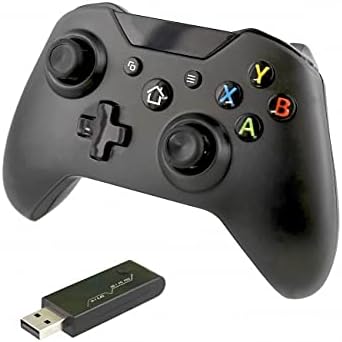
Image: Nyko 86158 Core Wireless Controller shown alongside its USB wireless receiver dongle. This illustrates the main components included in the package.

Slika: Bližnji posnetek view of the USB wireless receiver dongle. This dongle is essential for establishing a wireless connection between the controller and the Xbox One console or PC.

Image: The USB charging cable provided with the controller. This cable is used to recharge the controller's internal battery.
Postavitev krmilnika
Familiarize yourself with the buttons and features of your Nyko Core Wireless Controller.
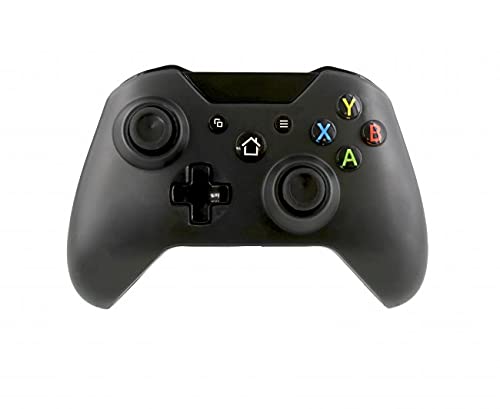
Slika: spredaj view of the Nyko 86158 Core Wireless Controller, showing the two analog sticks, D-pad, A/B/X/Y buttons, View button, Menu button, Xbox button, and Share button.
- Leva analogna palica: Za gibanje in nadzor kamere.
- Desna analogna palica: Za upravljanje in ciljanje s kamero.
- D-pad: Directional input for menu navigation and specific game actions.
- Gumbi A/B/X/Y: Primarni akcijski gumbi.
- View Gumb: Accesses additional in-game information or menus.
- Gumb menija: Odpre menije igre ali sistemske možnosti.
- Gumb Xbox: Powers on the controller, accesses the Xbox Guide, or returns to the home screen.
- Gumb za skupno rabo: Captures screenshots or video clips (functionality may vary by console/game).

Slika: Zgoraj view of the Nyko 86158 Core Wireless Controller, highlighting the Left and Right Bumpers (LB, RB), Left and Right Triggers (LT, RT), and the micro-USB charging port located at the front.
- Left Bumper (LB) / Right Bumper (RB): Ramenski gumbi za različna dejanja v igri.
- Left Trigger (LT) / Right Trigger (RT): Analog triggers for precise input, often used for acceleration or aiming.
- Vrata mikro-USB: Used for charging the controller.

Slika: Nazaj view of the Nyko 86158 Core Wireless Controller, showing the battery compartment cover. This is where the batteries are inserted or the rechargeable battery pack is housed.
Navodila za namestitev
1. Napajanje krmilnika
The Nyko 86158 Core Wireless Controller requires batteries to operate wirelessly. It is compatible with standard AA batteries or a rechargeable battery pack (sold separately).
- Poiščite predal za baterije na zadnji strani krmilnika.
- Pritisnite jeziček navzdol in potisnite pokrov baterije stran.
- Insert two (2) AA batteries, ensuring correct polarity (+/-). If using a rechargeable pack, insert it as directed by the pack's instructions.
- Zamenjajte pokrov baterije.
2. Connecting to Xbox One
To connect your wireless controller to an Xbox One console:
- Insert the USB Wireless Receiver Dongle into an available USB port on your Xbox One console.
- Turn on your Xbox One console.
- Pritisnite in držite Gumb Xbox on the controller until it powers on. The Xbox button will flash.
- The controller will automatically attempt to pair with the USB receiver. Once connected, the Xbox button on the controller will glow solid.
- If the controller does not connect automatically, press the small pairing button on the USB receiver dongle, then press and hold the Gumb Xbox on the controller until it pairs.
3. Connecting to PC (Optional)
The controller can also be used with a PC. Ensure your PC has an available USB port for the wireless receiver.
- Insert the USB Wireless Receiver Dongle into an available USB port on your PC.
- The PC should automatically install the necessary drivers. This may take a few moments.
- Pritisnite in držite Gumb Xbox on the controller until it powers on.
- The controller will connect to the receiver. The Xbox button will glow solid once connected.
Navodila za uporabo
Vklop/izklop
- Prižgati: Pritisnite in držite Gumb Xbox until the controller vibrates and the light turns on.
- Izklopiti: Pritisnite in držite Gumb Xbox for 5-10 seconds until the controller powers down. The controller will also automatically turn off after a period of inactivity to conserve battery life.
Polnjenje krmilnika
If using a rechargeable battery pack (not included) or if the controller has a built-in rechargeable battery:
- Connect the small end of the USB Charging Cable to the micro-USB port on the front of the controller.
- Connect the larger end of the USB Charging Cable to an available USB port on your Xbox One console or a USB wall adapter (5V, 1A recommended).
- The indicator light on the controller (usually the Xbox button) will show charging status (e.g., flashing while charging, solid when fully charged).
- Ko je polnjenje končano, odklopite kabel.
Vzdrževanje
- Čiščenje: Za čiščenje krmilnika uporabite mehko, suho krpo. Ne uporabljajte agresivnih kemikalij ali abrazivnih materialov.
- Shranjevanje: Krmilnik shranjujte na hladnem in suhem mestu, stran od neposredne sončne svetlobe in ekstremnih temperatur.
- Vzdrževanje baterije: If not using the controller for an extended period, remove the AA batteries to prevent leakage.
- Izogibajte se kapljicam: Krmilnik zaščitite pred padci in udarci, ki lahko poškodujejo notranje komponente.
Odpravljanje težav
Controller Not Turning On
- Prepričajte se, da so baterije pravilno vstavljene s pravilno polarnostjo.
- Replace old batteries with new ones, or fully charge the rechargeable battery pack.
Controller Not Connecting to Xbox One/PC
- Ensure the USB Wireless Receiver Dongle is securely plugged into an active USB port.
- Poskusite druga vrata USB.
- Prepričajte se, da je krmilnik vklopljen.
- Re-attempt the pairing process: press the pairing button on the dongle, then press and hold the Xbox button on the controller.
- Znova zaženite konzolo Xbox One ali računalnik.
Input Lag or Disconnections
- Ensure the controller is within range of the USB receiver (typically up to 30 feet/9 meters).
- Zmanjšajte motnje drugih brezžičnih naprav (npr. usmerjevalnikov Wi-Fi, brezžičnih telefonov).
- Prepričajte se, da je baterija krmilnika dovolj napolnjena.
Specifikacije
| Znamka | Nyko |
| Številka modela | 86158 |
| Združljive naprave | Xbox One, PC |
| Vrsta krmilnika | Brezžični krmilnik igre |
| Tehnologija povezljivosti | Wireless (2.4GHz via USB dongle) |
| Vir napajanja | Batteries (AA or rechargeable pack) |
| Dimenzije (D x Š x V) | 8.3 x 18.4 x 15.2 cm (približno 3.27 x 7.24 x 5.98 palca) |
| UPC | 743840861584 |
| ASIN | B09BD8813T |
Garancija in podpora
For warranty information or technical support, please refer to the documentation included with your purchase or visit the official Nyko webspletnega mesta. Shranite dokazilo o nakupu za uveljavljanje garancije.