
1. Uvod
Hvala za nakupasing the BYTECH BYMCLB116BK Projector Decor Light-Rainbow. This device is designed to project vibrant rainbow light effects, enhancing room ambiance and providing unique lighting for creative photography. Please read this manual thoroughly before use to ensure proper operation and maintenance.

Image 1.1: The BYTECH BYMCLB116BK Projector Decor Light-Rainbow packaging, highlighting its key features including rainbow glow, secure stabilization, 360-degree rotation and tilt, and USB connectivity.
2. Varnostne informacije
- Napravo hranite ločeno od vode in vlage.
- Naprave ne izpostavljajte ekstremnim temperaturam ali neposredni sončni svetlobi.
- Izogibajte se padcem ali izpostavljanju naprave močnim udarcem.
- Naprave ne poskušajte razstavljati ali popravljati sami. Vsa servisna dela prepustite usposobljenemu osebju.
- Use only the provided USB cable or a certified equivalent for power.
- Napravo postavite na stabilno, ravno površino, da preprečite prevrnitev.
- Hraniti izven dosega otrok in hišnih ljubljenčkov.
3. Vsebina paketa
Prosimo, da natančno preverite vsebino paketa. Če kateri koli predmet manjka ali je poškodovan, se obrnite na prodajalca.
- 1 x BYTECH BYMCLB116BK Projector Decor Light-Rainbow
- 1 x USB Power Cable (with wired remote control)
- 1 x uporabniški priročnik
4. Nastavitev
- Razpakiraj: Carefully remove the Projector Decor Light from its packaging.
- Umestitev: Place the projector on a stable, flat surface. Consider the desired projection area and distance from the wall or ceiling for optimal effect. The device features 360-degree rotation and tilt for flexible positioning.
- Priključite napajanje: Insert the small end of the USB power cable into the USB port on the projector. Connect the larger end of the USB cable to a standard USB power adapter (not included) or a powered USB port (e.g., on a computer or power bank).
- Secure Stabilization: Ensure the base is firmly placed to prevent accidental movement, utilizing its secure stabilization feature.
5. Navodila za uporabo
The BYTECH Projector Decor Light is designed for simple operation.
- Vklop/izklop: Once connected to a power source, locate the wired remote control on the USB cable. Press the power button on the remote to turn the light on or off.
- Prilagodi svetlost/način: Use the other buttons on the wired remote control to cycle through different brightness levels or projection modes, if available. Refer to the remote's markings for specific functions.
- Prilagodi kot projekcije: Ročno nastavite lamp head to rotate and tilt 360 degrees to direct the rainbow light projection to your desired area.
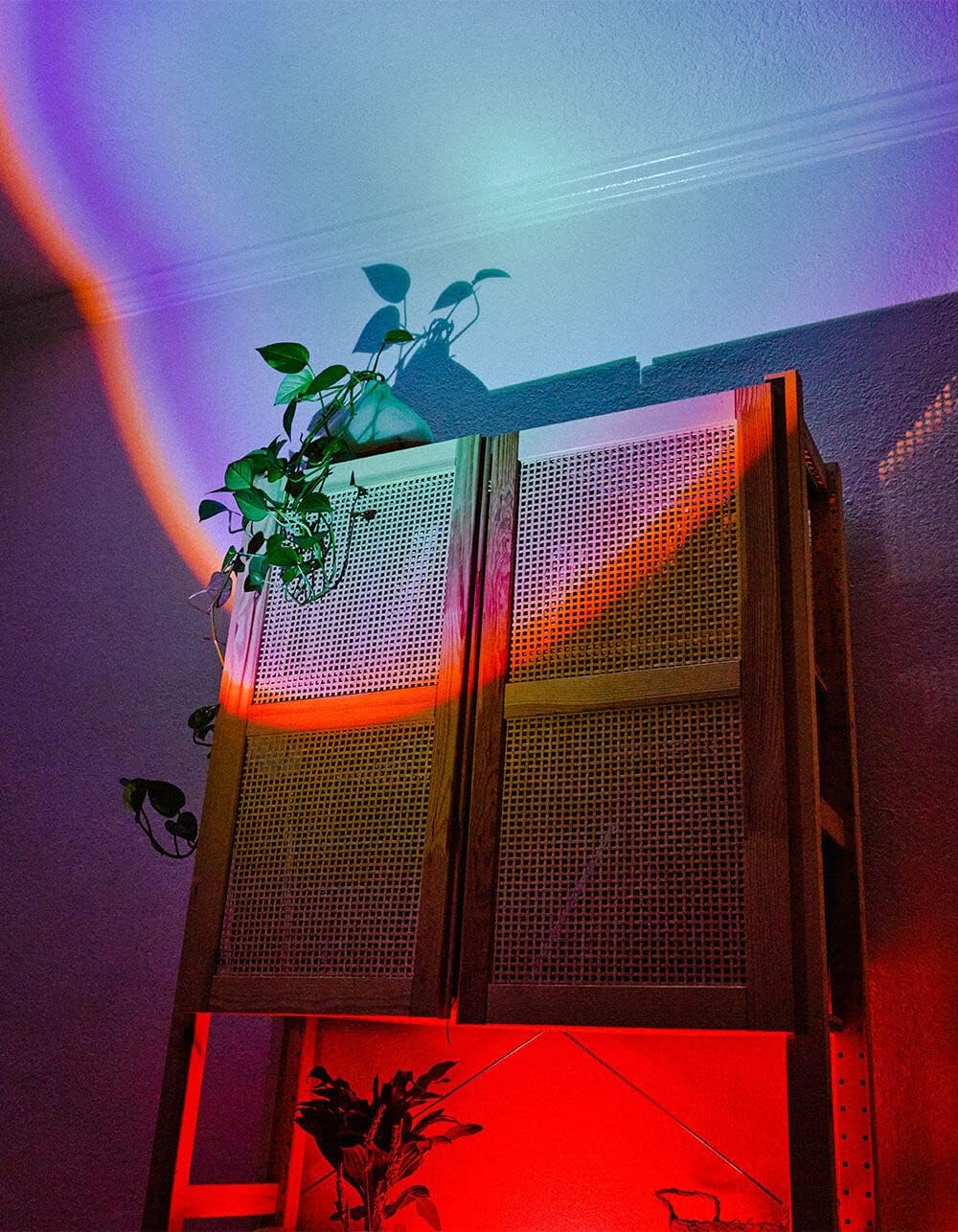
Image 5.1: The BYTECH Projector Decor Light-Rainbow in operation, casting vibrant rainbow light patterns onto a room's wall and furniture, demonstrating its ambient effect.
6. Vzdrževanje
- Čiščenje: Disconnect the power before cleaning. Use a soft, dry cloth to wipe the surface of the projector. Do not use abrasive cleaners or solvents.
- Shranjevanje: When not in use for extended periods, store the device in a cool, dry place, away from direct sunlight and moisture.
- Ravnanje: Handle the device with care to avoid damage to the lens or internal components.
7. Odpravljanje težav
| Težava | Možen vzrok | rešitev |
|---|---|---|
| Naprava se ne vklopi. | Ni priključka za napajanje ali pa je kabel pokvarjen. | Ensure the USB cable is securely connected to both the projector and a powered USB port/adapter. Try a different USB port or adapter. |
| Svetloba je šibka ali utripa. | Insufficient power supply or dirty lens. | Ensure the power source provides adequate power. Clean the projector lens gently with a soft, dry cloth. |
| Projekcija je zamegljena. | Leča je umazana. | Gently clean the projector lens with a soft, dry cloth. |
8. Specifikacije
- Model: BYMCLB116BK
- Znamka: Bytech
- Vhodna moč: USB Powered (5V DC, current not specified, typical for USB)
- Vir svetlobe: LED
- Vrsta projekcije: Rainbow Glow
- Prilagodljivost: 360° Rotation & Tilt
- Dimenzije paketa: 5 x 5 x 5 palcev
- Teža artikla: 1 funtov
- Proizvajalec: BYTECH
9. Garancija in podpora
This product is covered by a limited warranty provided by BYTECH. For specific warranty terms and conditions, please refer to the warranty card included with your purchase or visit the official BYTECH website. For technical support, troubleshooting assistance, or to inquire about replacement parts, please contact BYTECH customer service through their official channels.
Za garancijske zahtevke shranite dokazilo o nakupu.