
Uvod
Thank you for choosing the CORN HB001 Bluetooth Wireless Headphones. This manual provides essential information for setting up, operating, and maintaining your headphones. Please read it carefully before use to ensure optimal performance and longevity of your device. Keep this manual for future reference.
Konec izdelkaview
The CORN HB001 headphones offer a comfortable on-ear design with wireless Bluetooth connectivity, allowing you to enjoy high-quality audio without the constraints of cables. They also feature a 3.5mm audio jack for wired connection when wireless is not preferred or battery is low.
Komponente slušalk
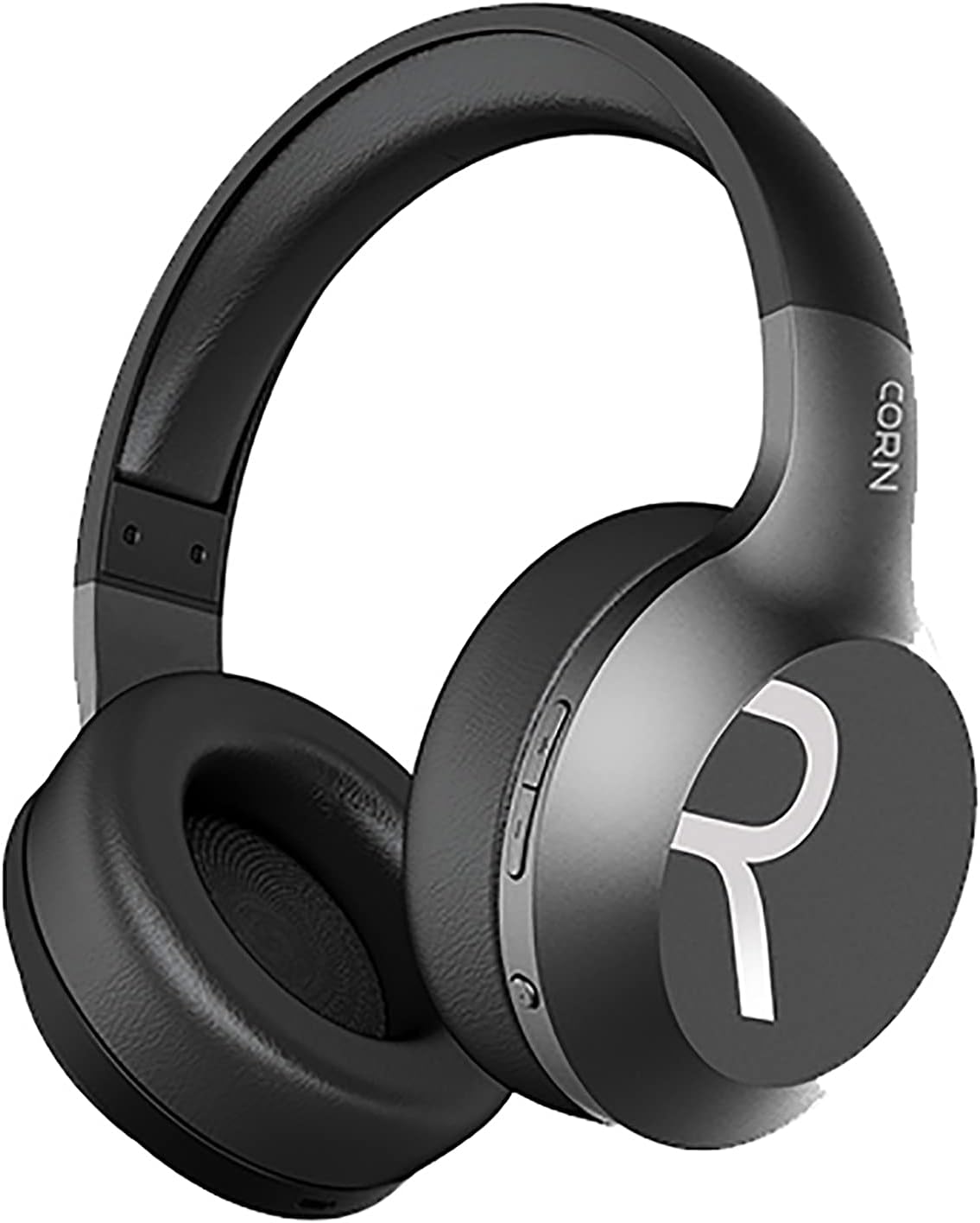
Slika 1: Na splošno view of the CORN HB001 Bluetooth Wireless Headphones. The image displays the black on-ear headphones with adjustable headband and earcups, featuring the 'CORN' brand logo on the side.
Postavitev kontrolnikov

Slika 2: Close-up of the control buttons located on the right earcup. These typically include volume up/down and a multi-function button for power, play/pause, and call management.
Familiarize yourself with the buttons and ports on your headphones. Typically, you will find a power/multi-function button, volume controls, a charging port (e.g., USB-C), and a 3.5mm audio jack.
Nastavitev
1. Polnjenje slušalk
Before first use, fully charge your headphones. Connect the charging cable (usually USB) to the charging port on the headphones and the other end to a USB power source (e.g., computer, wall adapter). The LED indicator will typically show red during charging and turn off or blue when fully charged.
- Čas polnjenja: Približno 2 ur.
- Kapaciteta baterije: 300 mAh.
2. Bluetooth seznanjanje
Če želite brezžično povezati slušalke z napravo:
- Prepričajte se, da so slušalke napolnjene in izklopljene.
- Pritisnite in držite gumb za vklop/večfunkcijo približno 5–7 sekund, dokler LED indikator ne utripa izmenično modro in rdeče, kar označuje način seznanjanja.
- V napravi (pametnem telefonu, tablici, računalniku) omogočite Bluetooth in poiščite nove naprave.
- Select "CORN HB001" from the list of available devices.
- Once connected, the LED indicator will usually flash blue slowly or turn solid blue.
- Slušalke se bodo ob vklopu samodejno poskušale ponovno povezati z zadnjo seznanjeno napravo.
Navodila za uporabo
Vklop/izklop
- Vklop: Press and hold the Power/Multi-function button for about 3 seconds until the LED indicator lights up blue.
- Ugasniti: Press and hold the Power/Multi-function button for about 3-5 seconds until the LED indicator turns red and then off.
Predvajanje glasbe
- Predvajanje/pavza: Enkrat pritisnite gumb za vklop/večfunkcijo.
- Povečaj glasnost: Pritisnite gumb '+'.
- Znižaj glasnost: Pritisnite gumb '-'.
- Naslednja skladba: Pritisnite in držite gumb »+«.
- Prejšnja skladba: Pritisnite in držite gumb '-'.
Upravljanje klicev
- Sprejmi/končaj klic: Enkrat pritisnite gumb za vklop/večfunkcijo.
- Zavrni klic: Press and hold the Power/Multi-function button for about 2 seconds.
- Ponovno klicanje zadnje številke: Dvakrat pritisnite gumb za vklop/večfunkcijo.
Wired Mode (3.5mm Audio Jack)
You can use the headphones in wired mode even if the battery is depleted. Simply connect one end of a 3.5mm audio cable (not always included) to the headphone's 3.5mm jack and the other end to your audio source. In wired mode, Bluetooth functions are disabled, and controls on the headphones may not function.
Vzdrževanje
Proper maintenance ensures the longevity of your headphones.
- Čiščenje: Use a soft, dry cloth to wipe the headphones. Do not use abrasive cleaners or solvents. For ear cushions, gently wipe with a damp krpo in pustite, da se popolnoma posuši na zraku.
- Shranjevanje: Store the headphones in a cool, dry place away from direct sunlight and extreme temperatures. If your headphones are foldable, fold them carefully to prevent damage.
- Izpostavljenost vodi: These headphones are not waterproof. Avoid exposure to water, moisture, or rain.
Odpravljanje težav
Če naletite na težave, poskusite naslednje rešitve:
| Težava | rešitev |
|---|---|
| Slušalke se ne vklopijo | Ensure the headphones are fully charged. Press and hold the Power button for a few seconds. |
| Seznanitev z napravo ni mogoča | Ensure headphones are in pairing mode (flashing blue/red). Turn off and on Bluetooth on your device. Forget previous pairings and try again. Ensure headphones are within 10m range. |
| Brez zvoka | Check volume levels on both headphones and your device. Ensure headphones are properly paired. Try wired connection if available. |
| Slaba kakovost zvoka | Move closer to your device to reduce interference. Ensure no physical obstructions between headphones and device. |
Specifikacije
| Funkcija | Podrobnost |
|---|---|
| Ime modela | HB001 |
| Blagovna znamka | KORUZA |
| Tehnologija povezljivosti | Brezžično, Bluetooth |
| Brezžična različica | V5.0 |
| Delovna razdalja | 10 metrov |
| Velikost gonilnika zvočnika | Φ40 mm |
| Impedanca zvočnika | 32Ω |
| Moč zvočnika | 15mW |
| Kapaciteta baterije | 300 mAh |
| Čas polnjenja | Približno 2 ur |
| Delovni čas | Približno 8 ur |
| Faktor oblike slušalk | Na uho |
| Priključek za slušalke | 3.5mm Jack (for wired use) |
| Vključene komponente | Ušesne blazinice |
| Opis starostne skupine | Odrasel |
| Material | Plastika |
| barva | Črna |
Garancija in podpora
For warranty information or technical support, please refer to the documentation included with your purchase or contact the manufacturer directly through their official webspletnega mesta ali kanalov za pomoč strankam. Shranite dokazilo o nakupu za uveljavljanje garancije.