
Uvod
The Poly DA75 is a versatile USB-A/USB-C digital adapter designed to connect Poly Quick Disconnect (QD) headsets to computers. It ensures clear audio quality for call center environments, supporting both USB-A and USB-C connections for compatibility with various systems. This adapter is engineered to work seamlessly with platforms such as Avaya, Genesys, and Cisco, providing a reliable audio solution for professionals.
Glavne lastnosti vključujejo:
- Univerzalna povezljivost: Equipped with both USB-A and USB-C connectors on the cable for broad compatibility with new and legacy equipment.
- Intelligent Headset Recognition: Automatically adjusts audio performance to the specific Poly Quick Disconnect headset for optimized call quality.
- Acoustic Protection: Incorporates features to manage safe volume levels, protecting user hearing.
- Integracija platforme: Fully compatible with leading call center platforms including Avaya, Genesys, and Cisco.
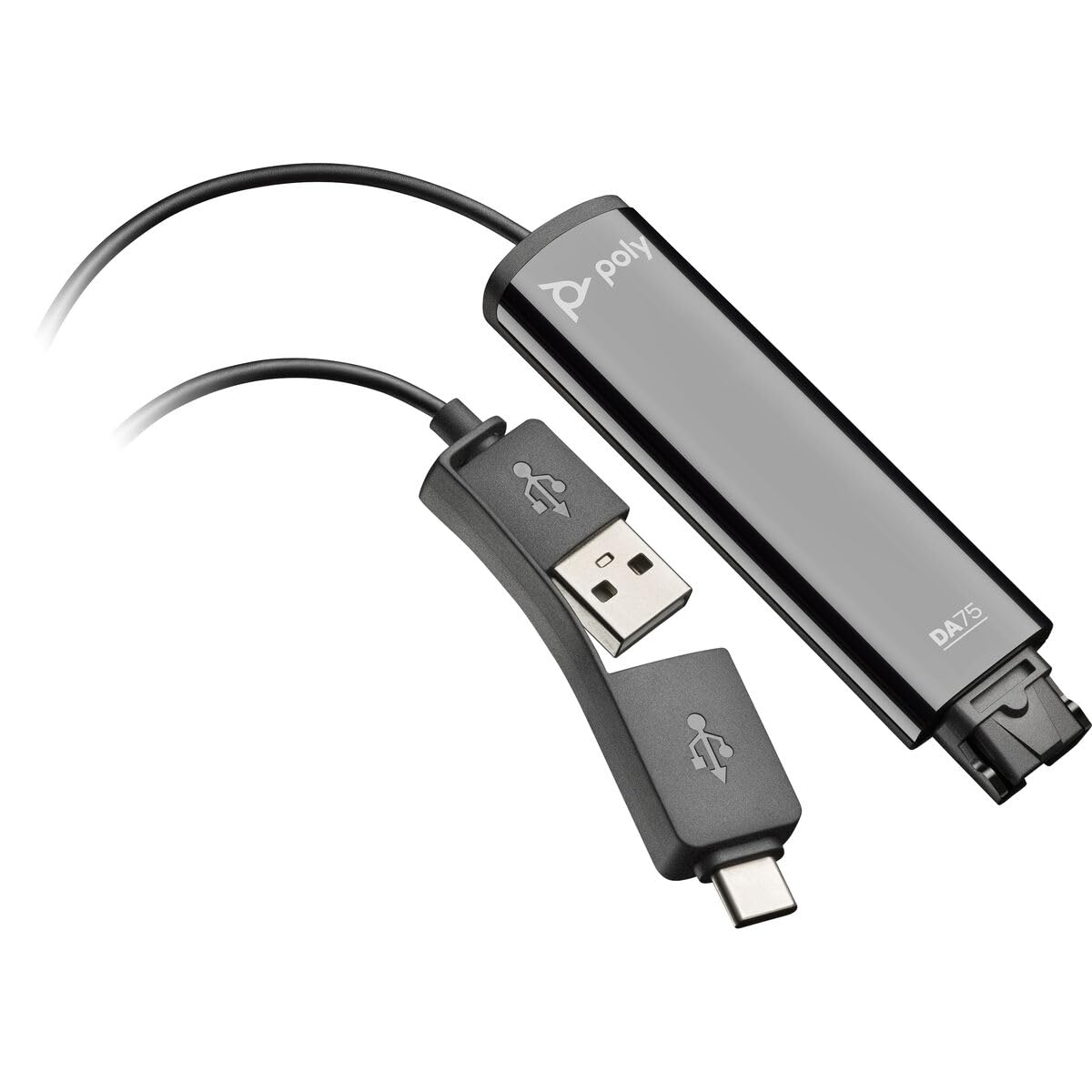
Image: The Poly DA75 USB-A/USB-C Digital Adapter, showing its dual USB-A and USB-C connectors and the Quick Disconnect port for headsets.
Kaj je v škatli
The Poly DA75 package typically includes the following items:
- Poly DA75 USB-A/USB-C Digital Adapter
- Dokumentacija (Vodnik za hiter začetek, Varnostne informacije)
Note: Headsets are sold separately and are not included with the DA75 adapter.
Nastavitev
Follow these steps to set up your Poly DA75 Digital Adapter:
- Priključite slušalke: Connect your Poly Quick Disconnect (QD) headset to the QD port on the Poly DA75 adapter. Ensure the connection is secure.
- Povežite se z računalnikom:
- If your computer has a USB-A port, use the USB-A connector on the DA75 cable.
- If your computer has a USB-C port, use the USB-C connector on the DA75 cable.
Plug the appropriate USB connector into an available USB port on your computer.
- Namestitev gonilnika: The DA75 is a plug-and-play device. Your operating system (Windows, macOS) should automatically detect the device and install the necessary drivers. This process may take a few moments.
- Preverjanje prepoznavanja naprave:
- Windows: Pojdi na Nastavitve > Sistem > Zvok or Nadzorna plošča > Zvok. The Poly DA75 should appear as an audio input and output device.
- MacOS: Pojdi na System Settings > Sound. The Poly DA75 should appear as an input and output device.
Select the Poly DA75 as your default communication device for both playback and recording.
- Konfiguracija programske opreme: If you are using communication software (e.g., Avaya, Genesys, Cisco, Microsoft Teams, Zoom), ensure that the Poly DA75 is selected as the audio device within the application's settings.
Navodila za uporabo
The Poly DA75 adapter facilitates audio communication through your connected Poly QD headset. Its operation is primarily managed through your computer's operating system and communication software.
- Klicanje/sprejemanje klicev: Use your communication software to initiate or answer calls. The audio will be routed through your connected Poly QD headset via the DA75 adapter.
- Nadzor glasnosti: Adjust the listening volume using your computer's system volume controls or the volume controls within your communication application.
- Izklop mikrofona: Mute and unmute your microphone using the controls provided by your communication software.
- Audio Optimization: The DA75 automatically optimizes audio for your specific Poly QD headset. No manual adjustments are typically required for audio profiles.
Vzdrževanje
To ensure the longevity and optimal performance of your Poly DA75 Digital Adapter, follow these maintenance guidelines:
- Čiščenje: Gently wipe the adapter with a soft, dry, anti-static cloth. Do not use liquid cleaners or abrasive materials.
- Shranjevanje: Adapter shranjujte na hladnem in suhem mestu, stran od neposredne sončne svetlobe in ekstremnih temperatur.
- Ravnanje: Izogibajte se prekomernemu upogibanju ali zvijanju kabla, zlasti v bližini priključkov, da preprečite notranje poškodbe.
- Povezljivost: Ensure the Quick Disconnect (QD) connection and USB connections are clean and free of debris before connecting.
Odpravljanje težav
If you encounter issues with your Poly DA75 Digital Adapter, refer to the following troubleshooting steps:
| Težava | Možen vzrok | rešitev |
|---|---|---|
| Ni zvoka iz slušalk |
|
|
| Mikrofon ne deluje |
|
|
| Adapter not recognized by computer |
|
|
Specifikacije
| Funkcija | Podrobnost |
|---|---|
| Številka modela | 218266-01 |
| Znamka | POLI |
| Vrsta priključka | USB-A, USB-C (dual connector) |
| Združljive naprave | Poly Quick Disconnect (QD) Headsets |
| Posebne uporabe | PC, Call Center Platforms (Avaya, Genesys, Cisco) |
| barva | Črna |
| Mere predmeta (D x Š x V) | 0.98 x 0.39 x 2.95 palcev |
| Teža predmeta | 30 gramov |
| Število vrat | 2 (USB-A/USB-C to QD) |
| UPC | 197029650054, 017229175112 |
Garancija in podpora
Informacije o garanciji: The Poly DA75 Digital Adapter comes with a 2-letna omejena garancija proizvajalcaTa garancija krije napake v materialu in izdelavi pri normalni uporabi. Za uveljavljanje garancije shranite dokazilo o nakupu.
Tehnična podpora: For technical assistance, product inquiries, or warranty service, please contact Poly customer support. Visit the official Poly website for the most up-to-date support contact information, FAQs, and additional resources.
Spletni viri: Podpora Poly Webmesto