
1. Uvod
This manual provides detailed instructions for the setup, operation, and maintenance of your WISE TIGER LED Digital Alarm Clock (Model CK-LED1302). Please read this manual thoroughly before use to ensure proper functionality and to maximize your product experience.

Image 1.1: WISE TIGER LED Digital Alarm Clock and its remote control.
2. Vsebina paketa
Prosimo, preverite, ali so v vašem paketu vsi elementi:
- WISE TIGER LED Digital Alarm Clock (Model CK-LED1302)
- Daljinski upravljalnik
- USB napajalni kabel
- Uporabniški priročnik (ta dokument)
- Fixed Bracket (for desk placement)
3. Izdelek je končanview
The WISE TIGER LED Digital Alarm Clock features a modern 3D design, offering clear time display and multiple functions for various environments.
3.1 Ključne lastnosti
- Prikaz časa: 12-urni ali 24-urni format.
- Prikaz koledarja: Shows date.
- Budilka: With snooze function.
- Prikaz temperature: Prikazuje temperaturo okolice.
- Nastavljiva svetlost: Automatic brightness sensor and manual adjustment via remote control.
- Funkcija nočne luči: Provides soft illumination.
- Funkcija pomnilnika: Built-in battery retains time settings for 4-8 hours during power disconnection.
- Vsestranska postavitev: Suitable for desk or wall mounting.

Image 3.1: Visual representation of the clock's main functions.
3.2 Komponente
Za pregled glejte spodnji diagramview of the clock's components and connection points.
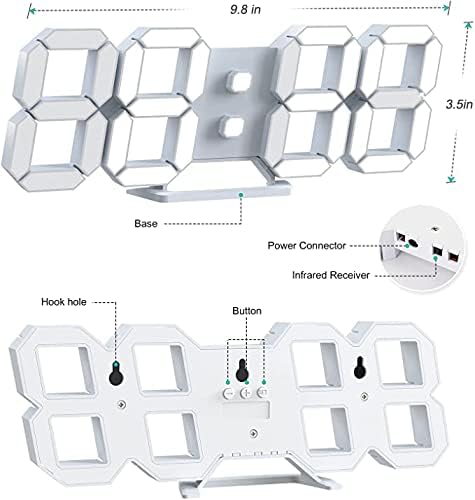
Slika 3.2: Hrbet view and dimensions of the clock, highlighting the power connector, infrared receiver, and mounting options.
- Zaslon: Large 3D LED digits for time, date, and temperature.
- Osnova: Removable stand for desk placement.
- Priključek za napajanje: USB port for power input.
- Infrardeči sprejemnik: Za signale daljinskega upravljalnika.
- Hook Holes: Za montažo na steno.
- Gumbi za upravljanje: Located on the back for basic settings (Power, Up, Down, Set).
4. Nastavitev
4.1 Napajalni priključek
- Connect the provided USB power cable to the power connector on the back of the clock.
- Drugi konec kabla USB priključite v standardni napajalnik USB (ni priložen) ali vrata USB računalnika.
- The clock will power on and display the time.
The clock is powered by the USB cable only. A built-in battery serves to record time settings when power is disconnected, ensuring settings are retained for 4-8 hours.

Image 4.1: Explanation of the clock's power and memory function.
4.2 Možnosti namestitve
The clock can be used as a desk clock or a wall clock.
- Postavitev mize: Attach the fixed bracket to the bottom of the clock. The angle of the bracket can be adjusted for optimal viewing.
- Montaža na steno: Remove the fixed bracket if attached. Use the installation slots (hook holes) on the back of the clock to hang it securely on a wall using appropriate fasteners (not included).

Image 4.2: The clock configured for wall mounting and desk placement.
5. Navodila za uporabo
The clock's functions are primarily controlled using the included remote control. Basic settings can also be adjusted via the buttons on the back of the clock.
5.1 Nastavitev časa in datuma
- Pritisnite ČAS gumb na daljinskem upravljalniku za vstop v način nastavitve časa.
- Uporabite UP in DOL puščice za nastavitev ure.
- Pritisnite ČAS again to move to minute setting, then use UP in DOL prilagoditi.
- Nadaljujte s pritiskom ČAS za preklapljanje med nastavitvami leta, meseca in dneva ter prilagajanje vsake od njih z UP in DOL.
- Pritisnite ČAS še zadnjič ali počakajte nekaj sekund, da se nastavitve samodejno shranijo.
5.2 12/24-urni format
Za preklop med 12-urnim in 24-urnim formatom časa pritisnite 12/24H gumb na daljinskem upravljalniku.

Slika 5.1: Primerample of 12-hour and 24-hour time display.
5.3 Nastavitev alarma
- Pritisnite ALARM button on the remote control to enter alarm setting mode.
- Uporabite UP in DOL arrows to set the desired alarm hour.
- Pritisnite ALARM again to move to minute setting, then use UP in DOL prilagoditi.
- Pritisnite ALARM one last time or wait for the settings to save.
- Za vklop/izklop alarma pritisnite ALARM button briefly outside of setting mode. An alarm icon will appear/disappear on the display.
5.4 Funkcija dremeža
Ko se oglasi alarm, pritisnite tipko DREMEŽ button on the remote control to temporarily silence the alarm. The alarm will sound again after a set interval (typically 5-10 minutes).

Image 5.2: The snooze alarm function in use.
5.5 Prilagoditev svetlosti
The clock features both automatic and manual brightness control.
- Samodejna svetlost: The built-in sensor automatically adjusts the display brightness based on ambient light conditions.
- Ročna svetlost: Pritisnite SVETEL button on the remote control to cycle through different brightness levels (e.g., high, medium, low).

Image 5.3: Automatic brightness adjustment based on ambient light.

Image 5.4: Manual adjustment through three brightness levels.
5.6 Prikaz temperature
The clock automatically displays the ambient temperature. No manual adjustment is typically required for this function.
6. Vzdrževanje
To ensure the longevity and optimal performance of your WISE TIGER LED Digital Alarm Clock, follow these maintenance guidelines:
- Čiščenje: Use a soft, dry cloth to wipe the display and casing. Avoid abrasive cleaners, solvents, or spray cleaners directly on the clock.
- moč: Always use the provided USB cable for power. Ensure the power source is stable.
- Okolje: Uro hranite stran od ekstremnih temperatur, neposredne sončne svetlobe in visoke vlažnosti.
- Daljinski upravljalnik: Store the remote control in a safe place to prevent loss or damage. Ensure batteries are replaced when needed (typically 2 Lithium Ion batteries, included).
7. Odpravljanje težav
If you encounter issues with your clock, refer to the following common problems and solutions:
| Težava | Možen vzrok | rešitev |
|---|---|---|
| Ura se ne vklopi | Ni napajanja ali je povezava ohlapna | Ensure USB cable is securely connected and power source is active. Try a different USB port or adapter. |
| Daljinski upravljalnik ne deluje | Remote batteries are dead or remote is out of range/blocked | Replace remote control batteries. Ensure remote is pointed at the clock's infrared receiver (refer to Image 3.2) and within 8 meters. Remove any obstructions. |
| Čas je netočen | Time was not set precisely | Reset the time carefully, ensuring you set it at the exact second of the desired time. |
| Zaslon je pretemno ali presvetlo | Brightness setting needs adjustment | Pritisnite SVETEL button on the remote to cycle through manual brightness levels. Check if automatic brightness is functioning correctly in different light conditions. |
| Alarm se ne oglasi | Alarm is not activated or set incorrectly | Ensure the alarm is set and activated (alarm icon visible). Verify the alarm time is correct. |
8. Specifikacije
| Funkcija | Podrobnost |
|---|---|
| Znamka | MODRI TIGER |
| Številka modela | CK-LED1302 |
| Vrsta zaslona | Digitalno |
| barva | Bela |
| Dimenzije izdelka | 9.7 cm Š x 3.5 cm V |
| Vir napajanja | Žični električni (USB) |
| Pomnilniška baterija | 2 Lithium Ion batteries (included), retains settings for 4-8 hours |
| Vrsta namestitve | Wall Mount, Desk Mount |
| Posebne lastnosti | Adjustable Brightness, Alarm Clock, Temperature Display, Date Display, 12/24 Hour Format |
| Material | Akrilonitril butadien stiren |
| Teža predmeta | 0.317 unč (približno 9 gramov) |
| UPC | 728990655931 |
9. Garancija in podpora
For warranty information or technical support, please refer to the product packaging or contact the retailer where the product was purchased. Keep your purchase receipt as proof of purchase.