
1. Uvod
This manual provides comprehensive instructions for the setup, operation, and maintenance of your DIGITUS 2D Barcode Scanner (Model: DA-81002). This device is designed for efficient and accurate scanning of 1D and 2D barcodes, including QR codes, supporting bi-directional scanning at 200 scans/sec. Please read this manual thoroughly before using the scanner to ensure proper functionality and longevity.
2. Kaj je v škatli
Po odprtju paketa preverite, ali so vse komponente prisotne in nepoškodovane:
- 1 x 2D barcode hand scanner, QR code compatible
- 1 x scanner holder
- 1 x cable, USB - RJ45, 2 m
- 1 x Vodnik za hitro namestitev (QIG)
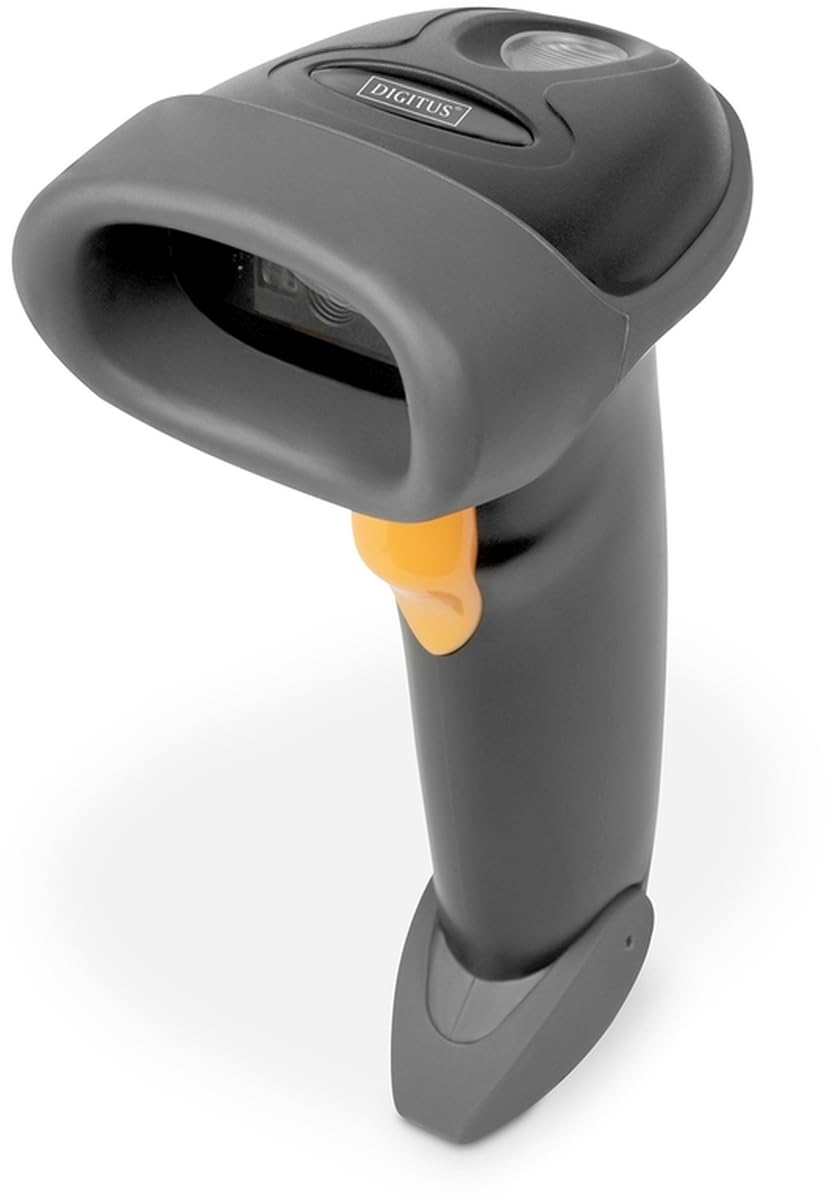
Image: The DIGITUS 2D Barcode Scanner, shown with its included stand and USB-RJ45 cable. The scanner is dark grey with an orange trigger button.
3. Nastavitev
- Priključite kabel: Insert the RJ45 end of the provided cable into the port at the base of the barcode scanner. Ensure it clicks securely into place.
- Povezava z gostiteljsko napravo: Plug the USB end of the cable into an available USB port on your computer or point-of-sale (POS) system.
- Namestitev gonilnika (Plug & Play): The scanner is typically plug-and-play and should be recognized automatically by most operating systems (Windows, macOS, Linux). No specific driver installation is usually required. If prompted, allow the system to install necessary drivers.
- Position the Scanner: Place the scanner in its holder for hands-free operation, or hold it comfortably for handheld scanning.
- Testno skeniranje: Open a text editor (e.g., Notepad, Word) or a compatible application. Scan a known barcode. The data should appear in the open application.
4. Navodila za uporabo
The DIGITUS 2D Barcode Scanner is designed for ease of use. Follow these steps for effective scanning:
- Vklop: The scanner powers on automatically when connected to a powered USB port. A successful power-on is usually indicated by a short beep and/or a light indicator.
- Ciljanje: Point the scanning window towards the barcode you wish to scan. Ensure the entire barcode is within the scanner's field of view.
- skeniranje: Press and hold the trigger button (orange button on the handle). A red aiming beam or illumination light will appear. Position the scanner so the aiming beam crosses the center of the barcode.
- Uspešno skeniranje: Upon a successful scan, the scanner will emit a short beep and/or the indicator light will flash. The scanned data will be transmitted to your connected device as if typed via a keyboard.
- Bi-Directional Scanning: The scanner supports bi-directional scanning, meaning it can read barcodes regardless of their orientation, improving scanning efficiency.
- QR Code Compatibility: This scanner is fully compatible with QR codes, allowing for versatile data capture.
5. Vzdrževanje
Pravilno vzdrževanje zagotavlja dolgo življenjsko dobo in optimalno delovanje vašega bralnika črtnih kod:
- Čiščenje okna za skeniranje: Redno čistite okno za skeniranje z mehko krpo, ki ne pušča vlaken. Za trdovratne madeže rahloampKrpo sperite z vodo ali blagim, neabrazivnim čistilom. Izogibajte se agresivnim kemikalijam ali abrazivnim materialom, ki bi lahko opraskali okno.
- Generalno čiščenje: Zunanjost skenerja obrišite z mehko, suho krpo, da odstranite prah in umazanijo.
- Skrb za kabel: Izogibajte se pretiranemu upogibanju ali zvijanju kabla USB, saj lahko s tem poškodujete notranje žice.
- Shranjevanje: Ko skenerja ne uporabljate, ga shranjujte v čistem in suhem okolju, stran od ekstremnih temperatur in neposredne sončne svetlobe.
- Izogibajte se kapljicam: While designed for durability, avoid dropping the scanner, as impact can damage internal components.
6. Odpravljanje težav
If you encounter issues with your DIGITUS 2D Barcode Scanner, refer to the following common problems and solutions:
| Težava | Možen vzrok | rešitev |
|---|---|---|
| Skener se ne vklopi. | No power from USB port; loose cable connection. | Ensure USB cable is securely connected to both scanner and host device. Try a different USB port or host device. |
| Skener ne bere črtnih kod. | Barcode damaged/unreadable; incorrect aiming; scanner not configured for barcode type. | Ensure barcode is clear and undamaged. Aim the scanner correctly. Refer to the QIG for advanced configuration options if specific barcode types are not recognized. |
| Skenirani podatki so napačni ali nepopolni. | Partial scan; software/application issue. | Ensure the entire barcode is within the scanning area. Test with a simple text editor to rule out application-specific issues. |
| Optični bralnik piska, vendar se podatki ne prikažejo. | Host device not receiving data; application not in focus. | Ensure the cursor is active in the target input field. Restart the application or host device. |
7. Specifikacije
Key technical specifications for the DIGITUS 2D Barcode Scanner (Model: DA-81002):
- Dimenzije izdelka: 1.1 x 9.7 x 6.5 palcev
- Teža artikla: 3.88 unč
- Številka modela artikla: DA-81002
- Proizvajalec: ŠTEVILKA
- Združljive naprave: Scanner (general purpose)
- vir energije: Električni z žico (prek USB-ja)
- Tehnologija povezljivosti: USB kabel
- Hitrost skeniranja: 200 sličic na sekundo (sličic na sekundo)
- Združljivost črtne kode: 1D and 2D barcodes, including QR Code
- Dolžina kabla: 2 meters (USB - RJ45)
8. Garancija in podpora
For warranty information and technical support, please refer to the Quick Installation Guide (QIG) included in your product package or visit the official Digitus webspletnega mesta. Račun shranite kot dokazilo o nakupu za uveljavljanje garancije.
For further assistance, you may contact Digitus customer support through their official channels. Details are typically provided in the product documentation or on the manufacturer's webmesto.