
1. Uvod
This manual provides comprehensive instructions for the setup, operation, and maintenance of your Mitzu MRC-UNI13 Universal Remote Control. Please read this manual carefully before using the device to ensure proper functionality and to maximize its lifespan.
2. Izdelek je končanview
The Mitzu MRC-UNI13 is a universal remote control designed for Smart TVs and Slim Screens. It features a lightweight and ergonomic design, providing a practical solution for controlling multiple television brands.
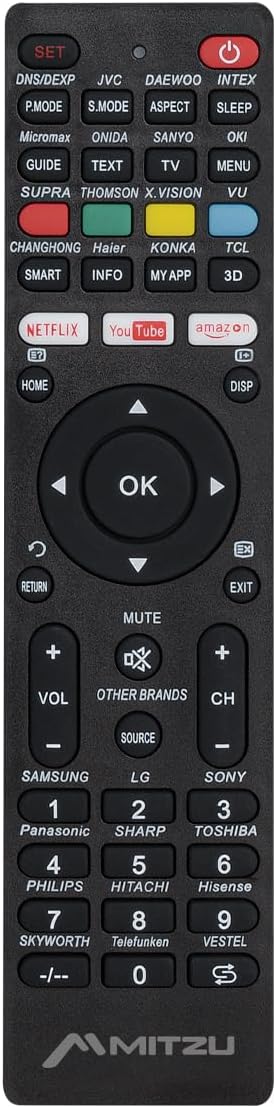
Slika 2.1: Spredaj view of the Mitzu MRC-UNI13 Universal Remote Control, showing all buttons and layout.

Slika 2.2: Pod kotom view of the Mitzu MRC-UNI13 Universal Remote Control, highlighting its slim profile.

Slika 2.3: Mitzu MRC-UNI13 Universal Remote Control with approximate dimensions: 17.7 cm length, 4.5 cm width, and 2 cm thickness.
3. Nastavitev
3.1. Namestitev baterije
The Mitzu MRC-UNI13 remote control requires two AAA batteries (not included) for operation. Follow these steps to install the batteries:
- Poiščite pokrov prostora za baterije na zadnji strani daljinskega upravljalnika.
- Potisnite pokrov navzdol ali pritisnite zapah, da ga odprete.
- Vstavite dve bateriji AAA in pazite, da se pozitivni (+) in negativni (-) pol pravilno poravnata z oznakami v predalu.
- Pokrov predalčka za baterije namestite nazaj tako, da ga potisnete nazaj na svoje mesto, dokler se ne zaskoči.
Opomba: Vedno uporabljajte nove baterije in zamenjajte obe bateriji hkrati. Ne mešajte starih in novih baterij ali različnih vrst baterij.
3.2. Programiranje daljinskega upravljalnika
The MRC-UNI13 is a universal remote control that needs to be programmed to operate your specific television. The programming method typically involves entering a code or using an auto-search function. Refer to the included code list (if provided with the physical product) for your TV brand. If no code list is available, or if the codes do not work, use the auto-search method.
3.2.1. Code Entry Method (Example)
- Turn on the TV you wish to control manually.
- Pritisnite in držite NASTAVI button on the remote until the indicator light (usually red) illuminates.
- Enter the 3-digit code for your TV brand using the numeric keypad. (e.g., for Samsung, LG, Sony, Panasonic, Sharp, Toshiba, Philips, Hitachi, Hisense, Skyworth, Telefunken, Vestel, etc., as indicated on the remote).
- Če je koda pravilna, se bo indikatorska lučka ugasnila. Daljinski upravljalnik preizkusite s pritiskom na MOČ button. If the TV turns off, the remote is programmed.
- If the TV does not respond, repeat the process with the next code listed for your brand.
3.2.2. Auto-Search Method (Example)
- Turn on the TV you wish to control manually.
- Daljinski upravljalnik usmerite proti televizorju.
- Pritisnite in držite NASTAVI gumb in MOČ button simultaneously until the indicator light illuminates.
- Release both buttons. The indicator light will flash.
- Neprekinjeno pritiskajte GLASNOST+ gumb (oz CH+) repeatedly until the TV volume changes or the channel changes. This indicates the remote has found a compatible code.
- Once the TV responds, immediately press the NASTAVI gumb za shranjevanje kode. Indikatorska lučka bo ugasnila.
- Test all functions of the remote. If some functions do not work, you may need to repeat the auto-search process to find a more compatible code.
Opomba: The exact programming steps may vary slightly. If these methods do not work, consult the specific instructions that came with your physical remote or visit the Mitzu support website for detailed programming guides.
4. Navodila za uporabo
Once programmed, the Mitzu MRC-UNI13 remote control functions similarly to your original TV remote. Below is a general guide to its main functions:
- VKLOP (rdeči gumb): Vklopi ali izklopi TV.
- NASTAVITEV: Uporablja se za programiranje daljinskega upravljalnika.
- DNS/DEXP, JVC, DAEWOO, INTEX, etc. (Brand Buttons): Specific buttons for direct brand code entry or selection.
- P.MODE, S.MODE, ASPECT, SLEEP: Picture mode, Sound mode, Aspect ratio, Sleep timer functions.
- GUIDE, TEXT, TV, MENU, VU: Electronic Program Guide, Teletext, TV/AV input, Menu, Volume Up/Down (likely a typo on the remote, VU usually means Volume Up).
- SMART, INFO, MY APP, 3D: Smart TV functions, Information display, Custom app access, 3D mode.
- NETFLIX, YouTube, Amazon: Direct access buttons for streaming services.
- HOME, DISP: Home menu, Display information.
- Navigacijska tipkovnica (gor, dol, levo, desno, V redu): Navigacija po menijih in potrditev izbir.
- RETURN, EXIT: Vrnitev na prejšnji zaslon ali izhod iz menija.
- MUTE: Utiša ali vklopi zvok televizorja.
- GLASNOST+ / GLASNOST-: Prilagoditev glasnosti navzgor ali navzdol.
- CH+ / CH-: Spremeni kanal navzgor ali navzdol.
- VIR: Izbere vhodne vire (HDMI, AV itd.).
- Numerična tipkovnica (0-9): Neposredni vstop v kanal.
- -/--: For two-digit channel entry.
Opomba: The functionality of some buttons may depend on the specific TV model and brand you are controlling. Not all buttons may be supported by all TVs.
5. Vzdrževanje
To ensure the longevity and optimal performance of your Mitzu MRC-UNI13 Universal Remote Control, follow these maintenance guidelines:
- Čiščenje: Za čiščenje daljinskega upravljalnika uporabite mehko, suho krpo. Za trdovratno umazanijo rahlo obrišiteampen the cloth with water or a mild cleaning solution. Do not use abrasive cleaners, alcohol, or solvents.
- Vzdrževanje baterije:
- Če daljinskega upravljalnika ne boste uporabljali dlje časa, odstranite baterije, da preprečite puščanje.
- If battery leakage occurs, clean the compartment thoroughly before inserting new batteries.
- Izrabljene baterije zavrzite v skladu z lokalnimi predpisi.
- Shranjevanje: Daljinski upravljalnik shranjujte na hladnem in suhem mestu, stran od neposredne sončne svetlobe, ekstremnih temperatur in visoke vlažnosti.
- Ravnanje: Pazite, da vam daljinski upravljalnik ne pade ali da ga ne izpostavljate močnim udarcem, saj lahko s tem poškodujete notranje komponente.
6. Odpravljanje težav
If you encounter issues with your Mitzu MRC-UNI13 Universal Remote Control, refer to the following troubleshooting tips:
- Daljinski upravljalnik sploh ne deluje:
- Preverite, ali so baterije pravilno vstavljene s pravilno polarnostjo (+/-).
- Zamenjajte stare baterije z novimi.
- Ensure there is a clear line of sight between the remote and the TV's infrared sensor.
- Remote controls some functions but not others:
- The current code may not be fully compatible with your TV model. Try reprogramming the remote using a different code for your TV brand or using the auto-search method again.
- Some advanced functions (e.g., specific Smart TV features) may not be supported by universal remotes.
- Kontrolna lučka med programiranjem ne sveti:
- Prepričajte se, da pritisnete in držite NASTAVI button for the required duration.
- Preverite ali zamenjajte baterije.
- TV does not respond during auto-search:
- Ensure the TV is turned on manually before starting the auto-search.
- Prepričajte se, da daljinski upravljalnik usmerite neposredno v televizor.
- Pritisnite GLASNOST+ or CH+ button repeatedly and quickly enough to cycle through codes.
If the problem persists after trying these steps, contact Mitzu customer support for further assistance.
7. Specifikacije
| Funkcija | Podrobnost |
|---|---|
| Znamka | Mitzu |
| Model | MRC-UNI13 |
| Združljive naprave | Televisions (Smart TVs, Slim Screens) |
| Posebne lastnosti | Lightweight, Universal Compatibility (up to 10 devices, though typically programmed for one TV at a time) |
| Tehnologija povezljivosti | Infrardeči (IR) |
| Vir napajanja | 2 x AAA baterije (niso vključene) |
| Mere (pribl.) | 22.2 x 8.8 x 2.8 cm (Package); Remote: ~17.7 x 4.5 x 2 cm |
| Teža (pribl.) | 70 g (pakiranje) |
8. Garancija in podpora
8.1. Informacije o garanciji
Mitzu products are designed for quality and reliability. For specific warranty terms and conditions, please refer to the warranty card included with your purchase or visit the official Mitzu webspletnega mesta. Shranite dokazilo o nakupu za uveljavljanje garancije.
8.2. Podpora strankam
For technical assistance, programming codes, or any other inquiries regarding your Mitzu MRC-UNI13 Universal Remote Control, please contact Mitzu customer support. Contact details can typically be found on the Mitzu official webspletnem mestu ali na embalaži izdelka.
Obiščete lahko tudi Mitzu Brand Store on Amazon za več informacij o izdelku.