
1. Uvod
Thank you for choosing the Truman TM 1000 HD Receiver. This manual provides detailed instructions for the proper installation, operation, and maintenance of your new satellite receiver. Please read this manual thoroughly before using the device to ensure optimal performance and safety.
2. Varnostne informacije
- Ensure the receiver is placed on a stable, flat surface to prevent falls.
- Naprave ne izpostavljajte dežju, vlagi ali ekstremnim temperaturam.
- Izogibajte se blokiranju prezračevalnih odprtin, da preprečite pregrevanje.
- Med nevihtami ali če naprave dalj časa ne uporabljate, izključite napajalni kabel.
- Sprejemnika ne poskušajte odpirati ali popravljati sami. Vsa servisna dela prepustite usposobljenemu osebju.
- The device features automatic low current protection for the signal input.
3. Vsebina paketa
Prosimo, preverite paket za naslednje artikle:
- Truman TM 1000 HD Receiver
- Daljinski upravljalnik
- Napajalni adapter
- Uporabniški priročnik (ta dokument)
- Note: A Wi-Fi adapter is not included and must be purchased separately if wireless connectivity is desired.
4. Izdelek je končanview
The Truman TM 1000 HD Receiver is a high-definition satellite receiver designed to provide a rich viewing experience. It supports various resolutions and offers multiple features for channel management and media playback.
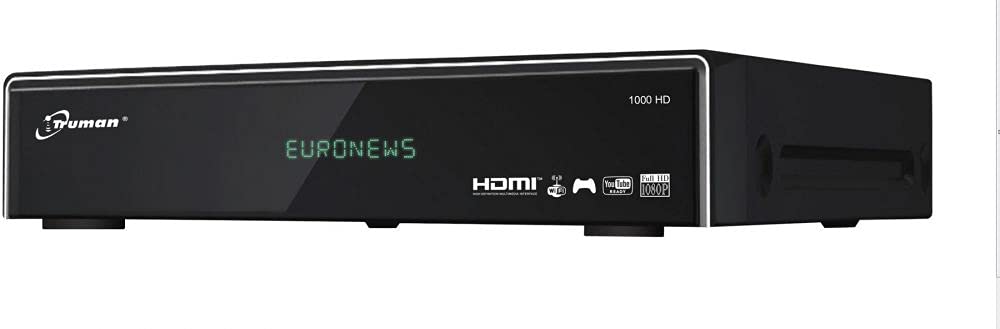
Slika 4.1: Spredaj view of the Truman TM 1000 HD Receiver. This image shows the compact design of the receiver, featuring a front panel display and control buttons, indicating its readiness for integration into a home entertainment system.
Ključne značilnosti:
- Full HD support: 1080p, 1080i, 720p, 576p, 480p, 576i, 480i.
- Supports up to 6000 channels.
- USB vrata za viewing and recording media.
- Simultaneous recording of one channel and viewing of another.
- Picture-in-picture (PIP) functionality for up to 16 channels.
- Automatic search for frequencies and satellites.
- Multi-language and user-friendly menu interface.
- Ethernet (LAN) port for network connectivity.
- Wi-Fi support (requires external Wi-Fi adapter).
- Electronic Program Guide (EPG).
5. Nastavitev
5.1 Priključitev sprejemnika
- Povezava s satelitsko anteno: Connect the coaxial cable from your satellite dish LNB to the "LNB IN" port on the back of the receiver.
- TV povezava: Connect an HDMI cable from the "HDMI OUT" port on the receiver to an available HDMI input on your television.
- Napajalni priključek: Connect the power adapter to the "DC IN" port on the receiver, then plug the adapter into a wall outlet.
- Omrežna povezava (neobvezno):
- Ethernet: Connect an Ethernet cable from your router to the "LAN" port on the receiver.
- Wi-Fi: If using a Wi-Fi adapter (not included), plug it into an available USB port on the receiver.
- Naprava USB (neobvezno): For recording or media playback, insert a USB storage device into an available USB port.
5.2 Prvi vklop
- Vklopite televizor in izberite pravilen vhodni vir HDMI.
- Power on the Truman TM 1000 HD Receiver.
- Follow the on-screen instructions for initial setup, which typically includes language selection, time zone, and satellite/channel scanning.
- Perform an automatic satellite search to find available frequencies and channels.
6. Navodila za uporabo
6.1 Basic Channel Operations
- Izbira kanala: Uporabite CH+ / CH- buttons on the remote control to change channels, or enter the channel number directly.
- Nadzor glasnosti: Uporabite VOL + / VOL- gumbe za prilagajanje glasnosti.
- Dostop do menija: Pritisnite MENI gumb za dostop do glavnega menija za nastavitve in funkcije.
- Elektronski programski vodnik (EPG): Pritisnite EPG gumb za view the program schedule.
6.2 Snemanje in predvajanje
To record programs, ensure a USB storage device is connected to the receiver.
- Takojšnje snemanje: While watching a channel, press the REC button on the remote control to start recording. Press STOP da končate snemanje.
- Predvideno snemanje: Use the EPG to select a program and schedule a recording.
- Predvajanje: Access the media player through the main menu or a dedicated button (if available) to browse and play recorded content or other media filez vaše naprave USB.
- Sočasne operacije: The receiver supports recording one channel while watching another channel from the same transponder.
6.3 Network Features (LAN/Wi-Fi)
If connected to a network, the receiver may offer additional features such as firmware updates, internet applications, or media streaming.
- Nastavitev omrežja: Go to the "Network Settings" in the main menu.
- Ethernet: If using a wired connection, ensure the cable is connected. The receiver should obtain an IP address automatically.
- Wi-Fi: If using a Wi-Fi adapter, select your network from the list, enter the password, and connect.
7. Vzdrževanje
- Čiščenje: Za čiščenje zunanjosti sprejemnika uporabite mehko, suho krpo. Ne uporabljajte tekočih čistil ali abrazivnih materialov.
- Prezračevanje: Ensure the ventilation slots are clear of dust and obstructions to prevent overheating.
- Posodobitve vdelane programske opreme: Periodically check for firmware updates through the receiver's menu (if available) to ensure optimal performance and access to new features.
8. Odpravljanje težav
| Težava | Možen vzrok | rešitev |
|---|---|---|
| Brez moči | Napajalni kabel odklopljen; težava z vtičnico. | Preverite priklop napajalnega kabla; poskusite z drugo vtičnico. |
| No signal / "No Signal" message | LNB cable disconnected; satellite dish misalignment; incorrect satellite settings. | Check LNB cable connection; ensure dish is correctly aligned; verify satellite settings in the menu. |
| Ni slike na televizorju | Na televizorju je izbran napačen vhod HDMI; okvarjen kabel HDMI. | Select the correct HDMI input on your TV; try a different HDMI cable. |
| Daljinski upravljalnik ne deluje | Dead batteries; obstruction between remote and receiver. | Zamenjajte baterije; zagotovite neoviran pogled na IR senzor sprejemnika. |
| Ni mogoče vzpostaviti povezave z Wi-Fi | No Wi-Fi adapter; incorrect password; network issue. | Ensure a compatible Wi-Fi adapter is connected; re-enter Wi-Fi password; check router. |
9. Specifikacije
| Funkcija | Opis |
|---|---|
| Znamka | Truman |
| Model | TM 1000 HD |
| Podpora za video ločljivost | 1080p, 1080i, 720p, 576p, 480p, 576i, 480i |
| Zmogljivost kanala | Do 6000 kanalov |
| Povezljivost | USB, Ethernet (LAN), Wi-Fi (external adapter required) |
| Snemanje | PVR function via USB (record one, watch another on same transponder) |
| večview | Picture-in-picture up to 16 channels |
| Funkcija iskanja | Automatic frequency and satellite search |
| Jezik menija | Večjezična podpora |
| Zaščita | Automatic low current protection for signal input |
| EPG | Elektronski programski vodnik |
10. Garancija in podpora
For warranty information, please refer to the warranty card included with your product or contact your local dealer. For technical support or service inquiries, please visit the official Truman webali se obrnite na njihov oddelek za pomoč uporabnikom.
Opomba: Posebni garancijski pogoji in kontaktni podatki za podporo se lahko razlikujejo glede na regijo.