
Uvod
Welcome to the user manual for your new Other T11 Smart Watch. This device is designed to enhance your daily life with features such as fitness tracking, health monitoring, and smart notifications. Please read this manual carefully to understand the functions and proper operation of your smartwatch. This watch is compatible with both Android and iOS devices.
Nastavitev
1. Polnjenje pametne ure
Before initial use, fully charge your T11 Smart Watch. Connect the provided charging cable to the charging port on the back of the watch and plug the USB end into a standard USB power adapter (not included) or a computer USB port. The watch display will indicate charging status.
2. Prenos spremljevalne aplikacije
To unlock all features and synchronize data, download the dedicated companion app on your smartphone. Iskanje the app name (usually indicated in the quick start guide or on the watch packaging) in the Apple App Store (for iOS) or Google Play Store (for Android).
3. Seznanjanje s pametnim telefonom
- Prepričajte se, da je Bluetooth na vašem pametnem telefonu omogočen.
- Odprite spremljevalno aplikacijo na pametnem telefonu.
- Follow the in-app instructions to search for and connect to your T11 Smart Watch. The watch name should appear in the list of available devices.
- Potrdite zahtevo za seznanjanje tako na telefonu kot na uri, če ste pozvani.
Navodila za uporabo
Osnovna navigacija
The T11 Smart Watch features a full touch screen for easy navigation. Swipe left, right, up, or down to access different menus and functions. Tap to select an option or confirm an action.
Changing Watch Dials
The T11 Smart Watch offers various beautiful dials to personalize your experience. You can change the watch face directly by touching and holding the screen, then swiping to browse available options and tapping to select. No phone connection is needed for this function.

Image: The T11 Smart Watch allows users to easily change between various pre-installed watch faces by interacting directly with the touch screen.
Real-time Information Reminders
Once paired with your smartphone via Bluetooth, the T11 Smart Watch can provide real-time reminders for calls and messages. Ensure your phone's Bluetooth is active and the companion app is running in the background. The watch will vibrate to alert you, displaying the content of messages or caller ID directly on the screen.
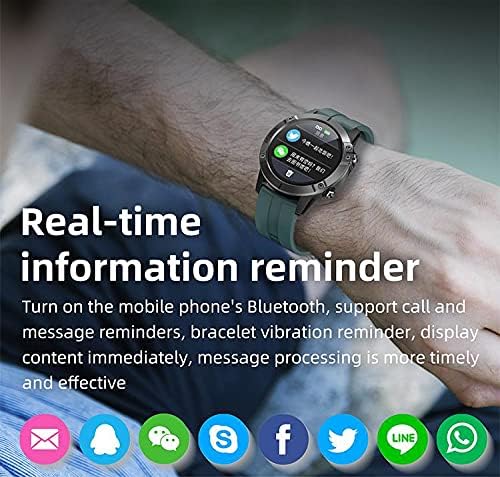
Image: The T11 Smart Watch on a wrist, showing notifications from various social media and messaging applications.
Več športnih načinov
The T11 Smart Watch supports multiple sports modes to track your physical activities. These modes include hiking, climbing, running, swimming, cycling, walking, football, basketball, badminton, and more. Select the appropriate mode before starting your activity for accurate data recording.

Image: A visual representation of the T11 Smart Watch's multiple sports modes, including walking, running, riding, climbing, football, basketball, table tennis, and badminton.
Spremljanje zdravja
The watch includes several health monitoring features:
- Sledilnik srčnega utripa: Spremlja vaš srčni utrip čez dan.
- Krvni nadzor kisika: Meri raven nasičenosti krvi s kisikom.
- Sledilnik spanja: Analyzes your sleep patterns, including deep sleep and light sleep.
- Sledilnik telesne pripravljenosti: Beleži korake, razdaljo in porabljene kalorije.
Dodatne funkcije
- Nadzor glasbe: Predvajanje glasbe na pametnem telefonu upravljajte neposredno z uro.
- Oddaljena kamera: Uporabite uro kot daljinski sprožilec za kamero pametnega telefona.
- Budilka: Nastavite alarme, ki vas bodo zbudili ali opomnili na opravila.
- Sledilnik razpoloženja: (Functionality may vary, refer to app for details).

Slika: Prekoview of the T11 Smart Watch's key features: full touch screen, sport pedometer, music control, multiple sports modes, health assistant, large-capacity battery, and remote camera.
Vzdrževanje
Vodoodpornost (IP67)
The T11 Smart Watch is IP67 water-resistant, meaning it is protected against dust and can withstand immersion in water up to 1 meter for 30 minutes. It is suitable for daily use and activities like hand washing or light rain. However, it is not recommended for swimming, diving, or hot water activities.
Čiščenje
Redno čistite uro in pašček z mehko, suho krpo. Po potrebi uporabite rahloamp cloth and then dry thoroughly. Avoid using harsh chemicals or abrasive materials, as these can damage the device.
Skrb za baterijo
To prolong battery life, avoid fully discharging the watch frequently. Charge it regularly, especially if you plan not to use it for an extended period.
Odpravljanje težav
Ura se ne vklopi
- Prepričajte se, da je ura popolnoma napolnjena. Priključite jo na polnilnik za vsaj 30 minut.
- Press and hold the power button (if available) for several seconds.
Seznanjanje s pametnim telefonom ni mogoče
- Prepričajte se, da je Bluetooth omogočen na vašem pametnem telefonu.
- Prepričajte se, da je ura v dosegu Bluetooth vašega telefona (običajno 10 metrov).
- Znova zaženite pametni telefon in uro.
- Clear the Bluetooth cache on your phone or forget the device and try pairing again.
- Prepričajte se, da je spremljevalna aplikacija posodobljena na najnovejšo različico.
Netočni zdravstveni podatki
- Prepričajte se, da je ura tesno prilegana zapestju, ne pretesna ali preohlapna.
- Očistite senzorje na zadnji strani ure.
- Za večjo natančnost se med meritvami izogibajte pretiranemu premikanju.
Obvestila se ne prikazujejo
- V nastavitvah telefona preverite dovoljenja za obvestila za spremljevalno aplikacijo.
- Prepričajte se, da aplikacija deluje v ozadju in da je ne zapirajo funkcije za varčevanje z energijo telefona.
- Verify that notifications are enabled within the companion app settings.
Tehnične specifikacije
| Funkcija | Specifikacija |
|---|---|
| Ime modela | T11 |
| Blagovna znamka | drugo |
| Operacijski sistem | Večkratna |
| Združljivi operacijski sistemi | Android, iOS |
| Vrsta zaslona | LCD |
| Velikost zaslona | 1.3 palcev |
| Resolucija | 320 x 240 |
| Vnos človeškega vmesnika | Nadzor na dotik |
| Tehnologija povezljivosti | Brezžično |
| Standard brezžične komunikacije | Bluetooth 4.0 |
| Kapaciteta baterije | 280 mAh |
| Čas pripravljenosti | Približno 35 dni |
| Delovni čas | 7-10 dni |
| Ocena mednarodne zaščite | IP67 (vodoodporno) |
| Globina vodoodpornosti | 1 meter |
| Vrsta materiala traku | Silikon |
| Vrsta materiala ohišja | Plastika |
| barva | Črna |
| Vključene komponente | Silicone bracelet (black), 280 mAh battery, 280 mAh battery charger |
Garancija in podpora
Za informacije o garanciji in podporo strankam glejte dokumentacijo, ki ste jo prejeli ob nakupu, ali se obrnite na prodajalca. Shranite dokazilo o nakupu za morebitne garancijske zahtevke.