
Uvod
This manual provides detailed instructions for the safe and efficient operation of your DIGITNOW M513 Record Player. Please read this manual thoroughly before using the product and retain it for future reference. This record player features a belt-drive turntable, external stereo speakers, Bluetooth connectivity, and Vinyl-to-MP3 recording capabilities.
Konec izdelkaview
Familiarize yourself with the components and controls of your record player.
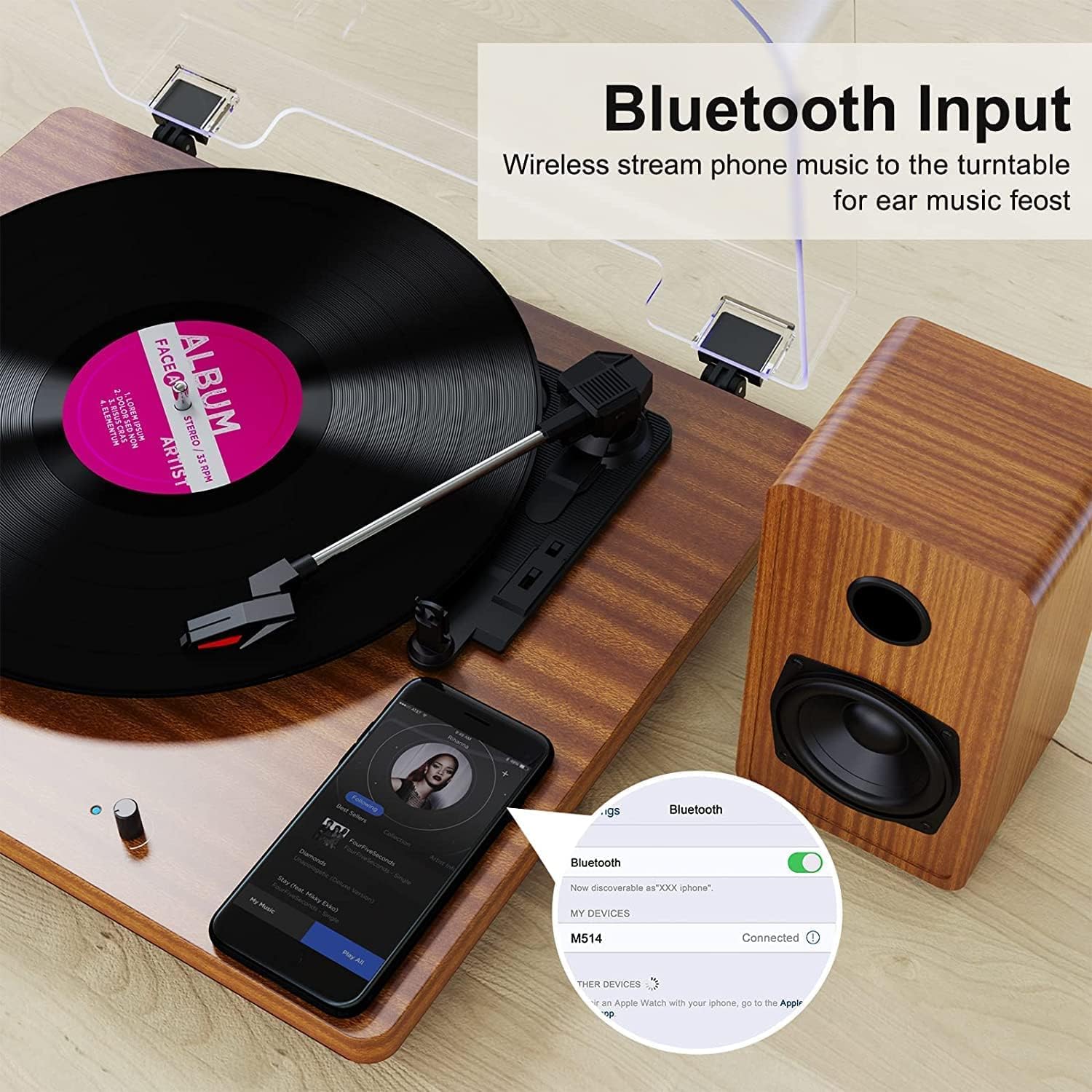
Figure 1: DIGITNOW M513 Record Player with external speakers and Bluetooth connectivity.
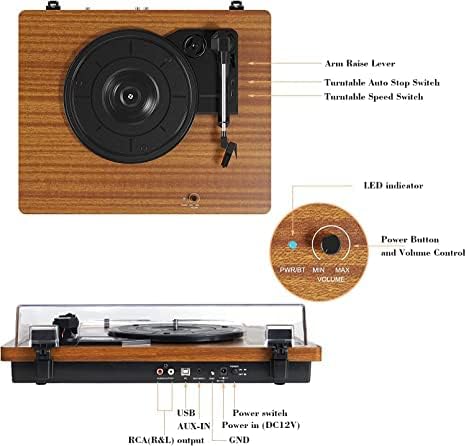
Figure 2: Top and rear panel controls including arm raise lever, auto stop switch, speed switch, power button, volume control, USB, AUX-IN, RCA(R&L) output, power input, and ground.
Ključne komponente:
- Vrtljiva plošča: Where vinyl records are placed.
- Tonar: Drži pisalo in sledi utorom plošče.
- Pisalo (igla): Prebere zvočne informacije iz posnetka.
- External Stereo Speakers: Zagotovite avdio izhod.
- Pokrov proti prahu: Protects the turntable from dust.
- Nadzorna plošča: Includes power, volume, speed selection, and input/output ports.
Nastavitev
- Razpakiranje: Carefully remove all components from the packaging. Ensure all accessories (dust cover, 45 RPM adapter, RCA output cables, ground wire, USB cable, user manual) are present.
- Umestitev: Place the record player on a stable, level surface away from direct sunlight, heat sources, and excessive vibration. Position the external speakers for optimal sound distribution.
- Priključitev zvočnikov: Connect the provided external stereo speakers to the RCA output ports on the rear of the record player using the RCA cables. Ensure correct left (L) and right (R) connections.
- Napajalni priključek: Connect the DC 12V power adapter to the power input port on the rear of the unit, then plug the adapter into a wall outlet.
- Dust Cover Installation: Attach the dust cover to the hinges at the back of the turntable.
Navodila za uporabo
Predvajanje plošč
- Vklop: Turn the Power/Volume knob clockwise to power on the unit. The LED indicator will illuminate.
- Izberite hitrost: Choose the appropriate speed (33, 45, or 78 RPM) using the speed switch located on the top panel. Use the 45 RPM adapter for 7-inch records with large center holes.
- Krajevni zapis: Vinilno ploščo previdno položite na gramofonski krožnik.
- Dviganje ročice tona: Use the arm raise lever to gently lift the tonearm.
- Položaj ročice tona: Move the tonearm over the desired starting track of the record.
- Spodnja ročica: Slowly lower the tonearm using the arm raise lever. The stylus will make contact with the record, and playback will begin.
- Prilagodi glasnost: Glasnost prilagodite z gumbom za vklop/glasnost.
- Samodejna zaustavitev: The record player features an auto-stop function. When enabled via the Auto Stop switch, the platter will stop spinning automatically when the record finishes. If disabled, the platter will continue to spin.
- Konec predvajanja: At the end of the record, or when you wish to stop, use the arm raise lever to lift the tonearm, return it to the tonearm rest, and then lower the lever. Turn the Power/Volume knob counter-clockwise to power off the unit.

Slika 3: Podrobno view of the stylus, belt-driven design for smooth music, and 33/45/78 RPM speed options for various record sizes.
Povezava Bluetooth
The record player can receive audio wirelessly from your Bluetooth-enabled devices.
- Aktivirajte način Bluetooth: Ensure the record player is powered on. The unit will automatically enter Bluetooth receiving mode if no record is playing or AUX input is not connected. The LED indicator may change color or blink to indicate Bluetooth mode.
- Omogočite Bluetooth v napravi: Na pametnem telefonu ali drugi napravi Bluetooth omogočite Bluetooth in poiščite razpoložljive naprave.
- Seznani napravo: Select "DIGITNOW" or a similar name from the list of available devices to pair. Once connected, you will hear a confirmation sound.
- Predvajaj zvok: Play music from your device, and it will stream through the record player's speakers.
Video 1: Demonstrates the setup and Bluetooth connection process for the DIGITNOW M513 Record Player, including placing a record and pairing with a smartphone.
Snemanje vinila v MP3
Convert your vinyl records to digital MP3 files via a USB connection to your computer.
- Povežite se z računalnikom: Use the provided USB cable to connect the record player's USB port (PC OUT) to a USB port on your Mac or PC.
- Namestite programsko opremo: Refer to the detailed instructions in the included user manual for information on compatible recording software and installation.
- Začetek snemanja: Follow the software's instructions to begin recording audio from your vinyl record to your computer.

Figure 4: Connection diagram illustrating USB for PC recording, AUX-IN for external audio sources like CD players, and RCA OUT for external speakers.
External Audio Connections
- AUX vhod: Connect external audio sources (e.g., CD player, smartphone, digital media player) to the AUX-IN port on the rear panel using a 3.5mm audio cable. The record player will play audio from the connected device through its speakers.
- Izhod RCA: For enhanced or louder sound, connect the RCA(R&L) output ports to an external amplifier or powered speakers using RCA cables.
Vzdrževanje
- Čiščenje pisala: Pisalo redno nežno čistite z mehko krtačko, namenjeno čiščenju pisala, in jo ščetkajte od zadaj naprej. Pisala se ne dotikajte s prsti.
- Čiščenje enote: Wipe the record player and dust cover with a soft, dry cloth. Do not use abrasive cleaners or solvents.
- Belt Maintenance: The belt-drive system is designed for durability. If the platter does not spin or spins inconsistently, the drive belt may have slipped during shipping or use. Refer to the full user manual for instructions on how to re-seat or replace the drive belt.
- Skrb za zapise: Keep your records clean and free of dust to ensure optimal sound quality and prolong stylus life. Store records vertically in their sleeves.
Odpravljanje težav
| Težava | Možen vzrok | rešitev |
|---|---|---|
| Brez moči | Napajalnik ni priključen ali vtičnica ne deluje. | Ensure power adapter is securely plugged into the unit and a working wall outlet. Check the power switch. |
| Brez zvoka | Volume too low; speakers not connected; incorrect input mode. | Increase volume. Verify speaker connections. Ensure correct input mode (Phono, Bluetooth, AUX). |
| Preskakovanje ali popačen zvok | Dirty or damaged record; worn or dirty stylus; unit not level. | Clean record. Clean or replace stylus. Place unit on a level surface. |
| Plošča se predvaja prehitro/prepočasi | Nepravilna nastavitev hitrosti. | Adjust the speed switch to 33, 45, or 78 RPM as appropriate for the record. |
| Brenčanje | Ozemljitvena žica ni priključena; motnje zaradi druge elektronike. | Ensure the ground wire is properly connected (if applicable). Move the unit away from other electronic devices. |
Specifikacije
- Model: M513
- Znamka: DIGITNOW
- Dimenzije izdelka: 15 x 12.87 x 6.22 palcev
- Teža artikla: 11.77 funtov
- Hitrosti: 33 1/3, 45, 78 RPM
- Vrsta pogona: Jermenski pogon
- Vrsta motorja: DC motor
- Povezljivost: Bluetooth, AUX-IN, RCA Output, USB (for Vinyl-to-MP3 recording)
- Vključene komponente: Dust cover, 45 RPM adapter, RCA output cables, ground wire, USB cable, user manual
- Material: Plastika, Les
- Posebne lastnosti: Bluetooth Function, RCA Output, Vinyl-to-MP3 Recording, Auto Stop
Garancija in podpora
For warranty information, technical support, or service inquiries, please refer to the contact details provided in the original product packaging or visit the official DIGITNOW webspletnega mesta. Račun shranite kot dokazilo o nakupu za uveljavljanje garancije.