
1. Uvod
Thank you for choosing the Mitzu MCS-9956 Bluetooth Car Stereo. This manual provides essential information for the proper installation, operation, and maintenance of your new car stereo. Please read this manual thoroughly before using the product to ensure safe and optimal performance. Keep this manual for future reference.
The MCS-9956 features Bluetooth connectivity for hands-free calls and audio streaming, USB and SD card playback for MP3 files, an AUX input, and an LCD display with a pre-set equalizer and digital clock.
2. Varnostne informacije
- Namestitev: Ensure professional installation to prevent damage to the unit or your vehicle. Incorrect wiring can cause fire or electrical shock.
- Napajanje: Napravo priključite samo na 12V enosmerno napajanje z negativno ozemljitvijo.
- Raven glasnosti: Avoid operating the unit at excessively high volume levels for extended periods to prevent hearing damage and to maintain awareness of traffic conditions.
- Čiščenje: Za čiščenje uporabite mehko, suho krpo. Ne uporabljajte abrazivnih čistil ali topil.
- Vlaga: Napravo hranite stran od vode in prekomerne vlage.
- Delovanje med vožnjo: Do not operate complex functions or watch videos while driving. Distraction can lead to accidents.
3. Izdelek je končanview
3.1 Sprednja plošča in daljinski upravljalnik
The front panel provides access to all primary controls, including power, volume, mode selection, and media playback. The included remote control offers convenient access to these functions from a distance.

Slika 3.1: Spredaj view of the Mitzu MCS-9956 car stereo showing the main unit with its LCD display, control knob, buttons, USB, SD, and AUX ports, alongside the included remote control.
- Gumb za vklop / način: Press to turn on/off, short press to change mode (Radio, USB, SD, AUX, Bluetooth).
- Gumb za glasnost: Rotate to adjust volume. Press to access audio settings (EQ, Bass, Treble, Balance, Fader).
- Zaslon: LCD screen showing current status, time, track information, etc.
- Vrata USB: Za predvajanje MP3-jev priključite USB-ključke.
- SD Card Slot (TF): Insert Micro SD cards for MP3 playback.
- AUX vhod: 3.5 mm priključek za priključitev zunanjih avdio naprav.
- Mikrofon (MIC): Vgrajen mikrofon za prostoročno telefoniranje.
- Band/APS Button: In radio mode, press to select radio band (FM1, FM2, FM3). Long press for automatic station scan.
- Gumb za izklop zvoka: Utiša zvočni izhod.
- Navigation Buttons (<< / >>): Skip tracks, fast forward/rewind, tune radio stations.
- Prednastavljeni gumbi (1–6): Store and recall radio stations. In media mode, these can also function as play/pause, repeat, random, and folder navigation.
3.2 Priključki na zadnji plošči
The rear panel houses all necessary wiring connections for power, speakers, and external amposvežilci.
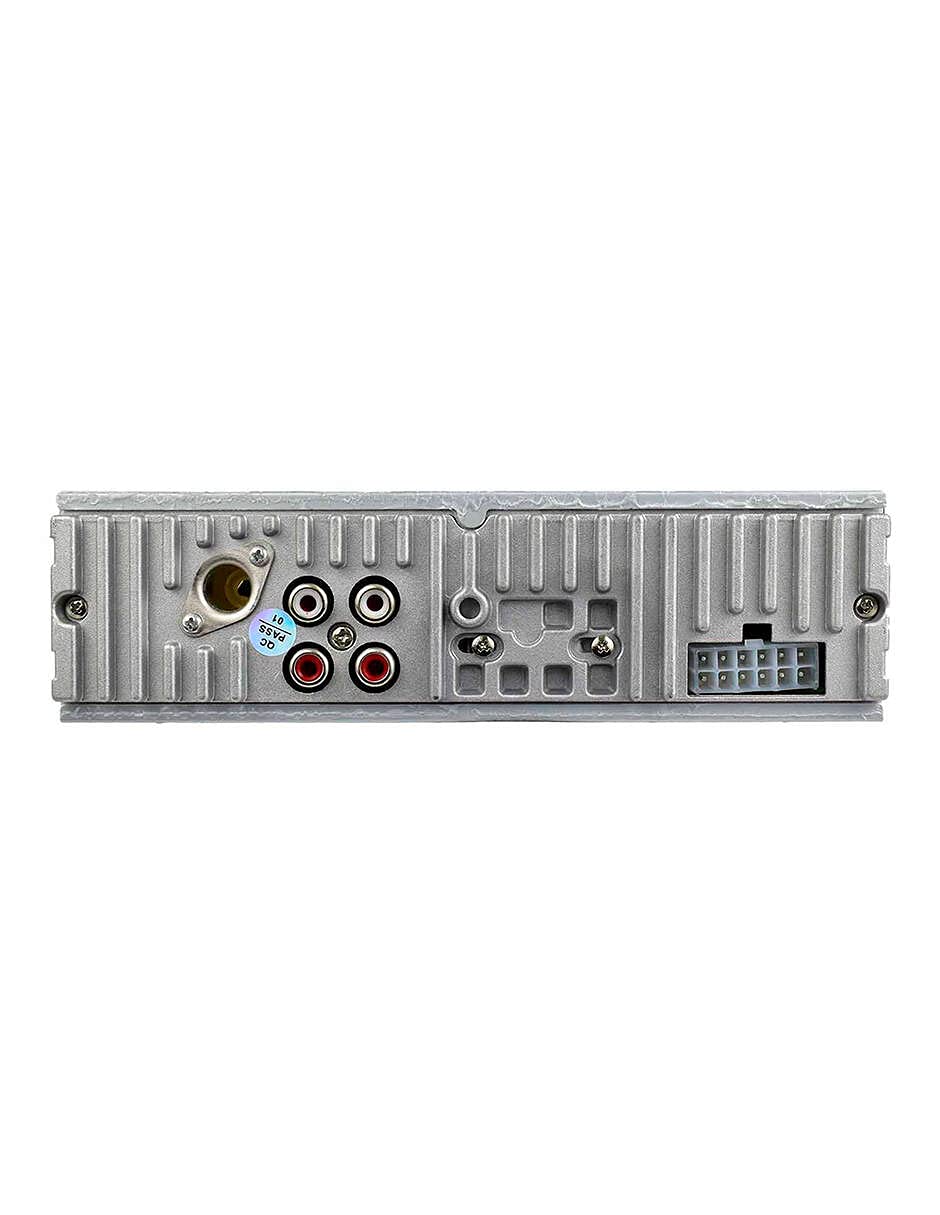
Slika 3.2: Zadaj view of the Mitzu MCS-9956 car stereo, displaying the antenna input, RCA audio outputs, and the multi-pin wiring harness connector.
- Antenski vhod: Tukaj priključite radijsko anteno vašega avtomobila.
- RCA avdio izhodi: Za priklop zunanjih amplifiers (Front Left/Right, Rear Left/Right).
- Priključek kabelskega snopa: Connects to the included wiring harness for power, ground, and speaker connections.
3.3 Stran View
Stran view illustrates the mounting points and heat dissipation design of the unit.
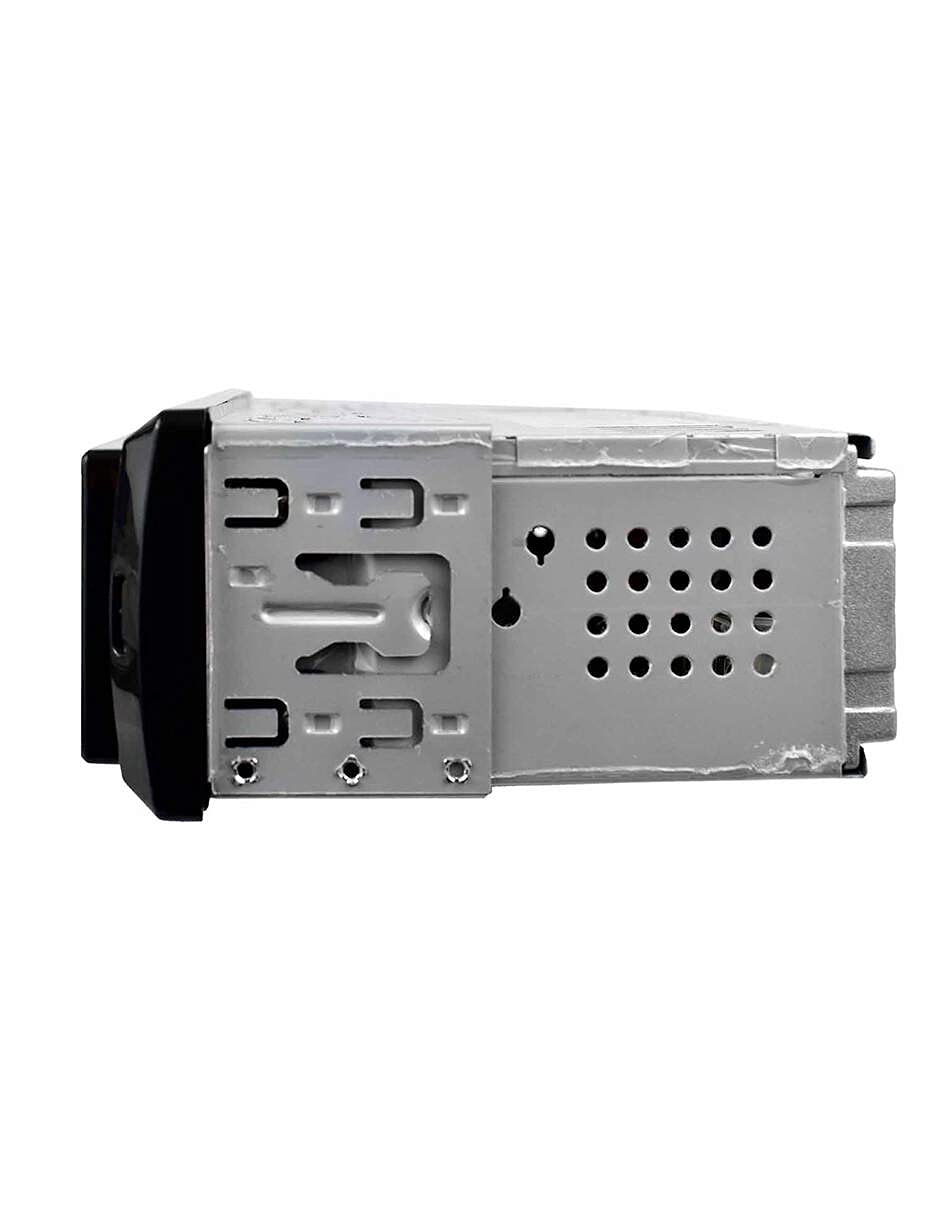
Slika 3.3: Stran view of the Mitzu MCS-9956 car stereo, highlighting the mounting brackets and ventilation holes for heat management.
4. Nastavitev
4.1 Namestitev
Professional installation is highly recommended. Incorrect wiring can damage the unit or your vehicle's electrical system. Refer to your vehicle's service manual for specific dashboard removal and wiring instructions.
- Odklopite baterijo: Before starting, disconnect the negative terminal of your car battery to prevent electrical shorts.
- Montaža: Install the car stereo into the dashboard opening using the provided mounting sleeve and brackets. Secure it firmly.
- Žične povezave:
- moč: Connect the yellow wire (constant 12V) to a constant 12V power source, the red wire (accessory 12V) to a switched 12V source (ignition), and the black wire (ground) to a good chassis ground point.
- Govorci: Connect the speaker wires according to the color codes (e.g., White/White-Black for Front Left, Gray/Gray-Black for Front Right, Green/Green-Black for Rear Left, Purple/Purple-Black for Rear Right). Ensure correct polarity.
- Antena: Connect the car's radio antenna cable to the antenna input on the rear of the unit.
- RCA Outputs (Optional): Če uporabljate zunanje amplifiers, connect RCA cables from the unit's RCA outputs to the amplifierjevi vložki.
- Ponovno priključite baterijo: Once all connections are secure, reconnect the car battery.
4.2 Začetni vklop
After installation, turn on your vehicle's ignition. Press the Moč/način button on the unit. The LCD display should illuminate. If not, check all wiring connections.
5. Navodila za uporabo
5.1 Osnovne funkcije
- Vklop/izklop: Pritisnite Moč/način button to turn the unit on. Long press to turn off.
- Izbira načina: Kratek pritisk na Moč/način button to cycle through available modes: Radio (FM), USB, SD, AUX, Bluetooth.
- Nadzor glasnosti: Zavrtite Gumb za glasnost v smeri urinega kazalca za povečanje glasnosti, v nasprotni smeri urinega kazalca za zmanjšanje.
- Mute: Pritisnite Mute gumb za utišanje zvoka. Pritisnite znova za obnovitev.
5.2 Radijsko delovanje
- Izberite pas: V načinu radia pritisnite BAND/APS button to switch between FM1, FM2, and FM3 bands.
- Ročna nastavitev: Kratek pritisk na Navigation Buttons (<< / >>) to fine-tune frequencies.
- Samodejno skeniranje: Dolgo pritisnite Navigation Buttons (<< / >>) to automatically search for the next strong station.
- Auto Store (APS): Dolgo pritisnite BAND/APS button to automatically scan and store the strongest stations into the preset memory.
- Prednastavljene postaje: Short press preset buttons (1-6) to recall stored stations. To store a station, tune to the desired frequency, then long press one of the preset buttons (1-6) until you hear a beep.
5.3 Delovanje Bluetooth
Naprava podpira Bluetooth za prostoročno klicanje in pretakanje zvoka.
- Seznanjanje:
- Ensure the car stereo is in Bluetooth mode (select via Način button). The display will show "BT".
- V mobilni napravi omogočite Bluetooth in poiščite razpoložljive naprave.
- Select "Mitzu MCS-9956" (or similar name) from the list. If prompted for a PIN, enter "0000".
- Once paired, the display will show "CONNECTED" or a Bluetooth icon.
- Prostoročno telefoniranje:
- Sprejmi klic: Pritisnite SEL button (or green call button on remote) to answer an incoming call.
- Končaj klic: Pritisnite SEL button (or red call button on remote) to end a call.
- Klicanje: Dial from your phone; audio will automatically transfer to the car stereo.
- Pretakanje zvoka prek Bluetootha (A2DP):
- Once paired, play music on your mobile device. Audio will stream wirelessly to the car stereo.
- Uporabite Navigation Buttons (<< / >>) za preskakovanje skladb.
- Uporabite SEL button (or Play/Pause on remote) to play or pause.
5.4 Predvajanje z USB-ja/SD-kartice
Insert a USB flash drive into the USB port or a Micro SD card into the TF slot. The unit will automatically switch to USB/SD mode and begin playing MP3 files.
- Predvajanje/pavza: Pritisnite 1/PAU button (or Play/Pause on remote).
- Naslednja / prejšnja skladba: Kratek pritisk na Navigation Buttons (<< / >>).
- Hitro previjanje naprej/nazaj: Dolgo pritisnite Navigation Buttons (<< / >>).
- Ponovi: Pritisnite 2 / INT button (or RPT on remote) to cycle through repeat modes (Repeat One, Repeat All).
- Naključno predvajanje: Pritisnite 3 / RDM button (or RDM on remote) to enable/disable random playback.
- Navigacija po mapah: Uporabite -DIR in +DIR buttons to navigate between folders.
5.5 AUX vhod
Connect an external audio device (e.g., smartphone, MP3 player) to the 3.5mm AUX input jack on the front panel using an audio cable. Switch the unit to AUX mode using the Način button. Audio will play through the car speakers. Control playback from the connected device.
5.6 Audio Settings (EQ, Bass, Treble)
Pritisnite Gumb za glasnost to cycle through audio settings:
- EQ (izenačevalnik): Select from pre-set equalizer modes (e.g., POP, ROCK, CLASS, JAZZ, FLAT).
- NIZKI/VISOKI: Prilagodite raven nizkih in visokih tonov.
- BALANCE (BAL): Adjust audio balance between left and right speakers.
- FADER (FAD): Adjust audio balance between front and rear speakers.
Zavrtite Gumb za glasnost to change the value of the selected setting.
5.7 Nastavitev ure
Pritisnite CLK button (or CLK on remote) to display the time. Long press the CLK button to enter clock setting mode. Use the Navigation Buttons (<< / >>) to adjust hours and minutes, and the Gumb za glasnost to confirm and move between hour/minute settings. Press CLK spet za izhod.
6. Vzdrževanje
- Čiščenje enote: Use a soft, dry cloth to wipe the front panel. Do not use harsh chemicals, solvents, or abrasive cleaners, as they may damage the finish or display.
- USB/SD Card Care: Ensure USB drives and SD cards are clean and free of dust before insertion. Avoid forcing them into the slots.
- Temperatura: Izogibajte se izpostavljanju enote ekstremnim temperaturam, neposredni sončni svetlobi dlje časa ali visoki vlažnosti.
7. Odpravljanje težav
| Težava | Možen vzrok | rešitev |
|---|---|---|
| Brez moči | Nepravilno ožičenje; pregorela varovalka; ohlapna povezava. | Check power and ground wires. Inspect the fuse (usually located on the yellow wire). Ensure all connections are secure. |
| Brez zvoka | Volume too low; Mute activated; Incorrect speaker wiring; Faulty speakers. | Increase volume. Deactivate mute. Check speaker connections and polarity. Test with known good speakers. |
| Radijski sprejem je slab | Antena ni priključena; Poškodovana antena; Območje šibkega signala. | Ensure antenna is securely connected. Check antenna for damage. Try a different location. |
| Bluetooth se ne povezuje | Bluetooth not enabled on device; Device too far; Incorrect pairing process. | Ensure Bluetooth is on and discoverable on your phone. Keep devices within 10 meters. Re-attempt pairing. Forget device on phone and pair again. |
| USB/SD se ne predvaja | Nepodprto file format; Poškodovano files; Incorrectly inserted media; Max capacity exceeded. | Zagotovite files are MP3 format. Check media for errors. Reinsert USB/SD card. Use media within supported capacity. |
8. Specifikacije
- Znamka: Mitzu
- Model: MCS-9956
- Max Audio Output Power: 4 x 45 W
- Obseg Bluetooth: 10 metrov (pribl.)
- Tehnologija zaslona: LCD
- Način avdio izhoda: Stereo
- Združljive naprave: Pametni telefon
- Posebne lastnosti: Equalizer, Hands-free calling
- Povezljivost: Auxiliary (3.5mm), Bluetooth, USB, Micro SD card
- Podprte vrste medijev: MP3
- Napajanje: 12 V DC (negativna ozemljitev)
- Dimenzije paketa: 21.1 x 15.5 x 7.9 cm
- Teža: 480 g
9. Garancija in podpora
For warranty information, please refer to the warranty card included with your product or contact your retailer. For technical support, product inquiries, or service, please visit the official Mitzu webspletno mesto ali se obrnite na njihovo službo za pomoč strankam. Shranite račun kot dokazilo o nakupu.
Mitzu Official Store: Visit Mitzu Store on Amazon