
Uvod
Thank you for choosing the Renkforce RF-SBS-500 2D Wired Barcode Scanner. This device is designed for efficient and reliable scanning of both 1D and 2D barcodes from various surfaces, including paper and smartphone screens. Its omnidirectional scanning capability and hands-free operation make it suitable for a wide range of applications. This manual provides essential information for the proper setup, operation, and maintenance of your scanner.
Varnostna navodila
- Optičnega bralnika ne izpostavljajte ekstremnim temperaturam, vlagi ali neposredni sončni svetlobi.
- Pazite, da vam skener ne pade ali da ga ne izpostavljate močnim udarcem.
- Ne poskušajte razstavljati ali spreminjati optičnega bralnika. S tem boste razveljavili garancijo.
- Keep the scanning window clean to ensure optimal performance. Use a soft, dry cloth.
- Ensure the USB cable is connected securely to prevent accidental disconnection.
Vsebina paketa
- Renkforce RF-SBS-500 2D Wired Barcode Scanner
- Integrated USB-A Cable
- Uporabniški priročnik (ta dokument)
Nastavitev
Follow these steps to set up your Renkforce RF-SBS-500 barcode scanner:
- Razpakirajte skener: Previdno vzemite skener iz embalaže.
- Povežite se z računalnikom: Plug the integrated USB-A cable from the scanner into an available USB port on your desktop or laptop computer.
- Namestitev gonilnika: The scanner is typically plug-and-play. Your operating system (Windows, macOS, Linux) should automatically detect and install the necessary drivers. Wait for the installation to complete.
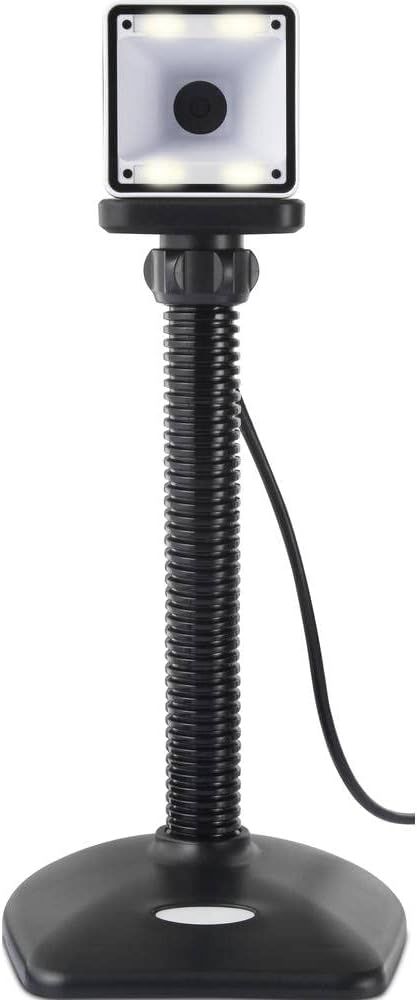
- Umestitev: Place the scanner on a stable, flat surface. The flexible neck allows for adjustment of the scanning head angle for optimal positioning.

Upravljanje skenerja
The Renkforce RF-SBS-500 is designed for ease of use with its omnidirectional and hands-free capabilities.
- Vklop: Once connected via USB, the scanner will power on automatically. The LED indicators on the scanner head may illuminate briefly.
- Skeniranje črtne kode: Position the barcode within the scanning area of the scanner head. The scanner will automatically detect and read the barcode.
- Vizualne in zvočne povratne informacije: Upon successful scanning, the integrated buzzer will emit a short beep, and the LED display on the scanner will flash or change color, indicating a successful read.
- Omnidirectional Reading: The scanner can read barcodes regardless of their orientation, eliminating the need to align the barcode precisely.
- Hands-Free Mode (Presentation Mode): The scanner operates continuously in a presentation mode, allowing you to simply pass items with barcodes in front of the scanning window without pressing any buttons. This saves time and improves workflow efficiency.
- Podprte črtne kode: The scanner supports both 1D (e.g., EAN, UPC, Code 39) and 2D (e.g., QR Code, Data Matrix, PDF417) barcode types.
Vzdrževanje
Pravilno vzdrževanje zagotavlja dolgo življenjsko dobo in optimalno delovanje vašega skenerja.
- Čiščenje okna za skeniranje: Redno čistite okno za skeniranje z mehko krpo, ki ne pušča vlaken. Za trdovratno umazanijo rahloampKrpo obrišite z vodo ali blagim, neabrazivnim čistilom. Čistila ne pršite neposredno na optični bralnik.
- Generalno čiščenje: Zunanjost skenerja obrišite s suho ali rahlo navlaženo krpoamp krpo. Izogibajte se uporabi močnih kemikalij ali abrazivnih materialov.
- Shranjevanje: Ko skenerja ne uporabljate, ga shranjujte v čistem in suhem okolju, stran od neposredne sončne svetlobe in ekstremnih temperatur.
Odpravljanje težav
Če imate težave s skenerjem, si oglejte naslednje pogoste težave in rešitve:
| Težava | Možen vzrok | rešitev |
|---|---|---|
| Skener se ne vklopi. | USB cable not connected properly or faulty USB port. | Ensure the USB cable is firmly connected to both the scanner and the computer. Try a different USB port. |
| Skener ne bere črtnih kod. | Barcode damaged, scanning window dirty, or incorrect barcode type. | Check the barcode for damage. Clean the scanning window. Ensure the barcode type is supported (1D/2D). Adjust the distance and angle of the barcode to the scanner. |
| No beep or LED feedback after scanning. | Barcode not read successfully. | Refer to the "Scanner does not read barcodes" solution. If the issue persists, contact support. |
| Skenirani podatki se prikazujejo nepravilno. | Keyboard layout mismatch or software issue. | Ensure your computer's keyboard layout matches the expected output. Test with a simple text editor. |
If the problem persists after trying these solutions, please contact Renkforce customer support.
Specifikacije
| Funkcija | Specifikacija |
|---|---|
| Številka modela | RF-4679568 |
| Zmogljivost skeniranja | 1D in 2D črtne kode |
| Tehnologija povezljivosti | USB-A (žični) |
| Stopnja skeniranja | 60 slik na sekundo |
| Način skeniranja | Omnidirectional, Hands-free (Presentation Mode) |
| Povratne informacije | Integrated Buzzer, LED Display |
| Združljive naprave | Desktop Computer, Laptop, Smartphone (via appropriate adapter if needed) |
| Dimenzije (D x Š x V) | 150 x 5.2 x 5.2 cm |
| Teža predmeta | 102 gramov |
| Vir napajanja | Napajanje USB |
| Država izvora | Nemčija |
Garancija in podpora
Renkforce products are manufactured to high-quality standards and come with a standard warranty. Please refer to your purchase documentation or the Renkforce official webZa posebne garancijske pogoje, ki veljajo za vašo regijo, obiščite spletno mesto.
For technical support, troubleshooting assistance, or warranty claims, please contact Renkforce customer service. Contact details can typically be found on the Renkforce webspletnem mestu ali na embalaži vašega izdelka.