
Uvod
Hvala za nakupasing the Samsung HW-Q600A 3.1.2 Ch Dolby Atmos Soundbar with Wireless Subwoofer. This manual provides essential information for the safe and efficient use of your new audio system. Please read it thoroughly before operating the device and retain it for future reference.
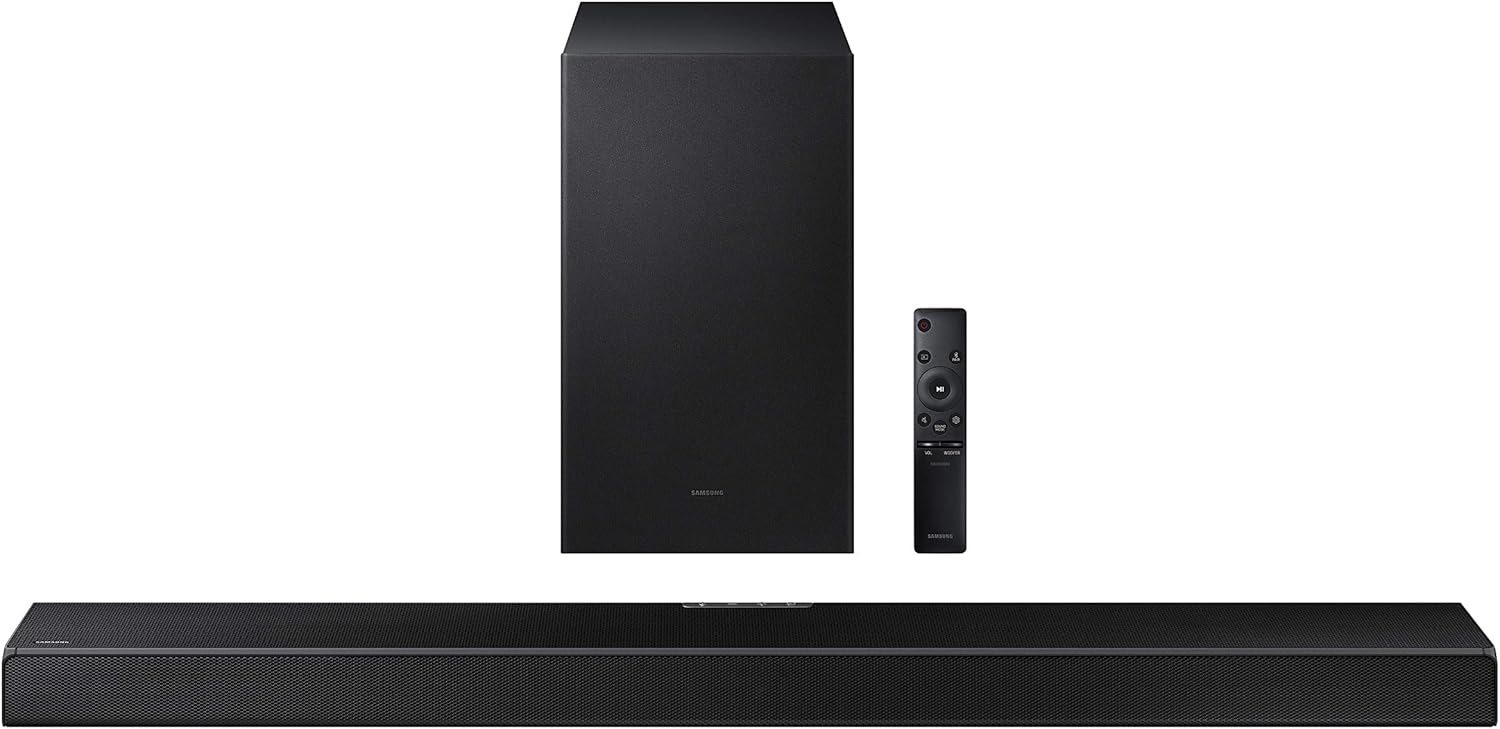
Figure 1: Samsung HW-Q600A Soundbar system components including the soundbar, wireless subwoofer, and remote control.
Varnostne informacije
Da bi zmanjšali tveganje električnega udara, požara ali poškodbe enote, upoštevajte naslednje varnostne ukrepe:
- Naprave ne izpostavljajte dežju ali vlagi.
- Na napravo ne postavljajte predmetov, napolnjenih s tekočino, kot so vaze.
- Zagotovite ustrezno prezračevanje. Ne blokirajte prezračevalnih odprtin.
- Uporabljajte samo priključke/dodatke, ki jih je določil proizvajalec.
- Za vse servise se obrnite na usposobljeno servisno osebje.
Vsebina paketa
Preverite, ali so v paketu vsi elementi:
- Soundbar (HW-Q600A)
- Brezžični globokotonec
- Daljinski upravljalnik z baterijami
- Power Cord for Soundbar
- Napajalni kabel za nizkotonec
- HDMI kabel
- Stenski nosilec (izbirno)
- Uporabniški priročnik (ta dokument)
Nastavitev
1. Umestitev
Place the soundbar centrally below your TV. The wireless subwoofer can be placed anywhere in the room, ideally within 10 meters (33 feet) of the soundbar, for optimal bass performance.

Figure 2: Recommended placement of the soundbar directly in front of the television and the wireless subwoofer to the side.
2. Povezave
Zvočniški modul priključite na televizor na enega od naslednjih načinov:
- HDMI ARC (priporočeno): Connect an HDMI cable from the soundbar's HDMI OUT (TV-ARC) port to your TV's HDMI IN (ARC) port. This allows audio to be sent from the TV to the soundbar and enables control with a single remote.
- Optični kabel: Priključite optični kabel iz vhoda DIGITAL AUDIO IN (OPTICAL) na zvočniški letvi v vhod Optical Digital Audio Out na televizorju.
- Bluetooth: For wireless audio from a mobile device, refer to the 'Bluetooth Pairing' section under Operating.
3. Napajalni priključek
Connect the power cords to the soundbar and the wireless subwoofer, then plug them into a wall outlet. The subwoofer will automatically connect to the soundbar when both are powered on.

Figure 3: The wireless subwoofer, designed for flexible placement within the room.
Delovanje
1. Osnovne kontrole
Use the included remote control to manage your soundbar. The remote allows you to power on/off, adjust volume, change input sources, and select sound modes.

Figure 4: The included remote control for the soundbar, featuring intuitive buttons for various functions.
2. Zvočni načini
The HW-Q600A supports various sound modes to optimize your listening experience:
- Standardno: Zagotavlja originalen zvok brez posebnih učinkov.
- Igra: Provides an immersive gaming experience with optimized sound effects.
- Prilagodljiv zvok: Analyzes content and optimizes sound settings in real-time.
- Dolby Atmos/DTS:X Experience three-dimensional surround sound with overhead effects.

Figure 5: The soundbar adapts to various content types, offering optimized sound modes for dialogue, sports, news, and movies.
3. Bluetooth Pairing (Tap Sound)
To play audio from your mobile device via Bluetooth:
- Omogočite Bluetooth na mobilni napravi.
- On the soundbar remote, press the Vir button to select the "BT" (Bluetooth) input.
- On your mobile device, search for and select "[AV] Samsung Soundbar Q600A" from the list of available devices.
- For Tap Sound, ensure your mobile device has NFC enabled. Gently tap your mobile device to the soundbar's NFC tag (usually on the top or side). The soundbar will automatically connect.

Figure 6: Illustrates the 'Tap Sound' feature, allowing quick Bluetooth pairing by tapping a compatible smartphone to the soundbar.
4. En daljinski upravljalnik
If connected via HDMI ARC, you can often control the soundbar's volume and power using your Samsung TV's remote control, simplifying your home entertainment setup.

Figure 7: The One Remote Control feature allows a single TV remote to manage both the television and the soundbar for convenience.
Vzdrževanje
Proper maintenance ensures the longevity and performance of your soundbar system:
- Čiščenje: Za čiščenje površin zvočne letve in nizkotonca uporabite mehko, suho krpo. Ne uporabljajte tekočih čistil ali abrazivnih materialov.
- Prezračevanje: Ensure that the ventilation openings are not blocked by dust or debris. Regularly clean around the vents.
- Shranjevanje: Če enoto shranjujete dalj časa, jo izključite iz električnega omrežja in jo shranite na hladnem in suhem mestu, stran od neposredne sončne svetlobe in ekstremnih temperatur.
Odpravljanje težav
Če imate težave z zvočno vrstico, poskusite naslednje rešitve:
| Težava | Možna rešitev |
|---|---|
| Brez moči | Check if the power cords are securely connected to the soundbar/subwoofer and the wall outlet. |
| Brez zvoka | Verify the input source is correct. Check volume levels on both the soundbar and TV. Ensure cables are properly connected. |
| Nizkotonec se ne poveže | Ensure both soundbar and subwoofer are powered on. If issues persist, manually pair the subwoofer (refer to the full user manual for specific steps). |
| Težave s povezavo Bluetooth | Ensure the soundbar is in BT mode. Delete the soundbar from your device's Bluetooth list and re-pair. Move closer to the soundbar. |
For more detailed troubleshooting or persistent issues, please refer to the comprehensive online user manual or contact Samsung customer support.
Specifikacije
Key technical specifications for the Samsung HW-Q600A Soundbar:
- Ime modela: HW-Q600A
- Znamka: SAMSUNG
- Način avdio izhoda: Surround
- Tehnologija povezljivosti: Bluetooth, HDMI, optični, USB
- Povezljivost globokotonca: Brezžično
- Dimenzije izdelka: 14"D x 39"W x 12"H (approximate, combined)
- Teža artikla: 26.3 pounds (approximate, combined)
- Premer nizkotonca: 6 palcev
- Obseg Bluetooth: 10 metrov
Garancija in podpora
Your Samsung HW-Q600A Soundbar comes with standard manufacturer's warranty. Additionally, this specific product includes an Additional 1 Year Coverage by Epic Protect, extending your peace of mind.

Figure 8: The product includes an additional 1-year extended warranty provided by Epic Protect.
For warranty claims or technical support, please contact Epic Protect directly for the extended coverage, or Samsung customer service for standard warranty and product inquiries. Visit the official Samsung support website for the most up-to-date contact information and resources.

Figure 9: The logo for Epic Protect, the provider of the additional 1-year coverage.