
1. Uvod
The ScorpionEXO EXO-COM Bluetooth Communicator Kit is designed to integrate seamlessly with compatible ScorpionEXO helmets, providing advanced communication and audio features for riders. This manual provides essential information for the proper installation, operation, and maintenance of your EXO-COM system.
Key features include Bluetooth 5 connectivity, DynaMESH intercom for group communication, high-definition speakers with integrated dual microphones, and adjustable noise cancellation for clear audio.
2. Varnostne informacije
Please read and understand all safety warnings before using the EXO-COM system.
- Do not use this device in a manner that distracts you from operating your vehicle safely. Always prioritize road safety.
- Follow all local laws and regulations regarding the use of communication devices while operating a motorcycle.
- Ensure proper installation to prevent interference with helmet components or discomfort during use.
- Handle the battery pack with care. Do not expose it to extreme temperatures, puncture, or disassemble it. Dispose of batteries according to local regulations.
- Keep the volume at a level that allows you to hear ambient traffic sounds and emergency signals. Prolonged exposure to loud sounds may cause hearing damage.
3. Vsebina paketa
Verify that all items listed below are present in your EXO-COM kit:
- EXO-COM Main Unit
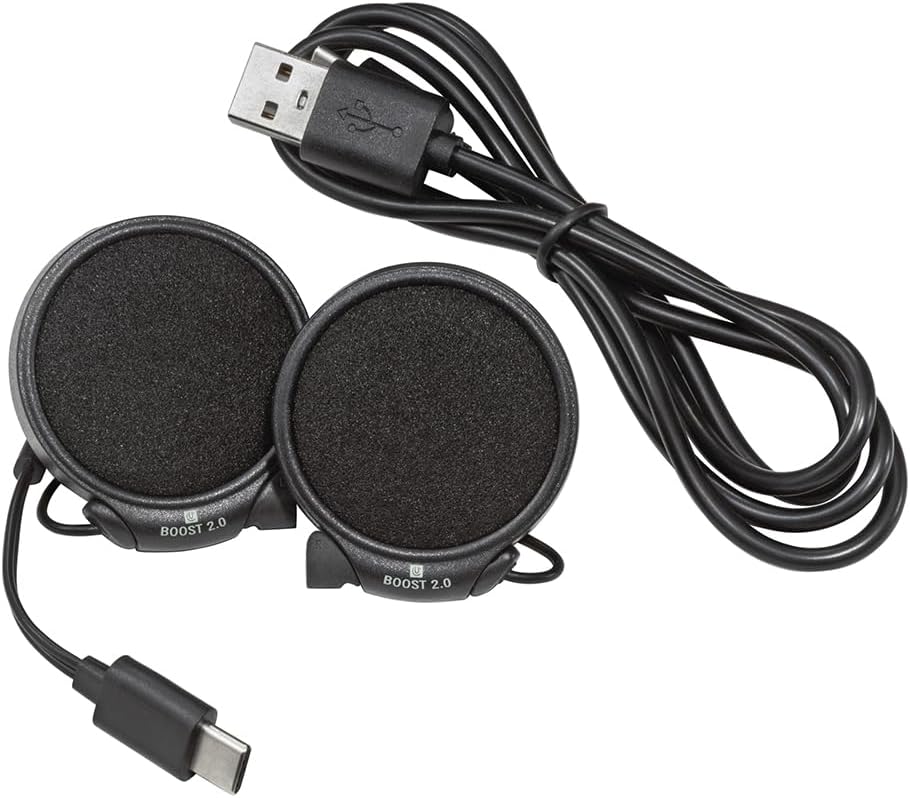
- High-Definition Speakers with Integrated Microphones (Boost 2.0)
- Baterija za polnjenje
- Polnilni kabel USB (od USB-A do USB-C)
- Speaker Spacers/Velcro Pads
- Installation Guide (often integrated into the helmet manual or app)


4. Nastavitev in namestitev
The EXO-COM system is designed for integrated installation into specific ScorpionEXO helmet models: AT960, T520, and GT930. Refer to your helmet's specific manual for detailed instructions on removing and re-installing interior padding.
4.1. Začetno polnjenje
Before installation, fully charge the battery pack. Connect the USB charging cable to the battery pack and a compatible USB power source. The charging indicator will show the charging status.
4.2 Priprava čelade
- Carefully remove the helmet's cheek pads and comfort liner according to your helmet's instruction manual.
- Locate the designated speaker pockets and wiring channels within the helmet.
4.3. Speaker and Main Unit Installation
- Place the speakers into the helmet's speaker pockets. Use the provided Velcro pads or spacers if needed to ensure a snug fit and optimal ear alignment. The integrated microphones are part of the speaker units.
- Route the speaker wires through the designated channels to the rear of the helmet, ensuring they do not interfere with padding or cause discomfort.
- Install the EXO-COM main unit into its designated slot on the exterior or interior of the helmet, typically near the left side. Ensure it clicks securely into place.
- Priključite žice zvočnika na glavno enoto.

4.4. Battery Pack Placement
- The battery pack is typically placed in a dedicated slot at the rear base of the helmet, under the neck roll.
- Connect the battery pack to the main unit.
- Carefully re-install the helmet's comfort liner and cheek pads, ensuring all wires are tucked away and do not create pressure points.
5. Navodila za uporabo
5.1. Vklop/izklop
- Za vklop: Pritisnite in držite gumb za vklop, dokler se ne prižge indikatorska lučka.
- Za izklop: Pritisnite in držite gumb za vklop, dokler se indikatorska lučka ne izklopi.
5.2. Povezovanje z mobilno napravo prek Bluetootha
- With the EXO-COM powered off, press and hold the Power button for approximately 5-7 seconds until the indicator light flashes rapidly, indicating pairing mode.
- On your mobile device, go to Bluetooth settings and select 'EXO-COM' from the list of available devices.
- Once paired, the indicator light will change to a steady blue or flash slowly.
5.3. DynaMESH Intercom
The EXO-COM features DynaMESH intercom technology, allowing up to 4 riders to communicate. The system automatically reorganizes the network as riders move, maintaining connection.
- Vzpostavljanje interkoma: Follow the specific instructions in the EXO-COM Mobile App or the detailed manual for initiating a DynaMESH group.
- Domet interkoma: Up to 0.8 KM (0.5 mile) per person in optimal conditions.
- Univerzalno seznanjanje: Limited pairing with other compatible brands is supported.
5.4. Telefonski klici
- Sprejem / zaključevanje klicev: Press the designated button on the main unit (refer to the specific button layout for your model).
- Glasovno klicanje: Activate your phone's voice assistant (Siri, Google Assistant) by pressing the appropriate button.
- The integrated dual microphones and adjustable ABF (Advanced Beam Forming) noise cancellation enhance call clarity.
5.5. Predvajanje glasbe
- Predvajanje/pavza: Pritisnite določeno tipko.
- Naslednja / prejšnja skladba: Use the designated buttons for track control.
- Prilagoditev glasnosti: Uporabite gumba za povečanje/zmanjšanje glasnosti.
- The 40mm premium drivers and adjustable graphic equalizer provide enhanced sound quality.
5.6. EXO-COM Mobile App
Download the EXO-COM Mobile App from your device's app store. The app allows you to:
- Customize user preferences.
- Adjust audio settings, including the graphic equalizer.
- Access a complete PDF manual.
- Seamlessly connect with compatible onboard OEM systems (motorcycles, UTVs, snowmobiles) and GPS units.
6. Vzdrževanje
6.1. Čiščenje
- Glavno enoto in zvočnike obrišite z mehko krpoamp krpo. Ne uporabljajte močnih kemikalij ali abrazivnih čistil.
- Pred polnjenjem se prepričajte, da so vsa priključka suha.
6.2. Skrb za baterijo
- Redno polnite baterijo, tudi če je ne uporabljate pogosto, da ohranite njeno zdravje.
- Izogibajte se popolnemu praznjenju baterije dlje časa.
- Ko naprave ne uporabljate, jo hranite na hladnem in suhem mestu.
- The battery pack is replaceable. Contact ScorpionEXO support for replacement options.
7. Odpravljanje težav
If you encounter issues with your EXO-COM system, try the following steps:
- Brez napajanja: Ensure the battery is fully charged. Check that the battery pack is securely connected to the main unit.
- Težave pri seznanjanju: Ensure the device is in pairing mode. Turn off and restart both the EXO-COM and your mobile device. Delete previous pairings and attempt to pair again.
- Ni zvoka/slaba kakovost zvoka: Check volume levels on both the EXO-COM and your connected device. Ensure speakers are correctly positioned and connected. Verify that wires are not pinched or damaged.
- Intercom Disconnections: Ensure all riders are within range. The DynaMESH system is self-healing, but extreme distances or obstacles can affect connectivity.
- Težave z mikrofonom: Ensure the integrated microphones are not obstructed. Adjust noise cancellation settings via the mobile app if experiencing excessive wind noise.
- Ponastavitev sistema: If the device becomes unresponsive, perform a factory reset (refer to the EXO-COM Mobile App or detailed manual for specific instructions).
For persistent issues, contact ScorpionEXO customer support.
8. Specifikacije
| Številka modela | COM-338104 |
| Tehnologija povezljivosti | Bluetooth 5.0 |
| Vrsta domofona | DynaMESH (up to 4 riders) |
| Domofon | Up to 0.8 KM (0.5 mile) per person |
| Zvočniki | 40mm Premium Drivers |
| Mikrofoni | Integrated Dual Microphones with ABF Noise Cancellation |
| Vrsta baterije | Lithium Ion (replaceable) |
| Življenjska doba baterije (povprečna) | Do 15 ur |
| Čas pripravljenosti | Do 400 ur |
| Čas polnjenja | 2.5–3.5 ure |
| Vrata za polnjenje | USB-C |
| Združljive čelade | ScorpionEXO AT960, T520, GT930 |
| Dimenzije izdelka | 1 x 1 x 1 palcev |
| Teža predmeta | 12 unč |
9. Garancija in podpora
For warranty information, product support, or to purchase replacement parts, please visit the official ScorpionEXO webspletno mesto ali se obrnite na njihovo službo za pomoč strankam. Shranite dokazilo o nakupu za uveljavljanje garancije.
ScorpionEXO Official Webspletno mesto: Visit the ScorpionEXO Store on Amazon