
1. Uvod
Thank you for choosing the Hoco W27 Cat Ear Bluetooth Headphones. These headphones combine advanced Bluetooth 5.0 technology with a unique glowing cat ear design, offering a versatile audio experience. They support Bluetooth, TF card, and AUX playback modes, making them compatible with a wide range of mobile phones and tablets. This manual provides detailed instructions for setup, operation, maintenance, and troubleshooting to ensure you get the most out of your device.
2. Izdelek je končanview
Familiarize yourself with the components of your Hoco W27 headphones.
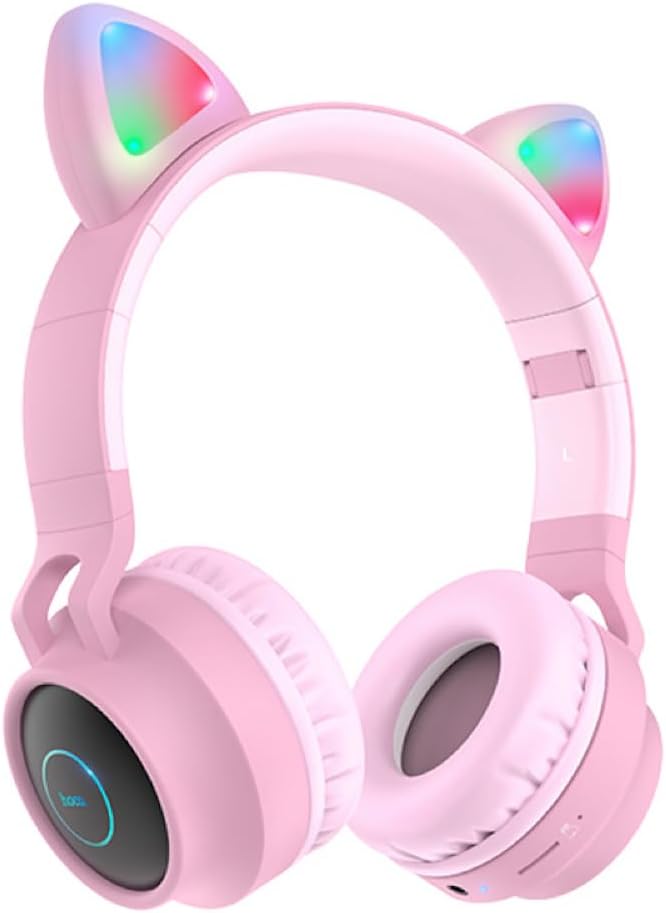
Slika 2.1: Spredaj view of the Hoco W27 Cat Ear Bluetooth Headphones in pink, showcasing the glowing cat ears and over-ear design.

Slika 2.2: Stran view of the Hoco W27 headphones, highlighting the control buttons on the left earcup, including volume, track control, and mode switch.

Slika 2.3: Od zgoraj navzdol view of the Hoco W27 headphones, showing the adjustable headband and the placement of the control panel on the earcup.
3. Nastavitev
3.1 Polnjenje slušalk
Before first use, fully charge the headphones. The built-in 300mAh battery requires approximately 2 hours for a full charge.
- Connect the charging cable (usually USB-C or Micro-USB, depending on model) to the charging port on the headphones.
- Drugi konec kabla priključite na vir napajanja USB (npr. vrata USB računalnika, stenski adapter).
- The indicator light will show charging status (e.g., red light while charging, off or blue when fully charged).
3.2 Bluetooth seznanjanje
The Hoco W27 headphones feature Bluetooth 5.0 for stable and efficient wireless connection.
- Prepričajte se, da so slušalke izklopljene.
- Pritisnite in držite gumb za vklop, dokler indikatorska lučka ne utripa izmenično modro in rdeče, kar označuje način seznanjanja.
- V napravi (pametnem telefonu, tablici, računalniku) omogočite Bluetooth in poiščite razpoložljive naprave.
- Select "Hoco W27" or a similar name from the list of found devices.
- Once connected, the indicator light will typically flash blue slowly or turn off, and you will hear a confirmation tone.
3.3 Način TF kartice
The headphones support TF (MicroSD) card playback.
- Insert a TF card with your desired audio filev režo za kartico TF na slušalkah.
- The headphones should automatically switch to TF card playback mode. If not, press the Mode button to cycle through modes until TF card mode is active.
3.4 Način AUX
For wired connection, use the AUX mode.
- Connect one end of a 3.5mm audio cable (not always included) to the AUX port on the headphones.
- Drugi konec priključite na avdio izhod vaše naprave.
- The headphones will automatically switch to AUX mode. Note that controls on the headphones may be limited in this mode, and playback is controlled by the connected device.
4. Navodila za uporabo
4.1 Vklop/izklop
- Vklop: Press and hold the Power button for approximately 3 seconds until the indicator light turns on and you hear a power-on prompt.
- Ugasniti: Press and hold the Power button for approximately 3-5 seconds until the indicator light turns off and you hear a power-off prompt.
4.2 Predvajanje glasbe
- Predvajanje/pavza: Press the Multi-function button (often the Power button or a dedicated Play/Pause button) once.
- Naslednja skladba: Press and hold the Volume Up (+) button or a dedicated Next Track button.
- Prejšnja skladba: Press and hold the Volume Down (-) button or a dedicated Previous Track button.
- Povečaj glasnost: Na kratko pritisnite gumb za povečanje glasnosti (+).
- Znižaj glasnost: Na kratko pritisnite gumb za zmanjšanje glasnosti (-).
The headphones offer up to 5 hours of continuous music playback on a full charge.
4.3 Klicne funkcije
- Sprejmi/končaj klic: Med dohodnim klicem enkrat pritisnite večfunkcijski gumb.
- Zavrni klic: Med dohodnim klicem pritisnite in držite večfunkcijski gumb približno 2 sekundi.
- Ponovno klicanje zadnje številke: Dvakrat pritisnite večfunkcijski gumb, ko ne kličete.
4.4 Preklop načina
Press the 'M' (Mode) button to cycle between Bluetooth, TF Card, and AUX playback modes.
4.5 Cat Ear Lights
The glowing cat ear design adds a unique aesthetic. The lights typically activate automatically when the headphones are powered on. Refer to the product packaging or specific model features for details on controlling the lights, if a dedicated button exists.
4.6 Voice Prompt Switch
To switch the voice prompt language or disable prompts:
- When the headphones are ni povezan to a device, double-click the 'M' (Mode) button. You will hear a beep, indicating a change in the voice prompt setting.
5. Vzdrževanje
Pravilna nega zagotavlja dolgo življenjsko dobo vaših slušalk.
- Čiščenje: Use a soft, dry, lint-free cloth to clean the surfaces of the headphones. Do not use abrasive cleaners, solvents, or spray directly onto the headphones.
- Shranjevanje: Store the headphones in a cool, dry place away from direct sunlight and extreme temperatures. If storing for an extended period, ensure they are partially charged.
- Vzdrževanje baterije: To preserve battery life, avoid fully discharging the headphones frequently. Charge them regularly, even if not in use for a long time.
- Izogibajte se vlagi: Slušalk ne izpostavljajte vodi ali prekomerni vlagi.
6. Odpravljanje težav
If you encounter issues with your Hoco W27 headphones, try the following solutions:
| Težava | Možen vzrok | rešitev |
|---|---|---|
| Slušalke se ne vklopijo. | Nizka baterija. | Slušalke polnite vsaj 30 minut. |
| Seznanitev prek Bluetootha ni mogoča. | Slušalke niso v načinu seznanjanja; Bluetooth naprave izklopljen; preveč oddaljeno od naprave. | Ensure headphones are in pairing mode (flashing red/blue). Turn device Bluetooth off and on. Move headphones closer to device. |
| Iz slušalk ni zvoka. | Volume too low; incorrect mode; loose AUX cable; corrupted TF card files. | Increase volume on headphones and device. Ensure correct mode (Bluetooth, TF, AUX). Re-insert AUX cable. Check TF card files. |
| Slaba kakovost zvoka. | Motnje; nizka baterija; oddaljenost od naprave. | Move away from sources of interference. Charge headphones. Reduce distance between headphones and device. |
| Cat ear lights not working. | Headphones off; specific light control setting. | Ensure headphones are powered on. Check if there's a dedicated button for lights (refer to product specifics). |
7. Specifikacije
Key technical specifications for the Hoco W27 Cat Ear Bluetooth Headphones:
| Funkcija | Specifikacija |
|---|---|
| Različica Bluetooth | 5.0 (JL AC6925F chip) |
| Kapaciteta baterije | 300 mAh |
| Čas polnjenja | Približno 2 ur |
| Call / Music Time | Do 5 ur |
| Čas pripravljenosti | Do 200 ur |
| Premer zvočnika | 40 mm |
| Dimenzije (D*Š*V) | 203 x 175 x 80 mm (8 x 6.9 x 3.1 palca) |
| Teža | 182 g (6.4 oz) |
| Podprti načini | Bluetooth, TF kartica, AUX |
| Značilnost oblikovanja | Glowing cat ear shape |
| Namestitev ušesa | Nad ušesi |
| Nadzor hrupa | Noben |
8. Varnostne informacije
Za varno delovanje preberite in upoštevajte ta varnostna navodila:
- Izdelka ne razstavljajte, popravljajte ali spreminjajte. To lahko povzroči požar, električni udar ali popolno poškodbo izdelka.
- Keep the headphones away from extreme temperatures, direct sunlight, and high humidity.
- Avoid exposing the headphones to water or other liquids.
- Do not use the headphones at excessively high volumes for prolonged periods, as this may cause hearing damage.
- Hraniti izven dosega otrok.
9. Garancija in podpora
For warranty information and customer support, please refer to the documentation provided with your purchase or contact the retailer where you purchased the Hoco W27 headphones. Keep your proof of purchase for any warranty claims.