
1. Uvod
Thank you for choosing the MEBUS Model 11908 Weather Station. This device provides accurate indoor and outdoor temperature and humidity readings, a weather forecast, moon phase display, and an alarm clock function. Please read this manual carefully to ensure proper setup and operation.
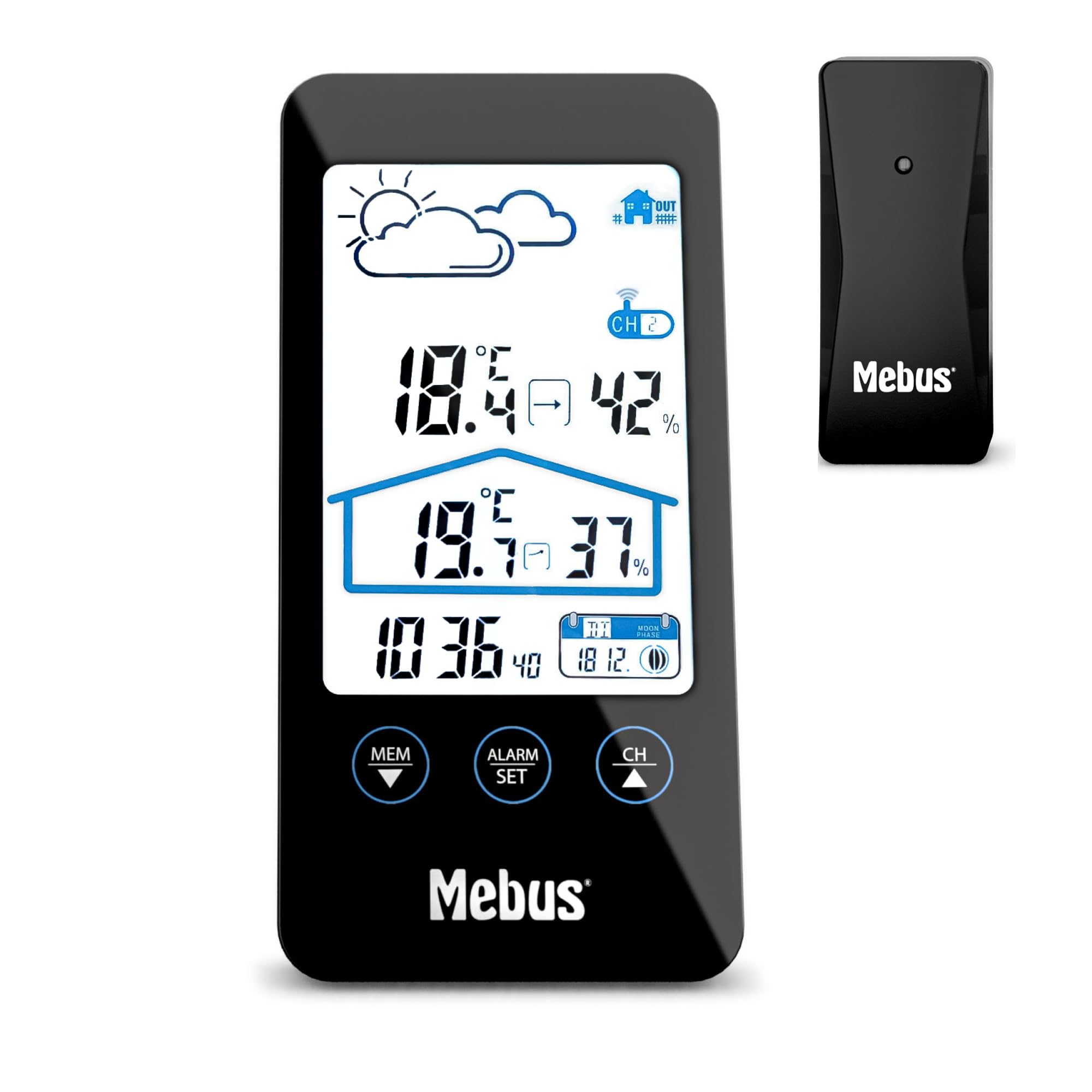
Image 1.1: The MEBUS Model 11908 Weather Station main unit and its wireless outdoor sensor.
2. Vsebina paketa
- MEBUS Model 11908 Weather Station (Main Unit)
- Brezžični zunanji senzor
- 4 x AAA Batteries (for both units)
- Uporabniški priročnik (ta dokument)
3. Nastavitev
3.1 Namestitev baterije
Both the main unit and the outdoor sensor require batteries for operation. Use the provided 4x AAA batteries.
- Odprite pokrov predalčka za baterije na zadnji strani glavne enote.
- Vstavite 2 bateriji AAA in pri tem upoštevajte pravilno polarnost (+/-).
- Zaprite pokrov prostora za baterije.
- Odprite pokrov predalčka za baterije na zadnji strani zunanjega senzorja.
- Vstavite 2 bateriji AAA in pri tem upoštevajte pravilno polarnost (+/-).
- Zaprite pokrov prostora za baterije.

Slika 3.1: Zadaj view of the main unit and outdoor sensor, indicating battery compartment locations.
3.2 Namestitev senzorja
For accurate outdoor readings, place the wireless sensor in a sheltered location away from direct sunlight and rain. Ensure it is within the effective transmission range of the main unit (typically up to 30 meters in open air).
3.3 Začetna sinhronizacija
After inserting batteries, the main unit will automatically search for the outdoor sensor and the DCF77 radio signal for time synchronization. This process may take a few minutes. Ensure both units are close to each other during initial setup.
- If the outdoor temperature/humidity does not appear, press the "CH" button on the main unit to cycle through channels or initiate a new search.
- The radio-controlled time signal (DCF77) will automatically set the time. If reception is poor, manual time setting is possible (see Section 4.2).
4. Navodila za uporabo
4.1 Prikaz končanview
LCD-zaslon prikazuje različne informacije:
- Zgoraj levo: Weather forecast icons (sunny, cloudy, rainy).
- Zgoraj desno: Zunanja temperatura in vlažnost.
- Sredina: Temperatura in vlažnost v zaprtih prostorih.
- Spodaj levo: Trenutni čas.
- Spodaj desno: Date and Moon phase.

Slika 4.1: Podrobno view of the weather station's LCD display.
4.2 Nastavitev časa in datuma
The time is automatically set via the DCF77 radio signal. If manual adjustment is needed:
- Pritisnite in držite "NASTAVLJEN ALARM" button (or similar, referring to the image of buttons) for a few seconds to enter time setting mode.
- Uporabite "MEM ▼" in "CH ▲" gumbi za prilagajanje vrednosti.
- Pritisnite "NASTAVLJEN ALARM" again to confirm and move to the next setting (e.g., hour, minute, year, month, day).
- Pritisnite "NASTAVLJEN ALARM" repeatedly to exit setting mode.
Za preklop med 12-urnim in 24-urnim formatom časa pritisnite "NASTAVLJEN ALARM" button briefly in normal display mode.
4.3 Funkcija alarma
Vremenska postaja ima budilko s funkcijo dremeža.
- Pritisnite "NASTAVLJEN ALARM" enkrat pritisnite gumb, da prikažete čas alarma.
- Pritisnite in držite "NASTAVLJEN ALARM" za vstop v način nastavitve alarma.
- Uporaba "MEM ▼" in "CH ▲" za nastavitev želene ure in minute budilke.
- Pritisnite "NASTAVLJEN ALARM" za potrditev vsake nastavitve.
- Za vklop/izklop alarma pritisnite "NASTAVLJEN ALARM" na kratko pritisnite gumb, ko je prikazan čas alarma. Ikona alarma se bo prikazala/izginila.
- When the alarm sounds, press the top button (often labeled "SNOOZE" or similar, or the main unit's top surface) to activate the snooze function. The alarm will sound again after approximately 5 minutes.
- Za popolno ustavitev alarma pritisnite kateri koli drug gumb.

Image 4.2: Control buttons on the MEBUS weather station for settings and alarm.
4.4 Izbira enote za temperaturo (°C/°F)
Za preklop med Celzijem (°C) in Fahrenheitom (°F) pritisnite "MEM ▼" button briefly in normal display mode.
4.5 Osvetlitev zaslona
The display features a backlight for improved readability in low light conditions. Press the top button (often the snooze button) to activate the backlight temporarily.
4.6 Vremenska napoved
The weather station provides a forecast based on atmospheric pressure changes. The icons (sunny, cloudy, rainy) indicate the predicted weather for the next 12-24 hours. This is an estimation and may not always be perfectly accurate.
4.7 Prikaz luninih men
The bottom right of the display shows the current moon phase, which changes automatically with the date.
5. Vzdrževanje
5.1 Zamenjava baterije
When the battery indicator appears on the display, replace the batteries in the respective unit (main unit or sensor). Always replace all batteries at the same time with new ones of the same type (AAA).
5.2 Čiščenje
Vremensko postajo in senzor očistite z mehko krpoamp cloth. Do not use abrasive cleaners or solvents. Avoid getting moisture into the battery compartments or other openings.
5.3 Shranjevanje
If the device will not be used for an extended period, remove the batteries from both units to prevent leakage and damage.
6. Odpravljanje težav
| Težava | Možen vzrok | rešitev |
|---|---|---|
| Ni odčitka zunanje temperature/vlažnosti. |
|
|
| Prikazan je napačen čas. |
|
|
| Zaslon je zatemnjen ali prazen. |
|
|
7. Specifikacije
| Funkcija | Podrobnost |
|---|---|
| Številka modela | 11908 |
| Znamka | Mebus |
| Dimenzije (glavna enota) | Približno 8 cm (globina) x 2.5 cm (širina) x 16 cm (višina) |
| Teža | 290 gramov |
| Vir napajanja | 4 x AAA baterije (2 za glavno enoto, 2 za senzor) |
| Vrsta zaslona | LCD |
| Tehnologija povezljivosti | Radiofrekvenca (RF) |
| Posebne lastnosti | Alarm, Thermometer, Radio Clock, Hygrometer, Moon Phase Calendar, Display Backlight |
| Temperature Range (Upper) | 40.3°C |
| Vključene komponente | Weather station, outdoor sensor, batteries |
| Material | Plastika |
| Število kanalov | 3 (for outdoor sensors, though only one is included) |
8. Garancija in podpora
8.1 Informacije o garanciji
This MEBUS product comes with a 2-letna garancija from the date of purchase. This warranty covers manufacturing defects and material faults. It does not cover damage caused by improper use, accidents, unauthorized repairs, or normal wear and tear.
8.2 Podpora strankam
For technical assistance, warranty claims, or further inquiries, please contact your retailer or the MEBUS customer service department. Refer to the packaging or the official MEBUS webspletno mesto za kontaktne podatke.