
Uvod
The FLEXISPOT Pro 3 Stages Dual Motor Electric Standing Desk is designed to enhance your workspace by allowing seamless transitions between sitting and standing positions. This desk promotes better blood circulation, alleviates back and leg pain, and helps maintain proper muscle alignment, contributing to a healthier and more productive work style.
Key features include a seamless whole-piece desktop, a robust 3-stage lift system, quiet dual motors, and an intuitive one-touch LED control panel for personalized height adjustments.

Figure 1: The FLEXISPOT Pro 3 Stages Dual Motor Electric Standing Desk, showcasing its spacious whole-piece desktop and sturdy white frame.
Varnostne informacije
Pred montažo in uporabo natančno preberite vsa varnostna navodila, da preprečite poškodbe ali škodo na izdelku.
- Zmogljivost teže: Ensure the desk is not overloaded. The maximum weight capacity for this desk is 287 lbs. Exceeding this limit can cause damage to the desk and potential injury.
- Montaža: When assembling the desk, handle heavy parts with care. It is highly recommended to have the assistance of another person for safe assembly.
- Električna varnost: Ensure the power cord is properly connected and not pinched or damaged. Do not operate the desk with a damaged cord or plug. Keep liquids away from electrical components.
- Točke stiskanja: Keep hands and other objects clear of the moving parts of the desk frame during height adjustments to avoid pinching or crushing.
- Otroci in hišni ljubljenčki: Keep children and pets away from the desk during operation. Do not allow them to play on or under the desk.
- Umestitev: Place the desk on a level surface. Ensure there is sufficient clearance around the desk for safe movement and adjustment.
Vsebina paketa
Pred začetkom montaže preverite, ali so vse komponente prisotne in nepoškodovane. Če kateri koli deli manjkajo ali so poškodovani, se obrnite na podporo strankam.
- Whole-Piece Desktop (Natural Desktop)
- Electric Desk Frame (White) with Dual Motors
- One-Touch LED Control Panel
- Napajalni adapter in kabel
- Montažni material (vijaki, matice itd.)
- Navodila za uporabo (ta dokument)
Postavitev in montaža
Assembly of the FLEXISPOT standing desk is designed to be straightforward, though it is recommended for two people. The desktop comes with pre-marked holes for easy alignment of the frame.
- Razpakirajte komponente: Vse dele previdno vzemite iz embalaže in jih položite na čisto, mehko površino, da preprečite praske.
- Pritrditev nog na mizo: Align the desk frame with the pre-drilled holes on the underside of the desktop. Secure the frame to the desktop using the provided screws. A drill may be helpful for this step.
- Namestitev nadzorne plošče: Mount the one-touch LED control panel to the designated area on the underside of the desktop, typically on the front edge.
- Connect Motors and Control Panel: Connect the motor cables to the control box, and then connect the control panel cable to the control box. Ensure all connections are secure.
- Priključite napajanje: Plug the power adapter into the control box, and then plug the power cord into a wall outlet.
- Upravljanje kablov: Use the included cable ties or management clips to neatly organize and secure all cables to prevent tangling or damage during desk movement.

Figure 2: The seamless whole-piece desktop provides a superior and more durable surface compared to multi-piece alternatives.
Navodila za uporabo
The FLEXISPOT standing desk features an intuitive control panel for easy height adjustment and memory functions.
Nadzorna plošča je končanaview
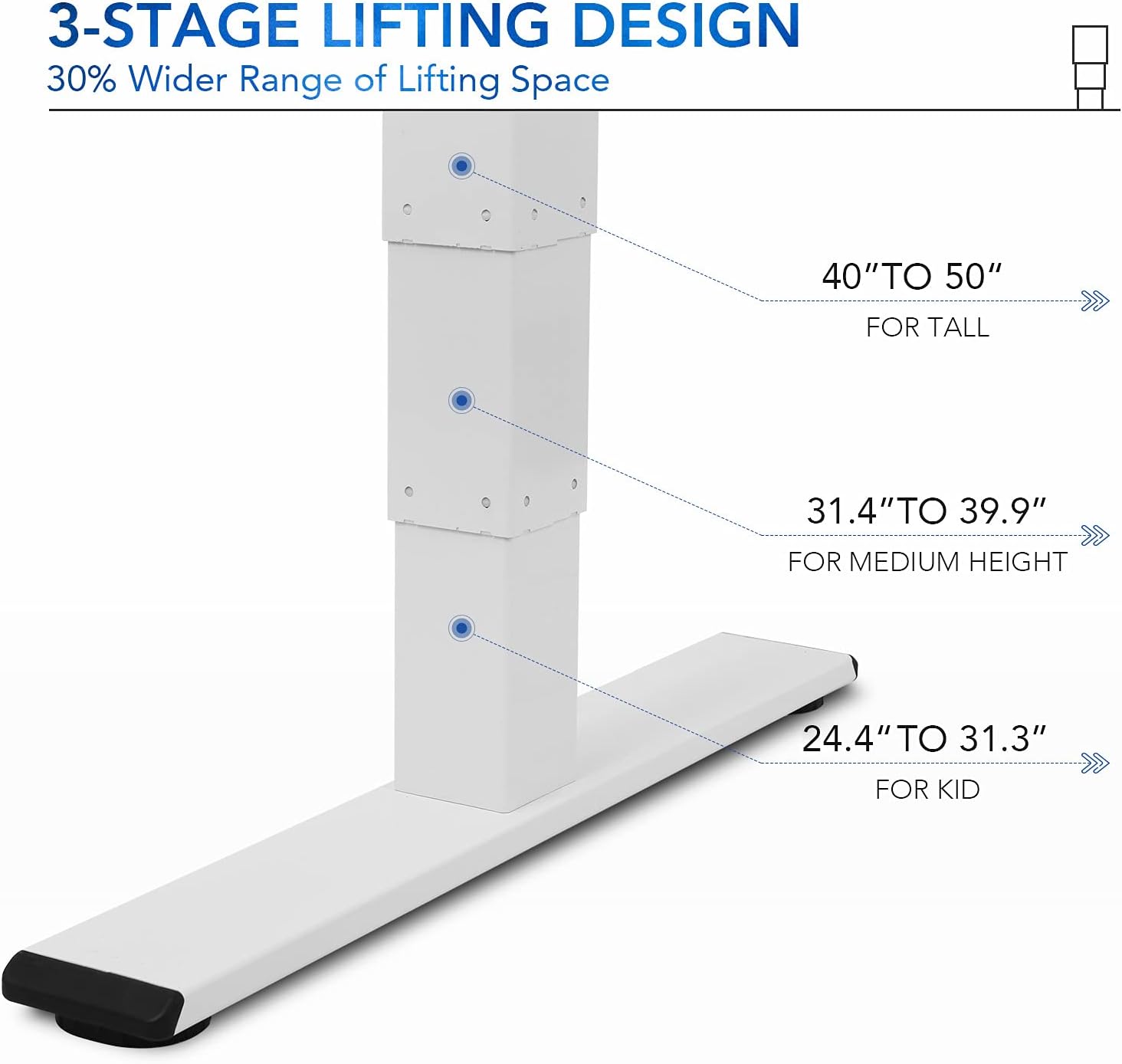
Figure 3: The one-touch LED control panel allows for precise height adjustments and memory programming.
- Puščice gor/dol: Press and hold to manually adjust the desk height. Release to stop.
- Gumbi za shranjevanje (1, 2, 3): Program and recall your preferred sitting and standing heights.
- "M" Button: Used to save a height into a memory preset.
- "A" Button: (If applicable) May be used for advanced settings or a sit/stand reminder.
Nastavitev višine
3-stage lift system provides a wide height range from 24.4 inches (for children) to 50 inches (for tall adults), accommodating various user heights comfortably.

Slika 4: Sedmicetage lifting design offers a 30% wider range of height adjustment compared to 2-stage sistemi.
- Ročna nastavitev: Use the up and down arrows to find your desired height.
- Saving Memory Presets:
- Prilagodite mizo na želeno višino.
- Press the "M" button. The display will flash.
- Press one of the numbered memory buttons (1, 2, or 3) before the display stops flashing. The height is now saved.
- Priklic prednastavitev pomnilnika: Simply press the corresponding numbered memory button (1, 2, or 3) to automatically move the desk to the saved height.
Quiet Dual Motors and Stability
The desk is equipped with whisper-quiet dual motors that generate less than 45 dB of sound during operation. These motors provide enhanced stability and can handle up to 287 lbs, ensuring smooth and reliable height adjustments even with heavy setups.
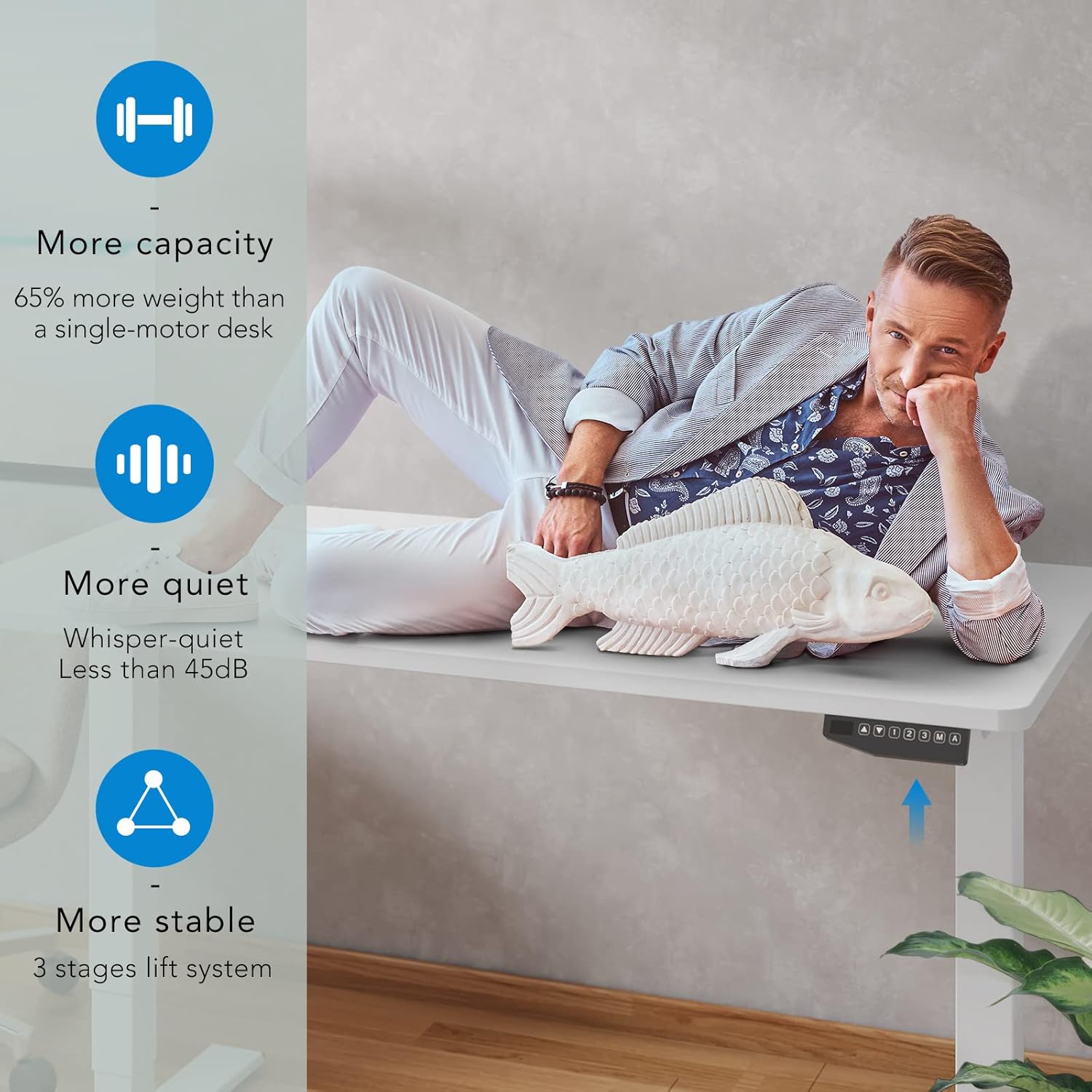
Figure 5: The dual motor system provides increased capacity, quiet operation, and superior stability.
Video 1: Demonstration of the FLEXISPOT Dual Motor Bamboo Standing Desk, highlighting its stability, quiet operation, and suitability for gaming setups. This video also shows the desk's ability to hold significant weight without instability.
Video 2: A home use version demonstration of the FLEXISPOT Dual Motor Bamboo Standing Desk, emphasizing its durability, ease of use with memory presets, and quiet operation for a productive home office environment.
Vzdrževanje
Regular maintenance ensures the longevity and optimal performance of your FLEXISPOT standing desk.
- Čiščenje: Obrišite delovno površino in okvir s suho, mehko krpo. Za trdovratne madeže rahloamp Uporabite lahko krpo, nato pa takoj nato suho krpo. Izogibajte se agresivnim kemikalijam ali abrazivnim čistilom.
- Preverjanje kabla: Periodically inspect all cables for any signs of wear, fraying, or damage. Ensure they are securely fastened and not interfering with the desk's movement.
- Tesnost vijakov: Over time, screws may loosen. Periodically check and tighten all assembly screws to maintain desk stability.
- Porazdelitev obremenitve: Distribute weight evenly across the desktop to prevent undue stress on any single point or motor.
Video 3: A durability test video for the desktop, demonstrating its resistance to scratches, weight, and ease of cleaning. This highlights the robust nature of the bamboo desktop material.
Odpravljanje težav
If you encounter any issues with your FLEXISPOT standing desk, refer to the following common solutions:
| Težava | Možen vzrok | rešitev |
|---|---|---|
| Miza se ne premika ali se ne odziva na ukaze. | Power disconnected, loose cables, motor overload. | Check power cord connection to outlet and control box. Ensure all motor cables are securely plugged in. Reduce weight on the desk if overloaded. |
| Pisalna miza se premika neenakomerno ali oddaja nenavadne zvoke. | Uneven load, loose assembly, obstruction. | Ensure weight is evenly distributed. Check and tighten all assembly screws. Inspect for any obstructions under or around the desk. |
| Prednastavitve pomnilnika ne delujejo. | Nepravilno programiranje. | Re-program the memory presets following the "Saving Memory Presets" instructions in the Operating section. |
| Miza se sredi gibanja ustavi. | Overheat protection, obstruction. | Allow the desk to cool down for 20 minutes if used continuously for an extended period. Check for obstructions. |
If the problem persists after attempting these solutions, please contact FLEXISPOT customer support for further assistance.
Specifikacije
| Funkcija | Podrobnost |
|---|---|
| Znamka | FLEXISPOT |
| Številka modela | EC5 |
| Mere izdelka (D x Š x V) | 55.1"D x 27.5"W x 23.6"H (Minimum height) |
| Razpon višine | 24.4" do 50" |
| Material za namizni računalnik | Whole-Piece Wood (Natural Desktop) |
| Osnovni material | Metal (White Frame) |
| Vrsta motorja | Dvojni motor |
| Nivo hrupa | Manj kot 45 dB |
| Zmogljivost teže | 287 lbs |
| Nadzorna plošča | One-Touch LED with 3 Memory Presets |
| Zahtevana montaža | Da (priporočljivi sta 2 osebi) |
| UPC | 810072796073 |
Garancija in podpora
FLEXISPOT stands behind the quality of its products. Your FLEXISPOT Pro 3 Stages Dual Motor Electric Standing Desk comes with the following warranty coverage:
- 5-letno kritje: Applies to the desk frame and motors.
- 2-letna zaščita: Applies to the control panel and electronics.
For any assistance, warranty claims, or technical support, please contact FLEXISPOT customer service. Please have your model number (EC5) and proof of purchase ready when contacting support.
You can visit the official FLEXISPOT webspletna stran za več informacij in kontaktne podatke: www.flexispot.com