
1. Uvod
Hvala za nakupasing the Generic B10 Hi-Fi Stereo Wireless Bluetooth Over-Ear Headphones. This manual provides essential information for the safe and efficient operation of your device. Please read it thoroughly before use and retain it for future reference.
2. Izdelek je končanview
The B10 headphones offer versatile audio playback options, including wireless Bluetooth connectivity, an integrated SD card reader, FM radio, and a wired audio input. They feature an over-ear design for comfort and include a built-in microphone for hands-free calls.
Vsebina paketa:
- Generic B10 Over-Ear Headphones
- USB polnilni kabel
- 3.5 mm avdio kabel
- Uporabniški priročnik
Headphone Diagram:
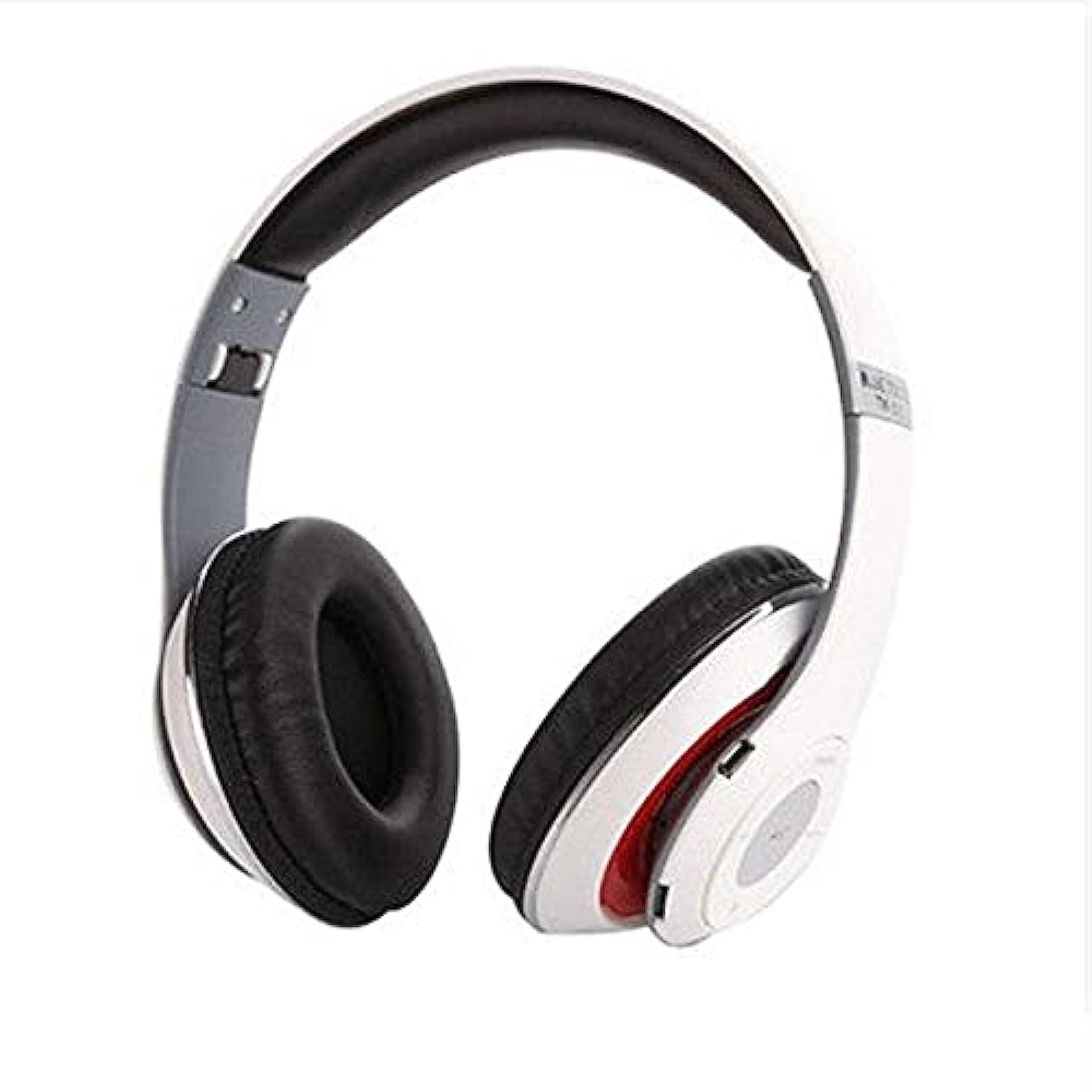
Image: The Generic B10 Over-Ear Headphones, featuring the adjustable headband, cushioned earcups, and visible control buttons on one earcup.
Ključne značilnosti:
- Brezžična povezava Bluetooth
- Built-in SD Card Reader for MP3 Playback
- Vgrajen FM radio sprejemnik
- Wired Audio Input (3.5mm AUX)
- Vgrajen mikrofon za prostoročno telefoniranje
- Izolacija hrupa
- Over-Ear Design for Comfort
3. Nastavitev
3.1. Polnjenje slušalk
- Manjši konec polnilnega kabla USB priključite na polnilno vtičnico na slušalkah.
- Večji konec polnilnega kabla USB priključite na napajalnik USB (ni priložen) ali na vrata USB računalnika.
- The LED indicator will illuminate, typically red, during charging.
- Once fully charged, the LED indicator will change color or turn off (refer to specific LED behavior in the specifications).
- Odklopite polnilni kabel.
Opomba: Za optimalno življenjsko dobo baterije slušalke pred prvo uporabo popolnoma napolnite.
3.2. Vklop/izklop
- Za vklop: Press and hold the Power/Multi-function button for approximately 3-5 seconds until the LED indicator flashes and an audible prompt is heard.
- Za izklop: Press and hold the Power/Multi-function button for approximately 3-5 seconds until the LED indicator turns off and an audible prompt is heard.
4. Navodila za uporabo
4.1. Bluetooth seznanjanje
- Prepričajte se, da so slušalke izklopljene.
- Press and hold the Power/Multi-function button for about 5-7 seconds until the LED indicator flashes red and blue alternately, indicating pairing mode.
- Omogočite Bluetooth v svoji napravi (pametni telefon, tablični računalnik, računalnik).
- Iskanje available Bluetooth devices. The headphones will appear as "B10" or a similar name.
- Select "B10" to connect. Once paired, the LED indicator will typically flash blue slowly, and an audible confirmation will be heard.
- Če se od vas zahteva geslo, vnesite »0000«.
4.2. Predvajanje s kartice SD
- Insert a microSD card (TF card) with MP3 audio files into the SD card slot on the headphones. Ensure the card is inserted correctly until it clicks into place.
- The headphones will automatically switch to MP3 mode and begin playing music from the SD card.
- Use the 'Next Track' and 'Previous Track' buttons to navigate songs.
- Press the 'Play/Pause' button to pause or resume playback.
4.3. Način radia FM
- With the headphones powered on, press the 'Mode' button to switch to FM Radio mode.
- Press the 'Play/Pause' button once to automatically scan and save available FM stations. This process may take a few minutes.
- Use the 'Next Track' and 'Previous Track' buttons to switch between saved FM stations.
4.4. Wired Audio Mode (AUX)
- En konec 3.5 mm avdio kabla priključite na vhod AUX na slušalkah.
- Connect the other end of the 3.5mm audio cable to the audio output jack of your device (e.g., smartphone, computer, MP3 player).
- Slušalke bodo samodejno preklopile v žični način.
- Opomba: In wired mode, the headphone controls (volume, track, play/pause) may not function. Control playback directly from your connected device.
4.5. Funkcije klica
- Sprejmi klic: Enkrat pritisnite gumb za vklop/večfunkcijo.
- Končaj klic: Med klicem enkrat pritisnite gumb za vklop/večfunkcijo.
- Zavrni klic: Pritisnite in držite gumb za vklop/večfunkcijo približno 2 sekundi.
- Ponovno klicanje zadnje številke: Dvakrat pritisnite gumb za vklop/večfunkcijo.
4.6. Splošni nadzor
| Gumb | funkcija |
|---|---|
| Moč/večfunkcijski | Power On/Off, Play/Pause, Answer/End/Reject Call, Redial |
| Glasnost + / naslednja skladba | Short press: Next Track/Station; Long press: Volume Up |
| Glasnost - / Prejšnja skladba | Short press: Previous Track/Station; Long press: Volume Down |
| Način (M) | Switch between Bluetooth, SD Card, and FM Radio modes |
5. Vzdrževanje
- Slušalke očistite z mehko, suho krpo. Ne uporabljajte abrazivnih čistil ali topil.
- Slušalk ne izpostavljajte ekstremnim temperaturam, vlagi ali neposredni sončni svetlobi.
- Ko slušalk ne uporabljate, jih hranite na hladnem in suhem mestu.
- Slušalk ne poskušajte razstavljati ali spreminjati, saj boste s tem razveljavili garancijo in jih lahko poškodovali.
6. Odpravljanje težav
| Težava | Možna rešitev |
|---|---|
| Slušalke se ne vklopijo. | Prepričajte se, da je baterija napolnjena. Priključite na vir napajanja s kablom USB. |
| Seznanitev prek Bluetootha ni mogoča. | Ensure headphones are in pairing mode (flashing red/blue). Turn off and on Bluetooth on your device. Move closer to the headphones. |
| Iz slušalk ni zvoka. | Check volume levels on both headphones and connected device. Ensure headphones are correctly paired or connected via AUX cable. Check if the correct mode (Bluetooth, SD, FM) is selected. |
| SD card music not playing. | Ensure the SD card is inserted correctly and contains compatible MP3 files. Press the 'Mode' button to switch to SD card mode. |
| FM radio ne deluje. | Ensure you are in FM mode. Perform an auto-scan for stations by pressing the Play/Pause button. Try in a location with better signal. |
7. Specifikacije
| Funkcija | Podrobnost |
|---|---|
| Znamka | Generično |
| Številka modela | B10 |
| barva | Bela |
| Tehnologija povezljivosti | Žično/brezžično (Bluetooth) |
| Namestitev ušesa | Nad ušesi |
| Faktor oblike | Nad ušesi |
| Nadzor hrupa | Izolacija hrupa |
| Mikrofon | ja |
| Baterija | Rechargeable (Included) |
| Združljive naprave | All devices with Bluetooth or 3.5mm audio output |
| Posebne lastnosti | Noise Cancellation, Microphone Included |
| Vrsta nadzora | Nadzor glasnosti |
| Nadzorna metoda | Dotik (gumbi) |
| Stopnja vodoodpornosti | Ni vodoodporen |
8. Varnostne informacije
- Slušalk ne uporabljajte pri visoki glasnosti dlje časa, da preprečite poškodbe sluha.
- Do not use the headphones while driving, cycling, or in situations where you need to hear ambient sounds.
- Slušalke hranite stran od vode, vlage in ekstremnih temperatur.
- Dispose of the battery according to local regulations. Do not expose to fire or extreme heat.
- Hraniti izven dosega otrok.
9. Garancija in podpora
This product comes with a standard manufacturer's warranty. For warranty claims or technical support, please refer to the contact information provided at your point of purchase. Keep your proof of purchase for warranty validation.