
Cetis 2510D NOMW
Cetis Standard Desk Phone 2510D NOMW User Manual
Model: 2510D NOMW
Uvod
Welcome to the user manual for your Cetis Standard Desk Phone, model 2510D NOMW. This guide provides essential information for setting up, operating, and maintaining your new telephone. Please read these instructions carefully to ensure proper use and longevity of your device.
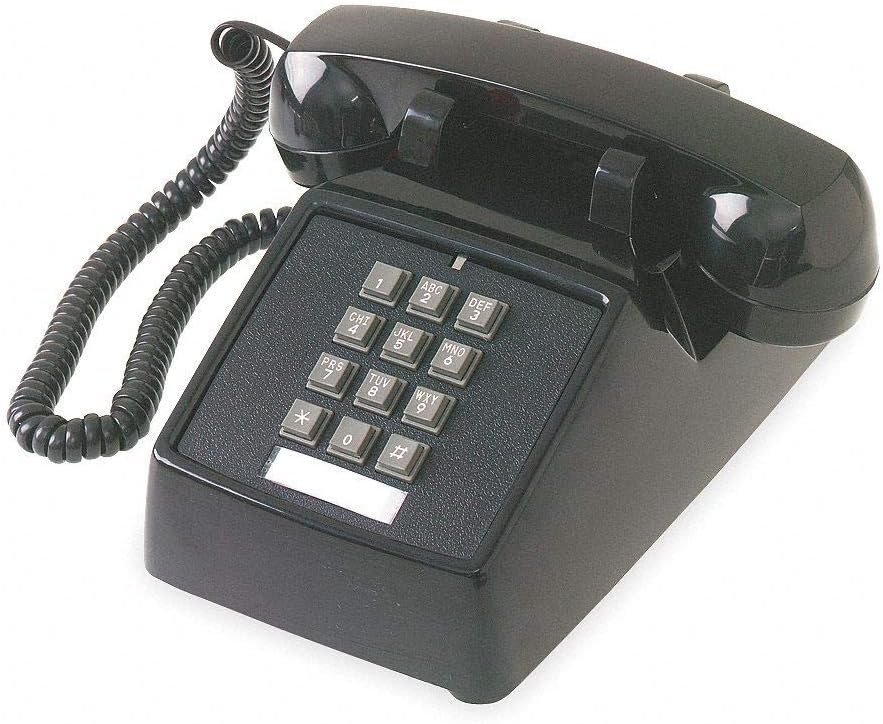
Figure 1: Cetis Standard Desk Phone 2510D NOMW. This image shows the black corded desk phone with its coiled handset cord, numeric keypad, and a blank label area below the keypad.
Pomembna varnostna navodila
- ne uporabljajte ta izdelek v bližini vode, nprample, v bližini kopalne kadi, umivalnika, kuhinjskega korita ali kadi za pranje perila, v mokri kleti ali blizu bazena.
- Izogibajte se using the telephone during an electrical storm. There may be a remote risk of electric shock from lightning.
- ne use the telephone to report a gas leak in the vicinity of the leak.
- Samo use the power cord and accessories provided by the manufacturer.
- Zaščititi the power cord from being walked on or pinched, particularly at plugs, convenience receptacles, and the point where they exit from the appliance.
Vsebina paketa
Preverite, ali vaš paket vsebuje naslednje elemente:
- Cetis Standard Desk Phone (Base Unit)
- Slušalka
- Zvit kabel za slušalko
- Line Cord (RJ11)
- Uporabniški priročnik (ta dokument)
Navodila za namestitev
- Priključite slušalko: Plug one end of the coiled handset cord into the handset and the other end into the jack on the side of the phone base unit, typically marked with a handset icon.
- Priključite telefonski kabel: Plug one end of the line cord into the wall telephone jack (RJ11) and the other end into the LINE jack on the back or side of the phone base unit.
- Umestitev: Place the phone on a stable, flat surface. Ensure it is not near heat sources or in direct sunlight.
- Začetni test: Dvignite slušalko. Slišati morate ton centrale. Če ne, ponovno preverite vse povezave.
Navodila za uporabo
Klicanje
- Dvignite slušalko.
- Poslušajte znak centrale.
- Z uporabo tipkovnice pokličite želeno telefonsko številko.
- Počakajte, da se klic poveže.
- When finished, place the handset back on the cradle.
Sprejem klica
- Ko telefon zazvoni, dvignite slušalko.
- Začnite pogovor.
- When finished, place the handset back on the cradle.
Adjusting Ringer Volume
The Cetis 2510D NOMW features a double gong ringer. The ringer volume is typically fixed or adjusted via a mechanical switch on the base unit (if present). Refer to the physical phone for any visible switches.
Adjusting Handset Volume
This model includes ADA compliant volume control for the handset. The volume control is usually a slider or button located on the side of the handset or base unit. Adjust it to a comfortable listening level during a call.
Vzdrževanje
- Čiščenje: Telefon obrišite z mehko krpoamp krpo. Ne uporabljajte močnih kemikalij ali abrazivnih čistil.
- Nega kabla: Avoid tangling or stretching the coiled handset cord excessively. Ensure the line cord is not pinched or damaged.
- Shranjevanje: If storing the phone for an extended period, disconnect it from the wall jack and store it in a cool, dry place.
Odpravljanje težav
| Težava | Možen vzrok | rešitev |
|---|---|---|
| Ni znaka centrale | Line cord disconnected or faulty. | Ensure the line cord is securely plugged into both the wall jack and the phone. Test with another phone if available. |
| Ne slišim klicatelja / Klicatelj me ne sliši | Handset cord loose or faulty; Handset volume too low. | Check handset cord connections. Adjust handset volume control. |
| Telefon ne zvoni | Ringer turned off or faulty line. | Check for a ringer on/off switch on the phone base. Verify the phone line is active. |
| Gumbi se ne odzivajo | Stuck buttons or internal fault. | Gently press buttons to ensure they are not stuck. If the issue persists, contact support. |
Specifikacije
- Model: Cetis 2510D NOMW
- Tip: Standard Desk Phone
- barva: Črna
- Število vrstic: 1
- Ringer: Double Gong Ringer
- Zvočnik: št
- Vrsta pritrditve: Pisalna miza
- Nadzor glasnosti: ADA Compliant Handset Volume Control
- vir energije: Line Powered (No Batteries Required)
- Vključuje: Podatkovna vrata
Informacije o garanciji
For warranty details and service, please refer to the warranty card included with your product or visit the official Cetis webspletno mesto. Shranite račun kot dokazilo o nakupu.
Podpora uporabnikom
If you require further assistance or encounter issues not covered in this manual, please contact Cetis customer support. Contact information can typically be found on the manufacturer's webspletnem mestu ali na embalaži izdelka.
Za več informacij obiščite Cetis Official Webmesto.