
1. Uvod
This manual provides detailed instructions for the safe installation, operation, and maintenance of your Lumi LPA36-463A Full-Motion TV Wall Mount. Please read this manual thoroughly before installation and retain it for future reference. This wall mount is designed to securely hold most LED and LCD televisions ranging from 37 to 70 inches, with a maximum weight capacity of 45 kg (99 lbs).
The full-motion design allows for maximum extension, tilt, and rotation of your television, providing optimal viewing angles from various positions within a room. The mount can extend up to 475 mm from the wall and retract to a slim profile 95 mm.
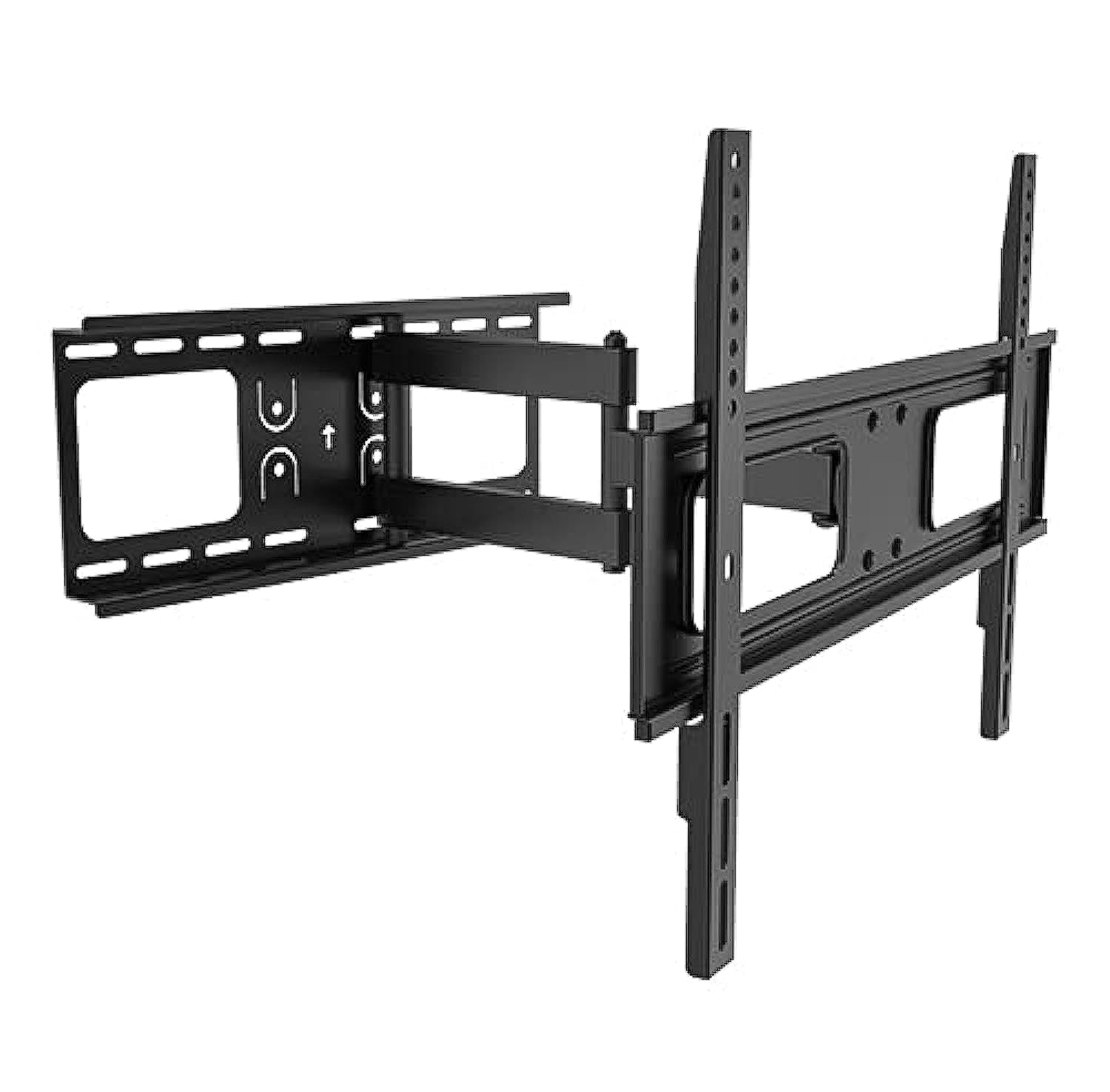
Image 1.1: The Lumi LPA36-463A Full-Motion TV Wall Mount, showing its articulated arm and VESA plate.
2. Varnostne informacije
OPOZORILO: Če teh navodil ne preberete in ne upoštevate, lahko pride do resnih telesnih poškodb, materialne škode ali razveljavitve garancije. Če teh navodil ne razumete ali dvomite o varnosti namestitve, se obrnite na usposobljenega monterja.
- Ne prekoračite največje dovoljene nosilnosti 45 kg (99 lbs).
- This mount is designed for installation on solid concrete walls, brick walls, or wood stud walls. Do not install on drywall alone.
- Prepričajte se, da lahko stenska konstrukcija varno podpira skupno težo nosilca in televizorja.
- Use only the mounting hardware provided. Do not use power tools to tighten screws, as this may strip threads.
- Vse majhne dele hranite izven dosega otrok.
- Pri namestitvi naj bosta vedno prisotni vsaj dve osebi, da preprečite poškodbe ali škodo.
- Občasno preverite vse povezave, da zagotovite njihovo varnost.
3. Vsebina paketa
Verify that all components are present and undamaged before beginning installation. If any parts are missing or defective, contact your retailer for assistance.
| del | Opis | Količina |
|---|---|---|
| Sestavljanje stenske plošče | Main wall mounting bracket with articulated arm. | 1 |
| TV Bracket (VESA Plate) | Bracket that attaches to the back of the TV. | 1 |
| Montažni komplet strojne opreme | Includes various screws, washers, and anchors for wall and TV attachment. | 1 komplet |
| Raven | For ensuring horizontal alignment during installation. | 1 |
| Navodila za uporabo | Ta dokument. | 1 |
4. Nastavitev in namestitev
Before you begin, ensure you have the necessary tools: pencil, drill, stud finder (for wood studs), measuring tape, and a Phillips head screwdriver. It is highly recommended to have two people for installation.
4.1. Določite mesto montaže
- Choose a location on the wall that can support the weight of the TV and mount.
- For wood stud walls, locate the center of the studs using a stud finder.
- For concrete or brick walls, ensure there are no hidden pipes or electrical wires.
- Mark the desired height for the top of your TV.
4.2. Attach Wall Plate to Wall
- Position the wall plate assembly against the wall at the desired height. Use the integrated level to ensure it is perfectly horizontal.
- Mark the drill holes through the wall plate onto the wall with a pencil.
- Izvrtajte vodilne luknje:
- For wood studs: Use a 5.5mm (7/32") drill bit.
- For concrete/brick: Use a 10mm (3/8") masonry drill bit and insert wall anchors.
- Stensko ploščo pritrdite na steno s priloženimi vijaki in podložkami. Trdno privijte, vendar ne premočno.
4.3. Pritrdite nosilce za televizor na televizor
- Televizor previdno položite z zaslonom navzdol na mehko, čisto površino.
- Identify the VESA mounting holes on the back of your TV. This mount supports VESA patterns up to 400x400 mm.
- Select the appropriate screws (M4, M6, or M8) and washers from the hardware kit that fit your TV's mounting holes.
- Attach the TV brackets to the back of your TV, ensuring they are centered and securely fastened. Do not overtighten.
4.4. Mount TV to Wall Plate
- S pomočjo previdno dvignite televizor in pritrdite nosilce televizorja na sklop stenske plošče.
- Prepričajte se, da je televizor varno pritrjen na stensko ploščo.
- Engage any safety locking mechanisms (if present) to prevent accidental dislodgement.
5. Navodila za uporabo
The Lumi LPA36-463A mount offers full-motion capabilities for optimal viewfleksibilnost.
5.1. Adjusting Extension and Retraction
- Gently pull the TV away from the wall to extend the arm. The mount can extend up to 475 mm.
- Push the TV back towards the wall to retract the arm. The mount can retract to a minimum distance of 95 mm from the wall.
- Always move the TV smoothly and avoid sudden jerks.
5.2. Adjusting Tilt
- The mount allows for vertical tilt adjustment. Loosen the tilt adjustment knobs (if present, refer to diagram in physical manual) on the TV brackets.
- Adjust the TV to the desired upward or downward angle.
- Tighten the tilt adjustment knobs to secure the TV in position.
5.3. Adjusting Swivel (Rotation)
- The articulated arm allows for horizontal swivel of the TV up to 90 degrees left and right.
- Gently push or pull the side of the TV to rotate it to your preferred viewvhodni kot.
- No locking mechanism is typically required for swivel; the friction of the joints holds the position.
6. Vzdrževanje
Redno vzdrževanje zagotavlja dolgo življenjsko dobo in varno delovanje vašega stenskega nosilca za televizor.
- Čiščenje: Nosilec obrišite z mehko, suho krpo. Ne uporabljajte abrazivnih čistil ali topil.
- Periodični pregled: Every 3-6 months, check all screws and bolts to ensure they are tight and secure. Retighten if necessary.
- Mazanje sklepov: If the arm movement becomes stiff, a small amount of silicone-based lubricant can be applied to the pivot points. Avoid oil-based lubricants.
- Preverjanje škode: Inspect the mount for any signs of damage, wear, or corrosion. If any damage is found, discontinue use and contact customer support.
7. Odpravljanje težav
If you encounter issues with your Lumi LPA36-463A TV mount, refer to the following common problems and solutions.
| Težava | Možen vzrok | rešitev |
|---|---|---|
| Televizor po namestitvi ni poravnan. | Wall plate not perfectly horizontal. | Carefully loosen wall plate bolts, adjust with a level, and retighten. Some mounts have post-installation leveling adjustments; check your specific model. |
| Nosilec se zdi ohlapen ali majav. | Mounting bolts are not tight enough or incorrect wall anchors were used. | Ensure all wall bolts and TV attachment screws are securely tightened. Verify correct anchors for your wall type. If problem persists, consult a professional. |
| TV cannot tilt or swivel smoothly. | Spoji so pretesni ali pa jih je treba mazavati. | Check if any adjustment knobs are overtightened. Apply a small amount of silicone-based lubricant to the moving joints. |
| Nosilec za TV ni primeren. | Napačen vzorec VESA ali velikost/teža televizorja. | Verify your TV's VESA pattern and weight against the mount's specifications. This mount supports VESA up to 400x400mm and TVs up to 45kg (99lbs). |
8. Specifikacije
| Funkcija | Podrobnost |
|---|---|
| Številka modela | LPA36-463A |
| Znamka | Lumi |
| Vrsta pritrditve | Full-Motion Wall Mount |
| Material | Kovina |
| Združljivost velikosti zaslona | 37" - 70" |
| Zmogljivost teže | 45 kg (99 lbs) |
| Združljivost VESA | Do 400 x 400 mm |
| Podaljšek od stene | 95 mm (zloženo) do 475 mm (izvlečeno) |
| Razpon nagiba | Adjustable (vertical) |
| Vrtljiv domet | Up to 90 degrees left/right |
| Dimenzije pošiljanja | 51.4 x 22.2 x 7 cm; 2.52 kg |
9. Garancija in podpora
Lumi products are manufactured with quality and durability in mind. For specific warranty details, please refer to the warranty card included with your product or visit the official Lumi webspletno mesto. Shranite račun kot dokazilo o nakupu.
For technical support, missing parts, or any questions regarding the installation or operation of your Lumi LPA36-463A TV Wall Mount, please contact your local retailer or Lumi customer service.
Kontaktni podatki: (Please refer to your product packaging or Lumi's official webspletno mesto za najnovejše kontaktne podatke.)