
DELTACO GAMING DM210
Uporabniški priročnik za ultralahko igralno miško DELTACO GAMING DM210 RGB
Model: DM210 (GAM-108)
1. Uvod
Thank you for choosing the DELTACO GAMING DM210 Ultralight RGB Gaming Mouse. This manual provides essential information for setting up, operating, and maintaining your new gaming mouse. The DM210 is designed for performance, featuring an ultralight construction, customizable RGB lighting, and programmable buttons to enhance your gaming experience.
2. Vsebina paketa
- 1x DELTACO GAMING DM210 Ultralight RGB Gaming Mouse
- 1x uporabniški priročnik
3. Izdelek je končanview
The DELTACO GAMING DM210 mouse features an ergonomic design with a honeycomb shell for reduced weight and improved airflow. It includes 7 buttons for versatile control and customizable RGB lighting.
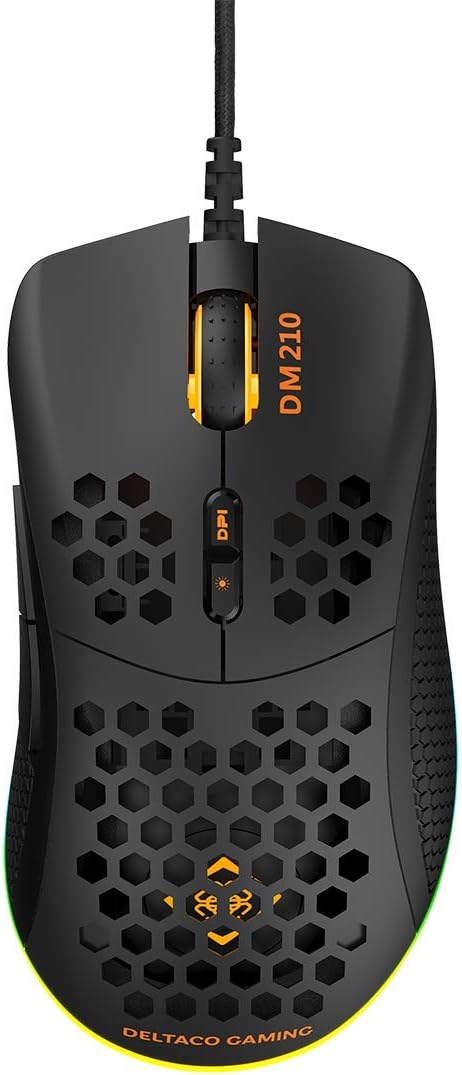
Slika 3.1: Vrh view of the DM210 mouse. This image displays the left and right click buttons, the scroll wheel, and the two DPI adjustment buttons located below the scroll wheel. The ultralight honeycomb shell design is visible across the top surface of the mouse.
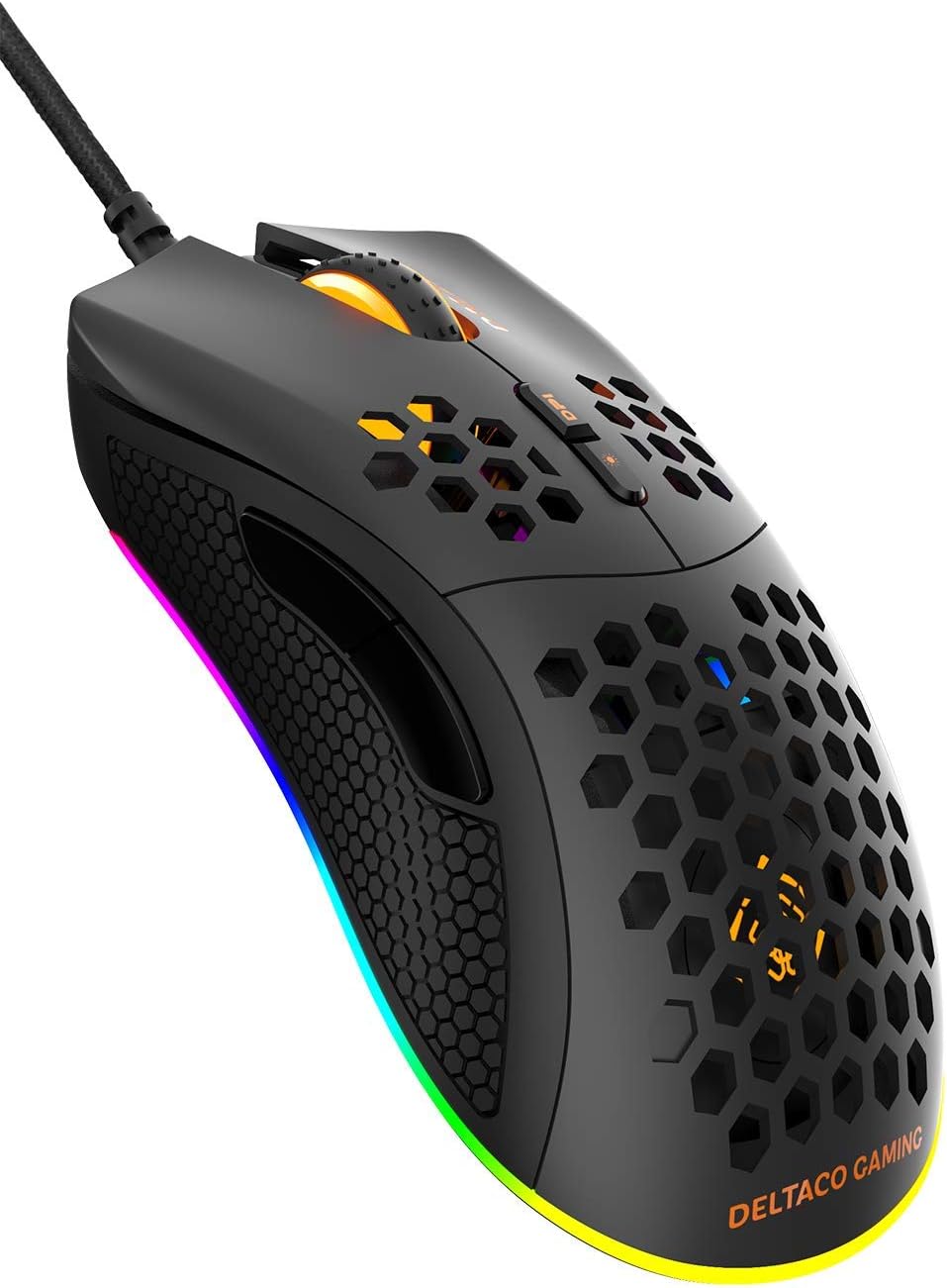
Slika 3.2: Pod kotom view of the DM210 mouse from the front-right. This image highlights the two side buttons (forward and back) located on the left side of the mouse, designed for easy thumb access. The RGB lighting strip along the base of the mouse is also visible.
Funkcije gumbov:
- Levi klik na gumb: Standardna funkcija primarnega klika.
- Desni klik na gumb: Standardna funkcija sekundarnega klika.
- Kolesce za pomikanje: For scrolling through documents and web strani. Deluje tudi kot srednji klik.
- Gumb DPI+: Poveča občutljivost DPI.
- Gumb DPI: Decreases the DPI sensitivity. (Note: The product description mentions a single DPI button and a separate LED button. For this model, the two buttons below the scroll wheel are typically for DPI adjustment.)
- Gumb za naprej: Navigacija naprej v web brskalniki ali aplikacije.
- Gumb za nazaj: Navigacija nazaj v web brskalniki ali aplikacije.
4. Nastavitev
- Povežite miško: Plug the USB connector of the DELTACO GAMING DM210 mouse into an available USB port on your computer.
- Namestitev gonilnika: Your operating system (Windows 7/8/10) will automatically detect and install the necessary drivers. This process may take a few moments.
- Namestitev programske opreme (neobvezno): For advanced customization, including programmable buttons and RGB lighting effects, download the DELTACO GAMING software. Refer to the product packaging or the official DELTACO GAMING website for the software download link.
5. Navodila za uporabo
5.1. Prilagoditev DPI
The DM210 mouse features multiple DPI (Dots Per Inch) settings, allowing you to adjust cursor sensitivity on the fly. Use the DPI buttons (located below the scroll wheel) to cycle through the available DPI levels:
- 400 DPI
- 800 DPI
- 1200 DPI
- 1600 DPI
- 3200 DPI
- 6400 DPI
Each DPI level may be indicated by a specific LED color or pattern, depending on the current RGB settings.
5.2. Nadzor osvetlitve RGB
The mouse features dynamic RGB lighting. While some basic lighting modes might be accessible via a dedicated button (if present, often combined with DPI control), full customization of the RGB loop and logo lighting is achieved through the DELTACO GAMING software. The software allows you to select from 16 million colors and various lighting effects.
5.3. Programabilni gumbi in programska oprema
The 7 buttons on the DM210 mouse are programmable using the DELTACO GAMING software. This software allows you to:
- Remap button functions to suit your preferences.
- Create macros for complex in-game actions.
- Adjust polling rate (up to 1000 Hz).
- Prilagodite RGB svetlobne učinke in barve.
Install the software from the official DELTACO GAMING website for access to these advanced features.
6. Vzdrževanje
To ensure the longevity and optimal performance of your DELTACO GAMING DM210 mouse, follow these maintenance guidelines:
- Čiščenje: Uporabite mehak, rahlo damp cloth to clean the surface of the mouse. Avoid using harsh chemicals, abrasive cleaners, or solvents, as these can damage the finish and internal components.
- Skrb za kabel: Avoid sharp bends or excessive pulling on the USB cable. Store the cable neatly when not in use to prevent tangling and damage.
- Okolje: Keep the mouse away from extreme temperatures, direct sunlight, and excessive moisture.
7. Odpravljanje težav
If you encounter issues with your DELTACO GAMING DM210 mouse, refer to the following common solutions:
- Miška se ne odziva:
- Prepričajte se, da je kabel USB varno priključen v delujoča vrata USB na računalniku.
- Poskusite miško priključiti v drug USB vhod.
- Znova zaženite računalnik.
- Preizkusite miško na drugem računalniku, da ugotovite, ali je težava v miški ali v vašem sistemu.
- DPI se ne spreminja:
- Prepričajte se, da pritiskate pravilne gumbe za nastavitev DPI.
- If using the software, check if DPI settings have been reconfigured or if a specific profile je aktiven.
- RGB osvetlitev ne deluje/je napačna:
- Verify the mouse is properly connected.
- Check the DELTACO GAMING software for lighting settings and ensure they are configured as desired.
- Prepričajte se, da je programska oprema posodobljena.
- Gumbi ne delujejo pravilno:
- If using the DELTACO GAMING software, check button assignments to ensure they haven't been accidentally remapped.
- Test the mouse on another computer to rule out software conflicts on your primary system.
8. Specifikacije
| Znamka | DELTACO GAMING |
| Model | DM210 (GAM-108) |
| Povezljivost | USB |
| Nastavitve DPI | 400/800/1200/1600/3200/6400 |
| Polling Rate | 1000 Hz |
| Gumbi | 7 (programabilne) |
| Teža | 70 g |
| Razsvetljava | RGB (16 milijona barv) |
| Združljivost | Windows 7/8/10 |
| barva | Črna |
9. Informacije o garanciji
The DELTACO GAMING DM210 Ultralight RGB Gaming Mouse comes with a 5-letna garancija from the date of purchase. This warranty covers manufacturing defects and ensures the product meets its specified performance. Please retain your proof of purchase for warranty claims. For detailed warranty terms and conditions, refer to the official DELTACO GAMING webspletno mesto ali se obrnite na podporo strankam.
10. Podpora
For further assistance, software downloads, frequently asked questions (FAQs), and the latest product information, please visit the official DELTACO GAMING website. You can also contact DELTACO GAMING customer support for technical issues or warranty inquiries.
Ask a question about this manual
Ask about setup, troubleshooting, compatibility, parts, safety, or missing instructions. Manuals+ will review the question and use this page’s manual context to help answer it.