
1. Uvod
Hvala za nakupasing the Trevi CMP 588 DAB Portable Stereo System. This manual provides essential information for the safe and correct operation of your device. Please read it thoroughly before use and retain it for future reference.
The Trevi CMP 588 DAB is a versatile portable stereo system featuring DAB/DAB+ and FM radio with RDS, a CD/MP3 player, USB input, AUX-in, Bluetooth connectivity, and a headphone jack, all designed for an enhanced audio experience.
2. Varnostne informacije
- vir energije: Uporabljajte samo navedeni napajalnik ali baterije. Prepričajte se, da je glasnosttage ustreza zahtevam enote.
- Voda in vlaga: Enote ne izpostavljajte dežju, vlagi in je ne potapljajte v vodo. Na enoto ne postavljajte predmetov, napolnjenih s tekočinami, kot so vaze.
- Prezračevanje: Zagotovite zadostno prezračevanje. Ne blokirajte prezračevalnih odprtin.
- Toplota: Napravo hranite stran od virov toplote, kot so radiatorji, grelniki, štedilniki ali druge naprave (vključno z amplifiers), ki proizvajajo toploto.
- Čiščenje: Pred čiščenjem izključite enoto iz stenske vtičnice. Uporabite mehko, suho krpo. Ne uporabljajte tekočih čistil ali aerosolnih čistil.
- Servisiranje: Tega izdelka ne poskušajte servisirati sami. Vsa servisna dela prepustite usposobljenemu servisnemu osebju.
- CD predvajalnik: Nikoli ne glejte neposredno v laserski žarek.
3. Vsebina paketa
Preverite, ali so vsi predmeti prisotni in v dobrem stanju:
- Trevi CMP 588 DAB Portable Stereo System
- Napajalni kabel
- Daljinski upravljalnik
- Uporabniški priročnik (ta dokument)
4. Značilnosti izdelka
- DAB/DAB+ and FM Radio with RDS
- High Readability Dot Matrix Display
- CD Player (supports CD-DA, MP3)
- USB Input for MP3 Playback
- AUX-in for external audio devices
- Bluetooth povezljivost
- Priključek za slušalke
- Prenosna oblika z ročajem za prenašanje
- Priložen daljinski upravljalnik
5. Nadzor in povezave

Slika 1: Spredaj view of the Trevi CMP 588 DAB, showing speakers, display, and main controls.
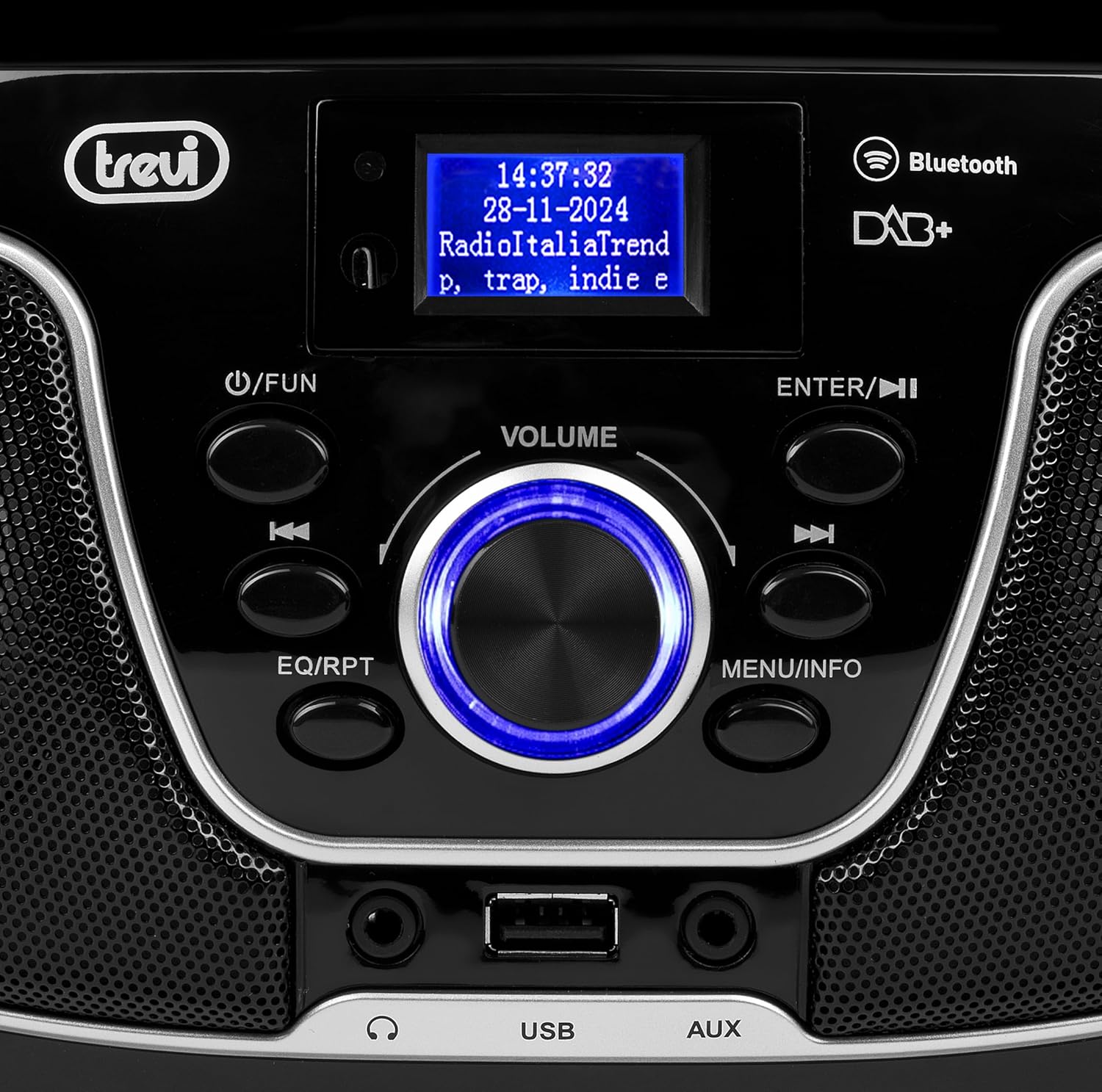
Slika 2: Podrobno view of the control panel, including power, function, volume knob, and navigation buttons.
Nadzor sprednje plošče:
- POWER / FUN button: Press to turn on/off, press to switch functions (CD/USB/DAB/FM/Bluetooth/AUX).
- GUMB VOLUME: Rotate to adjust volume. Press to confirm selections.
- ENTER / ►►I button: Confirm selection / Skip to next track/station.
- I▼▼ / EQ/RPT button: Skip to previous track/station / Equalizer settings / Repeat mode.
- MENU / INFO button: Access menu / Display information.
- Vrata USB: Connect USB storage devices for MP3 playback.
- Vhod AUX: Priključite zunanje zvočne naprave.
- Priključek za slušalke: Priključite slušalke za zasebno poslušanje.

Slika 3: Zadaj view of the Trevi CMP 588 DAB, showing the power input and telescopic antenna.
Priključki na zadnji plošči:
- Vhod za izmenični tok: Priključite priloženi napajalni kabel za izmenični tok.
- Teleskopska antena: Raztegnite za optimalen sprejem radia.

Figure 4: Remote control for the Trevi CMP 588 DAB, showing various function buttons.
Funkcije daljinskega upravljalnika:
- OSTANI V PRIPRAVLJENOSTI: Vklop/izklop vklopa.
- FUNKCIJA: Switch between modes (CD, USB, DAB, FM, Bluetooth, AUX).
- MUTE: Vklop/izklop zvoka.
- RPT: Način ponavljanja predvajanja.
- SCAN: Auto scan for radio stations.
- F+/CH+, F-/CH-: Navigate folders/channels.
- EQ: Nastavitve izenačevalnika.
- PLAY/PAUSE (►II): Predvajanje/pavza predvajanja.
- PREV/TUN- (▼▼): Previous track/tune down.
- NEXT/TUN+ (►►): Next track/tune up.
- STOP (■): Ustavite predvajanje.
- MENI: Dostop do menija.
- INFO: Prikaz informacij.
- PROG.: Program tracks/stations.
- GLASNOST+ / GLASNOST-: Prilagodite glasnost.
6. Nastavitev
6.1 Napajalni priključek
- AC napajanje: Connect the supplied AC power cable to the AC power input on the rear of the unit, then plug the other end into a wall outlet.
- Battery Operation (Optional): For portable use, insert 6 x C-size batteries (not included) into the battery compartment on the bottom of the unit. Ensure correct polarity.
6.2 Začetni vklop
Pritisnite POWER / FUN gumb na enoti oz OSTANI V PRIPRAVLJENOSTI button on the remote control to turn on the system. The display will light up.
6.3 Setting Up the Antenna
For optimal radio reception, fully extend the telescopic antenna located at the rear of the unit. Adjust its position for the best signal.
7. Navodila za uporabo
7.1 Delovanje radia DAB/DAB+
- Pritisnite POWER / FUN button repeatedly until "DAB" mode is selected.
- The unit will automatically scan for available DAB/DAB+ stations on first use. To perform a manual scan, press the MENI button, navigate to "Full Scan" and press ENTER.
- Ko je skeniranje končano, uporabite ▼▼ or â-º-ºã buttons to browse through the available stations. Press ENTER , da izberete postajo.
- Pritisnite INFO button to cycle through different information displays (e.g., program type, signal strength, time).
7.2 Delovanje FM-radia
- Pritisnite POWER / FUN button repeatedly until "FM" mode is selected.
- To auto-scan and store stations, press the SCAN button on the remote. The unit will scan and save strong signals.
- Za ročno uglaševanje pritisnite in držite ▼▼ or â-º-ºã buttons to search for the next available station. Press briefly to fine-tune the frequency.
- The RDS function will display station information (if available).
7.3 CD/MP3 Playback

Slika 5: Zgornji del view of the Trevi CMP 588 DAB with the CD compartment open, ready for disc insertion.
- Odprite pokrov predala za CD-je.
- Place a CD (CD-DA or MP3 CD) onto the spindle with the label side facing up.
- Zaprite pokrov predala za CD.
- Pritisnite POWER / FUN button repeatedly until "CD" mode is selected.
- The unit will read the disc. Press PLAY/PAUSE (►II) za začetek predvajanja.
- Uporaba ▼▼ or â-º-ºã to skip tracks. Press and hold to fast forward/rewind.
- Pritisnite STOP (■) za ustavitev predvajanja.
7.4 Predvajanje prek USB-ja
- Vstavite bliskovni pogon USB, ki vsebuje MP3 files v vrata USB.
- Pritisnite POWER / FUN večkrat pritisnite gumb, dokler ni izbran način »USB«.
- Naprava bo samodejno zaznala in začela predvajati MP3 datoteke files.
- Uporaba ▼▼ or â-º-ºã za preskakovanje skladb.
7.5 Združevanje in predvajanje prek Bluetootha
- Pritisnite POWER / FUN button repeatedly until "Bluetooth" mode is selected. The display will show "BT" or "PAIRING".
- Omogočite Bluetooth na svoji mobilni napravi (pametnem telefonu, tablici itd.).
- Iskanje available devices and select "TREVI CMP 588 DAB" from the list.
- Once paired, you can play audio from your device through the stereo system.
- Use the controls on your mobile device or the stereo system to manage playback.
7.6 Delovanje AUX-vhoda
- Zunanjo avdio napravo (npr. predvajalnik MP3, pametni telefon) priključite na vhod AUX s 3.5 mm avdio kablom (ni priložen).
- Pritisnite POWER / FUN večkrat pritisnite gumb, dokler ni izbran način "AUX".
- Play audio from your connected device. The volume can be controlled via both the stereo system and the external device.
8. Vzdrževanje
8.1 Čiščenje enote
Wipe the exterior of the unit with a soft, dry cloth. Do not use abrasive cleaners, waxes, or solvents as they may damage the finish. Ensure the unit is unplugged before cleaning.
8.2 CD Lens Care
If the CD player experiences reading errors, the lens may be dirty. Use a commercially available CD lens cleaner to clean the lens. Do not touch the lens with your fingers.
8.3 Shranjevanje
If the unit will not be used for an extended period, remove the batteries (if applicable) and unplug the power cable. Store the unit in a cool, dry place away from direct sunlight and extreme temperatures.
9. Odpravljanje težav
| Težava | Možen vzrok | rešitev |
|---|---|---|
| Brez moči | Napajalni kabel ni priključen; Baterije so prazne ali nepravilno vstavljene. | Check power cable connection; Replace batteries or ensure correct polarity. |
| Brez zvoka | Glasnost je prenizka; funkcija utišanja je aktivna; izbran je napačen vir. | Increase volume; Deactivate mute; Select correct function (CD, USB, DAB, FM, BT, AUX). |
| Slab radijski sprejem | Antenna not extended or positioned incorrectly; Weak signal area. | Popolnoma izvlecite in nastavite teleskopsko anteno; poskusite premakniti enoto na drugo mesto. |
| CD/USB se ne predvaja | Disc dirty/scratched; Incorrect file format on USB; USB drive not properly inserted. | Clean or replace disc; Ensure MP3 format for USB; Reinsert USB drive. |
| Bluetooth povezovanje ni uspelo | Device too far; Bluetooth not enabled on source device; Unit not in pairing mode. | Move devices closer; Enable Bluetooth on source device; Ensure unit is in Bluetooth mode and searching. |
10. Specifikacije
- Model: CM 588 DAB
- vir energije: AC 230V ~ 50Hz or 6 x C-size batteries (not included)
- Poraba energije: 15 vatov
- Vrsta zvočnika: Stereo (2 speakers)
- Povezljivost: Bluetooth, USB, AUX-in
- Podprti zvočni formati: CD audio (CD-DA), MP3
- radijske frekvence: DAB/DAB+, FM with RDS
- Dimenzije (D x Š x V): 50 x 50 x 28 cm (približno)
- Teža: 1.5 Kilograms (approximate)
- barva: Črna
11. Garancija in podpora
This product is covered by a standard manufacturer's warranty. Please refer to the warranty card included in your package for specific terms and conditions, including the warranty period and coverage details.
For technical support, service, or warranty claims, please contact your retailer or the official Trevi customer service. Contact information can typically be found on the Trevi webmestu ali v embalaži izdelka.
Please retain your proof of purchase (receipt) for any warranty-related inquiries.