
NOSILEC MU0034
MOUNTUP MU0034 Priročnik z navodili za namizno montažo z enim monitorjem
Znamka: MOUNTUP | Model: MU0034
1. Uvod
This manual provides detailed instructions for the installation, operation, and maintenance of your MOUNTUP MU0034 Single Monitor Desk Mount. Please read this manual thoroughly before installation to ensure correct setup and safe operation. This monitor mount is designed to enhance your workspace ergonomics by providing adjustable positioning for a single monitor.
2. Varnostne informacije
- Ensure all components are present and undamaged before installation. Do not use if any parts are missing or faulty.
- This product is intended for monitors weighing up to 17.6 lbs (8 kg) and screen sizes from 17 to 32 inches. Do not exceed the maximum weight capacity.
- Compatible VESA patterns are 75x75mm and 100x100mm. Verify your monitor's VESA pattern before proceeding.
- Ensure the desk surface is stable and strong enough to support the combined weight of the mount and monitor.
- Tighten all screws firmly, but do not overtighten to avoid stripping threads or damaging components.
- Med namestitvijo hranite otroke in hišne ljubljenčke proč.
- Če imate kakršne koli dvome o postopku namestitve, se posvetujte s usposobljenim strokovnjakom.
3. Vsebina paketa
Please verify that all parts are included in your package:
- Sklop ročice monitorja
- Pisalna miza Clamp Osnova
- Komponente podnožja Grommet
- VESA plošča
- Komplet strojne opreme (vijaki, podložke, imbus ključi)
- Navodila za uporabo
4. Specifikacije
| Funkcija | Specifikacija |
|---|---|
| Številka modela | MU0034 |
| Material | Polished Aluminum |
| Združljivost velikosti zaslona | 17" to 32" (flat or curved) |
| Zmogljivost teže | Do 17.6 lbs (8 kg) |
| Združljivost VESA | 75x75 mm, 100x100 mm |
| Nastavitev višine | Up to 11" (16.3" total height adjustment range) |
| Razpon nagiba | +45° do -45° |
| Vrtljiv domet | 360° (arm), 180° (monitor plate) |
| Vrtenje | 360° (landscape to portrait) |
| Max Desk Thickness (C-clamp) | 3.35" |
| Premer odprtine za tesnilo | 0.39" - 3.1" |
5. Nastavitev in namestitev
The MOUNTUP MU0034 offers two installation options: C-clamp mounting and Grommet mounting. Choose the method suitable for your desk.
5.1. C-Clamp Montaža
This method is for desks without existing grommet holes, or if you prefer clamping to the edge of your desk. Ensure your desk thickness is no more than 3.35 inches.
- Pritrdite C-clamp: Assemble the C-clamp components to the base of the monitor arm. Position the base on the edge of your desk and tighten the clamp screw until it is secure.
- Pritrdite ploščo VESA na monitor: Secure the VESA plate to the back of your monitor using the appropriate screws from the hardware kit. Ensure the screws are tightened securely.
- Slide Monitor onto Arm: Carefully slide the monitor (with the attached VESA plate) onto the monitor arm's VESA head. Ensure it clicks into place or is secured with the provided locking mechanism.
- Prilagodi napetost: Refer to Section 6.1 for adjusting the gas spring tension to match your monitor's weight.

Slika 1: Ilustracija C-clamp and Grommet mounting options. The C-clamp is shown securing the mount to the desk edge, while the grommet mount uses a desk hole.
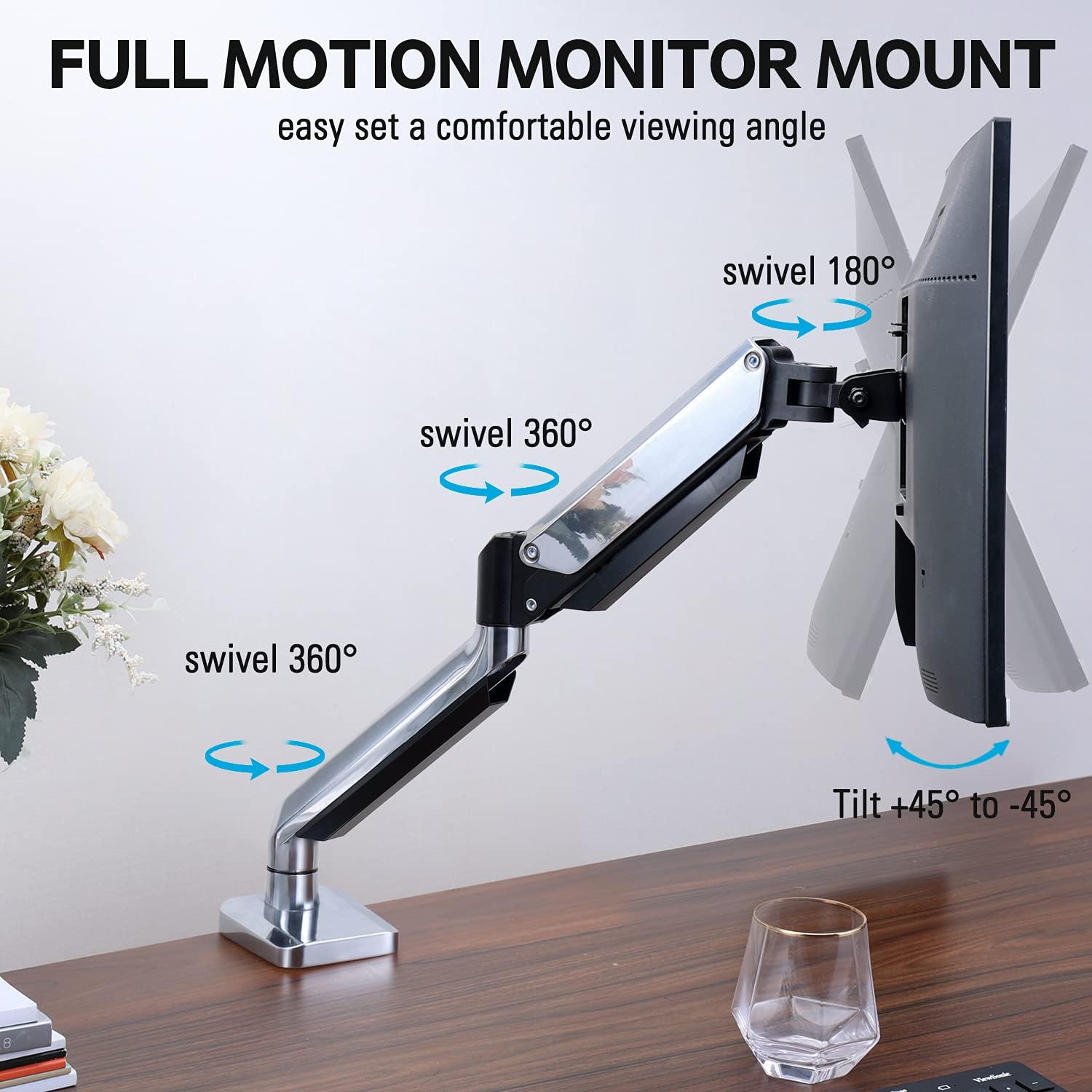
Figure 2: The removable VESA plate being attached to the back of a monitor, then sliding onto the monitor arm for easier installation.
5.2. Montaža na ušesa
This method utilizes an existing hole in your desk. Ensure your desk thickness is no more than 3.35 inches and the grommet hole diameter is between 0.39 and 3.1 inches.
- Assemble Grommet Base: Insert the grommet base components through the desk hole and secure them from underneath the desk using the provided plate and nut.
- Pritrdite ploščo VESA na monitor: Secure the VESA plate to the back of your monitor using the appropriate screws from the hardware kit. Ensure the screws are tightened securely.
- Slide Monitor onto Arm: Carefully slide the monitor (with the attached VESA plate) onto the monitor arm's VESA head. Ensure it clicks into place or is secured with the provided locking mechanism.
- Prilagodi napetost: Refer to Section 6.1 for adjusting the gas spring tension to match your monitor's weight.
6. Upravljanje in nastavitve
The MOUNTUP MU0034 monitor arm offers various adjustments for optimal viewudobje.
6.1. Nastavitev napetosti plinske vzmeti
The gas spring tension needs to be adjusted to match the weight of your monitor. This ensures the monitor stays in position once adjusted.
- If the monitor drifts down, turn the adjustment screw (usually located on the arm joint) clockwise ("+") to increase tension.
- If the monitor floats up, turn the adjustment screw counter-clockwise ("-") to decrease tension.
- Adjust gradually until the monitor remains stable at any height.
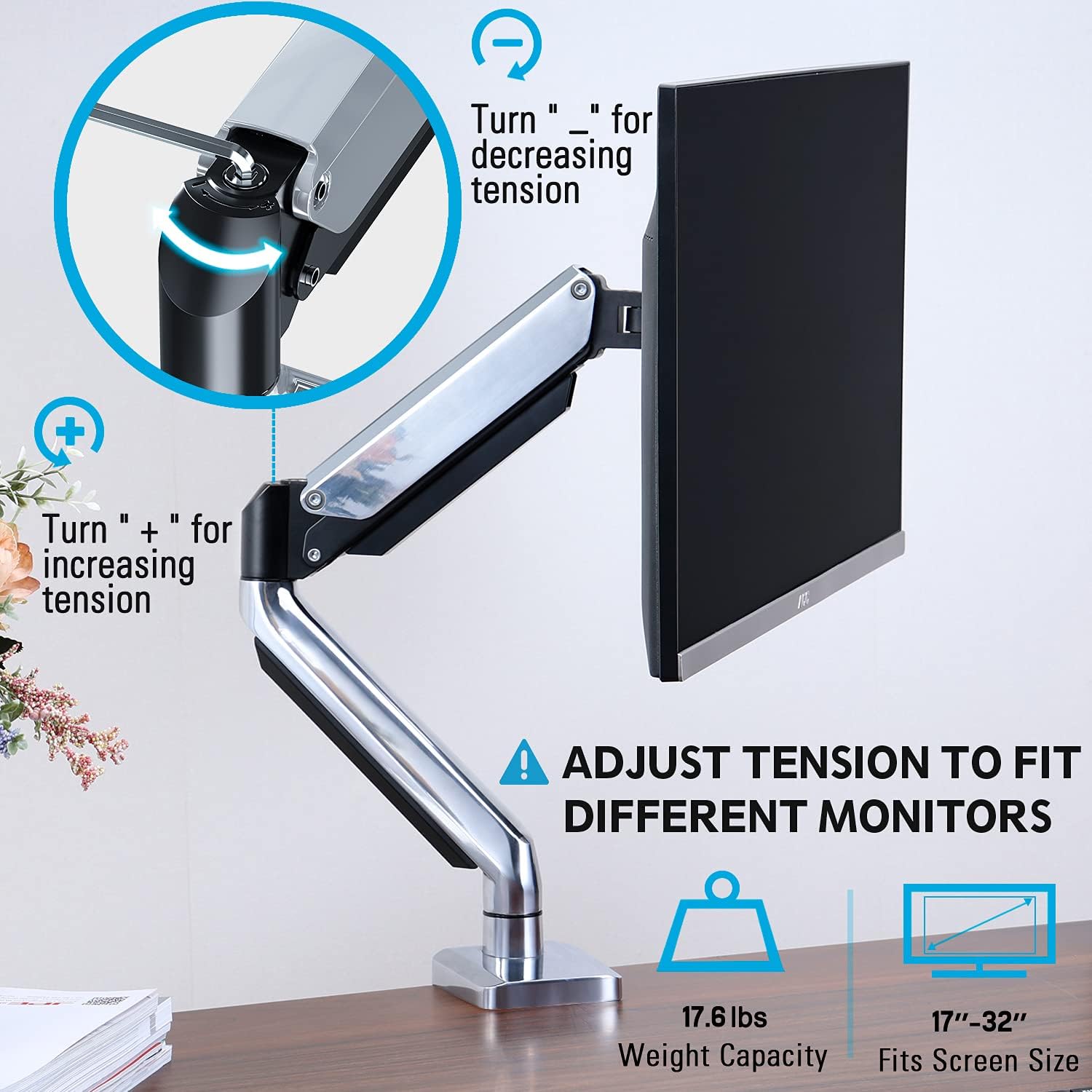
Figure 3: Instructions for adjusting the gas spring tension using an Allen key. Turning clockwise increases tension, counter-clockwise decreases it.
6.2. Nastavitev višine
Once the gas spring tension is correctly set, you can easily raise or lower your monitor to your desired ergonomic height. The arm allows for up to 11 inches of vertical adjustment.

Figure 4: Diagram illustrating the maximum height adjustment of 11 inches and maximum extension of 17.5 inches.
6.3. Tilt, Swivel, and Rotation
The monitor arm provides full motion capabilities:
- Nagib: Adjust the monitor screen +45° to -45° to reduce glare or find a comfortable viewvhodni kot.
- Vrtljiva: The arm can swivel 360° at the base and 360° at the middle joint. The monitor plate itself can swivel 180°. This allows for easy screen sharing or repositioning.
- Vrtenje: Za preklapljanje med ležečo in pokončno orientacijo monitor zavrtite za 360°.

Figure 5: Visual representation of the monitor arm's full motion capabilities, including 360° swivel, 180° swivel at the monitor plate, and +45° to -45° tilt.

Figure 6: An image demonstrating the monitor's ability to rotate 360 degrees, allowing for both landscape and portrait viewnačini ing.
7. Upravljanje kablov
The MOUNTUP MU0034 features integrated cable management to keep your workspace tidy.
- Kable monitorja (napajalni, video itd.) napeljite vzdolž spodnje strani roke.
- Use the provided cable clips or covers to secure the cables within the arm channels.
- Prepričajte se, da so kabli dovolj ohlapni, da omogočajo poln obseg gibanja brez napetosti.

Figure 7: Illustration of how cables are routed and organized through the integrated channels on the monitor arm, keeping the desk clear.
8. Vzdrževanje
- Redno preverjajte vse vijake in povezave, da se prepričate, da so trdno priviti.
- Nosilec očistite z mehko krpoamp krpo. Izogibajte se abrazivnim čistilom ali topilom.
- Do not lubricate the gas spring mechanism.
9. Odpravljanje težav
| Težava | Možen vzrok | rešitev |
|---|---|---|
| Monitor sags or won't stay up | Napetost plinske vzmeti je prenizka za težo monitorja. | Increase gas spring tension by turning the adjustment screw clockwise ("+"). |
| Monitor lebdi navzgor ali ga je težko potisniti navzdol | Napetost plinske vzmeti je previsoka za težo monitorja. | Decrease gas spring tension by turning the adjustment screw counter-clockwise ("-"). |
| Monitor se maja | Nosilec ni varno pritrjen na mizo ali pa plošča VESA ni tesno pritrjena. | Preverite in privijte vse vijakeamp/grommet screws and VESA plate screws. |
| Difficulty rotating/tilting monitor | Spoji so pretesni. | Loosen the corresponding joint screws slightly (do not remove). |
10. Garancija in podpora
The MOUNTUP MU0034 Single Monitor Desk Mount is backed by a 3-year support period. For technical assistance, missing parts, or warranty claims, please contact MOUNTUP customer support through their official channels or the retailer where the product was purchased.
Prosimo, shranite dokazilo o nakupu za namene garancije.
Ask a question about this manual
Ask about setup, troubleshooting, compatibility, parts, safety, or missing instructions. Manuals+ will review the question and use this page’s manual context to help answer it.