
1. Uvod
The TAKSTAR DA10 is a versatile 2-in-1 device designed to function as both a wireless microphone and a portable voice amplifier with an integrated speaker. It is suitable for various applications including karaoke, singing, home parties, meetings, outdoor events, and speeches. This manual provides detailed instructions for the proper setup, operation, and maintenance of your DA10 device.
Note: This device cannot connect to external speakers, amplifiers, or audio receivers like PA systems or karaoke systems.
2. Kaj je v škatli
- TAKSTAR DA10 Wireless Microphone & Voice Amplifier
- USB polnilni kabel tipa C
- Uporabniški priročnik
3. Izdelek je končanview & Lastnosti
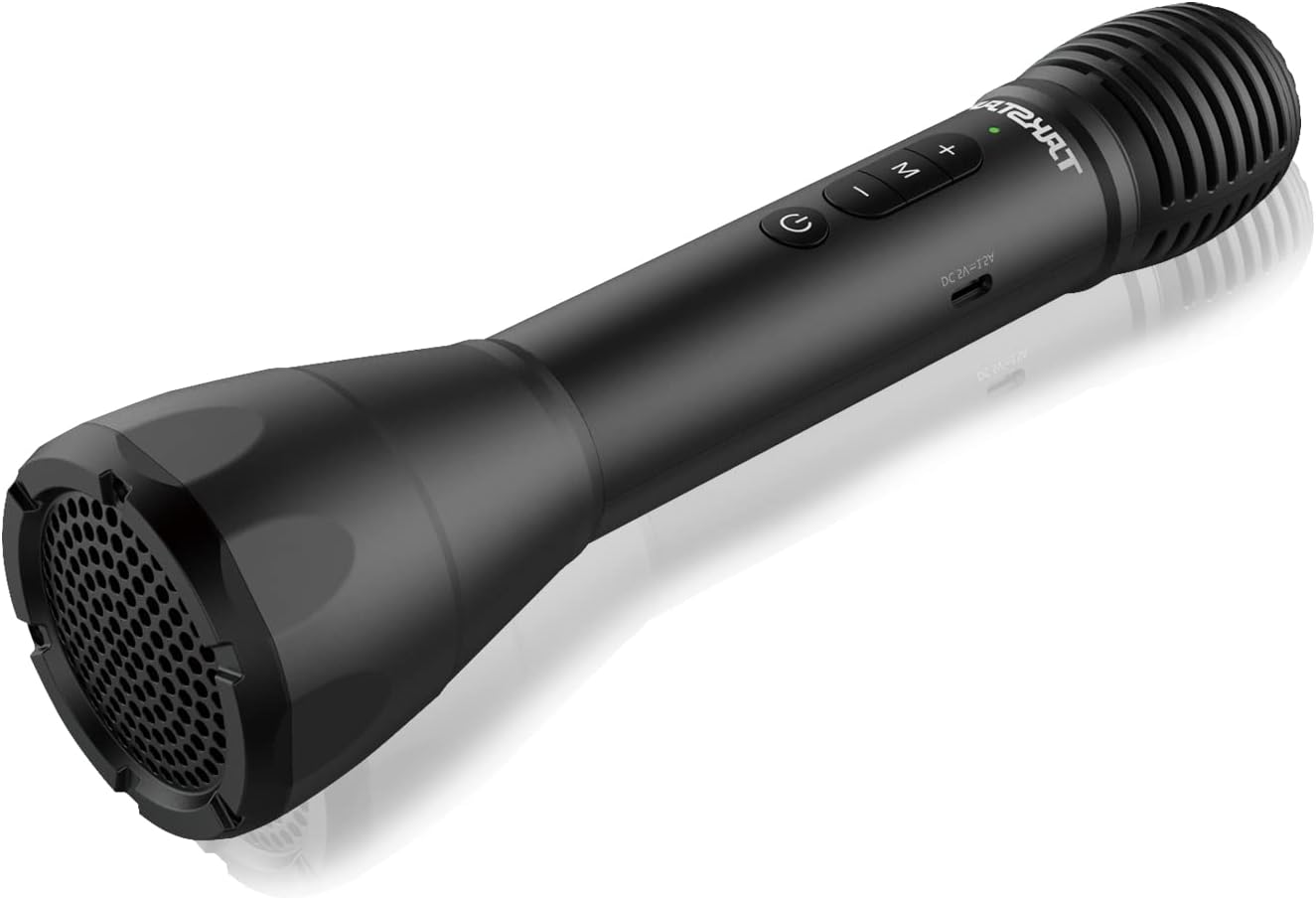
Figure 1: TAKSTAR DA10 Main Unit. A sleek black handheld microphone with integrated speaker at the base and control buttons on the handle.

Figure 2: Cardioid Pickup Pattern. The microphone features a cardioid pickup pattern for focused sound capture and clearer vocals, enhanced by a built-in DSP anti-howling chip.
Ključne značilnosti:
- Funkcionalnost 2 v 1: Combines microphone, power amplifier, and speaker.
- Brezžična povezava Bluetooth: Convenient wireless playing and connectivity to mobile phones, computers, and tablets.
- Profesionalna kakovost zvoka: Built-in DSP chip for effective howling reduction and clear, natural sound. Rear earth material speaker for lightweight portability and strong audio.
- Način karaok: Features reverb effects for an enhanced singing experience.
- Dolgo obstojen: Up to 8 hours of working time on a single charge, with ultra-long standby and automatic power-off after 15 minutes of no input.
- Prilagoditev glasnosti: Adjustable loudspeaker volume to suit different situations.
- Več načinov: Switch between Speech Mode, Host Mode, Karaoke Mode, and Bluetooth Mode.
- Široka pokritost: Covers an area of approximately 1,000 sq ft (100m²), suitable for about 25 people.
4. Nastavitev
4.1 Polnjenje naprave
Before first use, fully charge your TAKSTAR DA10. Connect the provided USB Type-C charging cable to the charging port on the microphone and to a suitable USB power source (e.g., computer, USB wall adapter). A full charge takes approximately 3 hours.
4.2 Bluetooth seznanjanje
- Power on the TAKSTAR DA10 by pressing and holding the power button.
- Press the 'M' button to switch to Bluetooth Mode. The device will indicate it is ready for pairing.
- On your mobile phone, computer, or tablet, enable Bluetooth and search for available devices.
- Select 'TAKSTAR DA10' from the list of devices to pair. Once paired, the device will confirm the connection.

Figure 3: Bluetooth Connection. The diagram illustrates how to connect the TAKSTAR DA10 to a smartphone or laptop/PC via Bluetooth 5.0.
5. Navodila za uporabo
5.1 Vklop/izklop
Pritisnite in pridržite gumb za vklop, da vklopite ali izklopite napravo.
5.2 Izbira načina
Press the 'M' button to cycle through the available modes:
- Govorni način: Optimized for clear vocal delivery.
- Host Mode: Suitable for presentations and public speaking.
- Način karaok: Adds reverb effects for singing.
- Način Bluetooth: For wireless audio playback from a paired device.
5.3 Prilagoditev glasnosti
Use the volume control buttons (+/-) on the device to adjust the loudspeaker volume to your desired level.
5.4 Karaoke Reverb Effects
In Karaoke Mode, the built-in reverb effects are automatically applied to enhance your singing experience.

Figure 4: Voice Amplifier Coverage. The TAKSTAR DA10 provides 8W output power, covering up to 1000+ sq.ft (100+ m²) for effective voice amppoenostavitev.

Figure 5: Versatile Usage. The image displays various applications for the TAKSTAR DA10, including karaoke, lectures/seminars, weddings, and teaching.
6. Vzdrževanje
- Naj bo naprava suha in čista.
- Naprave ne izpostavljajte ekstremnim temperaturam ali neposredni sončni svetlobi.
- Do not disassemble the device. Contact customer support for repairs.
- Redno polnite napravo, da ohranite stanje baterije, tudi če je ne uporabljate pogosto.
7. Odpravljanje težav
| Težava | Možna rešitev |
|---|---|
| Ni zvoka iz zvočnika | Ensure device is powered on and volume is adjusted. Check Bluetooth connection. |
| Seznanitev prek Bluetootha ni mogoča | Ensure device is in Bluetooth Mode. Turn off and on Bluetooth on your external device. Restart the TAKSTAR DA10. |
| Howling/Feedback noise | Reduce microphone volume. Avoid pointing the microphone directly at the speaker. |
| Kratka življenjska doba baterije | Ensure device is fully charged before use. Reduce usage time at maximum volume. |
8. Specifikacije
| Funkcija | Podrobnost |
|---|---|
| Znamka | TAKSTAR |
| Ime modela | DA10 |
| Tehnologija povezljivosti | Bluetooth |
| Faktor oblike mikrofona | Ročni |
| Vir napajanja | Baterija (litij-ionska) |
| Delovni čas | Do 8 ur |
| Čas polnjenja | Približno 3 ur |
| Izhodna moč | 8W |
| Območje pokritosti | Approx. 1,000 sq ft (100m²) |
| Audio Občutljivost | 47.5 decibelov |
| Razmerje med signalom in hrupom | 66 dB |
| Frekvenčni odziv | 8 KHz |
| Vrsta priključka | USB Type-C |
| Teža predmeta | 0.035 unče (1 grama) |
| Dimenzije paketa | 11.26 x 4.09 x 3.31 palcev |
9. Uradni videoposnetek izdelka
Video 1: TAKSTAR DA10S Bluetooth Wireless Microphone. This video provides an overview of the TAKSTAR DA10S, highlighting its features and functionality as a Bluetooth wireless microphone. Note: The DA10S is a variant of the DA10 model.
10. Garancija in podpora
For warranty information or technical support, please refer to the contact card included in your product packaging or visit the official TAKSTAR website. You may also contact the seller, Takstar Official Store, directly through the Amazon platform for assistance.