
1. Uvod
Welcome to the user manual for your new LTC NB681 Nimbleback Wired 65% Mechanical Keyboard. This guide provides detailed instructions on setting up, operating, maintaining, and troubleshooting your keyboard to ensure optimal performance and longevity. Please read this manual thoroughly before using the product.

Figure 1: LTC NB681 Nimbleback Wired 65% Mechanical Keyboard
Video 1: LTC NB681 65% Hot Swappable Keyboard OverviewTa videoposnetek ponuja splošen pregledview of the keyboard's features and design.
Video 2: LTC Nimbleback NB681 Keyboard. This video showcases the keyboard's aesthetics and some functionalities.
2. Ključne značilnosti
The LTC NB681 Nimbleback Keyboard is designed with a range of features to enhance your typing and gaming experience:
- Compact but Practical 65% Layout: Ultra-compact design with 68 keys, balancing functionality with space-saving. Includes practical arrow, navigation, and control keys.
- Hot-swappable Switches: Features a hot-swap PCB, allowing free replacement of 3-pin/5-pin MX-style switches (e.g., Gateron, Kailh). Equipped with quiet linear red switches for nimble reactions and quiet typing.
- 2 USB 2.0 Ports and Type-C Wired Connection: Two built-in USB passthrough ports for connecting peripheral devices like a mouse or flash drive, or for charging mobile devices. The Type-C wired connection ensures high-speed and stable data transmission.
- Dinamična RGB osvetlitev ozadja: Offers 18 preset backlight modes with 5 adjustable brightness and flowing speed levels, providing gorgeous color schemes and reactive effects.
- Professional Software Support: Customize keypress combinations, assign macros, and personalize RGB lighting effects using the powerful LTC drive software. Compatible with Windows 7/8/10, iOS, and Mac systems.
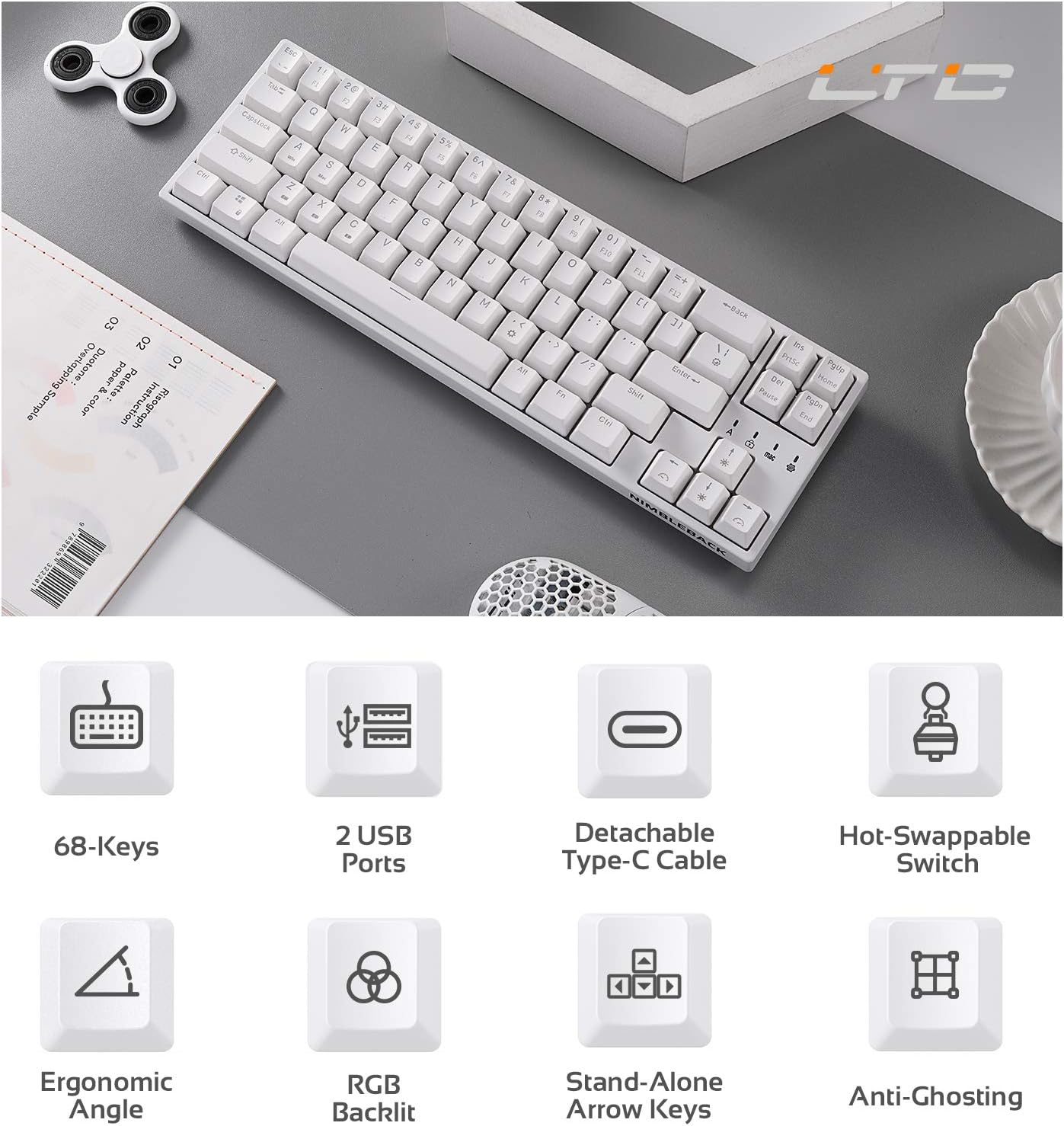
Figure 2: Visual representation of key features including 68-keys, 2 USB ports, detachable Type-C cable, hot-swappable switch, ergonomic angle, RGB backlit, stand-alone arrow keys, and anti-ghosting.
3. Nastavitev
Follow these steps to set up your LTC NB681 keyboard:
- Razpakiranje: Carefully remove the keyboard and all accessories from the packaging. Ensure you have the keyboard, USB-C cable, and any included tools (e.g., keycap puller, switch puller).
- Priključite kabel USB-C: Plug the USB-C end of the provided cable into the Type-C port on the keyboard. Connect the other end (USB-A) to an available USB port on your computer.
- Začetno priznanje: Vaš računalnik bi moral samodejno zaznati in namestiti potrebne gonilnike. To lahko traja nekaj trenutkov.
- Pozicioniranje: Place the keyboard on a stable, flat surface. You can adjust the typing angle using the foldable feet on the underside of the keyboard for ergonomic comfort.
- Namestitev programske opreme (neobvezno, vendar priporočljivo): For advanced customization, download the LTC drive software from the official LTC website. Install it on your Windows or Mac system to remap keys, assign macros, and customize RGB lighting.
Video 3: LTC NB681 Keyboard Unboxing! This video demonstrates the unboxing process and shows the included accessories.

Figure 3: Close-up of the keyboard's 2 built-in USB 2.0 passthrough ports and the detachable Type-C wired connection port.
4. Upravljanje tipkovnice
4.1 Osnovne funkcije
- Standardno tipkanje: The keyboard functions as a standard QWERTY keyboard.
- Arrow, Navigation, and Control Keys: Despite its compact size, the NB681 includes dedicated arrow keys and essential navigation/control keys for convenience.
4.2 Nadzor osvetlitve ozadja RGB
The NB681 features dynamic RGB backlighting with multiple customization options:
- Spreminjanje načinov: Pritisnite Fn + \| (pipe key) to cycle through 18 preset backlight modes.
- Prilagoditev svetlosti: Uporaba Fn + puščica gor za povečanje svetlosti in Fn + puščica navzdol za zmanjšanje svetlosti (5 stopenj).
- Prilagoditev hitrosti: Uporaba Fn + puščica levo to decrease flowing speed and Fn + puščica desno to increase flowing speed (5 levels).

Slika 4: Prikaz tipkovniceasing its dynamic 16.8 million RGB backlight with 19 modes and 5 brightness/speed levels.
4.3 Stikala z možnostjo vroče menjave
The hot-swappable design allows you to easily change switches without soldering:
- Odstranite pokrovček tipke: S priloženim snemalnikom nežno odstranite želeno tipkovnico.
- Odstranite stikalo: Use the included switch puller to carefully grip the switch and pull it straight up.
- Vstavi novo stikalo: Align the pins of the new 3-pin or 5-pin MX-style switch with the holes on the PCB. Press firmly until it clicks into place.
- Zamenjajte pokrovček tipke: Namestite pokrovček tipke nazaj na novo stikalo.

Figure 5: Close-up demonstrating the hot-swappable switch feature, allowing easy replacement of 3-pin or 5-pin mechanical switches.
Video 4: LTC NB681 Red Switch Keyboard Sound Test. This video provides an audio demonstration of the keyboard's red switches.
4.4 Professional Software Customization
The dedicated software allows for in-depth customization:
- Preslikava ključev: Spremenite funkcijo katere koli tipke glede na svoje želje.
- Macro Assignment: Create and assign complex macros for gaming or productivity tasks.
- Prilagajanje osvetlitve RGB: Design your own lighting effects, colors, and patterns beyond the preset modes.

Figure 6: Screenshot showing the professional software interface for customizing RGB backlight, remapping keys, and assigning macros.
5. Vzdrževanje
Pravilno vzdrževanje zagotavlja dolgo življenjsko dobo in delovanje vaše tipkovnice:
- Redno čiščenje: Use a soft brush or compressed air to remove dust and debris from between the keycaps. For deeper cleaning, remove keycaps and wipe the surface with a slightly damp cloth. Ensure the keyboard is disconnected before cleaning.
- Nega stikala: The hot-swappable design makes switch replacement easy if a switch becomes faulty or if you wish to try different switch types. Avoid excessive force when inserting or removing switches to prevent damage to the PCB sockets.
- Upravljanje kablov: Keep the USB-C cable untangled and avoid sharp bends to prevent internal wire damage.
6. Odpravljanje težav
If you encounter issues with your LTC NB681 keyboard, try the following steps:
- Tipkovnica se ne odziva:
- Prepričajte se, da je kabel USB-C varno priključen na tipkovnico in računalnik.
- Poskusite tipkovnico priključiti na drug USB vhod na računalniku.
- Preizkusite tipkovnico na drugem računalniku, da ugotovite, ali je težava s tipkovnico ali s prvotnim računalnikom.
- RGB Lights Not Working/Incorrect:
- Check the brightness settings using Fn + puščica gor/dol.
- Preklapljajte med različnimi načini osvetlitve z Fn + \|.
- If using the software, ensure the lighting profiles are correctly applied and the software is up to date.
- Keys Not Registering/Double Typing:
- This could indicate a faulty switch. Use the switch puller to remove the problematic switch and replace it with a spare or a known good switch.
- Prepričajte se, da je stikalo popolnoma nameščeno v vtičnico.
- Software Not Recognizing Keyboard:
- Ensure the keyboard is connected directly to the computer (avoiding USB hubs if possible).
- Znova zaženite računalnik in programsko opremo.
- Reinstall the LTC drive software.
If these steps do not resolve the issue, please contact LTC customer support for further assistance.
7. Specifikacije
| Funkcija | Opis |
|---|---|
| Številka modela | NB681 |
| Postavitev | 65 % (68 tipk) |
| Povezljivost | USB Type-C Wired |
| Stikala | Hot-Swappable (3-pin/5-pin MX-style compatible) |
| Osvetlitev ozadja | RGB (18 preset modes, 5 brightness/speed levels) |
| Prehodni USB | 2 x USB 2.0 vrata |
| Združljivost | Windows 7/8/10, iOS, Mac |
| Teža predmeta | 2 funtov |
| Dimenzije | 14.96 x 6.14 x 1.92 palcev |
| Proizvajalec | LTC |
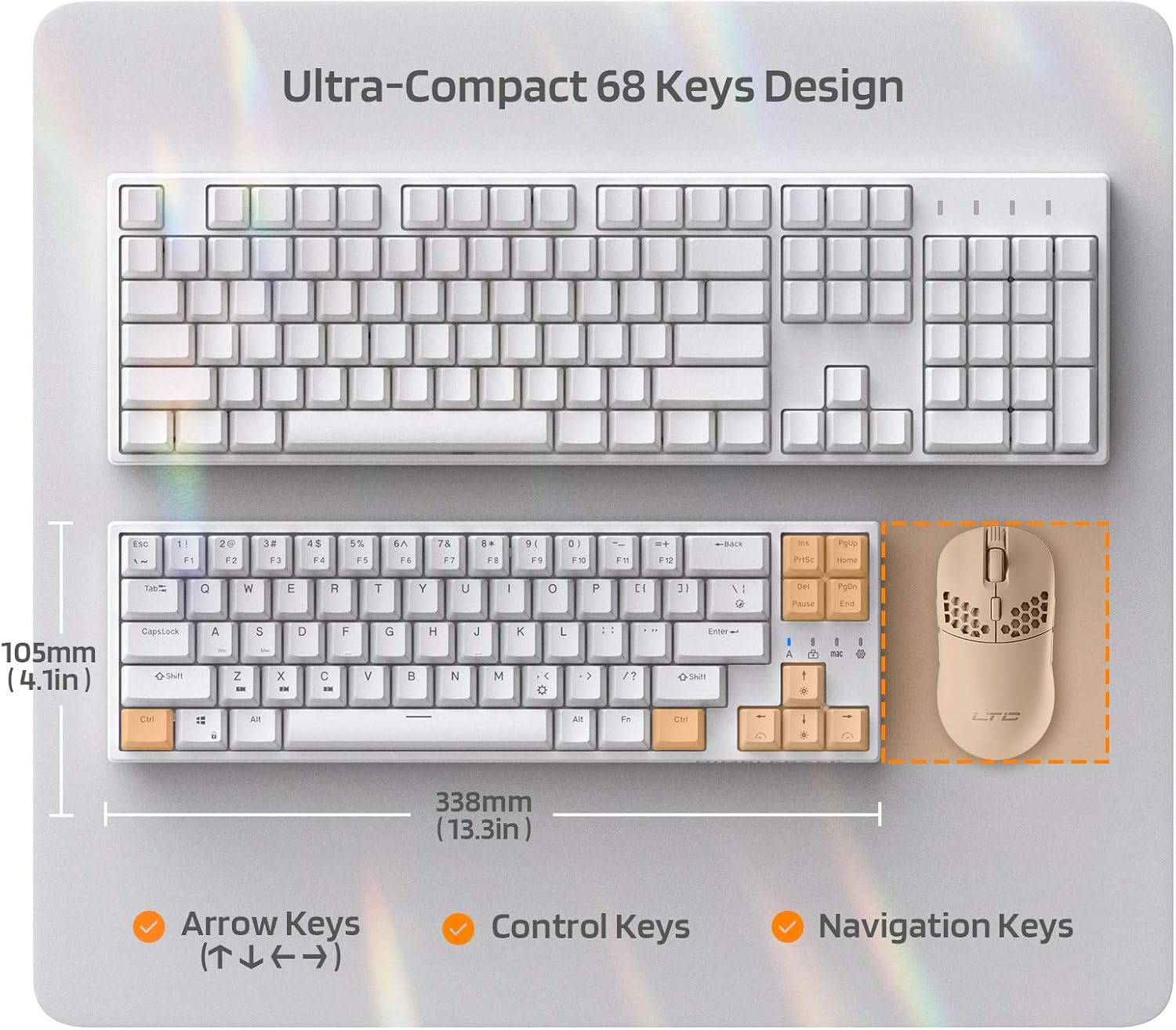
Figure 7: Comparison of the ultra-compact 68-key design with a full-size keyboard, highlighting its space-saving benefits.

Figure 8: Illustration of the ergonomic design with foldable feet for 10-degree and 5-degree typing angles, and anti-slip pads.
8. Garancija in podpora
For detailed warranty information and customer support, please refer to the official LTC webspletno mesto ali dokumentacijo o nakupu.
You can also find additional resources and a downloadable PDF user manual here: Uradni uporabniški priročnik (PDF)
For more products and support, visit the LTC Store on Amazon.