
Konec izdelkaview
The Hoco ES41 TWS (True Wireless Stereo) Bluetooth Headset provides a wireless audio experience with clear sound. This manual will guide you through the setup, operation, and maintenance of your ES41 headset.
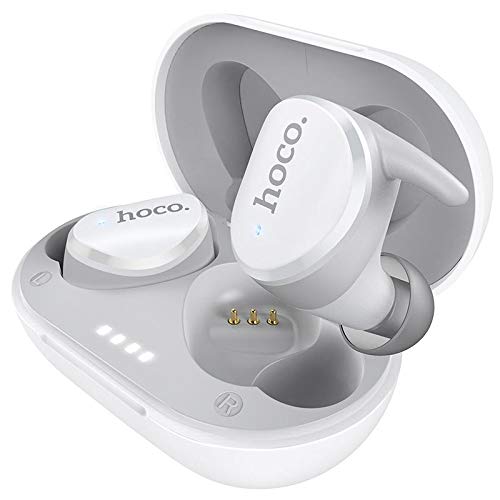
Image: The Hoco ES41 TWS Bluetooth Wireless Headset, showing both earbuds and the charging case in white.
Vsebina paketa
Prosimo, preverite paket za naslednje artikle:
- Hoco ES41 TWS Wireless Earbuds (Left and Right)
- Etui za brezžično polnjenje
- Polnilni kabel USB (mikro USB)
- Uporabniški priročnik

Slika: Spredaj in zadaj view of the Hoco ES41 retail packaging, displaying the product and key features.
Nastavitev
1. Polnjenje slušalk in ohišja
Pred prvo uporabo popolnoma napolnite polnilno ohišje in slušalke.
- Priloženi polnilni kabel USB priključite na polnilno vtičnico na ohišju in na vir napajanja USB.
- Indikatorske lučke na polnilnem ohišju bodo zasvetile, da bi prikazale stanje polnjenja.
- Slušalke postavite v polnilno ohišje. Prepričajte se, da so pravilno nameščene; slušalke se bodo začele samodejno polniti.
- Charging time for the headset is approximately 1 hour. The charging case takes approximately 2.5 hours to fully charge.

Image: The Hoco ES41 earbuds placed inside the open charging case, showing the LED indicator lights for battery status.
2. Seznanjanje z napravo Bluetooth
The ES41 headset uses Bluetooth 5.0 for a stable connection.
- Začetno seznanjanje:
- Odprite polnilno ohišje. Slušalke se bodo samodejno vklopile in preklopile v način seznanjanja.
- V napravi (pametnem telefonu, tabličnem računalniku itd.) omogočite Bluetooth.
- Iskanje Bluetooth devices and select "Hoco ES41" from the list.
- Ko je povezava vzpostavljena, boste zaslišali potrditveni zvok in indikatorske lučke na slušalkah se bodo spremenile.
- Ponovna povezava:
- After initial pairing, the earbuds will automatically connect to the last paired device when removed from the charging case and Bluetooth is enabled on the device.
Navodila za uporabo
Vklop/izklop
- Vklop: Open the charging case, or long-press the touch area on both earbuds for approximately 3 seconds.
- Ugasniti: Place the earbuds back into the charging case and close the lid, or long-press the touch area on both earbuds for approximately 5 seconds.
Predvajanje glasbe
- Predvajanje/pavza: Enkrat se dotaknite območja na dotik na kateri koli slušalki.
- Naslednja skladba: Dvakrat se dotaknite območja na dotik na desni slušalki.
- Prejšnja skladba: Dvakrat se dotaknite območja na dotik na levi slušalki.
Upravljanje klicev
- Sprejmi/končaj klic: Enkrat se dotaknite območja na dotik na kateri koli slušalki.
- Zavrni klic: Dve sekundi dolgo pritisnite območje na dotik na kateri koli slušalki.
Glasovni pomočnik
- Aktiviranje glasovnega pomočnika: Trikrat tapnite območje na dotik na kateri koli slušalki.
Vzdrževanje
- Čiščenje: Za čiščenje slušalk in polnilnega ohišja uporabite mehko, suho krpo. Ne uporabljajte agresivnih kemikalij ali abrazivnih materialov.
- Shranjevanje: Ko slušalk ne uporabljate, jih shranite v polnilno škatlico, da jih zaščitite in ohranite napolnjene. Hranite na hladnem in suhem mestu, stran od neposredne sončne svetlobe in ekstremnih temperatur.
- Vodoodpornost: Slušalke niso vodoodporne. Izogibajte se izpostavljanju vodi, potu ali visoki vlažnosti.
Odpravljanje težav
- Slušalke se ne morejo združiti med seboj:
Place both earbuds back into the charging case, close the lid, then open it again. This should reset their connection.
- Slušalke se ne povezujejo z napravo:
Ensure Bluetooth is enabled on your device. Forget "Hoco ES41" from your device's Bluetooth settings and attempt to pair again.
- Iz ene slušalke ni zvoka:
Check if both earbuds are charged. Try placing them back in the case and taking them out again. If the issue persists, try resetting the earbuds (refer to the full manual if available for specific reset instructions).
- Težave s polnjenjem:
Ensure the charging cable is securely connected and the power source is active. Clean the charging contacts on both the earbuds and the case with a dry cotton swab.
Specifikacije
| Funkcija | Specifikacija |
|---|---|
| Ime modela | ES41 |
| Različica Bluetooth | 5.0 |
| Bluetooth čip | JL6936D |
| Zmogljivost baterije polnilnega ohišja | 400 mAh |
| Single Headset Battery Capacity | 40 mAh |
| Čas za pogovor/glasbo | 5 uri |
| Čas pripravljenosti | 200 uri |
| Čas polnjenja slušalk | 1 ur |
| Čas polnjenja ohišja za polnjenje | 2.5 uri |
| Skupna teža | 37 g |
| Teža posameznih slušalk | 4g |
| Nadzorna metoda | Dotik |
| Tehnologija povezljivosti | Brezžično |
| Faktor oblike slušalk | V ušesu |
| Material | Plastika |
| Združljive naprave | Mobilni telefoni |
Garancija in podpora
For warranty information and technical support, please refer to the documentation provided with your purchase or contact HOCO customer service. Keep your proof of purchase for warranty claims.