
1. Uvod
Hvala za nakupasing the QFX E-B3 Bluetooth Professional High-Power Speaker. This manual provides essential information for the safe and efficient operation of your speaker. Please read it thoroughly before use and retain it for future reference.
The QFX E-B3 is designed to deliver powerful audio with features including Bluetooth connectivity, FM radio, USB/SD card playback, LED party lights, and a 250W power amplifier. It also supports True Wireless System (TWS) for stereo pairing with another compatible speaker.
2. Varnostne informacije
- vir energije: Connect the speaker only to the specified power supply as indicated on the unit.
- Prezračevanje: Zagotovite zadostno prezračevanje okoli zvočnika. Ne blokirajte prezračevalnih odprtin.
- Voda in vlaga: This speaker is not waterproof. Do not expose it to rain, moisture, or any liquids to prevent electric shock or fire.
- Toplota: Keep the speaker away from heat sources such as radiators, heat registers, stoves, or other apparatus that produce heat.
- Čiščenje: Unplug the speaker from the power outlet before cleaning. Use a dry cloth for cleaning. Do not use liquid cleaners or aerosol cleaners.
- Servisiranje: Tega izdelka ne poskušajte servisirati sami. Vsa servisna dela prepustite usposobljenemu servisnemu osebju.
- Umestitev: Zvočnik postavite na stabilno, ravno površino, da preprečite njegov padec.
3. Vsebina paketa
Preverite, ali so v paketu prisotni vsi elementi:
- QFX E-B3 High-Power Speaker
- Mikrofon
- Daljinski upravljalnik
- Napajalni kabel
- Uporabniški priročnik (ta dokument)
4. Izdelek je končanview
The QFX E-B3 speaker features dual 15-inch woofers and a 1-inch tweeter, protected by a metal grill. It includes integrated handles and wheels for portability.

Slika 4.1: Spredaj view of the QFX E-B3 Speaker.
Rear Panel Controls and Ports
The rear panel houses all input/output connections and control knobs.
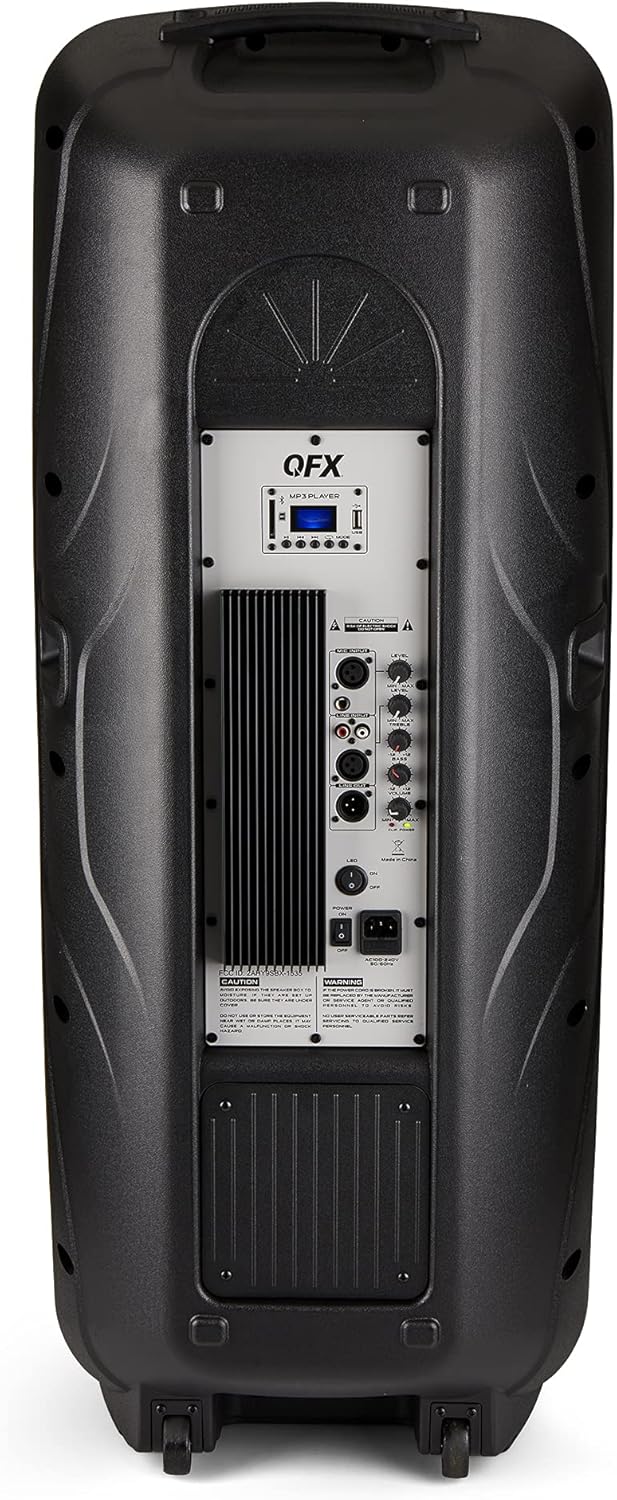
Figure 4.2: Rear panel with controls and ports.
- Stikalo za vklop: Vklopi/izklopi zvočnik.
- AC vhod: Connects the AC power cable.
- USB/SD Card Ports: Za predvajanje zvoka filez USB-ključkov ali SD-kartic.
- Zaslon: Prikazuje trenutni način in informacije o sledi.
- Gumb za način: Switches between input modes (Bluetooth, FM, USB, SD, RCA).
- Gumb za predvajanje/pavzo: Controls playback for USB/SD/Bluetooth.
- Gumbi za prejšnjo/naslednjo skladbo: Navigacija po skladbah ali FM postajah.
- Glavni gumb za glasnost: Prilagodi celotno glasnost.
- Bass/Treble Control Knobs: Adjusts low and high frequencies.
- XLR mikrofonski vhod: Connects a wired microphone.
- Gumbi za glasnost/odmev mikrofona: Adjusts microphone volume and echo effect.
- RCA Input (L/R): Connects external audio devices via RCA cables.
- XLR Line Input/Output: For connecting to other audio equipment.
5. Nastavitev
Začetna namestitev
Place the speaker on a stable, flat surface. For optimal sound, position it in a central location within the listening area. The integrated wheels and handle allow for easy transport.

Figure 5.1: Speaker being moved with handle and wheels.
Napajalni priključek
- Prepričajte se, da je stikalo za vklop zvočnika v položaju IZKLOP.
- Connect the AC power cable to the AC input on the rear panel of the speaker.
- Plug the other end of the AC power cable into a standard wall outlet.
- Flip the power switch to the ON position. The display screen will illuminate.
6. Navodila za uporabo
Bluetooth združitev
- Turn on the QFX E-B3 speaker.
- Pritisnite NAČIN button on the speaker or remote control until "BLUE" appears on the display screen, indicating Bluetooth mode.
- Omogočite Bluetooth na svoji mobilni napravi (pametnem telefonu, tablici itd.).
- Iskanje available Bluetooth devices and select "QFX E-B3" from the list.
- Ko je zvočnik seznanjen, bo oddal potrditveni zvok. Zdaj lahko prek zvočnika predvajate zvok iz naprave.
True Wireless System (TWS) Pairing
TWS allows two QFX E-B3 speakers to connect wirelessly for a stereo sound experience. This feature works only in Bluetooth mode.
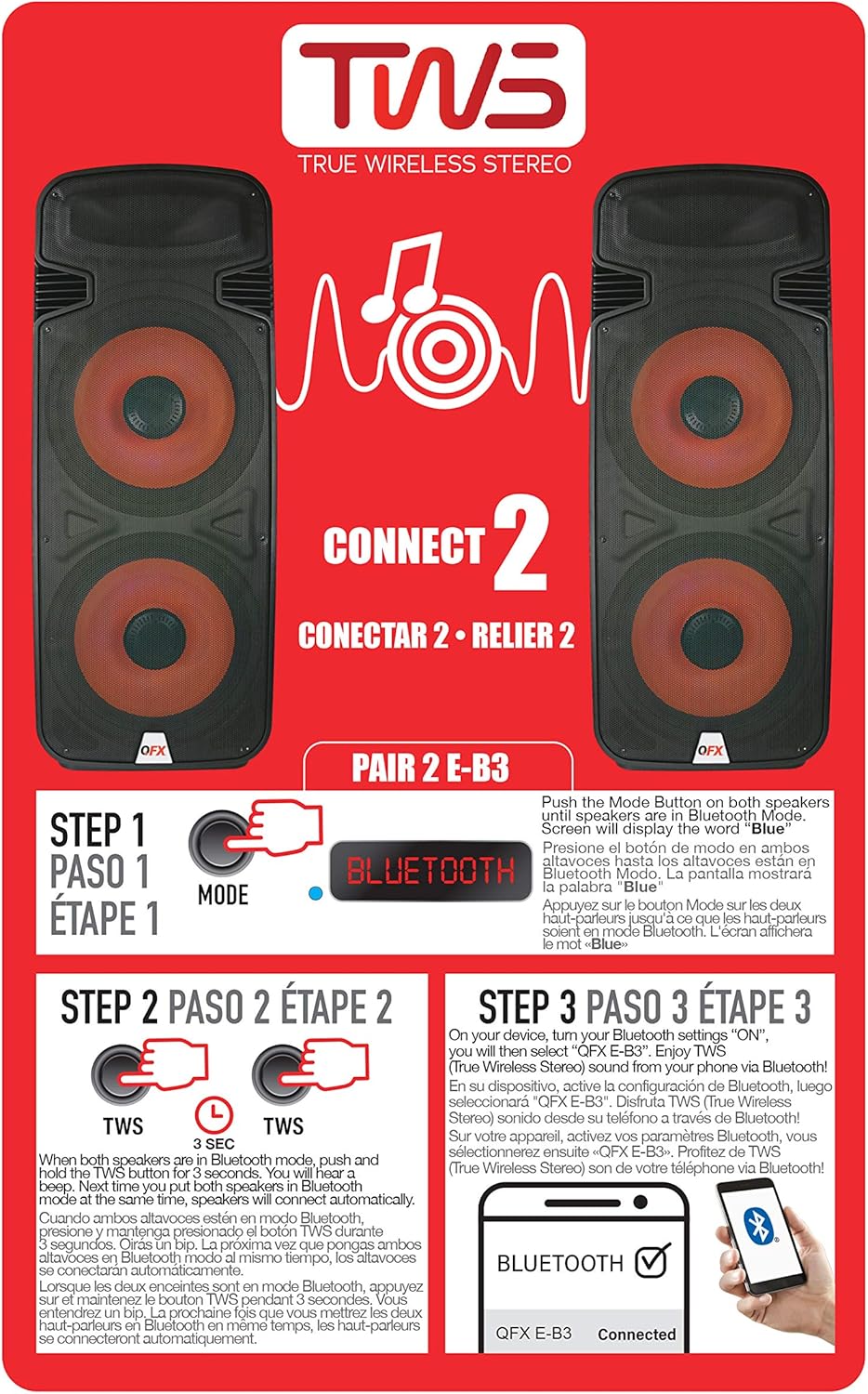
Figure 6.1: TWS Pairing Instructions.
- Ensure both QFX E-B3 speakers are powered on and in Bluetooth mode. The display on both speakers should show "BLUE".
- Na enem od zvočnikov (to bo vaš glavni zvočnik) pritisnite in držite TWS button for approximately 3 seconds. The speakers will attempt to connect to each other.
- Once successfully paired, you will hear a confirmation sound, and the display on the primary speaker will show "BLUE" while the secondary speaker will show "BLUE" as well.
- On your Bluetooth-enabled device, search for and select "QFX E-B3". The two speakers will now play audio in stereo.
Delovanje radia FM
- Pritisnite NAČIN button to switch to FM radio mode. The display will show the FM frequency.
- Pritisnite in držite Predvajaj/Premor button to initiate an automatic scan for FM stations. The speaker will save all found stations.
- Uporabite Prejšnja/naslednja skladba buttons to navigate through the saved FM stations.
Predvajanje s kartice USB/SD
- Vstavite USB-ključek ali SD-kartico (z združljivim zvočnim files) v ustrezno odprtino na zadnji plošči.
- Zvočnik bo samodejno preklopil v način USB/SD in začel predvajati zvok files. Če ne, pritisnite NAČIN button to select USB or SD mode.
- Uporabite Predvajaj/Premor in Prejšnja/naslednja skladba gumbi za nadzor predvajanja.
Vhod za mikrofon
- Connect a microphone to the XLR Microphone Input on the rear panel.
- Adjust the Microphone Volume and Echo knobs to achieve the desired sound.
Vhod RCA
- Connect an external audio source (e.g., CD player, mixer) to the RCA Input (L/R) ports using appropriate RCA cables.
- Pritisnite NAČIN button to select RCA input mode.
- Adjust the master volume on the speaker and the volume on your external audio source.
LED luči za zabave
The speaker features integrated LED party lights that activate automatically when the speaker is powered on. There are no specific controls for the LED lights mentioned; they are designed to enhance the audio experience.
7. Vzdrževanje
Čiščenje
- Always unplug the speaker before cleaning.
- Za brisanje zunanjih površin zvočnika uporabite mehko, suho krpo.
- Ne uporabljajte abrazivnih čistil, voskov ali topil, saj lahko poškodujejo premaz.
- Prezračevalne odprtine naj bodo čiste od prahu in umazanije.
Shranjevanje
When not in use for extended periods, store the speaker in a cool, dry place, away from direct sunlight and extreme temperatures. Cover the speaker to protect it from dust.
8. Odpravljanje težav
If you encounter issues with your QFX E-B3 speaker, refer to the following common problems and solutions:
| Težava | Možen vzrok | rešitev |
|---|---|---|
| Brez moči | Power cable not connected; Power outlet not active; Speaker power switch off. | Ensure AC cable is securely connected to speaker and outlet. Check if outlet is working. Turn speaker power switch ON. |
| Brez zvoka | Volume too low; Incorrect input mode selected; Audio source not playing. | Increase master volume. Press MODE button to select correct input. Ensure audio source is playing and its volume is up. |
| Bluetooth se ne povezuje | Speaker not in Bluetooth mode; Device Bluetooth off; Speaker already paired to another device; Device too far. | Ensure speaker is in Bluetooth mode ("BLUE" on display). Turn on device Bluetooth. Disconnect from other devices. Move device closer to speaker (within 30 feet). |
| Seznanjanje TWS ni uspelo | Zvočniki niso v načinu Bluetooth; gumb TWS ni bil pritisnjen dovolj dolgo. | Ensure both speakers are in Bluetooth mode. Press and hold the TWS button on one speaker for 3 seconds. |
| Predvajanje USB/SD ne deluje | Napačen način; Nezdružljivo file format; Corrupted USB/SD card. | Press MODE to select USB/SD. Ensure audio files are in a compatible format (e.g., MP3). Try a different USB/SD card. |
9. Specifikacije
| Funkcija | Specifikacija |
|---|---|
| Znamka | QFX |
| Številka modela | E-B3 |
| Največja izhodna moč zvočnika | 250 vatov |
| Tehnologija povezljivosti | USB, Bluetooth |
| Način avdio izhoda | Stereo |
| Vrsta namestitve | Plug Mount, Wheel Mount |
| Vrsta zvočnika | Woofer (Dual 15 Inches) |
| Vrsta krmilnika | Daljinski upravljalnik |
| barva | Party LED |
| Je vodoodporen | False |
| Nadzorna metoda | Daljinsko |
| Premer nizkotonca | 15 palcev |
| Število avdio kanalov | 2.0 |
| Brezžična tehnologija | Bluetooth |
| Protokol povezljivosti | Bluetooth |
| Vir napajanja | Električni na kabel |
| Vrsta zvočnega gonilnika | Dinamični gonilnik |
| Velikost zvočnega gonilnika | 15 palcev |
| Mere predmeta (D x Š x V) | 16.77"D x 13.98"Š x 23.74"V |
| Teža predmeta | 13.2 funta |
| Združljive naprave | Prenosnik, MP3 predvajalnik, pametni telefon, tablica, televizor |
| UPC | 606540039618 |
10. Informacije o garanciji
This product is covered by a limited warranty. For specific details regarding warranty coverage and terms, please refer to the warranty information provided at the point of purchase or contact QFX customer support directly. The warranty is typically per contract with the retailer.
11. Podpora
For technical assistance, troubleshooting beyond this manual, or inquiries about your QFX E-B3 speaker, please contact QFX customer support or your retailer. Contact information can usually be found on the manufacturer's webspletnem mestu ali na računu.