
Uvod
The Sharkoon Skiller SGK30 is a mechanical gaming keyboard designed for performance and durability. It features customizable RGB lighting, N-Key rollover, and a 1000Hz polling rate for responsive gameplay and typing. This manual provides essential information for setting up, operating, and maintaining your keyboard.

Image: Sharkoon Skiller SGK30 Mechanical Gaming Keyboard banner displaying the product name and type.
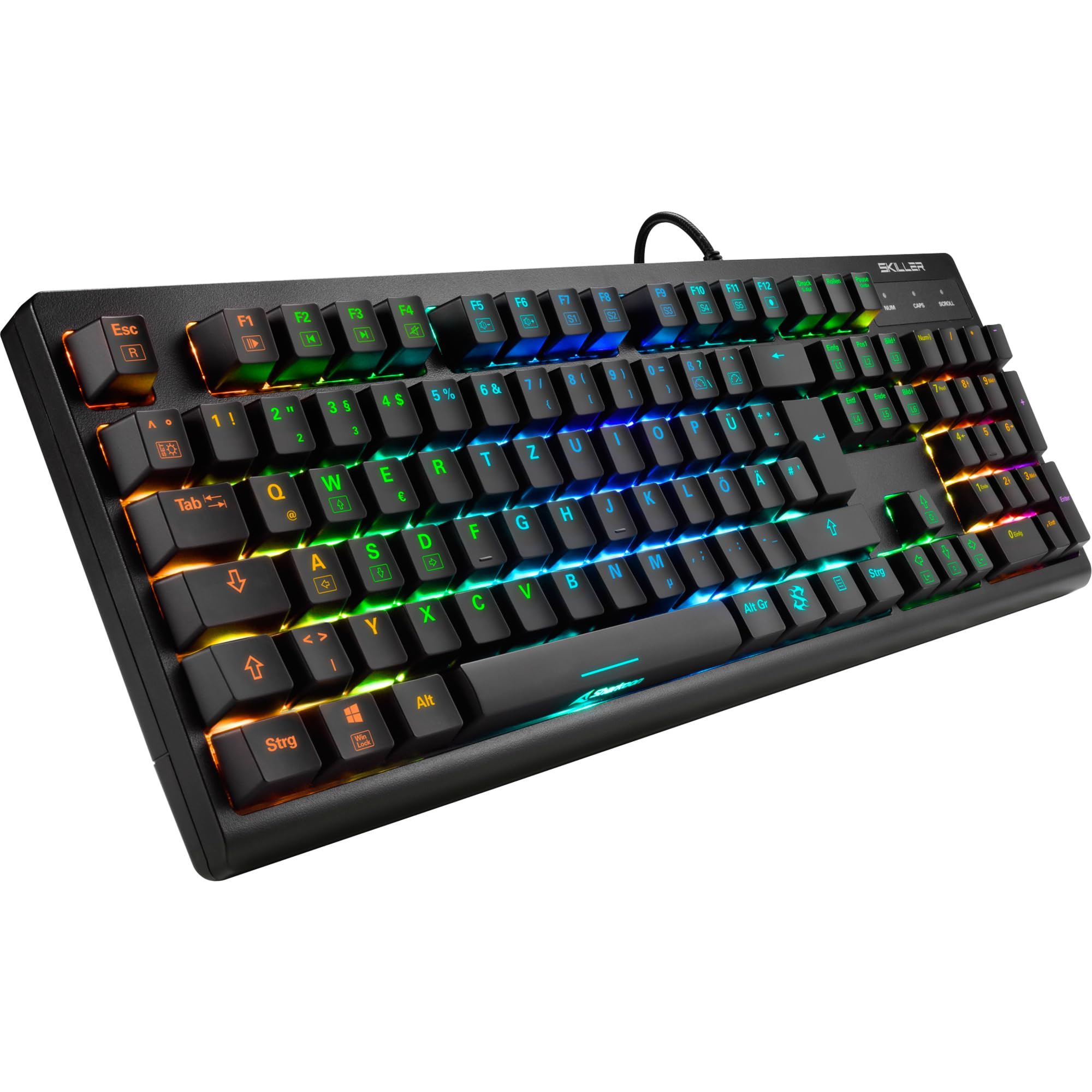
Slika: Pogled od zgoraj navzdol view of the Sharkoon Skiller SGK30 mechanical gaming keyboard, showcasins polno postavitvijo in živahno RGB osvetlitvijo ozadja.
Konec izdelkaview Video
Video: Uradni izdelek je končanview of the Sharkoon Skiller SGK30 Mechanical Gaming Keyboard, demonstrating its features, RGB lighting effects, and mechanical switches.
Nastavitev
Follow these steps to set up your Sharkoon Skiller SGK30 keyboard:
- Razpakirajte tipkovnico: Previdno vzemite tipkovnico in priloženi kabel USB iz embalaže.
- Povežite se z računalnikom: Plug the Micro USB end of the cable into the keyboard's port and the standard USB-A end into an available USB port on your computer.
- Namestitev gonilnika: The keyboard is plug-and-play. Your operating system (Windows 10 or later recommended) should automatically detect and install the necessary drivers.
- Namestitev programske opreme (neobvezno): For advanced customization of RGB lighting and key assignments, download the official Sharkoon software from the manufacturer's webmesto.

Image: The Sharkoon Skiller SGK30 keyboard positioned on a desk, ready for connection.
Navodila za uporabo
Osnovne ključne funkcije
The Sharkoon Skiller SGK30 features a standard layout with additional function keys accessible via the FN ključ.
- FN + F1–F12: Access multimedia controls (e.g., play/pause, volume up/down, mute).
- FN + tipka Windows: Lock/unlock the Windows key to prevent accidental presses during gaming.
- N-Key Rollover: All keys are registered simultaneously, ensuring every keystroke is detected, even during rapid input.
Nadzor osvetlitve RGB
The keyboard offers extensive RGB lighting customization. Use the following combinations to adjust lighting effects:
- FN + Insert/Home/Page Up/Delete/End/Page Down: Preklapljajte med različnimi vnaprej programiranimi svetlobnimi učinki.
- FN + Arrow Keys (Up/Down): Adjust brightness levels of the lighting.
- FN + Arrow Keys (Left/Right): Prilagodite hitrost dinamičnih svetlobnih učinkov.
- Custom Illumination: Use the dedicated software for advanced per-key lighting customization.

Slika: Bližnji posnetek view of the keyboard keys highlighting the adjustable RGB illumination capabilities.
Prilagajanje programske opreme
For advanced settings, macro programming, and detailed RGB customization, download and install the Sharkoon Skiller SGK30 software from the official Sharkoon webspletno mesto. Programska oprema vam omogoča:
- Ustvarite in shranite profesionalnega svetilnika po merifiles.
- Program macros for specific keys.
- Remap key functions.

Image: A screenshot showing the graphical user interface of the Sharkoon Skiller SGK30 customization software, illustrating various options for lighting and key remapping.
Vzdrževanje
Pravilno vzdrževanje zagotavlja dolgo življenjsko dobo in delovanje vaše tipkovnice:
- Čiščenje: Use a soft, dry cloth to wipe the surface of the keyboard. For deeper cleaning, use compressed air to remove dust and debris from between the keycaps.
- Odstranitev tipkovnice: If necessary, keycaps can be carefully removed using a keycap puller (not included) for thorough cleaning of the switches. Reinstall keycaps by pressing them firmly onto the switch stems.
- Izogibajte se tekočinam: Tipkovnice ne izpostavljajte tekočinam. V primeru razlitja jo takoj odklopite in pustite, da se popolnoma posuši, preden jo ponovno priključite.
- Shranjevanje: Tipkovnico shranjujte na hladnem in suhem mestu, stran od neposredne sončne svetlobe in ekstremnih temperatur.

Slika: Bližnji posnetek view of the mechanical switches on the Sharkoon Skiller SGK30 keyboard, illustrating their design for durability and ease of maintenance. Note: This model is available with Red switches, while the image shows Blue switches.
Odpravljanje težav
If you encounter issues with your Sharkoon Skiller SGK30 keyboard, refer to the following common solutions:
| Težava | Možen vzrok | rešitev |
|---|---|---|
| Tipkovnica se ne odziva | Ohlapna povezava USB, okvarjena vrata USB, težava z gonilnikom. |
|
| RGB osvetlitev ne deluje ali je nepravilna | Lighting settings incorrect, software conflict. |
|
| Ključi se ne registrirajo | Prah/ostanki pod tipkovnico, okvarjeno stikalo. |
|
Specifikacije
| Funkcija | Podrobnost |
|---|---|
| Znamka | Sharkoon |
| Številka modela | 4044951030026 |
| Vrsta tipkovnice | Mehanska igralna tipkovnica |
| Tip stikala | Red Switch (Blue switches are also available for this model series) |
| Povezljivost | mikro USB |
| Polling Rate | 1000Hz |
| N-Key Rollover | Podprto |
| RGB osvetlitev | Prilagodljiv RGB |
| Operacijski sistem | Windows 10 (and compatible with other Windows versions) |
| Dimenzije (DxŠxV) | 44 x 14.4 x 3.5 cm |
| Teža | 867 g |
Kaj je v škatli
The Sharkoon Skiller SGK30 package includes:
- Sharkoon Skiller SGK30 Mechanical Gaming Keyboard
- USB kabel
Garancija in podpora
Za informacije o garanciji in tehnično podporo se obrnite na uradno spletno stran Sharkoon. webali se obrnite na lokalnega prodajalca. Shranite dokazilo o nakupu za uveljavljanje garancije.
Opomba: Specifikacije in lastnosti izdelka se lahko spremenijo brez predhodnega obvestila.