
Goshyda KX-T6001CID
Goshyda KX-T6001CID Big Button Corded Telephone User Manual
Model: KX-T6001CID | Brand: Goshyda
Uvod
Thank you for choosing the Goshyda KX-T6001CID Big Button Corded Telephone. This manual provides detailed instructions to help you set up, operate, and maintain your new telephone. Please read this manual thoroughly before use to ensure proper functionality and to take full advantage njegovih značilnosti.
Varnostne informacije
- Telefona ne izpostavljajte vodi ali vlagi.
- Avoid placing the telephone in direct sunlight or near heat sources.
- Use only the provided telephone line cord.
- Ne poskušajte sami odpirati ali popravljati telefona. Vsa servisna dela prepustite usposobljenemu osebju.
- Hraniti izven dosega otrok.
Vsebina paketa
Preverite, ali so v paketu prisotni vsi elementi:
- 1 x slušalka
- 1 x Telephone Base Unit
- 1 x Handset Cord
- 1 x telefonski kabel
- 1 x uporabniški priročnik

Image: The Goshyda KX-T6001CID telephone, showing the base unit, handset, and coiled cord.
Konec izdelkaview
Familiarize yourself with the main components and controls of your telephone.

Slika: spredaj view of the telephone, highlighting the LCD display, large numeric keypad, and function buttons.
Keypad and Display:
- Številska tipkovnica (0–9, *, #): For dialing phone numbers.
- LCD zaslon: Shows caller ID, time, date, and menu options.
- Gumbi M1/M2: One-touch memory dialing keys.
- SET/STORE Button: Used for entering settings menu and saving entries.
- Gumba GOR/DOL: Navigate through menu options or adjust volume.
- RING Button: Adjust ringer volume.
- Gumb VOL: Adjust earpiece/speaker volume.
- FL/BRT (Flash/Brightness) Button: Flash function for call waiting, also adjusts LCD brightness.
- REDIAL Button: Redials the last dialed number.
- H.F (Hands-Free) Button: Activates speakerphone mode.

Slika: Bližnji posnetek view of the large, easy-to-read buttons on the telephone's keypad.
Nastavitev
1. Connecting the Telephone:
- En konec zvitega kabla slušalke priključite na slušalko, drugega pa na vtičnico za slušalko na levi strani telefonske bazne enote.
- Connect one end of the telephone line cord to the LINE jack on the back of the telephone base unit.
- Drugi konec telefonskega kabla priključite v stensko telefonsko vtičnico.
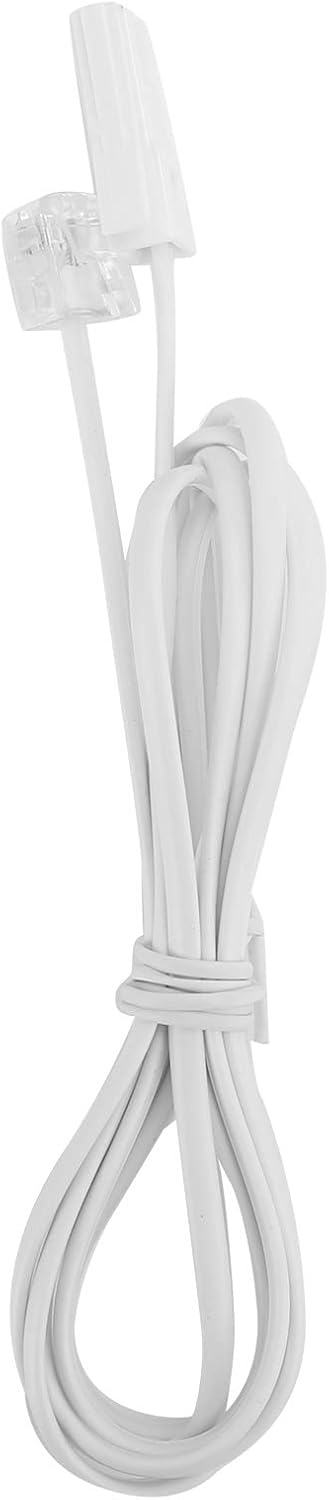
Image: The telephone line cord, used to connect the phone to the wall jack.
2. Začetne nastavitve:
Upon initial connection, the LCD display may prompt you to set the date and time. Follow the on-screen instructions using the UP in DOL gumbi za prilagajanje vrednosti in NASTAVITE/SHRANITE gumb za potrditev.
Navodila za uporabo
Klicanje:
- Dvignite slušalko ali pritisnite HF gumb za zvočnik.
- Z številsko tipkovnico pokličite želeno telefonsko številko.
- Počakajte, da se klic poveže.
- Za končanje klica odložite slušalko ali pritisnite HF gumb znova.
Sprejem klica:
Ko telefon zazvoni, dvignite slušalko ali pritisnite HF gumb za odgovor.
Ponovno klicanje:
Dvignite slušalko ali pritisnite HF, nato pritisnite PONOVNI POKUS gumb za klic zadnje klicane številke.
Using Memory Keys (M1/M2):
Shranjevanje številke:
- Dvignite slušalko ali pritisnite HF.
- Pritisnite NASTAVITE/SHRANITE.
- Dial the phone number you wish to store.
- Pritisnite NASTAVITE/SHRANITE znova.
- Pritisnite bodisi M1 or M2 to save the number to that memory key.
Dialing from Memory:
Dvignite slušalko ali pritisnite HF, then press either M1 or M2 to dial the stored number.
Lastnosti
- DTMF/FSK Dual System Caller ID: Supports both DTMF and FSK caller ID systems for displaying incoming call information.

Image: The telephone's display, showing its capability for DTMF/FSK dual system caller ID function.
- FLASH Time Adjustment: Adjustable FLASH time (90/95/100/120/180/300/600/1000ms) for compatibility with various PBX systems or call waiting services.
- 16 Ringtone Options: Choose from 16 different ringtones.

Image: The telephone with graphic elements suggesting a choice of 16 ringtones.
- Adjustable LCD Brightness: Five levels of LCD screen brightness adjustment for optimal viewing.
- 3 Alarm Clock Functions: Set up to 3 different alarm clocks, each with unique alarm sounds.
- 10 Groups of Dual Key Memory: Store up to 10 frequently called numbers using dual-key memory functions.
- 1-99 Hours Do Not Disturb Function: Set a "Do Not Disturb" period from 1 to 99 hours.
Vzdrževanje
- Telefon očistite z mehko krpoamp krpo. Ne uporabljajte abrazivnih čistil ali topil.
- Keep the telephone away from dust and extreme temperatures.
- Pazite, da kabli niso zapleteni ali stisnjeni, da preprečite poškodbe.
Odpravljanje težav
| Težava | Možen vzrok | rešitev |
|---|---|---|
| Ni znaka centrale | Telefonski kabel je odklopljen ali pokvarjen. | Check all cable connections. Try a different telephone line cord. Test the wall jack with another phone. |
| Ne morem klicati ali sprejemati klicev | Line issue, or phone is in "Do Not Disturb" mode. | Verify phone line service. Check if "Do Not Disturb" is active and disable it. |
| ID klicatelja ni prikazan | Caller ID service not subscribed or incompatible system. | Contact your telephone service provider to ensure Caller ID service is active. |
| Zaslon je zatemnjen ali prazen | LCD brightness setting is too low. | Adjust the LCD brightness using the FL/BRT button or menu settings. |
Specifikacije
| Funkcija | Podrobnost |
|---|---|
| Model | KX-T6001CID |
| Znamka | Gošida |
| Material | Akrilonitril butadien stiren (ABS) |
| barva | Bela |
| Vrsta | Vrvični telefon |
| Vrsta klicalnika | Enojna tipkovnica |
| ID klicatelja | Yes (DTMF/FSK Dual System) |
| Čas bliskavice | 90/95/100/120/180/300/600/1000ms |
| Melodije zvonjenja | 16 možnosti |
| LCD Svetlost | 5 stopenj nastavljivih |
| Funkcije alarma | 3 skupini |
| Funkcija pomnilnika | 10 groups of dual key memory |
| Ne moti | 1-99 ur |
| Teža predmeta | 481 gramov |
| Dimenzije (D x Š x V) | 10 x 10 x 10 milimetrov (približno) |
| Vir napajanja | Battery Powered (likely referring to LCD/memory backup, as corded phones are line-powered for basic functions) |
Garancija in podpora
This Goshyda product is covered by a standard manufacturer's warranty. For specific warranty details, please refer to the documentation included with your purchase or contact Goshyda customer support.
For technical assistance or further inquiries, please contact Goshyda customer service through their official webspletnega mesta ali kontaktnih podatkov, ki so navedeni z vašim izdelkom.
Ask a question about this manual
Ask about setup, troubleshooting, compatibility, parts, safety, or missing instructions. Manuals+ will review the question and use this page’s manual context to help answer it.