
1. Izdelek je končanview
The KAIDI KD-763 is a wired gaming headset designed for use with the PlayStation 4 (PS4) console and other compatible devices with a 3.5mm audio jack. It features over-ear cups for immersive sound, a rotary microphone for clear communication, and an inline volume control for convenient audio adjustments. The headset also includes an LED lighting effect, typically powered via a USB connection.
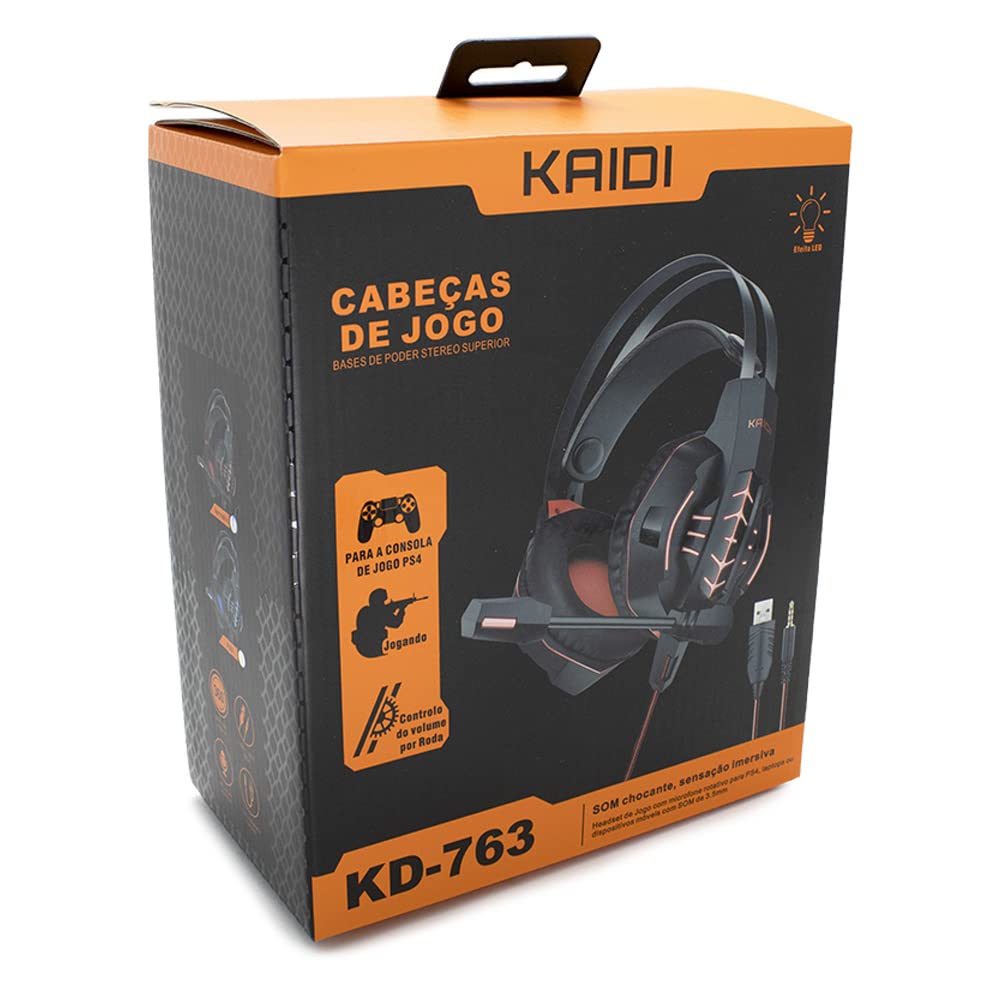
Slika 1.1: The KAIDI KD-763 PS4 Gaming Headset packaging, showing the headset, its features, and compatibility with PS4.
2. Varnostne informacije
- Izogibajte se dolgotrajnemu poslušanju pri visoki glasnosti, da preprečite poškodbe sluha.
- Slušalk ne izpostavljajte ekstremnim temperaturam, vlagi ali neposredni sončni svetlobi.
- Slušalke hranite stran od vode in drugih tekočin.
- Slušalk ne poskušajte razstavljati ali spreminjati. To lahko razveljavi garancijo in povzroči škodo.
- Slušalke čistite samo z mehko, suho krpo.
- Hraniti izven dosega otrok.
3. Vsebina paketa
Po odprtju preverite vsebino paketa. Če kateri koli predmet manjka ali je poškodovan, se obrnite na prodajalca.
- KAIDI KD-763 Gaming Headset
- Uporabniški priročnik (ta dokument)
4. Navodila za namestitev
- Connect to PS4 Controller: Locate the 3.5mm audio jack on your PS4 controller. Insert the 3.5mm connector from the KD-763 headset firmly into this port.
- Powering LED Lights (Optional): If your headset features LED lighting, connect the USB connector from the headset to an available USB port on your PS4 console or a compatible USB power adapter. The LED lights will illuminate once connected.
- Prilagoditev slušalk: Extend or retract the headband to ensure the earcups sit comfortably and securely over your ears. The over-ear design should fully enclose your ears for optimal sound isolation.
- Položaj mikrofona: Adjust the flexible rotary microphone boom to a position near your mouth for clear voice pickup. Ensure it is not obstructing your vision.
- Configure PS4 Audio Settings:
- Pojdi na nastavitve > Naprave > Avdio naprave on your PS4.
- Set Vhodna naprava to "Headset (Controller)".
- Set Izhodna naprava to "Headset (Controller)".
- Set Izhod za slušalke to "All Audio" for full game and chat sound.
- Prilagodi Nadzor glasnosti (slušalke) na udobno raven.
5. Navodila za uporabo
5.1. Nadzor glasnosti
The KD-763 headset features an inline volume control wheel located on the cable. Rotate the wheel upwards to increase the volume and downwards to decrease it. Adjust to a comfortable listening level.
5.2. Uporaba mikrofona
The microphone is designed to capture your voice clearly. Ensure it is positioned correctly near your mouth. If your PS4 audio settings are configured correctly, your voice will be transmitted to other players in online games or chat parties.
To mute the microphone, check if there is a physical mute switch on the inline control. If not, you can mute the microphone through your PS4's quick menu (hold the PS button on your controller).
6. Vzdrževanje
- Čiščenje: Use a soft, dry, lint-free cloth to wipe the earcups and headband. Do not use liquid cleaners or abrasive materials.
- Shranjevanje: When not in use, store the headset in a clean, dry place, away from direct sunlight and extreme temperatures. Avoid tangling the cable.
- Skrb za kabel: Do not pull on the cable to disconnect the headset. Always grasp the plug. Avoid bending or twisting the cable excessively.
7. Odpravljanje težav
- Ni zvoka ali nizka glasnost:
- Ensure the 3.5mm jack is fully inserted into the PS4 controller.
- Check the inline volume control wheel on the headset cable and turn it up.
- Verify PS4 audio settings (nastavitve > Naprave > Avdio naprave) are correctly configured for the headset.
- Test the headset with another device (e.g., smartphone) to rule out a headset issue.
- Mikrofon ne deluje:
- Prepričajte se, da je nosilec mikrofona pravilno nameščen.
- Check PS4 audio settings (nastavitve > Naprave > Avdio naprave) to ensure Vhodna naprava is set to "Headset (Controller)".
- Confirm the microphone is not muted via an inline switch or the PS4 quick menu.
- Če je mogoče, preizkusite mikrofon z drugo aplikacijo ali napravo.
- LED luči ne delujejo:
- Ensure the USB connector is firmly plugged into a powered USB port.
- Poskusite druga vrata USB.
8. Specifikacije
| Znamka: | KAIDI |
| Model: | KD-763 |
| Vrsta slušalk: | Over-ear (Circumaurais) |
| Impedanca: | 32 Ohmov |
| Občutljivost: | 110 dB |
| Povezljivost: | Wired (3.5mm audio jack + USB for LED) |
| Združljive naprave: | Gaming Consoles (e.g., PS4), devices with 3.5mm audio jack |
| Posebna uporaba: | Igranje |
| Vrsta nadzora: | Inline Volume Control Wheel |
| Mikrofon: | Rotary/Swivel |
| LED učinek: | Yes (USB powered) |
9. Garancija in podpora
KAIDI products are designed and manufactured to the highest quality standards. For information regarding warranty coverage, terms, and conditions, please refer to the warranty card included with your purchase or visit the official KAIDI webmesto.
For technical support, troubleshooting assistance, or to inquire about replacement parts, please contact KAIDI customer service through their official channels. Contact information can typically be found on the product packaging or the official KAIDI webmesto.