
1. Uvod
Hvala za nakupasing the Boytone BT-120MX 12 Channel Bluetooth Studio Audio Mixer. This professional audio mixer is designed for a variety of applications, including studio recording, live performances, and DJ setups. It features 12 channels, Bluetooth connectivity, a USB MP3 player, PC recording capabilities, 48V phantom power, and a 24-bit digital effect processor. This manual provides detailed instructions for setup, operation, and maintenance to ensure optimal performance and longevity of your device.
2. Varnostne informacije
- Napajanje: Uporabljajte samo navedeni napajalnik. Prepričajte se, da je glasnosttage ustreza vašemu lokalnemu napajalniku.
- Voda in vlaga: Do not expose the mixer to water, rain, or excessive moisture. Avoid placing liquid-filled objects on the unit.
- Prezračevanje: Zagotovite zadostno prezračevanje okoli enote. Ne blokirajte prezračevalnih odprtin.
- Viri toplote: Keep the mixer away from heat sources such as radiators, heat registers, stoves, or other heat-producing appliances.
- Čiščenje: Pred čiščenjem izklopite napajanje. Uporabite suho, mehko krpo. Ne uporabljajte tekočih čistil ali aerosolov.
- Servisiranje: Tega izdelka ne poskušajte servisirati sami. Vsa servisna dela prepustite usposobljenemu servisnemu osebju.
- Fantomska moč: When using 48V phantom power, ensure condenser microphones are connected before activating to prevent damage.
3. Vsebina paketa
Preverite, ali so v paketu prisotni vsi elementi:
- Boytone BT-120MX Audio Mixer
- Napajalni adapter
- USB kabel
- Uporabniški priročnik (ta dokument)
4. Izdelek je končanview
The Boytone BT-120MX is a versatile 12-channel mixer designed for comprehensive audio control. It features a robust metal chassis and intuitive controls for various audio sources.

Slika 4.1: Spredaj view of the Boytone BT-120MX Audio Mixer. This image displays the full layout of the mixer's controls and input/output sections.
4.1 Vhodno/izhodne povezave
The mixer offers a wide range of connectivity options for various audio equipment.

Slika 4.2: Podrobno view of the input and output ports on the Boytone BT-120MX. This includes XLR/1/4" combo jacks, RCA inputs, 1/4" mono/stereo inputs, send/return jacks, and main outputs.
- XLR/1/4" Combo Inputs (Channels 1-4): For microphones (XLR) or line-level instruments (1/4").
- 1/4" Line Inputs (Channels 5-12): For line-level instruments or audio devices.
- RCA Inputs (Stereo Pairs): For connecting consumer audio devices.
- Main Outputs (1/4" L/R): Priključite na napajanje ampdvigalniki ali zvočniki z napajanjem.
- Headphone Jack (1/4"): Za spremljanje zvoka.
- Vrata USB: For PC recording/playback and USB MP3 player functionality.
4.2 Funkcije nadzorne plošče
The mixer's control panel provides comprehensive adjustments for each channel and master output.

Figure 4.3: Close-up of the Bluetooth and USB section of the Boytone BT-120MX. This highlights the USB port for media playback and PC connection, and the Bluetooth indicator.
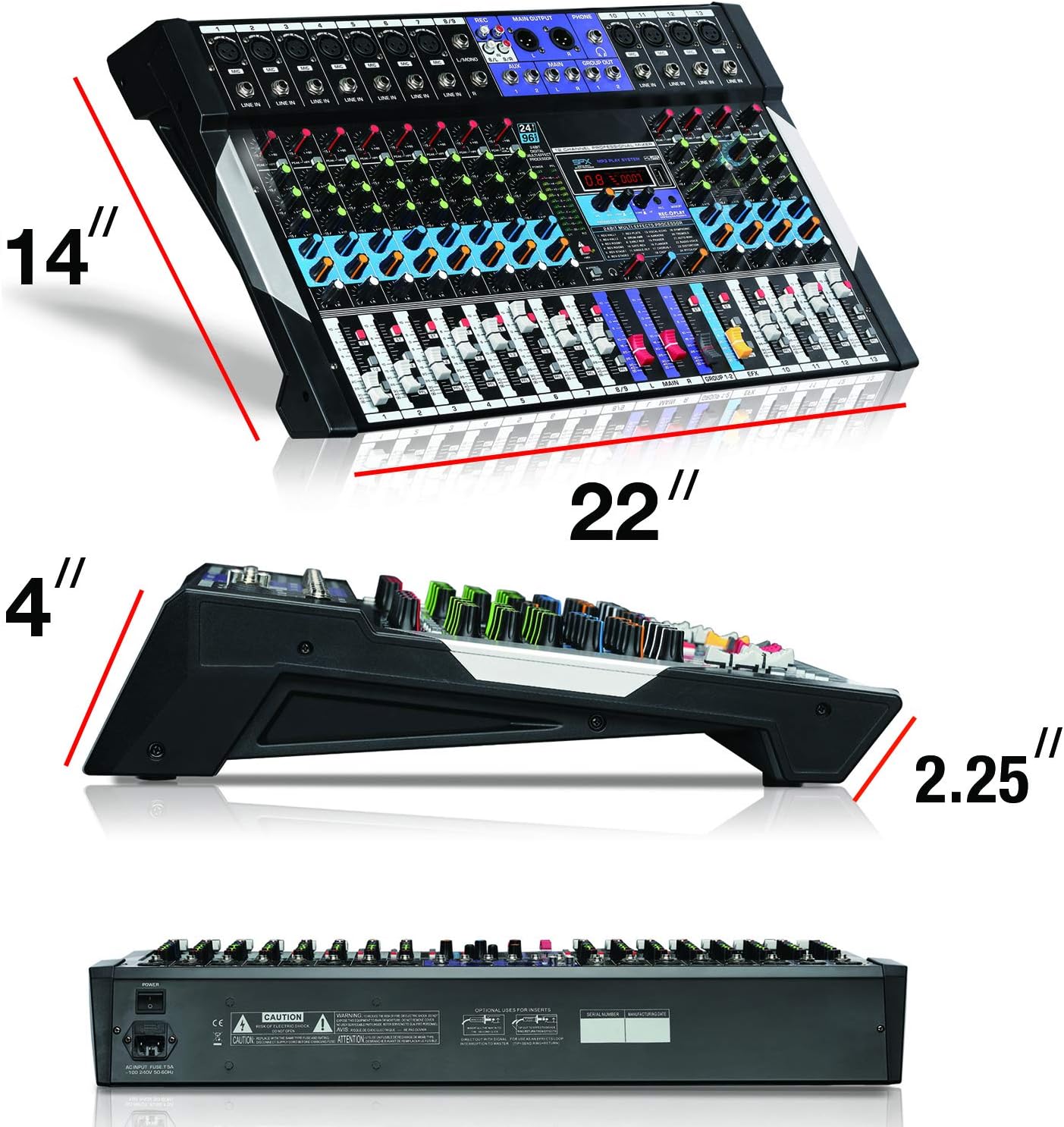
Figure 4.4: Close-up of the 24-bit digital multi-effect processor section. This shows the display, parameter controls, and effect selection options.
- Gain Control: Prilagodi vhodno občutljivost za vsak kanal.
- High, Mid, Low EQ: Three-band equalizer for tone shaping on each channel.
- AUX Send: Controls the level of the channel signal sent to the AUX output for external effects or monitoring.
- Pan Control: Prilagodi stereo položaj signala kanala.
- Faders za kanale: Controls the volume level of individual channels.
- Glavni miks faderji: Nadzoruje celotno izhodno glasnost.
- +48V fantomsko stikalo za napajanje: Aktivira fantomsko napajanje za kondenzatorske mikrofone.
- 24BIT Digital Multi Effect Processor: Provides various digital effects (e.g., reverb, delay) with parameter adjustments.
- USB/MP3 Player Controls: Playback, pause, skip, and mode selection for USB media.
- Indikator Bluetooth: Prikazuje stanje povezave Bluetooth.
5. Navodila za namestitev
Follow these steps to set up your Boytone BT-120MX mixer.
5.1 Napajalni priključek
- Prepričajte se, da je stikalo za vklop mešalnika v položaju IZKLOP.
- Connect the power adapter to the mixer's power input.
- Priključite napajalnik v ustrezno električno vtičnico.
5.2 Priklop avdio virov
- Mikrofoni: Connect XLR microphones to the XLR inputs (Channels 1-4). If using condenser microphones, ensure the +48V phantom power is OFF before connecting, then activate it after connection.
- Instruments/Line Devices: Connect instruments (e.g., keyboards, guitars with preamps) or other line-level devices to the 1/4" line inputs or RCA inputs.
- Naprava USB: Vstavite bliskovni pogon USB z MP3 files v vrata USB za predvajanje.
5.3 Priklop izhodnih naprav
- Zvočniki/Amplifirji: Connect the mixer's MAIN OUT (1/4" L/R) to your power amplifier ali močni zvočniki.
- Slušalke: Connect headphones to the 1/4" HEADPHONE jack for monitoring.
5.4 PC Connection for Recording/Playback
- Mešalnik priključite na računalnik s kablom USB.
- Your computer should recognize the mixer as an audio device. Select it as the input/output device in your audio software settings.
6. Navodila za uporabo
6.1 Osnovno mešanje
- Turn on the mixer and all connected audio devices.
- Set all channel faders and the main mix faders to their lowest position.
- For each active channel, gradually increase the GAIN control until the PEAK LED flashes only occasionally.
- Adjust the HIGH, MID, and LOW EQ controls to shape the tone of each input.
- Slowly raise the channel fader for each input to the desired level.
- Adjust the MAIN MIX faders to control the overall output volume.
- Use the PAN control to position the sound within the stereo field.
6.2 Povezljivost Bluetooth
- Press the MODE button on the USB/MP3 player section until 'BT' or 'Bluetooth' is displayed.
- On your Bluetooth-enabled device (smartphone, tablet, etc.), search for available devices.
- Select 'Boytone Mixer' or a similar name from the list to pair.
- Once paired, audio from your device will stream wirelessly to the mixer. Adjust the USB/MP3 channel fader for volume control.
6.3 Predvajanje MP3-jev prek USB-ja
- Vstavite USB-ključ z zvočno datoteko MP3 files v vrata USB.
- The mixer will automatically switch to USB mode or you may need to press the MODE button.
- Use the PLAY/PAUSE, PREVIOUS, and NEXT buttons to control playback.
- Adjust the USB/MP3 channel fader for volume control.
6.4 PC Recording
- Connect the mixer to your PC via USB.
- Open your preferred Digital Audio Workstation (DAW) software (e.g., Audacity, GarageBand, Ableton Live).
- In your DAW's audio settings, select the Boytone mixer as the input device.
- Arm a track for recording and begin recording. The main mix output of the mixer will be sent to your PC.
6.5 procesor digitalnih učinkov
- Use the PROGRAM knob to select from the available 24 digital effects (e.g., Reverb, Delay, Chorus). The selected effect number will be displayed.
- Adjust the PARAMETER knob to fine-tune the selected effect (e.g., decay time for reverb, delay time for echo).
- Use the EFX SEND controls on each channel to send a portion of that channel's signal to the effects processor.
- Adjust the EFX RETURN fader to control the overall volume of the applied effect in the main mix.
6.6 +48V Phantom Power
The +48V phantom power supplies voltage to condenser microphones. Ensure dynamic microphones are not connected when phantom power is active, as this may cause damage.
- Connect your condenser microphone(s) to the XLR inputs.
- Locate the +48V PHANTOM POWER switch and activate it. The indicator LED will illuminate.
- Deactivate phantom power before disconnecting condenser microphones.
7. Vzdrževanje
- Čiščenje: Regularly wipe the mixer's surface with a soft, dry cloth. Avoid abrasive cleaners or solvents.
- Shranjevanje: When not in use, store the mixer in a cool, dry place, away from direct sunlight and extreme temperatures.
- Upravljanje kablov: Ensure cables are not tangled or stressed, which can lead to damage.
8. Odpravljanje težav
| Težava | Možen vzrok | rešitev |
|---|---|---|
| Ni zvoka | Power off; incorrect connections; faders down; gain too low; output device issues. | Check power, all cable connections, channel faders, main mix faders, and gain controls. Verify external amplifier/speakers are on and working. |
| Popačen zvok | Gain too high; input signal too strong; damaged cables. | Reduce GAIN control. Check input source level. Replace faulty cables. |
| Bluetooth se ne povezuje | Mixer not in Bluetooth mode; device too far; interference; device already paired. | Ensure mixer is in BT mode. Move device closer. Disconnect from other Bluetooth devices. Try re-pairing. |
| MP3-naprava USB se ne predvaja | Nepravilno file format; USB drive not recognized; mixer not in USB mode. | Zagotovite files are MP3 format. Try a different USB drive. Press MODE to select USB. |
| Fantomsko napajanje ne deluje | Switch not activated; faulty microphone/cable. | Ensure +48V switch is ON and indicator is lit. Test with another condenser microphone or XLR cable. |
9. Specifikacije
| Funkcija | Podrobnost |
|---|---|
| Znamka | Boytone |
| Model | BT-120MX |
| Število kanalov | 12 |
| Tehnologija povezljivosti | Bluetooth, USB |
| Vir napajanja | Električni na kabel |
| Frekvenčni odziv | 20 Hz - 20 kHz |
| Vrsta izhodnega priključka | RCA, TRS (1/4") |
| Vrste avdio vhoda | XLR, RCA, 1/4" mono/stereo, USB |
| voltage | 110 V |
| Fantomska moč | +48 V |
| Digitalni učinki | 24-bit Multi Effect Processor |
| Teža predmeta | 18 funta |
| UPC | 643307992601 |
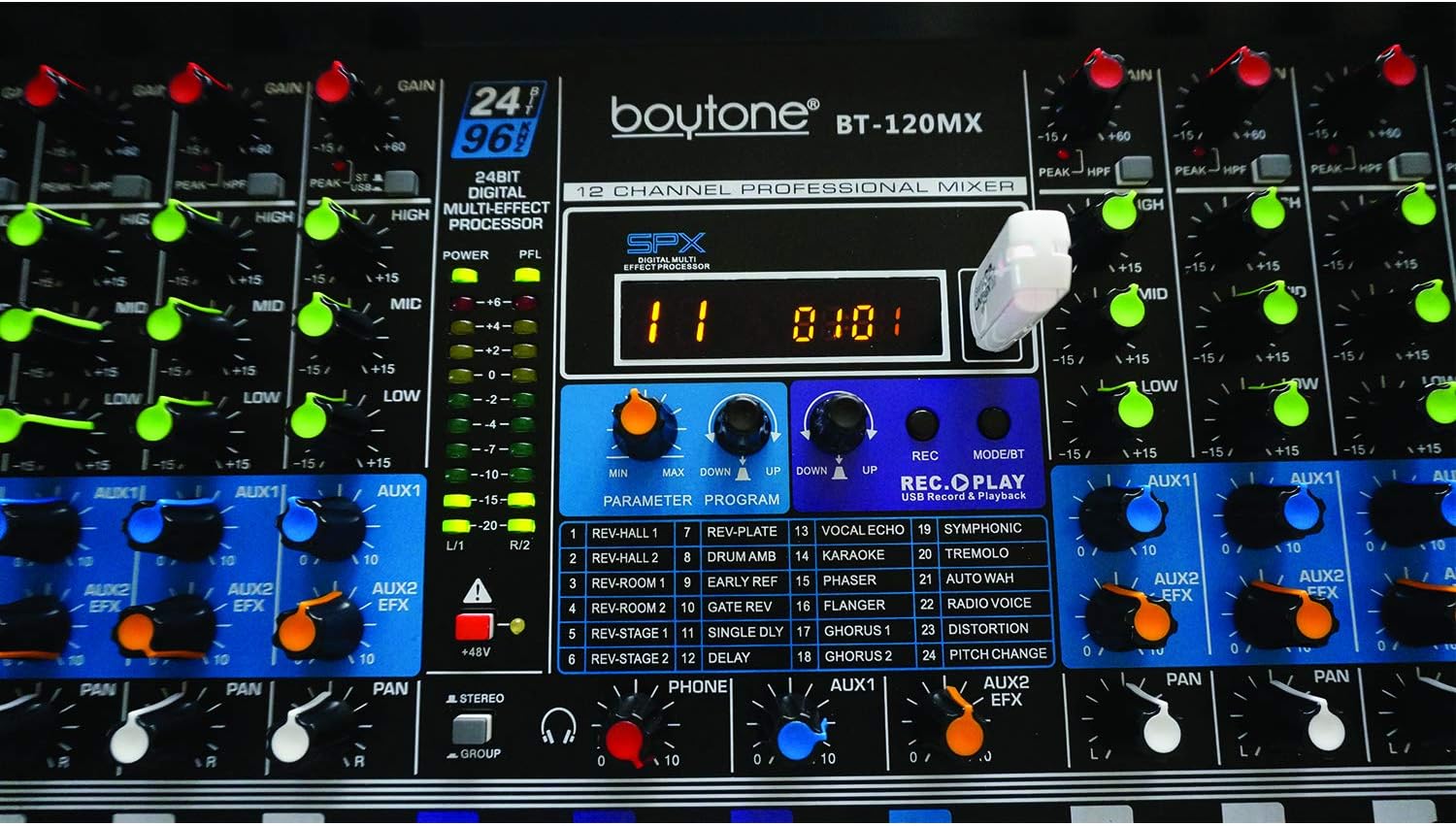
Figure 9.1: Dimensions of the Boytone BT-120MX mixer, showing approximate height, width, and depth.
10. Garancija in podpora
Boytone products are designed for reliability and performance. This product is covered by a limited warranty against defects in materials and workmanship. For specific warranty terms and conditions, please refer to the warranty card included with your product or visit the official Boytone webmesto.
For technical support, troubleshooting assistance, or service inquiries, please contact Boytone customer support through their official website or the contact information provided in your product packaging. Please have your model number (BT-120MX) and purchase information ready when contacting support.