
SNOOZ SNOOZ-G1-Charcoal
SNOOZ Go - Portable White Noise Machine User Manual
Model: SNOOZ-G1-Charcoal
Uvod
The SNOOZ Go is an ultra-portable white noise machine and Bluetooth speaker designed to create an optimal sleep environment wherever you are. It features a rechargeable battery, multiple sound options, and a soft night light, making it ideal for travel, home use, or any situation where you need to mask unwanted noise.
Ključne značilnosti
- Dolga življenjska doba baterije: Up to 20 hours of continuous use on a single charge, perfect for travel, camping in napajanjetages. Recharges via USB-C.
- Dvojna funkcionalnost: Functions as a high-quality Bluetooth speaker for music and podcasts during the day, and a white noise machine at night.
- Six High-Quality Sounds: Choose from white noise, fan sounds, and pink noise to create your ideal sleep environment. Suitable for babies, children, adults, and even pets.
- Ultra-prenosna zasnova: Compact size (9.7 cm) for easy transport in hand luggage, suitcases, or backpacks.
- Zakrivanje hrupa: Effectively masks unwanted noises such as loud neighbors, slamming doors, street noise, and outdoor disturbances.
- Mehka nočna svetloba: Provides a gentle, warm glow for additional illumination. Easily turn on/off with a long press of the power button.
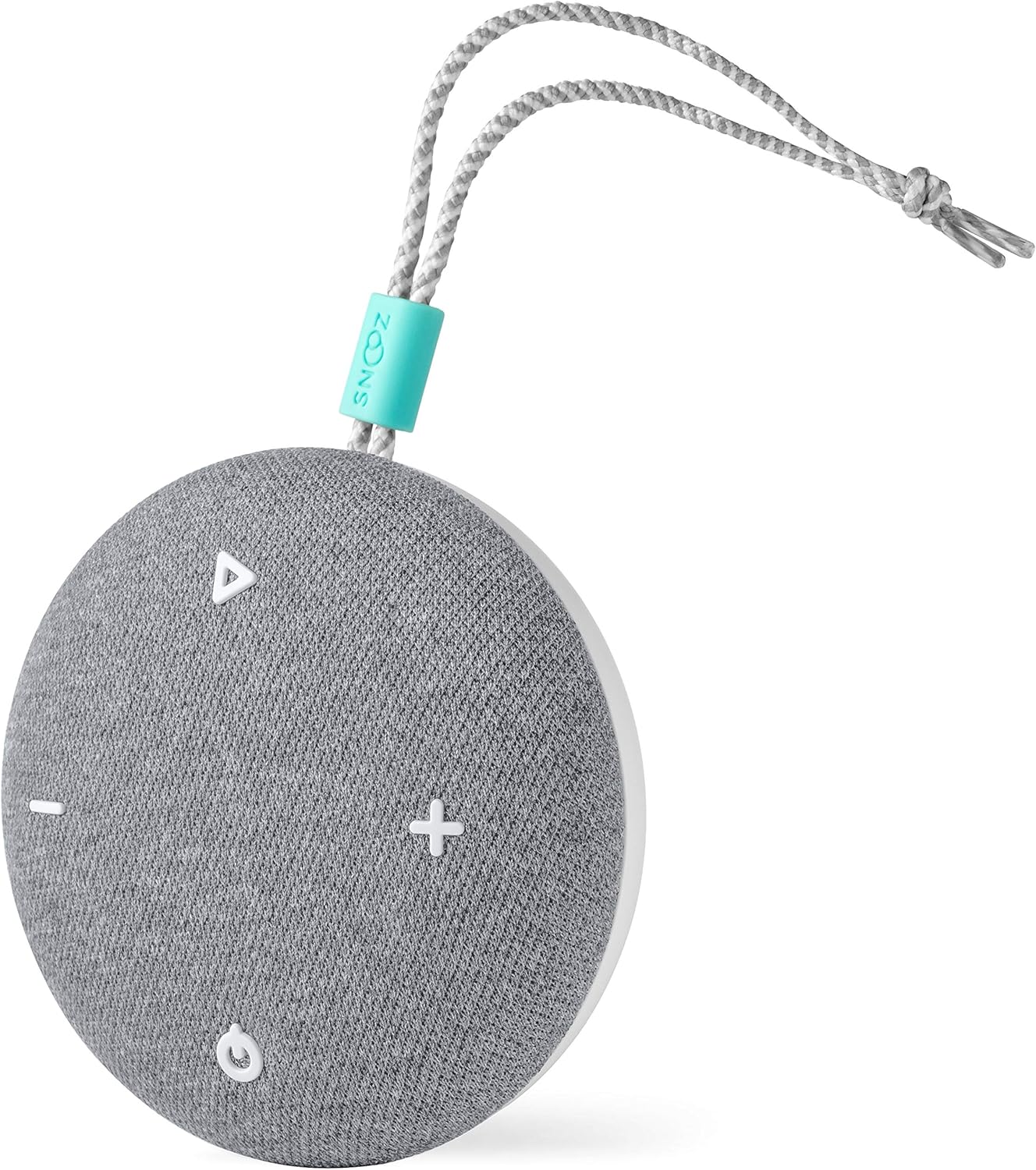
Konec izdelkaview


Nastavitev
Polnjenje naprave
- Locate the USB-C charging port on the SNOOZ Go.
- Connect the included USB-C cable to the device.
- Drugi konec kabla USB-C priključite v združljiv napajalnik USB (ni priložen) ali v vrata USB računalnika.
- Indikatorska lučka polnjenja bo zasvetila, kar pomeni, da se naprava polni.
- Popolno napolnjenost omogoča do 20 uri uporabe.
Vklop/izklop
- Za vklop pritisnite in držite gumb za vklop (⏻) za 2 sekunde.
- Za izklop pritisnite in držite gumb za vklop (⏻) za 2 sekunde.
Navodila za uporabo
Izbira zvoka
- Press the sound selection button (△) to cycle through the six available sound profiles: White Noise, Fan Sound 1, Fan Sound 2, Pink Noise, Fan Sound 3, Fan Sound 4.
Prilagoditev glasnosti
- Press the volume up button ( + ) za povečanje glasnosti.
- Press the volume down button ( - ) za zmanjšanje glasnosti.
Način zvočnika Bluetooth
- Ensure the SNOOZ Go is powered on.
- Pritisnite gumb Bluetooth (☊) to enter Bluetooth pairing mode. The indicator light will flash.
- On your device (smartphone, tablet, etc.), enable Bluetooth and search for "SNOOZ Go".
- Select "SNOOZ Go" from the list of available devices to pair.
- Once paired, the indicator light will become solid, and you can play audio through the SNOOZ Go.
- To disconnect Bluetooth, press the Bluetooth button (☊) znova.
Funkcija nočne luči
- To turn the night light on or off, press and hold the power button (⏻) for approximately 3 seconds while the device is powered on.
Vzdrževanje
- Čiščenje: Wipe the exterior of the SNOOZ Go with a soft, dry cloth. Do not use liquid cleaners or abrasive materials.
- Shranjevanje: Ko naprave ne uporabljate, jo hranite na hladnem in suhem mestu.
- Vzdrževanje baterije: Da podaljšate življenjsko dobo baterije, se izogibajte pogostemu popolnemu praznjenju baterije. Napravo redno polnite, tudi če je ne uporabljate nenehno.
Odpravljanje težav
| Težava | Možen vzrok | rešitev |
|---|---|---|
| Naprava se ne vklopi. | Baterija je prazna. | Napravo napolnite s kablom USB-C. |
| Ni zvoka ali nizka glasnost. | Volume is too low or muted. Incorrect sound profile izbrano. | Increase volume using the '+' button. Cycle through sound profiles using the '△' button. |
| Povezave ni mogoče vzpostaviti prek Bluetootha. | Device not in pairing mode. Bluetooth disabled on source device. Interference. | Press the Bluetooth button to enter pairing mode. Ensure Bluetooth is enabled on your device. Move closer to the SNOOZ Go and away from other wireless devices. |
| Night light does not turn on/off. | Nepravilen čas pritiska na gumb. | Ensure the device is powered on. Press and hold the power button for approximately 3 seconds. |
Specifikacije
- Številka modela: SNOOZ-G1-Charcoal
- Dimenzije (D x Š x V): 9.65 x 9.65 x 4.32 cm (3.8 x 3.8 x 1.7 palca)
- Teža: 160 gramov (0.35 lbs)
- vir energije: Napajanje z baterijo (1 litij-polimerna baterija priložena)
- Življenjska doba baterije: Do 20 ur
- Vrata za polnjenje: USB-C
- Zvočni posnetki: 6 (White Noise, Pink Noise, 4 Fan Sounds)
- barva: Oglje
- UPC: 860003757215
Garancija in podpora
For warranty information and customer support, please visit the official SNOOZ website or contact their customer service team. Keep your proof of purchase for any warranty claims.
Note: Specific warranty terms may vary by region. Please refer to the documentation included with your purchase or the manufacturer's webza najbolj natančne in ažurne podrobnosti o garanciji.
Ask a question about this manual
Ask about setup, troubleshooting, compatibility, parts, safety, or missing instructions. Manuals+ will review the question and use this page’s manual context to help answer it.