
1. Uvod
The ProForm Carbon T7 Smart Treadmill is designed to provide an effective and engaging cardiovascular workout experience in your home. Featuring a 7-inch HD touchscreen and integration with iFIT, this treadmill offers a variety of interactive training options. This manual provides essential information for the safe assembly, operation, maintenance, and troubleshooting of your Carbon T7 treadmill.

This image shows the ProForm Carbon T7 Smart Treadmill from a front-side angle, highlighting its console with a 7-inch HD touchscreen, the running deck, and the sturdy frame.
2. Pomembne varnostne informacije
Before operating the ProForm Carbon T7 Smart Treadmill, please read all instructions carefully. Keep this manual for future reference. Failure to follow these instructions could result in injury or damage to the product.
- Preden začnete s katerim koli programom vadbe, se vedno posvetujte z zdravnikom.
- Tekalno stezo postavite na ravno površino z vsaj 2 metri (6.5 čevljev) prostega prostora za njo in 0.5 metra (1.6 čevljev) na vsaki strani.
- Med delovanjem tekalne steze ne približujte otrok in hišnih ljubljenčkov.
- Tekalne steze ne uporabljajte, če je poškodovan napajalni kabel ali vtič ali če ne deluje pravilno.
- Nosite ustrezna športna oblačila in športne copate. Izogibajte se ohlapnim oblačilom, ki se lahko zataknejo v gibljive dele.
- Always use the safety key. Attach the clip to your clothing before starting the treadmill.
- Med premikanjem traku ne stopajte na tekalno stezo ali z nje.
- Do not attempt to adjust or repair the treadmill yourself. Contact qualified service personnel.
3. Montaža
The ProForm Carbon T7 Treadmill requires assembly. For detailed, step-by-step 3D instructions, download the free Bilt app on your smartphone or tablet. Ensure all parts are present before beginning assembly. It is recommended to have two people for assembly due to the weight and size of the components.
- Razpakirajte vse komponente in jih postavite na čisto, ravno površino.
- Follow the instructions provided in the Bilt app or the included assembly guide.
- Ensure all bolts, nuts, and screws are securely tightened before use.

The ProForm Carbon T7 Smart Treadmill is shown in its upright, folded configuration, illustrating its SpaceSaver design for compact storage when not in use.
4. Delovanje
4.1 Kako začeti
- Napajalni priključek: Napajalni kabel priključite v ozemljeno vtičnico.
- Varnostni ključ: Attach the safety key clip to your clothing and insert the safety key into the console. The treadmill will not operate without the safety key in place.
- Standing on the Treadmill: Stand on the foot rails, not the running belt, before starting your workout.
- Začetek vadbe: Press the 'Start' button on the console. The belt will begin to move at a low speed.
4.2 Using the Console and 7" HD Touchscreen
The Carbon T7 features a 7-inch HD interactive touchscreen display that allows you to stream iFIT workouts directly. The console also includes physical buttons for quick adjustments.
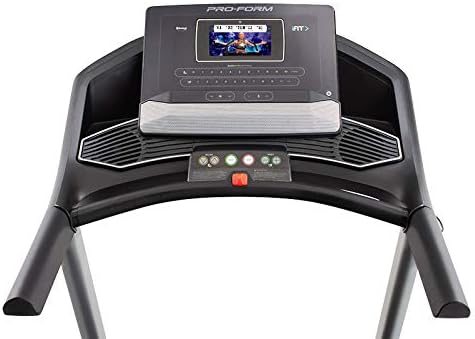
Podrobno view of the treadmill's console, featuring the 7-inch HD touchscreen display, control buttons for speed and incline, and integrated speakers.
- Navigacija z zaslonom na dotik: Use the touchscreen to browse iFIT workouts, adjust settings, and view workout metrics.
- QuickSpeed Controls: Use the 'Speed' buttons or quick-select buttons on the console to adjust the running belt speed from 0 to 10 MPH.
- Quick Incline Controls: Use the 'Incline' buttons or quick-select buttons to adjust the incline from 0% to 10%.
- Prekinitev vadbe: Press the 'Stop' button to pause or end your workout. Remove the safety key to fully power off the treadmill.
4.3 iFIT Integration
Your ProForm Carbon T7 Treadmill includes a 30-Day iFIT Family Membership. iFIT provides access to live workouts, studio classes, and global workouts led by expert personal trainers. With iFIT, your trainer can auto-adjust your treadmill's speed and incline for an optimized and immersive exercise experience.
- Activating iFIT: Follow the on-screen prompts on the 7-inch HD touchscreen to activate your iFIT membership.
- Izbira vadbe: Browse the iFIT library for a wide range of workouts, including running, walking, and cross-training.
- Trainer Control: During iFIT workouts, the treadmill's speed and incline may automatically adjust according to the trainer's program. You can override these adjustments manually if needed.

A woman is shown actively running on the ProForm Carbon T7 Smart Treadmill, demonstrating its use in a typical home environment. The treadmill's running deck and console are visible.
5. Vzdrževanje
Regular maintenance ensures the longevity and optimal performance of your ProForm Carbon T7 Treadmill.
- Čiščenje: Regularly wipe down the treadmill surfaces with a damp krpo. Izogibajte se uporabi abrazivnih čistil ali topil.
- Belt Cleaning: Periodically clean the running belt and the area beneath it to prevent debris buildup.
- Mazanje jermena: The running belt is pre-lubricated. Refer to the full product manual for specific lubrication instructions and frequency, typically required after a certain number of hours of use.
- Poravnava in napetost jermena: Check the running belt for proper alignment and tension. Adjust as needed according to the detailed instructions in the full product manual.
- Pregled napajalnega kabla: Preverite napajalni kabel za morebitne poškodbe. Če je poškodovan, prenehajte z uporabo in se obrnite na podporo strankam.
6. Odpravljanje težav
If you encounter issues with your ProForm Carbon T7 Treadmill, refer to the table below for common problems and solutions.
| Težava | Možen vzrok | rešitev |
|---|---|---|
| Tekalna steza se ne vklopi. | Napajalni kabel ni priključen; odklopnik se je sprožil; varnostni ključ ni vstavljen. | Ensure power cord is securely plugged in. Check household circuit breaker. Insert safety key fully into the console. |
| Tekalni trak se ne premika. | Safety key not inserted; 'Start' button not pressed; motor overload. | Insert safety key. Press 'Start'. If motor overload, reduce load and try again. |
| Jermen zdrsne ali okleva. | Napetost jermena je preohlapna; jermen je treba namazati. | Adjust belt tension according to the full manual. Lubricate the belt if necessary. |
| Zaslon konzole je prazen ali se ne odziva. | Power issue; software glitch. | Ensure power is connected. Try unplugging the treadmill for 60 seconds and plugging it back in. If issue persists, contact customer support. |
7. Specifikacije
Key technical specifications for the ProForm Carbon T7 Smart Treadmill:
| Funkcija | Podrobnost |
|---|---|
| Številka modela | PFTL87720 |
| Mere izdelka (D x Š x V) | 186.69 cm x 89.41 cm x 146.05 cm (73.5" x 35.2" x 57.5") |
| Teža predmeta | 97.98 kg (216 lbs) |
| Motorne konjske moči | 2.6 CHP (Continuous Horsepower) |
| Razpon hitrosti | 0-10 MPH (0-16 KPH) |
| Območje naklona | 0-10% Digital Quick Incline |
| Tread Belt Size | 20" x 55" (51 cm x 140 cm) |
| Zaslon | 7" HD Interactive Touchscreen |
| Zmogljivost teže | 300 lbs (136 kg) |
| Material okvirja | Legirano jeklo |
| Vir napajanja | Električni na kabel |
| Posebne lastnosti | SpaceSaver Design, ISO Flex Deck Cushioning |
8. Garancija in podpora strankam
Your ProForm Carbon T7 Smart Treadmill is backed by a comprehensive warranty to ensure your peace of mind.
- Garancija okvirja: 10 leti
- Garancija za dele in delo: 1 leto
For warranty claims, technical assistance, or to order replacement parts, please contact ProForm customer support. Refer to the contact information provided in your product packaging or on the official ProForm webmesto.