
Uvod
This manual provides detailed instructions for the setup, operation, and maintenance of your BUFFBEE Glow Alarm Clock HRS-BLACK. Please read this manual thoroughly before using the product to ensure proper function and longevity.
Konec izdelkaview
The BUFFBEE Glow Alarm Clock is a versatile device combining a digital alarm clock, FM radio, and a 7-color night light. It is designed to enhance your sleep and wake-up experience with customizable features.
Ključne značilnosti:
- Funkcionalnost 3 v 1: Digital alarm clock, FM radio, and night light.
- 7-barvna nočna lučka: Adjustable with 5 brightness levels.
- Dvojni alarmi: Set two independent alarms with choice of FM radio, built-in beep, or bird sounds.
- Adjustable Display Dimmer: 0-100% brightness control for the time display.
- Osvetljeni gumbi: For easy operation in low light conditions.
- Časovnik dremeža: Quick nap setting from 10 to 120 minutes.
- Auto-Off Sleep Timer: Automatically turns off night light and FM radio after a set duration.
- Vrata za polnjenje USB: Za polnjenje zunanjih elektronskih naprav.
- Možnosti napajanja: AC powered with AAA battery backup (batteries not included).
Vsebina paketa:
- 1 x BUFFBEE Glow Alarm Clock
- 1 x napajalnik
- 1 x uporabniški priročnik
Identifikacija komponente:
Za pregled si oglejte spodnjo slikoview of the alarm clock's buttons and display.

Slika: spredaj view of the BUFFBEE Glow Alarm Clock, showing the digital time display, alarm indicators, and control buttons on the top panel. The top edge features a light strip.
Nastavitev
1. Napajalni priključek:
- Connect the provided power adapter to the DC input port on the back of the alarm clock.
- Priključite adapter v običajno stensko vtičnico.
2. Battery Backup (Optional):
Za nemoteno delovanje med izpadom električne energijetages, install 3 AAA batteries (not included) into the battery compartment on the bottom of the unit. The clock will maintain time and alarm settings, and the alarm will still function, but the display and night light may be limited to conserve power.

Slika: Zadaj view of the alarm clock showing the power input and battery compartment, alongside a power adapter and three AAA batteries (not included).
3. Initial Time Setting:
- When first powered on, the display will show a default time.
- Pritisnite in držite ČAS NAST button (usually located on the top panel) until the hour digits flash.
- Uporabite +/- buttons (or similar navigation buttons) to adjust the hour.
- Pritisnite ČAS NAST again to confirm the hour and move to minute adjustment.
- Uporabite +/- gumbe za nastavitev minut.
- Pritisnite ČAS NAST še enkrat za potrditev in izhod iz načina nastavitve časa.
- Za preklop med 12-urnim in 24-urnim formatom časa pritisnite 12/24H button (if available, often combined with time set or a dedicated button).
Navodila za uporabo
1. Setting Alarms (Alarm 1 & Alarm 2):
Ura podpira dva neodvisna alarma.
- Pritisnite ALARM 1 gumb (oz ALARM 2) once to display the current alarm time.
- Pritisnite in držite ALARM 1 (oz ALARM 2) button until the hour digits flash.
- Uporabite +/- gumbi za nastavitev ure.
- Pritisnite ALARM ponovno pritisnite gumb, da potrdite uro in se premaknete na nastavitev minut.
- Uporabite +/- gumbe za nastavitev minut.
- Pritisnite ALARM button again to select the alarm sound: FM radio, built-in beep, or bird sounds. Use +/- za preklapljanje med možnostmi.
- Pritisnite ALARM Še enkrat pritisnite gumb, da potrdite in aktivirate alarm. Na zaslonu se bo prikazala ikona alarma.
- To turn off an active alarm, press the corresponding ALARM button. The alarm icon will disappear.
2. Funkcija dremeža:
Ko se oglasi alarm, pritisnite veliko SNOOZE / LUČ button on top to temporarily silence the alarm for 9 minutes. The alarm will sound again after the snooze period.
3. Night Light Operation:
The alarm clock features a 7-color night light with adjustable brightness.

Image: The alarm clock shown with its top light strip illuminated in various colors, demonstrating the 7-color night light feature.
- Pritisnite SVETLOBA button (often combined with SNOOZE or a dedicated button) to turn the night light on/off.
- When the night light is on, press the SVETLOBA večkrat pritisnite gumb , da preklapljate med 7 razpoložljivimi barvami.
- To adjust the brightness, use the +/- buttons while the night light is active. There are 5 brightness levels.
4. FM radio:
Vgrajeni FM radio vam omogoča poslušanje vaših najljubših postaj.
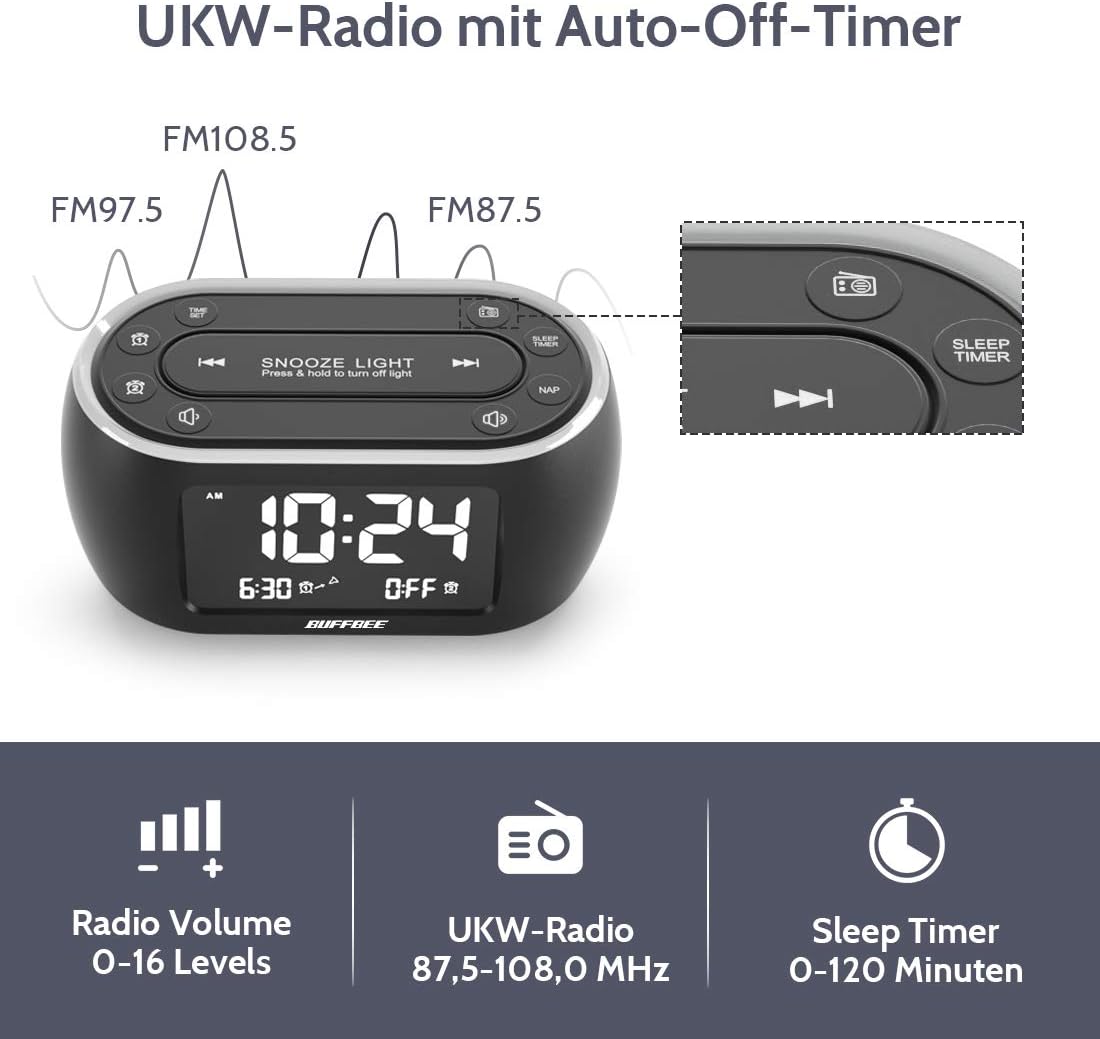
Image: The alarm clock display showing FM radio frequencies (FM108.5, FM97.5, FM87.5) and icons for radio volume and sleep timer.
- Pritisnite RADIO button to turn the FM radio on/off.
- Pritisnite SCAN button (or similar) to automatically scan and save available FM stations.
- Uporabite PREJ/NAPREJ buttons to navigate through saved stations or manually tune.
- Glasnost prilagodite s tipko GLASNOST +/- buttons. The volume can be set from 0 to 16 levels.
5. Nap Timer:
The nap timer allows for quick, short sleep periods without affecting regular alarm settings.
- Pritisnite NAP button. The display will show the default nap time (e.g., 10 minutes).
- Pritisnite NAP button repeatedly to cycle through preset nap durations (e.g., 10, 20, 30, 60, 90, 120 minutes).
- The nap timer will start automatically after selection.
- Če želite preklicati časovnik dremeža, pritisnite NAP gumb, dokler se ne prikaže "IZKLOP".
6. Auto-Off Sleep Timer:
Set a timer for the night light and/or FM radio to automatically turn off after a specified duration.
- While the night light or FM radio is active, press the ČASOVNIK ZA SPANJE gumb.
- Pritisnite ČASOVNIK ZA SPANJE button repeatedly to cycle through available durations (e.g., 15, 30, 60, 90, 120 minutes, or OFF).
- The selected duration will be displayed, and the timer will begin. The night light and/or FM radio will turn off automatically when the timer expires.
7. Display Dimmer:
Adjust the brightness of the main time display from 0% to 100%.

Image: Six different views of the alarm clock display, illustrating the range of brightness from very dim to fully bright, and also showing the night light dimmer.
Uporabite namensko DIMMER pokličite ali ZATEMNILO +/- buttons (if available) to adjust the display brightness to your preference. This allows for comfortable viewv vseh svetlobnih pogojih.
8. USB Charging Port:
A USB port is located on the back of the unit for charging small electronic devices.

Image: The alarm clock with a smartphone plugged into its side USB port, indicating the charging function.
Connect your device's USB charging cable to the port. The clock must be powered by the AC adapter for the USB charging function to work.
Vzdrževanje
To ensure the longevity and optimal performance of your BUFFBEE Glow Alarm Clock, follow these maintenance guidelines:
- Čiščenje: Napravo obrišite z mehko, suho krpo. Ne uporabljajte abrazivnih čistil, voskov ali topil, saj lahko poškodujejo površino.
- moč: Always disconnect the power adapter from the wall outlet before cleaning or if the unit will be unused for an extended period.
- Okolje: Keep the alarm clock away from direct sunlight, heat sources, and excessive moisture.
- Zamenjava baterije: If using battery backup, replace AAA batteries annually or when the battery indicator suggests low power. Ensure correct polarity when inserting new batteries.
Odpravljanje težav
If you encounter issues with your BUFFBEE Glow Alarm Clock, refer to the following common problems and solutions:
| Težava | Možen vzrok | rešitev |
|---|---|---|
| Clock display is blank or flickering. | No power or loose connection. Low battery backup. | Ensure the power adapter is securely plugged into the clock and the wall outlet. Check if AAA batteries are installed correctly and have sufficient charge. |
| Alarm se ne oglasi. | Alarm not activated. Alarm volume too low. | Verify that the alarm icon is displayed. Check the alarm volume setting. Ensure the correct alarm time is set. |
| Sprejem FM radia je slab. | Weak signal. Antenna not extended. Interference. | Extend the FM antenna fully. Try repositioning the clock. Perform an auto-scan for stations again. |
| Nočna lučka ne deluje. | Funkcija luči je izklopljena. | Press the LIGHT button to turn it on. Check if the brightness is set to 0%. |
| Polnjenje prek USB-ja ne deluje. | Clock not connected to AC power. Device not compatible. | Ensure the clock is powered by the AC adapter. Check if your device is compatible with standard USB charging. |
Specifikacije
| Funkcija | Podrobnost |
|---|---|
| Znamka | BUFFBEE |
| Številka modela | HRS-BLACK |
| Dimenzije (D x Š x V) | 12 x 3.81 x 6 cm (4.72 x 1.5 x 2.36 palca) |
| Teža | 330 gramov (0.73 lbs) |
| Vhodna moč | AC 100-240V, 50/60Hz |
| Rezervna baterija | 3 x AAA baterije (niso priložene) |
| Vrsta zaslona | Digitalno |
| Svetlost zaslona | 0-100% nastavljivo |
| Barve nočne svetlobe | 7 barv |
| Svetlost nočne lučke | 5 stopenj nastavljivih |
| FM radijska frekvenca | 87.5-108.0 MHz |
| Glasnost alarma | Nastavljive stopnje 0-16 |
| Posebne lastnosti | Ambient light, Dual Alarm, Nap Timer, Sleep Timer, USB Charging Port |
Garancija in podpora
BUFFBEE products are designed for reliability and performance. For specific warranty information, please refer to the documentation included with your purchase or contact BUFFBEE customer support.
If you require technical assistance or have questions regarding your BUFFBEE Glow Alarm Clock, please visit the official BUFFBEE webspletno mesto ali se obrnite na njihovo službo za pomoč strankam. Kontaktne podatke običajno najdete na embalaži izdelka ali na proizvajalčevem webmesto.